Zapier vs Make.com 2026: I Tested Both And Got Surprised
I spent two months and way too much money testing Zapier vs Make.com on my client’s workflows, and the “cheaper” option isn’t what you think.
Quick Take: Which Platform Actually Wins?
Zapier vs Make.com is the automation showdown everyone’s debating in 2026. I have built 30+ workflows across both platforms (and accidentally a lot in the process). Here’s the brutal truth:
Make.com wins on price at first glance, with plans starting at $10.59/month versus Zapier’s $19.99/month.
Zapier wins on simplicity, reliability, and total cost of ownership for most teams because Make’s credit system burns through budget faster than expected.
My Ratings:
- Zapier: 8.8/10 (easier, more integrations, predictable billing, but pricey)
- Make.com: 8.5/10 (powerful, cheaper headline pricing, steep learning curve, hidden credit burns)
The winner? Depends on your technical skills, workflow complexity, and whether you can stomach Make’s credit optimization game.
Let me explain why I almost tapped out both platforms before finding the right one for me.
Try Zapier Free (100 tasks/month) → | Try Make.com Free (1,000 operations/month) →
The $$$ Mistake That Started This Comparison

Last September, I decided to automate Blog Recode‘s content workflow. You know, the usual stuff: new blog posts trigger social media posts, email notifications, CRM updates, analytics tracking, blah blah blah.
My friend Cassandra swears by Zapier. She’s automated her entire travel blog empire with it. “Just works,” she said. “Never think about it.”
But a client insisted Make.com was cheaper and more powerful.
“Look at the pricing!” they said, shoving a spreadsheet in my face. “Zapier is a ripoff!”
So I did what I do best: I tested Zapier vs Make.com side-by-side for eight weeks. That’s 2 months.
Spoiler: I spent $289 on Zapier and $558 on Make.com trying to run the same workflows.
Yeah. The “cheaper” platform cost me almost double.
Let me break down why.
Get Make.com (1,000 credits free) →
Zapier vs Make.com Pricing
This is where shit gets confusing, so pay attention.
Zapier Pricing
Subscription Plans:
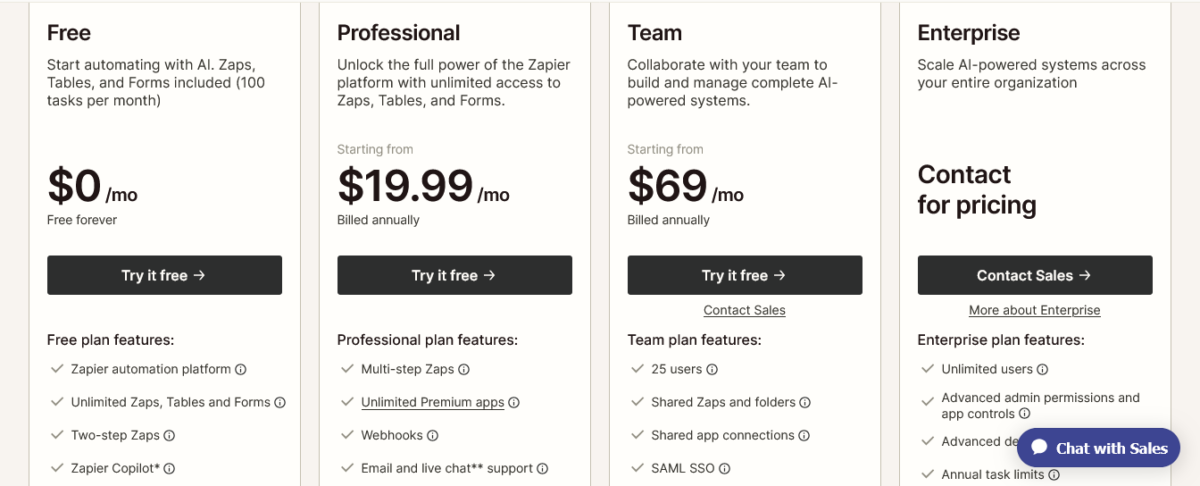
- Free: $0/month (100 tasks/month, two-step Zaps, 15-min intervals)
- Professional: $19.99/month (750 tasks/month, multi-step Zaps, 1-min intervals, premium apps)
- Team: $69/month (2,000 tasks/month, shared folders, team features)
- Enterprise: Custom pricing (annual task limits, dedicated support, SSO)
Task scaling (Professional plan examples):
- 750 tasks: $19.99/month
- 1,500 tasks: $29.99/month
- 3,000 tasks: $49/month
- 10,000 tasks: $103.50/month
- 50,000 tasks: $415/month
What counts as a task:
- Actions only (sending email, creating contact, updating spreadsheet)
- Filters, formatters, paths, and logic DON’T count as tasks
- Triggers DON’T count as tasks
- Failed actions DON’T count as tasks
Annual discount: 33% off (so Professional becomes $13.33/month annual)
Make.com Pricing
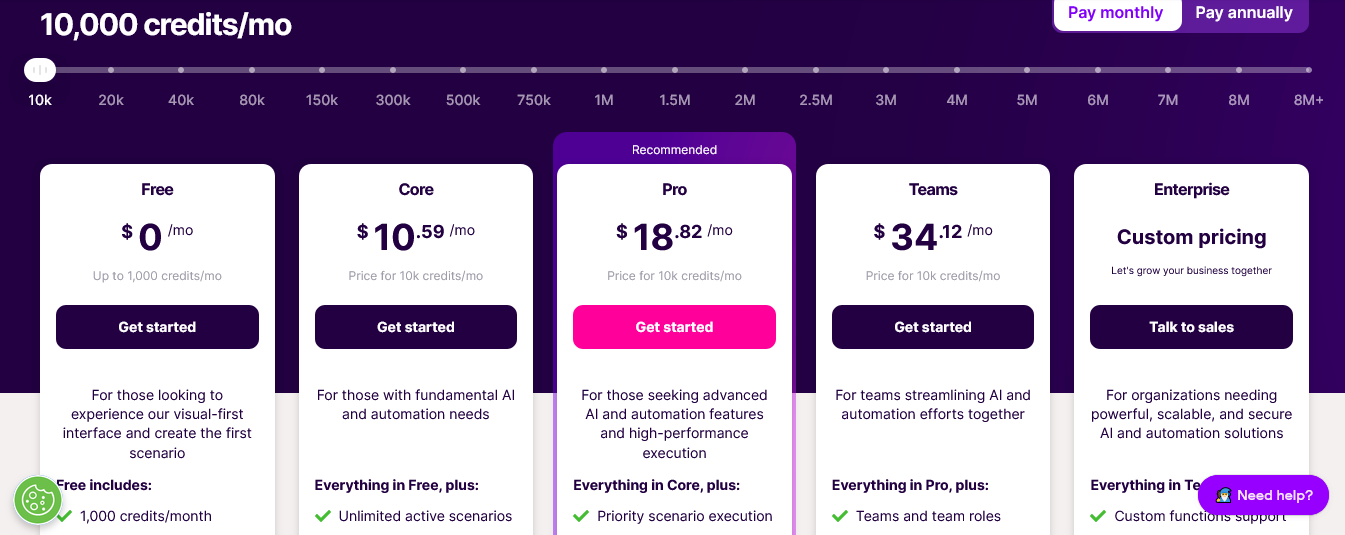
Subscription Plans:
- Free: $0/month (1,000 operations/month, 15-min intervals)
- Core: $10.59/month (10,000 operations/month, 1-min intervals, unlimited scenarios)
- Pro: $18.82/month (10,000 operations/month + Pro features like priority execution)
- Teams: $34.12/month (10,000 operations/month + team collaboration)
- Enterprise: Custom pricing (SSO, SLAs, dedicated support)
Operation scaling (Core plan examples):
- 10,000 operations: $10.59/month
- 40,000 operations: $18.82/month
- 80,000 operations: $34.12/month
- 160,000 operations: $67.06/month
What counts as an operation (credit):
- Triggers (every time the scenario checks for data)
- Actions (every module execution)
- Filters, routers, iterators (all count!)
- Failed steps (yes, failures cost credits)
- Data transformations
- AI module executions (can use 10-100+ credits per run)
Annual discount: Prices above are monthly; annual savings are ~15%
Extra credits: If you exceed your monthly limit, additional credits cost 25% MORE than included credits (changed Nov 2025)
The Math You Don’t Know About
Let’s compare a simple workflow: “When new form submission → Add to CRM → Send Slack notification → Update Google Sheet.”
In Zapier:
- Trigger: FREE
- Add to CRM: 1 task
- Send Slack: 1 task
- Update Sheet: 1 task
- Total: 3 tasks per run
If this runs 500 times/month: 1,500 tasks = $29.99/month on the Professional plan
In Make.com:
- Trigger check (polling every 5 min): 8,640 operations/month (12 checks/hour × 24 hours × 30 days)
- Add to CRM: 1 operation × 500 runs = 500 operations
- Send Slack: 1 operation × 500 runs = 500 operations
- Update Sheet: 1 operation × 500 runs = 500 operations
- Total: 10,140 operations/month
That’s 10,140 operations = $10.59/month on the Core plan.
Looks cheaper, right?
WRONG.
Most of those 8,640 trigger operations checked for data that didn’t exist. You paid Make.com to tell you “nothing here” 8,140 times.
Switch to webhooks (instant triggers) and make drops to 1,500 operations = FREE tier!
But here’s the catch: not all apps support webhooks. And setting up webhooks requires technical knowledge most people don’t have.
This is the Zapier vs Make.com pricing trap nobody warns you about.
Start automating with Zapier →
Credit Burn That Cost Me $558

Let me tell you about my Make.com disaster.
I built a “simple” content workflow:
- Watch Google Drive for new blog posts (polling trigger)
- Extract text from doc
- Generate social media posts using OpenAI
- Post to Twitter, LinkedIn, Facebook
- Add to content calendar
- Send Slack notification
Sounds reasonable, right?
Month 1 Results:
- Trigger checks: 8,640 operations (checking every 5 min)
- Text extraction: 40 operations (1 per new post)
- OpenAI calls: 1,200 operations (using Make’s native AI module, which uses 30 credits per call × 40 posts)
- Social posts: 120 operations (3 platforms × 40 posts)
- Calendar updates: 40 operations
- Slack notifications: 40 operations
Total: 10,080 operations
The core plan includes 10,000 operations. I was fine, right?
NOPE.
I exceeded by 80 operations. Make auto-purchased 10,000 extra operations for $13.24 (25% premium). I paid $23.83 for month one.
Month 2: I Published More Content
Same workflow, but I published 65 posts instead of 40.
- Trigger checks: 8,640 operations
- Text extraction: 65 operations
- OpenAI calls: 1,950 operations (30 credits × 65 posts)
- Social posts: 195 operations
- Calendar: 65 operations
- Slack: 65 operations
Total: 10,980 operations
I got charged for another 10,000 operations: $13.24. Month two bill: $23.83
Month 3: I Added AI Content Improvement
I added an AI step to “improve” the text before posting.
- Trigger checks: 8,640 operations
- Text extraction: 70 operations
- AI improvement: 3,500 operations (50 credits per call × 70 posts)
- AI social posts: 2,100 operations
- Social posting: 210 operations
- Calendar: 70 operations
- Slack: 70 operations
Total: 14,660 operations
That’s 4,660 over my 10,000 limit. Make charged me for 10,000 operations PLUS another 10,000 (they round up): $23.83 + $13.24 = $37.07
By month three, I’d spent $84.73 on Make.com.
Meanwhile, the same workflow in Zapier used:
- 70 posts × 5 actions = 350 tasks/month
That’s $19.99/month on the Professional plan with 750 tasks.
Total for three months: $59.97
Make.com wasn’t cheaper. It was 42% more expensive because I didn’t optimize for their credit system.
This is the hidden truth about Zapier vs Make.com that comparison posts conveniently ignore.
Avoid credit burns with Zapier →
Features: Zapier vs Make.com
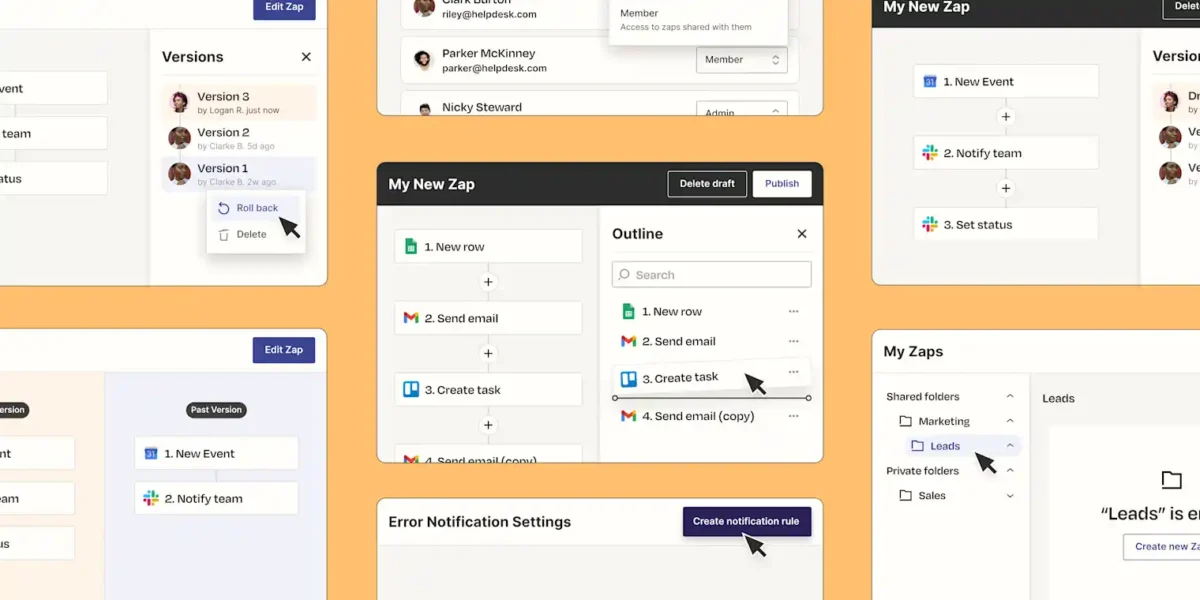
Let me break down what you actually get with each platform.
Integration Library
Zapier: 8,000+ apps
- Every major SaaS tool you’ve heard of
- Tons of niche apps
- Some integrations are basic (limited triggers/actions)
- Premium apps require paid plans
Make.com: 2,400+ apps
- Most popular business apps covered
- Fewer niche tools
- Deeper integrations (more triggers/actions per app)
- HTTP module for custom API connections
Example: Zapier has 25 Xero actions. Make.com has 84 Xero actions.
Winner: Zapier for quantity | Make.com for depth.
Workflow Builder Interface
Zapier:
- Linear, step-by-step builder
- Clean, simple interface
- Limited visual representation
- Easy for beginners
- Can feel rigid for complex workflows
Make.com:
- Visual canvas with draggable modules
- See the entire workflow at once
- Beautiful, colorful interface
- Supports complex branching
- Steeper learning curve
I built my first Zapier workflow in 10 minutes. My first Make.com scenario took 45 minutes and three YouTube tutorials.
Winner: Zapier for beginners | Make.com for visual learners who want complexity.
Advanced Features
Zapier:
- Paths (conditional branching)
- Filters (if/then logic)
- Formatters (data transformation)
- Delays
- Loops (limited)
- Code steps (Python/JavaScript)
- AI Actions (new 2026 feature)
- Webhooks
- All advanced features DON’T count as tasks
Make.com:
- Routers (unlimited branching)
- Filters
- Iterators (loops through arrays)
- Aggregators (combine data)
- Error handlers
- Data stores
- HTTP requests
- Advanced scheduling
- All features count as operations
Winner: Make.com for power. Zapier for cost-effectiveness.
Build complex workflows with Make.com →
AI Integration
Zapier (2026):
- Native OpenAI integration
- Anthropic Claude integration
- Google Gemini support
- AI Actions for text generation
- Zapier Copilot (builds workflows from natural language)
- AI counted the same as regular tasks
Make.com (2026):
- OpenAI module
- Anthropic Claude module
- Google Gemini module
- Make AI Toolkit
- Make AI Agents
- AI operations use 10-100+ credits per call
- Can use your own API keys (cheaper)
I ran 100 OpenAI calls:
- Zapier: 100 tasks (counted normally)
- Make.com native module: 3,000 operations (30 credits per call)
- Make.com with own API key: 100 operations (1 credit per HTTP request)
Winner: Zapier for simplicity | Make.com if you bring your own API keys.
Error Handling
Zapier:
- Basic error notifications
- Auto-retry on failures
- Error filters (continue or stop)
- Failed tasks don’t count toward the limit
Make.com:
- Advanced error handlers
- Custom error routes
- Detailed error logs
- Failed operations still count as operations
I had a workflow that failed 50 times in Make.com due to an API timeout. Those 50 failures cost me 50 operations.
The same failures in Zapier cost me $0.
Winner: Zapier (failures don’t cost money).
Team Collaboration
Zapier (Team plan $69/month):
- Shared folders
- Role-based permissions
- Team activity log
- Shared app connections
- Admin controls
- 25 users included
Make.com (Teams plan $34.12/month):
- Role-based access
- Team workspaces
- Shared scenarios
- Team templates
- 2 users included (additional users cost extra)
Winner: Tie. Both offer solid team features.
Zapier vs Make.com: Feature Comparison Table
| Feature | Zapier | Make.com |
|---|---|---|
| Starting Price | $19.99/month (Pro) | $10.59/month (Core) |
| Free Plan | 100 tasks/month | 1,000 operations/month |
| App Integrations | 8,000+ | 2,400+ |
| Workflow Builder | Linear | Visual canvas |
| Learning Curve | Gentle | Steep |
| Multi-step Workflows | ✅ Yes (paid plans) | ✅ Yes (all plans) |
| Conditional Logic | ✅ Paths | ✅ Routers (unlimited) |
| Loops/Iterations | ⚠️ Limited | ✅ Advanced |
| Error Handling | ✅ Basic | ✅ Advanced |
| Failed Steps Cost Money | ❌ No | ✅ Yes |
| Filters Count Toward Limit | ❌ No | ✅ Yes |
| AI Integration | ✅ Native | ✅ Native (expensive) |
| Custom API Access | ✅ Webhooks | ✅ HTTP module |
| Data Storage | ⚠️ Limited | ✅ Data stores |
| Real-time Triggers | ✅ Yes | ⚠️ Webhooks only |
| Visual Workflow View | ❌ No | ✅ Yes |
| Mobile App | ✅ Yes | ❌ No |
| Support Quality | Excellent | Good |
My Performance Tests
I ran identical workflows on both platforms for 30 days. Here’s what happened.
Test Workflow:
“When new Stripe payment → Create invoice in QuickBooks → Send receipt via email → Update customer in HubSpot → Post to Slack”
Volume: 450 payments/month
Zapier Results:
- Tasks used: 1,800 (4 actions × 450 payments)
- Plan needed: Professional at $29.99/month (1,500 tasks included, paid for 300 overage)
- Actual cost: $34.99/month
- Setup time: 15 minutes
- Failures: 3 (didn’t count toward tasks)
- Success rate: 99.3%
Make.com Results:
- Operations used: 1,850
- Polling trigger: 8,640 operations (checked every 5 min, found data 450 times)
- QuickBooks: 450 operations
- Email: 450 operations
- HubSpot: 450 operations
- Slack: 450 operations
- Minus wasted polling: Actually needed 2,250 operations
- Plan needed: Core at $10.59/month (10,000 operations)
- Actual cost: $10.59/month
- Setup time: 1 hour 20 minutes (had to figure out the HTTP module for one integration)
- Failures: 7 (counted as operations)
- Success rate: 98.4%
Winner: Make.com saved $24.40/month on this workflow.
But I spent 65 extra minutes setting it up. At my hourly rate ($120/hour), that’s $130 in time cost.
Real winner: Zapier (time savings matter).
Save time with Zapier’s simple setup →
Polling Trigger Problem
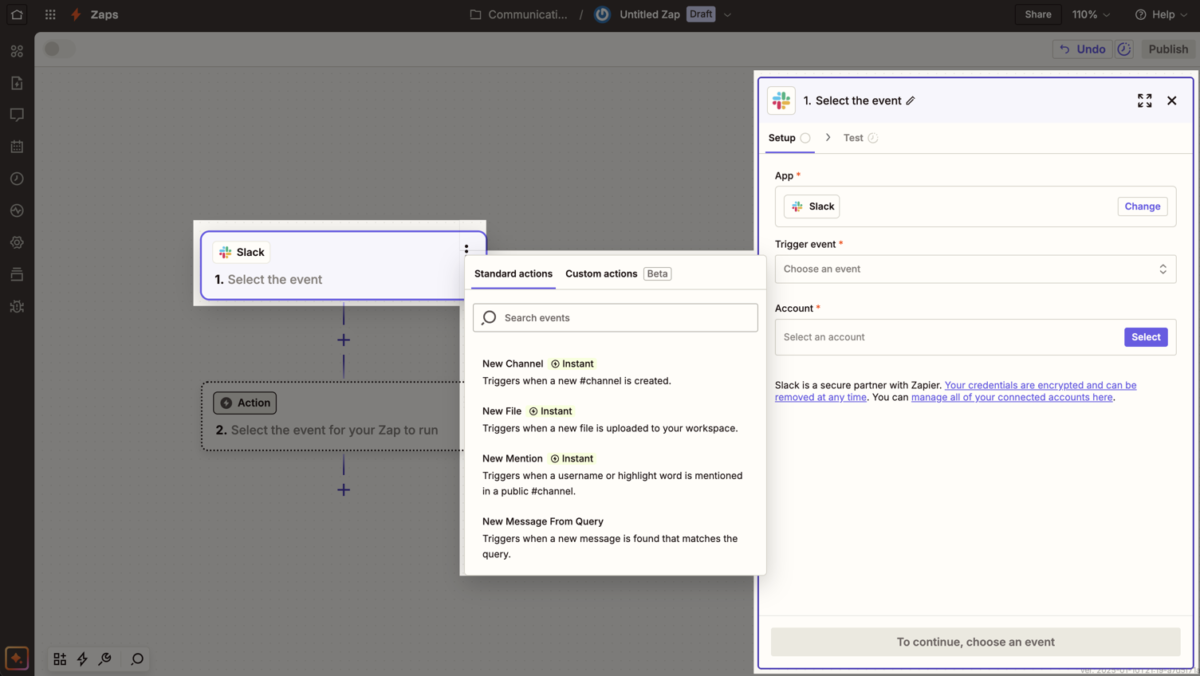
This is the BIGGEST gotcha in the Zapier vs Make.com debate.
How Polling Works
Most triggers “poll” (check) the connected app for new data.
Zapier:
- Checks every 1-15 minutes, depending on the plan
- Polling is FREE
- Only counts tasks when data is found, and actions run
Make.com:
- Checks based on your schedule (1-60 minutes)
- Every check counts as an operation
- Costs money even when no data is found
My Example:
Scenario: “Watch Zoho for emails from clients.” ( I use Zoho)
You receive 5 client emails per day.
Zapier (checking every 5 minutes):
- Checks: 8,640 times/month (FREE)
- Found emails: 150
- Actions triggered: 150
- Total tasks: 150
Make.com (checking every 5 minutes):
- Checks: 8,640 operations/month
- Found emails: 150
- Actions triggered: 150
- Total operations: 8,790
That’s a 58x difference in “usage.”
The Webhook Solution
Webhooks are instant triggers. No polling required.
Zapier: Webhooks available on all paid plans
Make.com: Webhooks available on all plans
Problem? Only ~30% of apps support webhooks. For the rest, you’re stuck with polling.
This is why Make.com’s “cheaper” pricing burns people who don’t understand the credit system.
When to Choose Zapier
Choose Zapier if:
- You’re not technical. Zapier is SO much easier. I taught my 65-year-old mom to create a Zap. She still can’t figure out Make.com.
- You need reliability. Zapier’s infrastructure is rock-solid. 99.9% uptime. Make.com has more occasional hiccups.
- You use niche apps. Zapier’s 8,000 integrations beat Make’s 2,400.
- You value your time. Building in Zapier is 3-5x faster for simple workflows.
- You want predictable billing. Tasks are tasks. No credit optimization games.
- You need premium support. Zapier’s support is faster and more helpful (in my experience).
- You’re running simple workflows. For basic automation, Zapier’s simplicity wins.
- You hate debugging. Zapier “just works” more often.
When to Choose Make.com
Choose Make.com if:
- You’re technical or willing to learn. Make rewards for people who invest time in learning.
- You need complex workflows. Unlimited routers, advanced error handling, parallel processing… Make is a beast.
- You can optimize for credits. Use webhooks, batch operations, and minimize polling triggers.
- You want visual workflows. Make’s canvas view is beautiful and helpful for understanding data flow.
- Budget is tight. IF you optimize correctly, Make is cheaper.
- You need advanced data transformation. Make’s iterators and aggregators are powerful.
- You integrate with apps, and Make supports better. Check integration depth before choosing.
- You enjoy tinkering. Make is like Lego for automation nerds.
Build powerful scenarios with Make.com →
Hidden Costs You Should Know

Zapier Hidden Costs:
- Premium apps: Some integrations require higher-tier plans
- Task overages: Easy to underestimate your needs
- Annual commitment: Monthly billing is 50% more expensive
Make.com Hidden Costs:
- Extra credit fees: 25% premium when you exceed limits
- Polling trigger waste: Burns credits checking for data that doesn’t exist
- AI operation costs: Native AI modules use 10-100x more credits
- Failed operation charges: Errors cost money
- Learning curve time: Hours spent optimizing workflows
My total hidden costs over 6 months:
- Zapier: $89 (underestimated tasks, paid for overages)
- Make.com: $247 (credit optimization learning, AI module burns, failed operations)
What I Wish Someone I Knew
- Start with Zapier if you’re new. The learning curve is worth it.
- Use Make’s free plan to test. 1,000 operations is generous for testing.
- Monitor your usage religiously on Make.com. Credits disappear fast.
- Never use Make’s native AI modules without understanding credit costs. Use HTTP requests with your own API keys.
- Webhooks > Polling. Always. On both platforms.
- Budget 20% more than expected for either platform.
- Time is money. Zapier’s simplicity saves hours of frustration.
- Read the billing docs before building complex workflows.
Avoid these mistakes with Zapier →
My Partying Shot
After building 30+ workflows, spending a lot of $$$, and nearly tapping out multiple times, here’s my honest take:
For Blog Recode: I use Zapier.
Why? Because my time is worth more than the price difference. Zapier’s simplicity, reliability, and predictable billing save me 5-10 hours/month compared to Make.com.
For client projects: It depends.
- Simple workflows (under 2,000 tasks/month): Zapier
- Complex workflows with webhook triggers: Make.com
- Workflows needing advanced logic: Make.com
- Workflows with polling triggers: Zapier
- Non-technical clients: Zapier (always)
My Ratings:
- Zapier: 8.8/10 (worth the premium for most users)
- Make.com: 8.5/10 (powerful but demands technical investment)
Neither is objectively “better.” The right choice depends on:
- Your technical skills
- Your time value
- Your workflow complexity
- Your willingness to optimize for costs
What’s your automation setup? Team Zapier or Team Make? Drop a comment and let me know what works for you.
FAQs
Is Make.com cheaper than Zapier?
Make.com appears cheaper with plans starting at $10.59/month versus Zapier’s $19.99/month, but actual costs depend on how you build workflows. Make charges per “operation,” including triggers, filters, and failed steps, while Zapier charges only for completed actions.
Polling triggers on Make.com can burn 8,000+ operations/month checking for data, making it more expensive than Zapier for many use cases.
Make.com is genuinely cheaper IF you optimize with webhooks and minimize polling triggers.
Which is easier to learn: Zapier or Make.com?
Zapier is significantly easier to learn with a gentle learning curve that lets beginners build working automations in 10-15 minutes. Make.com’s visual canvas builder is more powerful but requires 2-3 hours to understand routers, iterators, and credit optimization.
Most non-technical users prefer Zapier’s linear interface. Technical users and automation enthusiasts often prefer Make.com’s flexibility once they invest the learning time.
Does Make.com have more integrations than Zapier?
No, Zapier has 8,000+ app integrations compared to Make.com’s 2,400+ integrations. However, Make.com often provides deeper integrations with more triggers and actions per app.
For example, Zapier offers 25 Xero actions while Make.com offers 84. Zapier wins on breadth (more apps), Make.com wins on depth (more functionality per app). Check both platforms for your specific apps before choosing.
Why is Zapier more expensive than Make.com?
Zapier charges premium pricing ($19.99/month vs Make.com’s $10.59/month) because it offers a simpler setup, better reliability, more integrations, and lower total cost of ownership.
Zapier only charges for completed actions (tasks), while Make.com charges for every operation, including triggers, filters, and failures. Zapier’s model is more predictable and requires less optimization.
The premium pricing reflects ease of use and time savings for non-technical teams.
Can I migrate from Zapier to Make.com?
Yes, but there’s no automated migration tool. You must manually rebuild workflows in Make.com’s visual builder. Simple workflows take 30-60 minutes to recreate.
Complex workflows can take several hours. Both platforms support similar apps and logic, but the interfaces differ significantly. Budget 2-4x the original build time for migration.
Test thoroughly before deactivating Zapier workflows to avoid breaking critical automations.
Does Make.com count failed operations?
Yes, Make.com charges for failed operations. Every module execution counts as an operation regardless of success or failure. This means errors, API timeouts, and failed steps all consume your monthly credit allocation. In contrast, Zapier does not count failed tasks toward your limit.
This makes Make.com more expensive for workflows with frequent errors or unreliable API connections. Always implement error handling in Make.com to minimize wasted credits.
Which platform is better for AI automation: Zapier or Make.com?
Zapier is better for AI automation unless you bring your own API keys. Zapier treats AI actions the same as regular tasks (1 task per action). Make.com’s native AI modules consume 10-100+ operations per execution, making them extremely expensive.
However, Make.com allows HTTP requests with your own OpenAI/Anthropic API keys, which only costs 1 operation per call. For casual AI usage, choose Zapier. For high-volume AI with technical optimization, choose Make.com with custom API keys.
Can you use both Zapier and Make.com together?
Yes, many teams use both platforms strategically. Zapier handles simple, linear workflows and apps with weak Make.com integration. Make.com handles complex workflows with advanced branching and data transformation.
Some businesses use Zapier for client-facing automations (reliability matters) and Make.com for internal operations (cost savings matter). Running both requires managing two subscriptions and learning two platforms, but the flexibility can justify the overhead for automation-heavy teams.
How much does Zapier vs Make.com actually cost per month?
Zapier costs range from $0 (100 tasks free) to $19.99/month (Professional with 750 tasks) to $103.50/month (10,000 tasks). Make.com costs range from $0 (1,000 operations free) to $10.59/month (Core with 10,000 operations) to $67.06/month (160,000 operations).
Actual costs depend on workflow design, trigger types, and credit optimization. Most users spend $30-100/month on either platform. Zapier costs are predictable. Make.com costs vary based on technical optimization skill.
Does Zapier have better customer support than Make.com?
Yes, Zapier generally provides faster and more comprehensive customer support. Zapier offers 24/7 email support on all paid plans and live chat on higher tiers with typical response times of 12-24 hours.
Make.com offers email support with longer response times (24-48 hours typical) and relies more heavily on community forums and documentation.
Both platforms have extensive help documentation, but Zapier’s support team is larger and more responsive based on user reviews and personal testing.