Make.com Review 2026: I Saved $720/Year Ditching Zapier
I spent three months building the same workflows in Make.com and Zapier to find out which one truly saves you money. The results shocked me, and they’ll probably piss off Zapier fanboys.
My Verdict & Rating
The Good: Visual workflow builder, 5-7x cheaper than Zapier for complex automations, 3,000+ integrations, rollover credits
The Bad: Steeper learning curve, credit counting gets confusing, polling triggers burn budget, email-only support
Best For: Technical users, agencies, marketers running complex multi-step workflows who need power and flexibility
Try Make.com Free (1,000 Operations/Month) →
Alright, confession time for this Make.com review.
Last month, my Zapier bill hit $276 for the third month in a row. I was running maybe 15 workflows.
Nothing crazy, just standard stuff like connecting Google Sheets to my CRM, auto-posting to social media, and syncing client data between platforms.
I stared at that invoice thinking, “there’s gotta be a better way.”
Enter Make.com (formerly Integromat), the visual automation platform that everyone in the no-code community keeps whispering about. People claimed it was “way cheaper” and “more powerful” than Zapier, but I was skeptical.
I’ve heard that BS before.
So I did something probably stupid: I rebuilt all my workflows in Make.com and ran both platforms side-by-side for 90 days. Tracked everything. Compared costs. Documented the pain points.
The result? I’m saving $720 a year. And this Make.com review is gonna show you exactly how.
What Is Make.com and Why Should You Care?
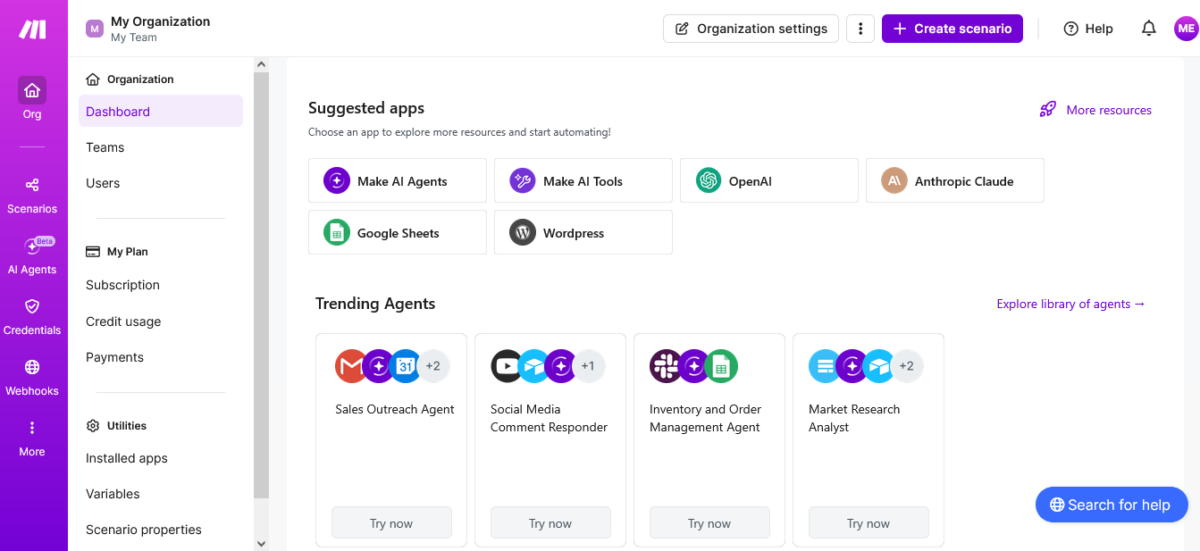
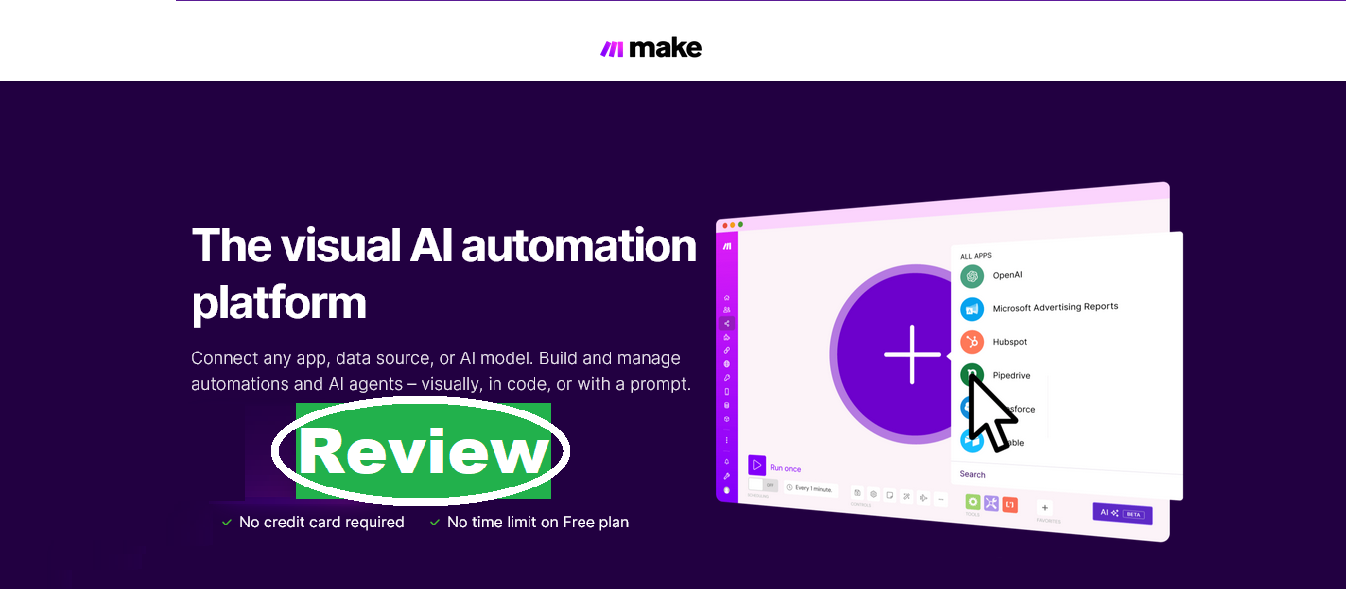
Make.com review time. This is a visual automation platform that connects apps and automates workflows without writing code. Think Zapier, but with a completely different pricing model and a way more visual interface.
Founded in 2012 as Integromat, they rebranded to Make in 2021. The platform now serves over 500,000 users and connects 3,000+ apps. In February 2026, they’re valued at $11 billion after being acquired by enterprise software giant Celonis.
But here’s what matters for this Make.com review: Unlike Zapier’s linear “if this, then that” approach, Make uses a visual canvas where you can see your entire workflow like a flowchart. You drag, drop, connect modules, and build complex automations that would make developers jealous.
The catch? There’s a learning curve. And the credit system can be confusing as hell.
Make.com Pricing: Credit System Explained

Let me break down the Make.com pricing because this is where people get confused and either love it or hate it.
Make.com Pricing Plans:
Free Plan:
- 1,000 operations/month
- Unlimited active scenarios
- 3,000+ app integrations
- 15-minute minimum run interval
- No credit card required
Core Plan – $9/month (billed annually) or $10.59/month (billed monthly):
- 10,000 operations/month
- 1-minute minimum run interval
- Webhooks and API access
- Higher data transfer limits
- Operations rollover for 1 month
Pro Plan – $16/month (billed annually) or $18.82/month (billed monthly):
- 10,000 operations/month
- Priority execution
- Full-text log search
- Custom variables
- Advanced scheduling
Teams Plan – $29/month (billed annually) or $34.12/month (billed monthly):
- 10,000 operations/month
- Team collaboration
- Role-based access
- Shared templates
- Everything in Pro
Enterprise Plan – Custom pricing:
- Custom operation limits
- SSO and auto-provisioning
- 24/7 support
- Technical account manager
- SLAs and audit logs
Start Free (No Credit Card Needed) →
The Credit Math Nobody Explains
Here’s the thing about this Make.com review: Make uses “operations” (they used to call them “credits,” which adds to the confusion).
Every module that executes in your workflow = 1 operation.
Example workflow:
- Watch for new Google Forms submission (1 operation)
- Add contact to HubSpot (1 operation)
- Send Slack notification (1 operation)
- Create a task in Asana (1 operation)
If this workflow runs 100 times = 400 operations total.
The math: That same workflow in Zapier counts the trigger as free, so it’s only 3 tasks per run. 100 runs = 300 tasks.
So, Make.com uses more operations than Zapier uses tasks? Yes. BUT Make operations are cheaper per unit than Zapier tasks.
Cost comparison:
- Make Core plan: $9/month for 10,000 operations
- Zapier Starter plan: $29.99/month for 750 tasks
If you run workflows with multiple steps, Make ends up 5-7x cheaper in most cases.
I know this is confusing. This Make.com review gets easier once you actually build a workflow and see the operation count.
The Rollover Feature That Saves Your Ass
As of November 2025, Make introduced operation rollover. Unused operations are carried forward for 1 month on paid plans.
This is great.
If you use 7,000 operations in January, you roll over 3,000 to February. Now you have 13,000 operations for February. For seasonal businesses or inconsistent workflows, this alone saves $50- $ 100/month.
Zapier doesn’t do this. Tasks disappear every month.
What Makes Make.com Different? (Features)
Alright, enough about money. Let’s talk about what you actually get in this Make.com review.
1. Visual Scenario Builder (Game-Changer)
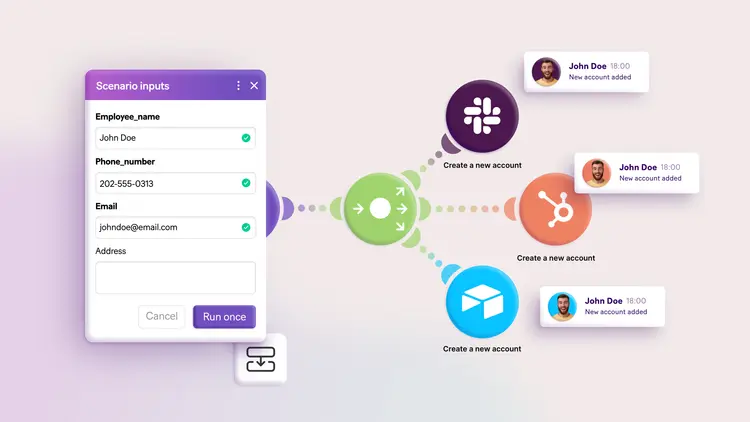
Make’s visual canvas is what separates it from Zapier. Instead of a boring linear list of steps, you get a colourful flowchart showing exactly how data flows through your automation.
You can see branches, conditions, loops, and error handlers all at once. This makes debugging so much easier because you can literally trace where things went wrong.
Zapier feels like reading a recipe. Make feels like seeing a map.
I tested this building a content approval workflow. In Zapier, it was a confusing 12-step list. In Make, I could see the whole thing visually: content submitted → manager review → if approved, publish to three platforms → if rejected, send back to writer.
Crystal clear.
2. Routers, Filters, and Advanced Logic
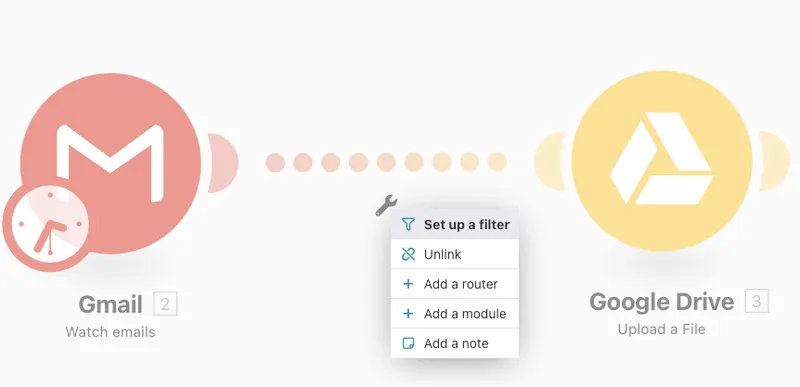
Make.com review highlight: This is where Make destroys Zapier for complex workflows.
Routers let you branch your workflow based on conditions. Example: If the deal value is over $10k, notify the CEO. If under $10k, notify the sales rep.
Filters stop workflows from running unless conditions are met. Example: Only process leads from the US with valid email addresses.
Iterators and Aggregators handle bulk data processing. Upload a CSV with 500 rows, process each one through your workflow, then combine the results.
Zapier has some of these features now, but Make’s implementation is more intuitive and doesn’t require upgrading to expensive plans.
3. HTTP Module (Connect Anything)
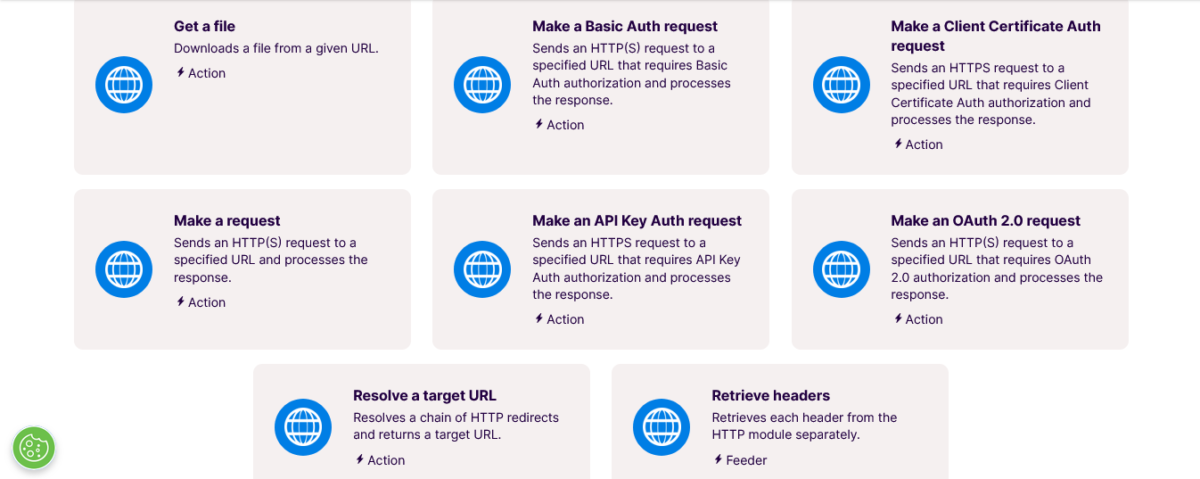
This Make.com review found that this HTTP module is ridiculously powerful. If an app has an API (even if Make doesn’t officially support it), you can connect to it using the HTTP module.
I used this to connect Make to a custom internal tool my client built. Zapier would’ve required hiring a developer. Make let me do it with some API documentation reading and trial-and-error.
This is not beginner-friendly, but for technical users, it’s a superpower.
4. Data Stores (Built-In Database)
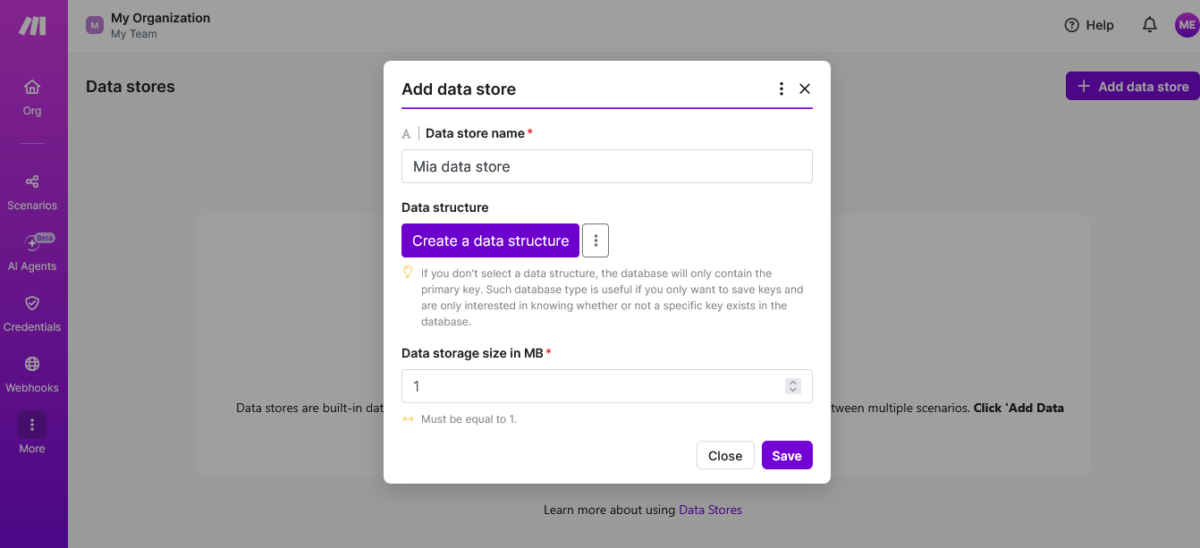
Make includes built-in data storage. You can save information between workflow runs without paying for Airtable or Google Sheets.
Example: Track how many emails you’ve sent to each lead this month. Store that count in Make’s data store, check it before sending, and stop at 5 emails per lead.
It’s basic database functionality, but it’s included for free on all plans.
5. AI Agents and AI Toolkit

As of 2026, Make has native integrations with OpenAI, Anthropic’s Claude, Google’s Gemini, and Stability AI. You can build AI-powered workflows directly in the visual builder.
The catch?
Using Make’s built-in AI modules costs more operations than using your own API key. If you’re running high-volume AI workflows, use the HTTP module with your own OpenAI/Anthropic key to save credits.
I built an automated content research system using the Claude API. It pulls trending topics, generates outlines, and saves everything to Google Sheets.
Would’ve cost $200/month in Zapier.
Costs me $16/month in Make. Save with Make.com →
Problems You Should Know
Let me give you the honest Make.com review problems I discovered after 90 days.
Learning Curve Is Brutal for Beginners
If you’ve never used automation tools, Make will kick your ass. The visual builder is powerful, but it’s intimidating. Understanding routers, iterators, aggregators, and data structures takes time.
Zapier? You can build your first workflow in 5 minutes.
Make? Expect 2-3 hours of watching tutorials and reading documentation before you feel comfortable.
I helped a friend set up her first Make scenario. She’s smart but not technical. It took us an entire afternoon just to build a simple form-to-email automation. She almost gave up twice.
Polling Trigger Money Trap
Here’s a Make.com trap that cost me about $50 before I figured it out: Polling triggers burn through operations like crazy.
If you set Make to “check Google Drive for new files every 5 minutes,” it runs 288 times per day. That’s 8,640 operations per month, just checking for files that might not even exist.
One polling trigger can eat 86% of your Core plan budget.
The fix: Use webhooks instead of polling whenever possible. Webhooks trigger instantly when something happens, without burning operations on empty checks.
But not all apps support webhooks. And configuring webhooks requires technical knowledge.
Credit Counting Gets Confusing Fast
Some actions use 1 operation. Some use multiple. AI modules can use dozens of operations per run, depending on how much data you’re processing.
This Make.com review found that tracking exactly what’s eating your operations requires digging through execution logs. You can’t just glance at your dashboard and know why you’re running out.
I burned through 3,000 operations in one week and had no idea why. Turned out I had a workflow looping incorrectly, executing 50 times when it should’ve run once.
Support Is Email-Only
No phone support. No live chat. Email tickets take 2-5 days for responses.
When something breaks at midnight before a client deadline (and it will), you’re googling solutions on the Make community forum and praying someone else had the same problem.
The community is active and helpful, but it’s not the same as talking to an actual support person who can look at your specific scenario.
Failed Scenarios Still Cost Operations
If your workflow runs but fails halfway through, you still pay for all the operations that were executed. This is frustrating when you’re testing and troubleshooting.
Zapier has the same problem, but it feels worse in Make because you’re more likely to have complex workflows that fail during testing.
Make.com vs The Competition
Let me save you research time with these Make.com comparisons.
Make.com vs Zapier
Zapier is the market leader with 7,000+ integrations and the easiest learning curve.
Why choose Make.com: You need complex workflows, want to save money (5-7x cheaper), and like visual builders
Why choose Zapier: You’re a complete beginner, need maximum integrations, or want AI-assisted workflow building (Zapier Copilot)
Pricing difference for a typical small business:
- Zapier Professional: $73.50/month for 2,000 tasks
- Make Core: $10.59/month for 10,000 operations
For the same workflows, Make typically costs $60-720 less per year.
Make.com vs n8n
n8n is an open-source automation platform you can self-host.
Why choose Make.com: You want a hosted solution with a visual interface, no server management
Why choose n8n: You need complete data control, unlimited executions, and have technical skills to self-host
Pricing difference: n8n’s cloud plan starts at $20/month. Self-hosted is free but requires server costs and technical knowledge.
Make.com vs Workato
Workato is enterprise automation software with advanced features and white-glove support.
Why choose Make.com: Budget under $500/month, building workflows yourself
Why choose Workato: Enterprise needs require dedicated support, a budget of over $10k/year
Workato is overkill for most small businesses and solopreneurs.
Who Should Pay for Make.com?
Make.com is worth your money if:
✅ You run 5+ complex automations regularly
✅ You’re comfortable with moderate technical learning
✅ You need a visual workflow design for debugging
✅ Budget is tight, and Zapier costs are climbing
✅ You want advanced logic (routers, iterators, conditions)
Skip Make.com if:
❌ You’ve never used automation tools (start with Zapier)
❌ You need hand-holding 24/7 support
❌ Your workflows are simple 2-3 step automations
❌ You have zero time for learning curves
My Honest Take After 90 Days
I’ve used Make.com for three months alongside Zapier to compare them directly. Here’s what I genuinely think:
The cost savings are real. I’m saving $720/year compared to Zapier for the exact same workflows. That’s not marketing hype, that’s my actual bank statement.
The learning curve is no joke. If you’re expecting Zapier-level simplicity, you’ll be disappointed. Budget 5-10 hours to get comfortable.
The visual builder is worth it. Once you understand how to use it, debugging and building complex workflows become so much easier.
You need technical comfort. Not coding skills, but comfort with concepts like APIs, data structures, and logic flows.
My verdict? For anyone running more than 5 automations or needing complex multi-step workflows, Make saves enough money to justify the learning investment.
If you’re just connecting Gmail to Slack, stick with Zapier. But if you’re serious about automation and want power + savings, Make is the move.
Use Cases That Work
Let me share what I’ve seen work well with Make:
1. Content Research & Publishing Pipeline
I built a system that monitors trending topics in my niche, uses Claude AI to generate content outlines, saves them to Notion, and notifies me in Slack. Runs automatically every morning.
Cost: $16/month on Pro plan
Zapier equivalent: Would’ve cost $99/month
2. Client Onboarding Automation
When a new client signs up, Make creates their folder in Google Drive, sets up their Asana project, adds them to HubSpot, sends a welcome email sequence, and schedules their kickoff call.
12-step workflow. Saves 45 minutes per client.
3. Social Media Cross-Posting
Post to Instagram, and it automatically reformats and publishes to LinkedIn, Twitter, Facebook, and Pinterest with platform-specific optimisations.
Cost: Free plan handles this easily
4. Invoice & Payment Tracking
Integrates Stripe, QuickBooks, and Slack. When payment is received → updates accounting → notifies me → marks invoice as paid → sends thank you email.
Zero manual data entry.
Tips from My Experience with Make
Let me share stuff I figured out in this Make.com review:
1. Start with templates. Make has hundreds of pre-built scenarios. Clone one similar to what you need, then customise it. Way faster than building from scratch.
2. Use webhooks over polling. Seriously. Polling burns operations like crazy. Webhooks are instant and way cheaper.
3. Test with low-frequency runs first. Set your scenario to run every hour while testing. Once it works, increase frequency. Saves operations during the trial-and-error phase.
4. Join the Make Community. 50,000+ members, tons of experts. When you’re stuck, someone has already solved your problem.
5. Track your operation usage weekly. Don’t wait until month-end to discover you’re over budget. Check weekly and adjust.
6. Bring your own API keys for AI. If you’re using OpenAI, Claude, or other AI tools heavily, connect them via the HTTP module with your own API key. Way cheaper than using Make’s native modules.
7. Name your scenarios clearly. “Social Media Auto-Post” is better than “Scenario 47.” Future you will thank you when managing 20+ workflows.
Also Read: Pressable MCP: I Let AI Run My WordPress Hosting (Results) 2026
Bottom Line
Here’s my final Make.com review take.
Make.com is a powerful, visual automation platform that saves serious money if you’re willing to invest time learning it. The visual builder makes complex workflows manageable, the pricing is 5-7x cheaper than Zapier for most use cases, and the feature set rivals enterprise tools.
But it’s not beginner-friendly. The learning curve is real, the credit system requires understanding, and support is minimal. You need technical comfort and patience.
If you’re running multiple complex automations and your Zapier bill keeps climbing, Make.com will probably save you $500-1,000+ per year. That’s real money.
If you’re brand new to automation, start with Zapier’s free plan, learn the concepts, then migrate to Make when you’re ready for more power and savings.
My Rating: 8.7/10
Pros:
- 5-7x cheaper than Zapier for complex workflows
- Visual canvas makes debugging easier
- 3,000+ app integrations
- Advanced logic (routers, iterators, aggregators)
- Operations rollover for one month
- Free plan actually usable (1,000 operations)
- Native AI integrations
Cons:
- Steep learning curve for beginners
- Polling triggers burn operations
- Credit tracking gets confusing
- Email-only support (slow responses)
- Failed scenarios still cost operations
- Requires technical comfort
Is it worth it? For power users and budget-conscious teams, absolutely. For complete beginners, maybe start elsewhere.
Try Make.com Free (1,000 Operations/Month) →
FAQs
Is Make.com worth it in 2026?
Yes, if you’re running complex automations and want to save money. This Make.com review found it’s typically 5-7x cheaper than Zapier for workflows with multiple steps.
However, there’s a learning curve. Beginners should expect 5-10 hours to feel comfortable. For anyone managing 5+ automations or looking to reduce automation costs, the investment pays off quickly.
How much does Make.com cost?
Make.com starts at $9/month (billed annually) or $10.59/month (billed monthly) for the Core plan with 10,000 operations. The Pro plan is $16/month annually, and Teams is $29/month annually. There’s also a genuinely usable free plan with 1,000 operations per month that doesn’t require a credit card.
Unused operations roll over for one month on paid plans, which can save $50-100/month for seasonal workflows.
Is Make.com cheaper than Zapier?
Usually, yes. For a typical small business running 5-10 automations, Make.com costs $60-720 less per year than Zapier.
This Make.com review found that while Make uses more “operations” than Zapier uses “tasks” (because Make counts the trigger), operations are much cheaper per unit. Example: Zapier Professional ($73.50/month) vs Make Core ($10.59/month) for similar workflow capacity.
What’s the difference between Make.com and Zapier?
Make.com uses a visual flowchart builder where you can see your entire workflow on a canvas with branches and logic. Zapier uses a linear list format. Make is more powerful for complex workflows but has a steeper learning curve.
Zapier has more app integrations (7,000+ vs 3,000+) and is easier for beginners. Make is significantly cheaper for multi-step automations.
Does the free plan actually work?
Yes. This Make.com review found the free plan provides 1,000 operations per month with full access to 3,000+ integrations, unlimited active scenarios, and the visual builder. You can run real business automations, not just test demos.
The only limitation is the 15-minute minimum run interval (paid plans can run every 1 minute) and no operation rollover.
Why do my operations disappear so fast?
The biggest culprit in this Make.com review is polling triggers. If you set Make to “check for new data” every 5 minutes, that’s 288 checks per day or 8,640 operations per month, just checking for data that might not exist. Switch to webhooks whenever possible.
Webhooks trigger instantly when something happens and don’t burn operations on empty checks.
Can I use Make.com for AI workflows?
Yes. Make has native integrations for OpenAI (ChatGPT, DALL-E), Anthropic’s Claude, Google Gemini, and Stability AI. However, using Make’s built-in AI modules costs more operations than connecting your own API key via the HTTP module.
For high-volume AI workflows, this Make.com review recommends bringing your own API keys to save 60-80% on operation costs.
Is Make.com better than Zapier for beginners?
No. Zapier is significantly easier for complete beginners with its linear interface and AI-assisted workflow builder (Zapier Copilot). Make.com requires understanding routers, iterators, data structures, and visual logic flows. Expect 5-10 hours of learning before feeling comfortable.
However, once you learn Make, you’ll have access to more powerful features at a fraction of the cost.
What happens if I run out of operations?
Your scenarios automatically pause. Make sends email warnings at 80% and 100% usage. You can upgrade your plan, purchase operation add-ons ($9 for 10,000 operations with a 25% markup as of November 2025), or wait until the next billing cycle.
Unlike some platforms, Make doesn’t surprise you with automatic overage charges.
Does Make.com have good support?
Support is email-only with 2-5 day response times. There’s no phone support or live chat. This Make.com review found the Make Community forum (50,000+ members) is incredibly active and helpful for troubleshooting.
Documentation and video tutorials are comprehensive. However, if you need immediate hand-holding support, this isn’t the platform for you.
Heads up. Some links here are affiliate links. That means if you click and buy, I might earn a small commission. No extra cost to you. Just helps keep the coffee flowing and the WiFi paid so I can keep testing tools for you ☕