Proton Mail Review 2026: Is Swiss Privacy Worth It? 🔐
Everyone says Proton Mail is the most secure email out there. After six months of daily use, testing every feature, and dealing with their support nightmares, here’s what actually matters in this Proton Mail review.
My Quick Verdict & Rating
The Good: Zero-access encryption (even Proton can’t read your emails), Swiss privacy laws, no ads, free plan actually works, open-source code
The Downside: Support is painfully slow, limited storage on the free tier (1GB), email-only support even on paid plans, and Bridge setup is technical.
Best For: Privacy-conscious users, journalists, activists, anyone tired of being Google’s product instead of their customer
Try Proton Mail Free (No Credit Card) →
Look, I’m gonna level with you about this Proton Mail review right from the start.
You’ve probably heard all the hype about Proton Mail being this ultra-secure Swiss email fortress that keeps Big Tech’s grubby hands off your inbox.
And honestly? Most of that hype is actually justified.
But here’s what nobody talks about: The support system is absolutely brutal when things go wrong. The free plan’s 1GB storage fills up faster than you’d think. And if you’re expecting the same seamless experience as Gmail, you’re gonna have some adjusting to do.
So let’s cut through the marketing and talk about what Proton Mail actually delivers in 2026. Because privacy matters, but so does your sanity.
What Is Proton Mail and Why Does Everyone Recommend It?
In this Proton Mail review, let’s start with the basics: This is an end-to-end encrypted email service based in Switzerland that was founded in 2014 by scientists from CERN (yeah, the people smashing particles together).
The whole point was to create an email service that mathematically can’t read your messages.
Not “we promise not to read them.” Can’t read them. Even if they wanted to.
As of 2026, Proton has over 100 million users worldwide. The service has expanded beyond just email to include VPN, cloud storage (Proton Drive), calendar, password manager (Proton Pass), and even a Bitcoin wallet.
But here’s what makes Proton different in this review: Your emails are encrypted on your device before they even leave your computer. The encryption keys stay with you. Proton literally doesn’t have the technical ability to decrypt your stored messages.
Google, Yahoo, Microsoft? They can read every single email in your inbox whenever they want. They say they don’t, but they can.
That’s the difference.
Proton Mail Pricing: Free vs Paid Plans 💰
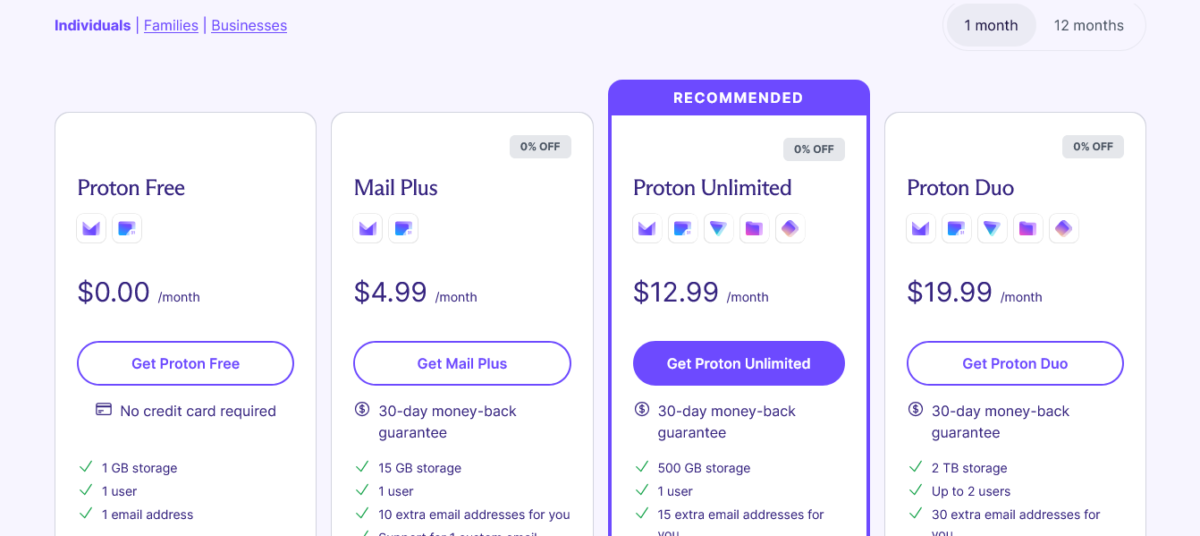
Let me break down the Proton Mail review pricing because it’s actually pretty straightforward compared to most services.
Personal Plans:
Free Plan:
- 1GB total storage (shared across mail and drive)
- 150 messages per day
- 1 email address
- 3 folders and 3 labels
- Limited support (community only)
- End-to-end encryption included
- No credit card required
Mail Plus – $4.99/month (or $47.88/year):
- 15GB total storage
- Unlimited messages
- 10 email addresses
- Unlimited folders, labels, and filters
- Custom domain support (1 domain)
- Email support
- Proton Calendar included
- Desktop app (Proton Bridge) for Outlook, Apple Mail, Thunderbird
Proton Unlimited – $12.99/month (or $119.88/year for 24 months):
- 500GB total storage
- Everything in Mail Plus
- Proton VPN Premium (1,700+ servers in 60+ countries)
- Proton Drive (encrypted cloud storage)
- Proton Pass (password manager)
- Proton Calendar (25 calendars)
- Priority support
Proton Family – $29.99/month (or $287.76/year for 24 months):
- 3TB total storage (shared)
- Up to 6 users
- All Unlimited features for each user
- Centralized billing
Business Plans:
Mail Essentials – $7.99/user/month:
- 15GB storage per user
- 10 email addresses per user
- Custom domain support
- Catch-all email
- Priority support
Proton Business – $12.99/user/month:
- 500GB storage per user
- 15 email addresses per user
- Proton VPN, Drive, Pass, Calendar included
- Admin panel
- SSO support
Let’s Do the Math
Here’s the thing about this Proton Mail review: The free plan is actually usable for basic personal email. You’re not getting a crippled demo version.
But 150 messages per day includes both sent and received. If you’re actively using email for work or running any kind of business, you’ll hit that limit.
And 1GB storage?
That sounds like a lot until you realize attachments eat it fast. A few PDFs, some photos from that vacation in 2019, and you’re suddenly getting “storage full” warnings.
For most people, Mail Plus at $4.99/month is the sweet spot. You get custom domain support (so you can use yourname@yourdomain.com instead of yourname@proton.me), unlimited messages, and 15GB storage.
Proton Unlimited at $12.99/month makes sense if you were already planning to pay for a VPN separately. Most VPN services cost $5-10/month anyway, so getting email + VPN + cloud storage + password manager for $13 is solid value.
Also Read: Proton Pass Review 2026: Is This $1.99 Manager Worth It? 🔑
What Makes Proton Mail Different?
Alright, let’s talk about what features you’re actually getting in this Proton Mail review.
1. Zero-Access Encryption (The Real Deal)
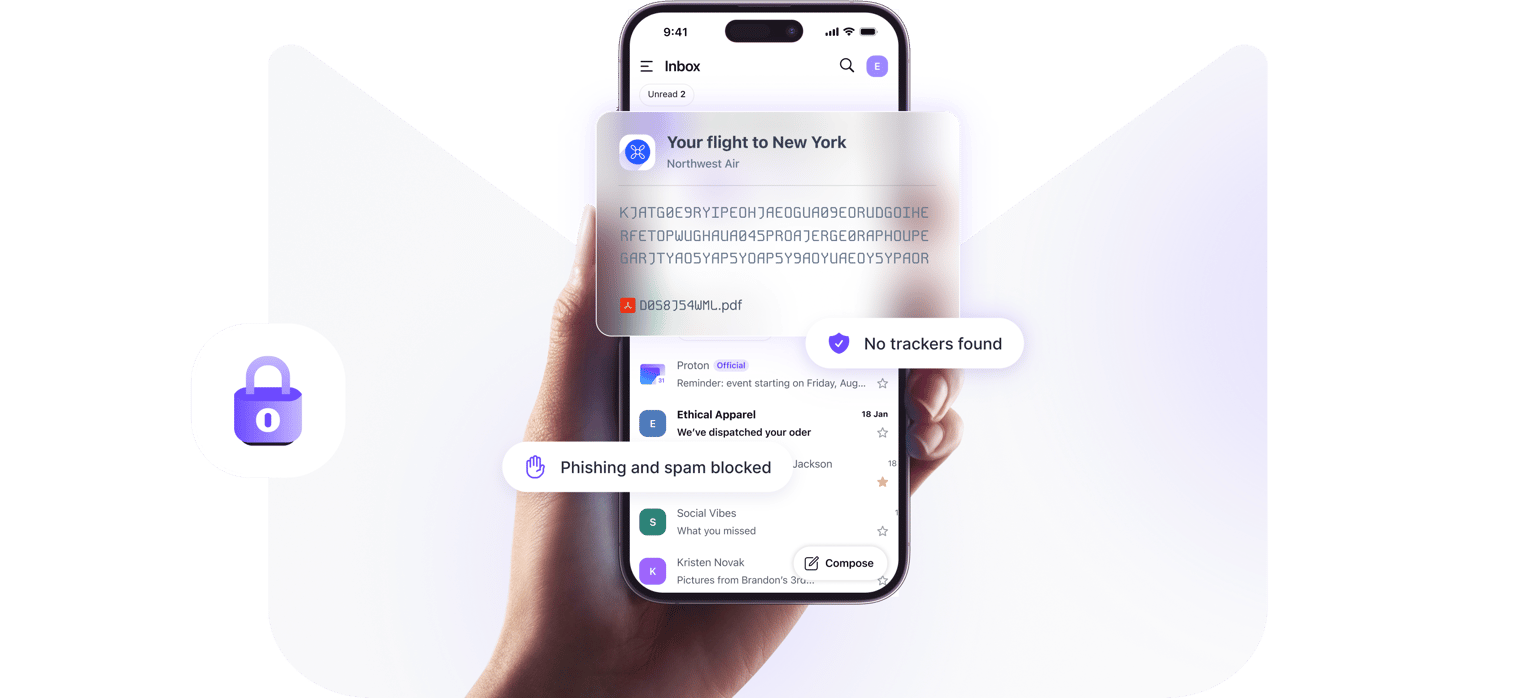
This isn’t marketing fluff. Proton Mail uses something called zero-access encryption, which means your emails are encrypted with keys that only you have.
When you send an email to another Proton user, it’s end-to-end encrypted automatically. Nobody can read it in transit or on Proton’s servers.
When you send to a non-Proton email address, you can use Password-Protected Emails to enable end-to-end encryption. You set a password, share it with the recipient separately (like via text), and they decrypt it on Proton’s website using that password.
Regular non-encrypted emails are encrypted in transit with TLS (like Gmail), then encrypted at rest on Proton’s servers using your key. So even those are protected from Proton staff reading them.
The Proton Mail review verdict on encryption? It actually works like they say it does. Multiple independent security audits have confirmed this.
2. Swiss Privacy Laws (Actually Matters)

Proton is based in Switzerland, which has some of the strongest privacy laws in the world. Switzerland isn’t part of the EU or any intelligence-sharing agreements like Five Eyes.
This means Proton can’t be compelled to hand over data by the US, UK, or EU governments without going through Swiss legal channels first. And Swiss courts have high standards for what constitutes a valid data request.
Now, real talk: Proton had to comply with a Swiss court order in 2021 to log an activist’s IP address. They were legally required to do so. But they publicly disclosed it, explained the situation, and emphasized they only log data when legally compelled by Swiss authorities.
The Proton Mail review takeaway? Privacy isn’t absolute, but it’s a hell of a lot better than US-based services where the NSA can stick a gag order on the company and force them to hand over everything in secret.
3. No Ads, No Data Mining
This seems obvious, but it matters. Proton makes money from subscriptions, not from selling your data or showing you ads based on your email contents.
Google scans your Gmail to build advertising profiles. Microsoft does the same with Outlook. Yahoo sells your data to third parties.
Proton? They literally can’t read your emails to mine data, even if they wanted to.
And they don’t want to.
4. Proton Bridge (Desktop Email Clients)
Mail Plus and higher plans include Proton Bridge, which is software that runs on your computer and lets you use desktop email clients like Outlook, Apple Mail, or Thunderbird with your Proton account.
This is huge if you hate web interfaces. You get the security of Proton with the workflow you’re used to.
The catch? Setting it up is kinda technical.
You need to install the Bridge app, configure authentication, and manually set up your email client. It’s not automatic like adding a Gmail account.
But once it’s working, it’s seamless.
5. Self-Destructing Emails
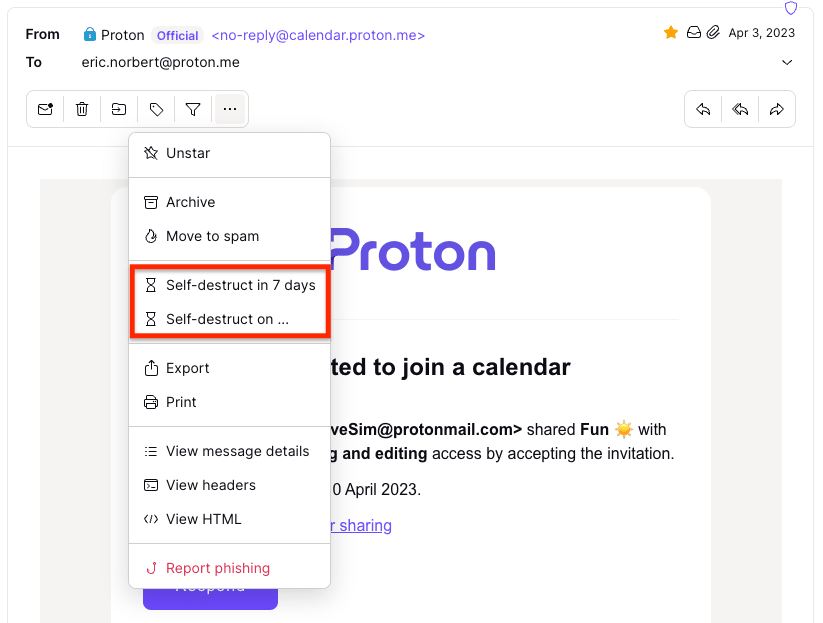
You can set emails to expire and delete themselves after a certain amount of time. Send a message that disappears in 24 hours, 7 days, or whatever timeframe you choose.
This works for emails sent to both Proton and non-Proton addresses.
Is it foolproof? No. Recipients can screenshot or copy the text before it expires. But it’s better than leaving sensitive information sitting in someone’s inbox forever.
Some Problems Nobody Warns You About
Let me give you the honest Proton Mail review problems I discovered after six months. Of course, nothing is perfect.
Support Is Painfully Slow
Email-only support. Even on paid plans. Response times range from 3 to 7 days for non-urgent issues.
When my account got locked due to a payment processing error, it took four days to get a response and another two days to resolve. Six days without email access because Stripe flagged a perfectly normal transaction.
No phone support. No live chat. Just submit a ticket and pray.
The community forum is active and helpful, but when you’re locked out of your account or dealing with a technical issue, you don’t want community volunteers. You want official support. Fast.
Free Plan Storage Fills Up Fast
1GB sounds reasonable until you actually use it. Here’s how fast it fills:
- 100 emails with small attachments: ~200MB
- One month of newsletter subscriptions: ~100-150MB
- A few client contracts or documents: ~50-100MB
You’ll hit 1GB within 3-6 months of active use. Then you either start deleting stuff constantly or upgrade to a paid plan.
There’s no way to buy additional storage on the free tier. It’s upgrade or delete.
Can’t Use It with External Clients on Free Plan
Want to use Proton Mail with your iPhone’s Mail app or Outlook? You need Mail Plus or higher for Proton Bridge.
The free plan forces you to use their web interface or mobile apps. Which are fine, but if you’re used to managing multiple email accounts in one client, this limitation gets annoying fast.
Migration isn’t seamless.
Proton has an Easy Switch tool that imports emails from Gmail, Outlook, Yahoo, etc. But it’s not perfect.
Folder structures sometimes get messed up. Labels don’t always transfer correctly. And you need to manually update all your accounts to use your new Proton address.
I spent an entire weekend updating my email on 47 different services when I migrated. Banking, shopping accounts, subscriptions, client portals; it’s a project.
Subject Lines Aren’t End-to-End Encrypted
This is a technical limitation of email standards. Subject lines and sender/recipient addresses are encrypted on Proton’s servers (zero-access encryption) but not end-to-end encrypted.
This means if someone intercepted your email in transit, they could see who you’re emailing and what the subject line says, just not the message content.
For most people, this isn’t a dealbreaker.
But if you’re ultra-paranoid, you’ll want to use generic subject lines like “Update” or “Following up” instead of “Secret Project Alpha Budget Report.”
Proton Mail vs The Competition: Comparisons
Let me save you research time with these Proton Mail review comparisons.
Proton Mail vs Gmail
Gmail is free, has 15GB storage, integrates perfectly with Google services, and is what everyone’s used to.
Why choose Proton Mail: You care about privacy, don’t want Google reading your emails, and want true encryption
Why choose Gmail: You want maximum convenience, huge storage, perfect integration with Google Calendar/Drive/Docs
Privacy difference: Google can read every email you’ve ever sent. Proton mathematically cannot.
Proton Mail vs Tuta Mail (formerly Tutanota)
Tuta Mail is another privacy-focused email service based in Germany with end-to-end encryption.
Why choose Proton Mail: More mature product, 500GB storage on Unlimited plan, includes VPN/Drive/Pass
Why choose Tuta: Slightly cheaper ($3/month vs $4.99/month for premium), encrypts subject lines end-to-end
Key difference: Tuta encrypts subject lines. Proton doesn’t (technical limitation). But Proton has a more comprehensive ecosystem.
Proton Mail vs Hey.com
Hey is the $99/year “email for humans” service with workflow-focused features.
Why choose Proton Mail: Privacy focus, encryption, way more storage (15GB vs 100GB limit on Hey)
Why choose Hey: Better workflow features, “Screener” to filter first-time senders, imprint threads
Philosophy difference: Hey optimizes workflow. Proton optimizes privacy.
Who Should Use Proton Mail?
This Proton Mail review makes sense for:
✅ You’re tired of being Google/Microsoft’s product
✅ Privacy matters more than maximum convenience
✅ You’re a journalist, activist, or someone who handles sensitive communications
✅ You want email + VPN + cloud storage in one subscription
✅ You can handle slight learning curves for better security
✅ You’re okay with email-only support
Skip Proton Mail if:
❌ You need instant live chat support
❌ You’re deeply embedded in Google/Microsoft ecosystems
❌ You email 200+ times per day on the free plan
❌ You need seamless desktop client integration without technical setup
❌ Privacy isn’t a concern for you
My Honest Take After 6 Months
I’ve been using Proton Mail as my primary/personal email for six months alongside a backup Gmail account. I use Zoho Mail for business.
Here’s what I genuinely think:
The privacy is real. This isn’t security theater. The encryption actually works as advertised. Independent audits confirm it. Open-source code proves it.
The free plan is surprisingly usable for personal email if you’re not a heavy user. But business use requires Mail Plus at a minimum.
Support quality is the biggest weakness. When things break, you’re stuck waiting days for responses. This is unacceptable for a paid service in 2026.
The ecosystem is getting better. Having email, VPN, cloud storage, and a password manager all in one subscription at $12.99/month is solid value if you were going to buy those separately anyway.
Migration is a pain, but worth it if privacy matters to you. Budget a weekend to update all your accounts.
My Proton Mail review verdict? If you care about privacy and are willing to trade a bit of convenience for actual encryption, Proton Mail is the best option available in 2026.
If you just want free email and don’t care who reads it, stick with Gmail.
Use Cases Where Proton Mail Shines

Let me share scenarios where Proton Mail actually makes sense in this review:
1. Journalists and Sources
End-to-end encryption + Swiss privacy laws = as close to secure communication as email can get. Multiple investigative journalists use Proton for source communication.
2. Healthcare Professionals
HIPAA compliance is easier when your email provider literally can’t access patient information. Proton Business plans support this.
3. Small Business Owners Tired of Google
Custom domain support means you can use yourname@yourbusiness.com with Proton’s encryption. Professional look, private backend.
4. Anyone in Countries with Surveillance
If your government monitors email, Swiss-based encryption with zero-access architecture is your friend.
5. People Who Value Digital Rights
Sometimes it’s not about having something to hide. It’s about principle. Your emails shouldn’t be data-mined for profit.
Tips from My Experience Using It Daily
Let me share stuff I learned the hard way in this Proton Mail review:
1. Use filters aggressively on paid plans. Automatically sort newsletters, clients, and personal stuff into folders. The free plan’s 3-folder limit makes this useless, but paid plans let you organize properly.
2. Enable two-factor authentication immediately. Proton supports authenticator apps, hardware keys, and email 2FA. Use it.
3. Set up email aliases strategically. Mail Plus gives you 10 email addresses. Use different ones for shopping, social media, and professional stuff. When one gets spam, you know exactly who sold your info.
4. Download your emails periodically. Use Proton Bridge to back up important emails to your local machine. Don’t rely 100% on cloud storage.
5. Use generic subject lines for sensitive stuff. Remember, subject lines aren’t end-to-end encrypted. “Project update” is better than “Whistleblower documents re: CEO fraud.”
6. Test Password-Protected Emails before you need them. The workflow is slightly clunky. Send a test to yourself to understand how it works before you use it for something important.
7. Join the Proton community forum. Support is slow, but the community is active. You’ll find answers faster there.
Bottom Line
Here’s my final Proton Mail review take.
Proton Mail is the best privacy-focused email service available in 2026 for anyone who genuinely cares about keeping their communications private. The encryption is real, the privacy laws are strong, and the company’s business model aligns with user privacy instead of data exploitation.
But it’s not perfect. Support is frustratingly slow, the free plan’s storage is limited, and migration from Gmail/Outlook requires genuine effort.
If privacy is a “nice to have,” stick with Gmail.
If privacy is a “must-have,” Proton Mail is your best option.
My Rating: 8.4/10
Pros:
- Zero-access encryption actually works (mathematically proven)
- Swiss privacy laws protect your data
- No ads, no data mining
- Free plan genuinely usable for personal email
- Open-source code (audited multiple times)
- Proton Unlimited bundles email, VPN, storage, and password manager
- Custom domain support on paid plans
- Self-destructing emails
Cons:
- Support is email-only and painfully slow (3-7 days)
- Free plan storage fills fast (1GB limit)
- 150 messages/day limit on free tier
- Subject lines are not end-to-end encrypted (technical limitation)
- Migration from Gmail is a weekend project
- Proton Bridge setup requires technical comfort
- Can’t buy extra storage on the free plan
Is it worth it? For privacy-conscious users, absolutely. For people who just want an easy email, probably not.
Try Proton Mail Free (No Credit Card Required) →
FAQs
Is Proton Mail actually safe in 2026?
Yes.
Proton Mail uses zero-access encryption, meaning your emails are encrypted with keys only you possess. Even the Proton staff cannot read your messages. Independent security audits and open-source code confirm this.
However, subject lines and sender/recipient addresses aren’t end-to-end encrypted due to email protocol limitations, though they’re still encrypted at rest on Proton’s servers.
How much does Proton Mail cost?
Proton Mail offers a free plan with 1GB storage and 150 messages/day.
Paid plans start at $4.99/month for Mail Plus (15GB, unlimited messages, custom domain), $12.99/month for Proton Unlimited (500GB plus VPN, Drive, Pass, Calendar), and $29.99/month for Proton Family (3TB shared across 6 users). Business plans start at $7.99/user/month.
Is the free plan actually usable?
Yes, but with limitations.
The Proton Mail review found the free plan works well for personal email if you’re not a heavy user. You get full encryption, no ads, and access to all core features.
However, 1GB storage fills within 3-6 months of active use, and the 150 messages/day limit includes both sent and received emails. Business users will need to upgrade.
Can Proton Mail read my emails?
No. This is the key difference from Gmail, Outlook, and Yahoo. Proton Mail uses zero-access encryption, where emails are encrypted on your device before transmission.
Proton doesn’t have your encryption keys and cannot decrypt your stored messages even if legally compelled.
Google, Microsoft, and Yahoo can read your emails whenever they choose.
How does Proton Mail make money if it’s free?
Proton Mail operates on a subscription model. The free tier is supported by paid users who upgrade for more storage, unlimited messages, custom domains, and additional services like VPN and cloud storage.
Unlike Gmail, Proton doesn’t make money from ads or selling user data. Their business model aligns with protecting privacy, not exploiting it.
Can I use Proton Mail with Outlook or Apple Mail?
Yes, but only on paid plans (Mail Plus or higher). The Proton Mail review found that you need Proton Bridge, a desktop application that lets you use third-party email clients with your Proton account.
Setup requires some technical knowledge, but once configured, it works seamlessly. The free plan forces you to use Proton’s web interface or mobile apps.
Is Proton Mail better than Gmail for privacy?
Absolutely. Gmail scans your emails to build advertising profiles and can access all your messages. Proton Mail uses zero-access encryption and cannot read your emails.
Proton is based in Switzerland with strong privacy laws, while Gmail is US-based and subject to government surveillance requests.
The trade-off is that Gmail offers more storage (15GB free vs 1GB) and better integration with other services.
What happens if I forget my Proton Mail password?
This is critical: If you forget your password, you cannot recover your emails. Because Proton uses zero-access encryption and doesn’t have your keys, they cannot reset your password and give you access to encrypted messages.
You can create a new password, but old emails remain inaccessible. The Proton Mail review strongly recommends using a password manager and storing your recovery codes safely.
Does Proton Mail work in countries with internet censorship?
Yes. Proton Mail includes alternative routing features that automatically find ways to connect to their servers if your connection is being blocked.
This helps users in countries with internet censorship access their email. However, the effectiveness varies by country and the sophistication of the blocking.
Is Proton Mail worth paying for?
The Proton Mail review found it’s worth paying for if privacy genuinely matters to you. At $4.99/month for Mail Plus, you get unlimited messages, 15GB storage, custom domain support, and escape from Google’s data collection.
The $12.99/month Unlimited plan is an excellent value if you need VPN service anyway, since most VPNs alone cost $5-10/month. For casual users who don’t care about privacy, Gmail’s free 15GB is hard to beat.