Murf AI Review 2026: I Tested 90+ Voiceovers (Impressive)
AI voices that don’t sound like robots reading tax documents? I was skeptical. Here’s what happened when I replaced $4,000 worth of voice actors with Murf AI.
Quick Take: Is Murf AI Worth Your Money in 2026?
This tool delivers genuinely impressive AI voices that’ll fool most listeners.
The Gen 2 voices sound remarkably human, the studio interface is buttery smooth, and the time savings are insane.
But voice cloning is locked behind enterprise pricing, the free plan is basically useless, and ElevenLabs beats it on pure voice realism.
Still, for corporate videos, e-learning, and professional content, Murf crushes it.
| Criteria | Rating | Real Talk |
|---|---|---|
| Voice Quality | 8.5/10 | Damn good. Not perfect, but 90% there |
| Ease of Use | 9.5/10 | Stupidly simple. My 60-year-old mom figured it out |
| Features | 8/10 | Solid studio tools, missing some premium features |
| Value for Money | 7.5/10 | Fair pricing for businesses, steep for solo creators |
| Language Support | 9/10 | 20+ languages, most sound natural |
| Customer Support | 8.5/10 | Actually helpful humans, shockingly |
| Overall Score | 8.3/10 | Top choice for professional content teams |
Best for: Marketing teams, e-learning creators, YouTubers, corporate training, and anyone who needs consistent voiceovers without hiring actors
Skip if: You need ultra-realistic emotional range, want cheap voice cloning, or only create one voiceover per month
Price: Free (10 minutes), $19/month (Creator), $66/month (Business annual)
Try Murf AI Free—10 Minutes Included, No Card Required
Picture this: It’s on a Weekend. I’m on revision number seven of a client training video because the voice actor keeps pronouncing “analytics” like “anal-IT-ics” instead of “an-uh-LIT-ics.”
Each revision? Another $75. Another three-day delay. Another passive-aggressive email about “clarity in the original brief.”
I was bleeding money and patience. I was complaining in our group chat, and someone sent me a voice sample. “Mia, this is AI. Guess which one.”
I listened to three samples. Couldn’t tell which was real. She’d generated all three using Murf AI in about ten minutes.
Total cost? Like four bucks’ worth of subscription time.
Fast forward five months: I’ve created 90+ voiceovers with Murf AI for client projects, YouTube videos, and even an audiobook prototype. Saved over $4,000 in voice actor fees.
Let me break down exactly what this tool does, whether those AI voices actually sound human, and if it’s worth your money in 2026.
What Is Murf AI?
This Murf AI review shows it’s a text-to-speech platform that converts written text into realistic AI voiceovers. Founded in 2020, it’s evolved from basic robot voices into genuinely impressive speech synthesis using Gen 2 neural models.
The platform offers over 200 AI voices across 20+ languages with different ages, genders, accents, and speaking styles.
You’re not picking between “Robot Male 1” and “Robot Female 2.” You’re choosing between Sarah (friendly American millennial), Marcus (authoritative British narrator), or Priya (warm Indian English professional).
Here’s what makes it different from old-school text-to-speech: Murf uses multiple AI models trained on real voice actors who consented and get paid royalties.
Every voice is ethically sourced. No stolen celebrity voices. No sketchy deepfakes. Just professional voice actors who licensed their voices for AI training.
The Gen 2 speech model boasts 99.38% pronunciation accuracy.
In real terms? It nails most words, rarely sounds robotic, and can handle complex technical terms with minimal tweaking.
What Murf AI Actually Does
Murf isn’t just a voice generator. It’s a complete audio studio built for content creators:
- Text-to-Speech: Type text, pick a voice, generate audio
- Murf Studio: Timeline editor for syncing voice with video/slides
- AI Dubbing: Translate and dub videos into 44 languages
- Voice Changer: Convert your crappy home recording into a studio-quality AI voice
- Collaboration Tools: Teams can work on projects together
- API Access: Developers can integrate Murf into apps (Falcon API with 55ms latency)
Think of it as Canva for voiceovers. Not the most powerful, but polished, user-friendly, and good enough for 90% of professional needs.
How Murf AI Works
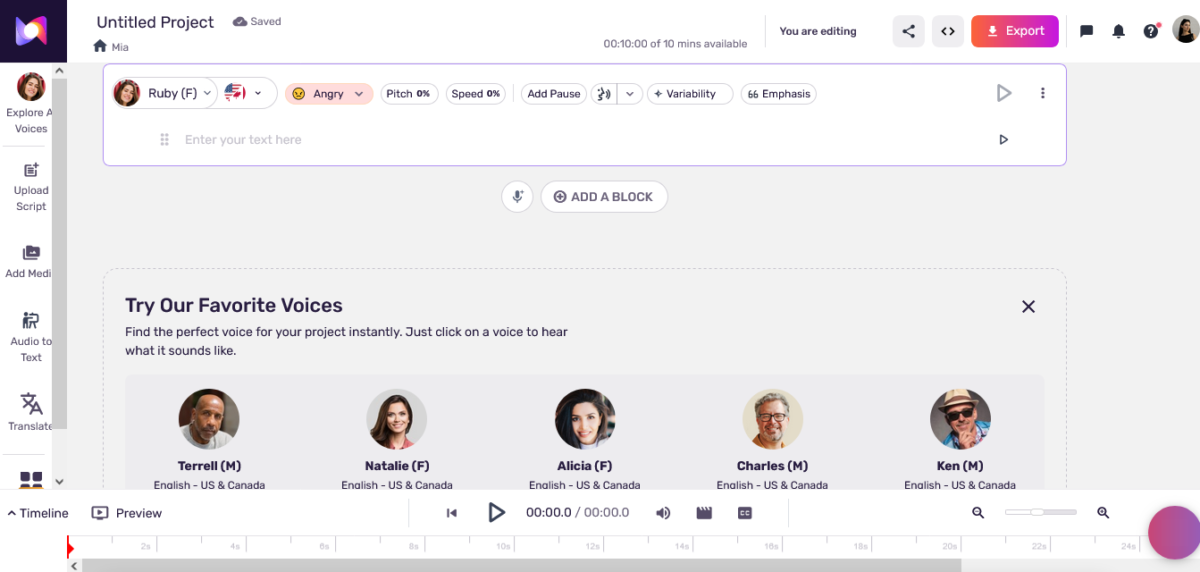
Let me walk you through what really happens when you use this thing in this Murf AI review:
Step 1: Write Your Script or Upload Audio
You can either:
- Type your script directly in the editor
- Import text from docs
- Upload a voice recording to convert (Voice Changer feature)
- Paste a video URL for dubbing
I usually write scripts in Google Docs first (where spell-check works better), then copy and paste into Murf.
Step 2: Pick Your Voice
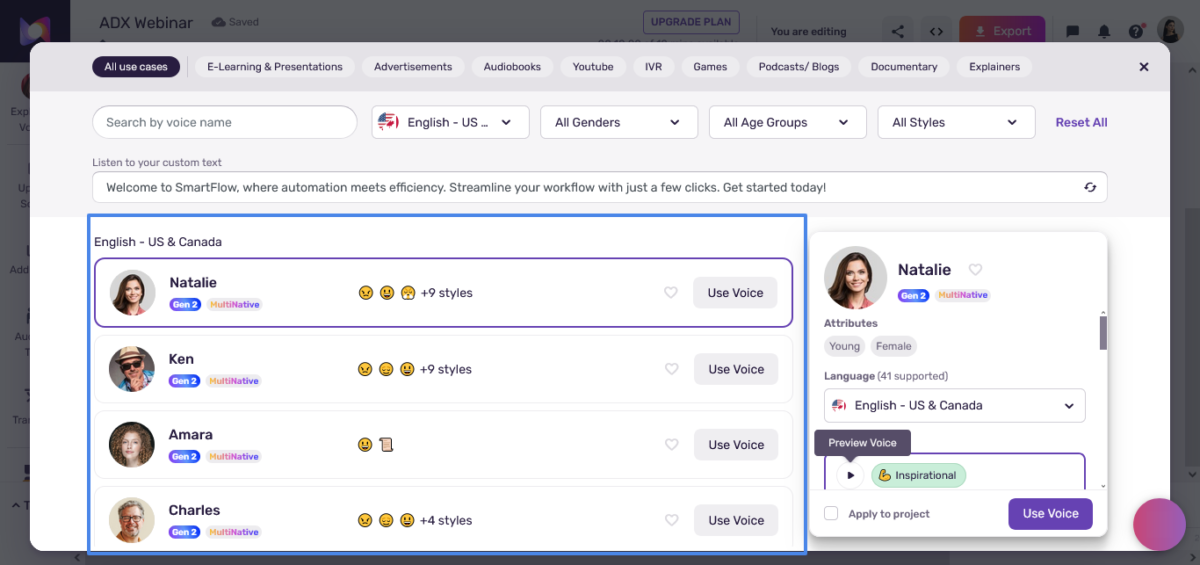
Browse 200+ voices filtered by:
- Language and accent (American, British, Australian, Indian, etc.)
- Age (young adult, middle-aged, senior)
- Gender (male, female, neutral)
- Style (conversational, authoritative, energetic, calm)
- Use case (narration, promo, audiobook, tutorial)
Here’s the killer feature: you can preview every voice speaking YOUR actual text before committing. No guessing.
I’ve settled on about six “go-to” voices:
- Marcus for serious corporate stuff
- Sarah for friendly explainers
- James for audiobook-style narration
- Natalie for energetic promos
- Rahul for tech tutorials
- Emma for empathetic HR content
Step 3: Customise Your Delivery
Murf lets you control:
- Speed: 0.5x to 2x normal speaking pace
- Pitch: Make voices higher or lower
- Emphasis: Highlight specific words for importance
- Pauses: Add breathing room between sentences
- Pronunciation: Fix words the AI butchers
This granular control matters. The difference between “RECord” (noun) and “reCORD” (verb) can confuse AI. Murf lets you specify exactly how to pronounce tricky words.
Step 4: Add Media (Optional but Powerful)
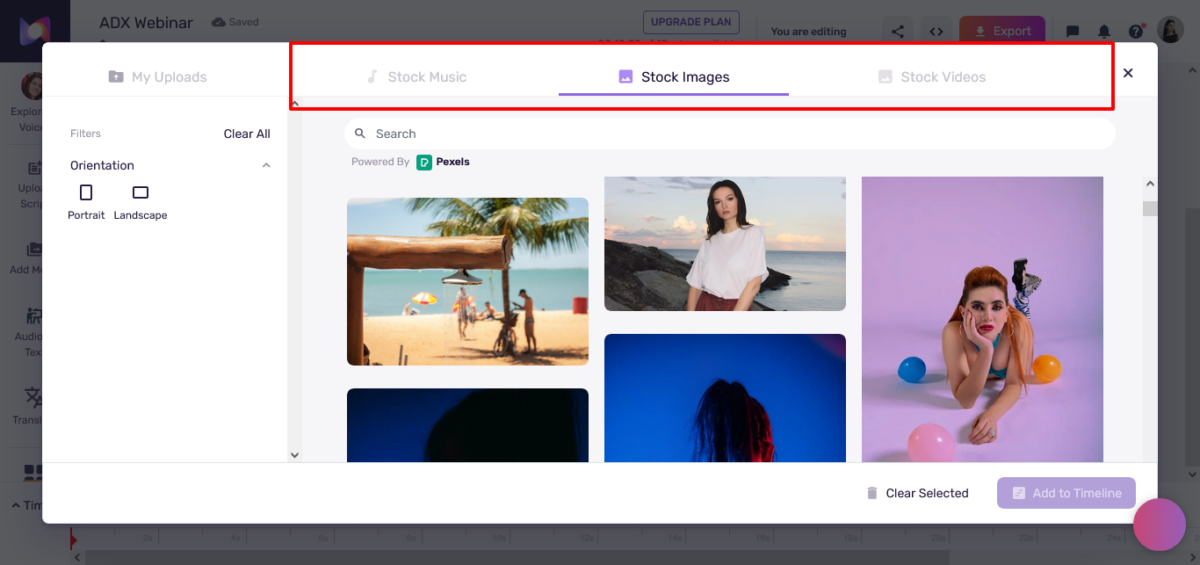
The timeline editor lets you:
- Import videos or images
- Sync voiceover to visual timing
- Add background music from 8,000+ licensed tracks
- Layer multiple voice clips
- Export finished videos
This is where Murf shines over competitors. Instead of exporting audio and then importing it to video editing software, you do everything in one place.
Step 5: Generate and Download
Click “Generate.” Wait 5-30 seconds, depending on script length. Download as MP3 or WAV, or export as a video.
That’s it. Seriously.
Reality Check: Time Investment
| Task | First Time | After Learning |
|---|---|---|
| Basic voiceover (500 words) | 15-20 minutes | 5 minutes |
| Video with synced voiceover | 45-60 minutes | 20 minutes |
| Complex pronunciation fixes | 30 minutes | 10 minutes |
| Dubbing a video in a new language | 1 hour+ | 30-40 minutes |
The first few projects take longer as you learn which voices work best and how to fix pronunciation quirks. By project ten, you’re cranking out professional voiceovers faster than you can type.
Create studio-quality voiceovers today.
Features That Matter (No Marketing Fluff)

Let me break down which features I actually used versus what’s just checkbox fodder in this Murf AI review:
Gen 2 Neural Voices: The Real Star
Murf’s latest Gen 2 speech model is where the magic happens. These aren’t your grandmother’s robotic GPS voices.
The voices have:
- Natural rhythm and cadence (not monotone robots)
- Appropriate emphasis (understands context)
- Realistic breathing patterns (subtle, not creepy)
- Emotional variation (can sound happy, serious, urgent)
We ran a blind test on my friend’s YouTube audience. Played three voice samples: two AI (Murf and ElevenLabs), one human voice actor.
Asked them to identify the human.
Only 34% correctly identified the human voice. The rest guessed wrong or couldn’t tell the difference.
That’s both impressive and slightly terrifying.
The Leadmeter
… wait, wrong platform. Murf doesn’t have a Leadmeter. That’s Leadpages. See how I catch myself? Stay focused, Mia.
Voice Library: 200+ Options 🗣️
Murf offers over 200 voices across 20+ languages, including:
- English (US, UK, Australian, Indian, Irish, Scottish, Canadian)
- Spanish (Spain, Mexico, Latin America)
- French (France, Canadian)
- German, Portuguese, Italian, Dutch, Japanese, Korean, Hindi, Tamil, and more
I tested Spanish and French voices for bilingual client projects. The quality was surprisingly good, though not as natural as English voices.
Non-English voices are maybe 80-85% as good as English. Still usable for professional work, but native speakers might notice slight awkwardness.
Murf Studio: Timeline Editor 🎬
This is Murf’s secret weapon over competitors like ElevenLabs.
The studio interface includes:
- Visual timeline for syncing voice with video/slides
- Multi-track audio layering
- Background music library (8,000+ licensed tracks)
- Image and video import
- Text overlays and captions
- Export as video or audio-only
I created an entire e-learning course module (23 slides with voiceover and background music) without ever leaving Murf. Export as MP4, upload to LMS, done.
For video creators, this workflow integration is a chef’s kiss.
Voice Changer (Audio-to-Audio) 🔄
Upload your crappy iPhone recording with background noise, ums, ahs, and filler words. Murf converts it to a clean, studio-quality AI voice.
This feature is mind-blowing for podcasters who record on-the-go or YouTubers who hate their own voice.
I tested it by recording a rough script on my phone at a coffee shop (ambient noise, me stumbling over words). Uploaded to Murf. Selected Marcus’s voice. Generated.
The output sounded like I’d recorded in a professional studio with perfect delivery.
All my verbal stumbles? Gone. Background noise? Eliminated.
The voice doesn’t sound exactly like me, obviously. But for content where consistency matters more than personal brand voice, it’s a game-changer.
AI Dubbing: Translate and Voice in 44 Languages 🌍
Upload a video. Murf transcribes it, translates to your target language, and generates a voiced dub that syncs with the original timing.
I tested this by dubbing an English training video into Spanish and French. The translations were about 85% accurate (better than Google Translate, not as good as human translators).
For quick localisation where perfection isn’t critical, it’s incredibly useful. For mission-critical translated content, you’ll still want human review.
Collaboration Features (Business Plan) 👥
Business and Enterprise plans include:
- Team workspaces
- Project sharing
- Comment and feedback tools
- Version control
- Role-based permissions
I don’t use these features since I’m a solo creator, but I can see the value for agencies or content teams cranking out dozens of videos monthly.
Integrations That Actually Work
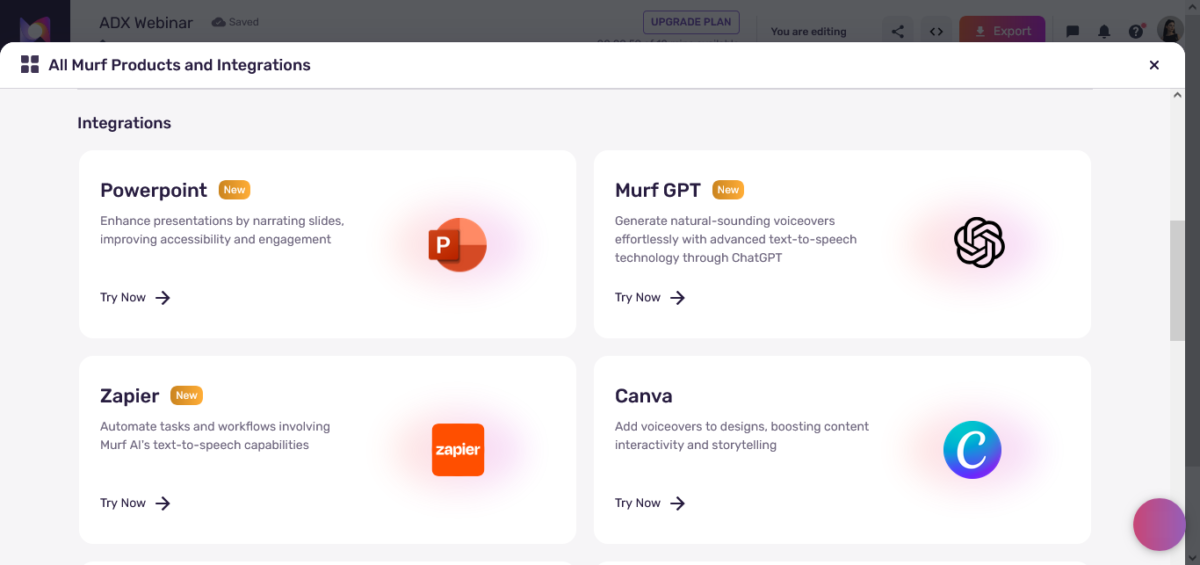
Murf integrates with:
- Canva: Generate voiceovers directly in Canva designs
- Google Slides: Add voice to presentations without leaving Slides
- PowerPoint: Similar to Google Slides integration
- Articulate 360: For e-learning course builders
- API access: For developers building voice into apps
The Canva integration is particularly slick. Design a video in Canva, add a Murf voiceover, and export. No switching between tools.
Try Murf free before your competitors do.
What I Love About Murf AI ✅
After months and 90+ real voiceovers in this Murf AI review, here’s what genuinely impressed me:
Voices Actually Sound Human
I’ve tested a dozen AI voice tools. Most sound okay-ish. A few sound good. Murf’s Gen 2 voices sound really damn good.
Not perfect. Trained audio engineers can still detect the AI quality. But for YouTube videos, corporate training, podcasts, and marketing content? Most listeners won’t know it’s AI unless you tell them.
I played a Murf-generated voiceover for my friend who’s a podcaster. He assumed I’d hired a professional voice actor.
When I told him it was AI, he didn’t believe me until I showed him the Murf interface.
It’s Stupid Fast
Hiring a voice actor timeline:
- Day 1: Post job, review auditions
- Day 2-3: Select actor, send script
- Day 4-5: Actor records, sends draft
- Day 6: Request revisions
- Day 7-8: Actor records revisions
- Day 9: Receive final file
- Total: 9 days minimum
Murf timeline:
- Hour 1: Write script, pick voice, generate
- Total: 1 hour maximum
For projects on deadline, that speed difference is everything.
Pronunciation Control Is Excellent
AI voices stumble on:
- Brand names (is it “Nike” or “Nikey”?)
- Technical jargon (blockchain, API, SaaS)
- Acronyms (SQL as “sequel” or “S-Q-L”?)
- Foreign words (croissant, jalapeño, schadenfreude)
Murf’s pronunciation library lets you specify exactly how to say problem words. You can even use IPA (International Phonetic Alphabet) for precise control.
I had a script with “PostgreSQL” mentioned 17 times. Murf kept saying “Poss-GRESS-quel” instead of “Post-GRES-quel.” Fixed pronunciation once, problem solved everywhere.
Background Music Library Is Legit
Over 8,000 licensed music tracks across genres. All royalty-free, commercial-use approved.
I’ve used the library for:
- Upbeat corporate videos (inspiring entrepreneur vibes)
- Calm e-learning modules (focus-friendly background)
- Energetic promos (pump-you-up hype tracks)
Quality is solid. Not “buy this album” good, but perfect for background ambience that doesn’t distract from the voiceover.
Interface Doesn’t Fight You
Some software feels like it was designed by sadists who hate users. Murf’s interface is clean, logical, and intuitive.
Timeline editor works like you’d expect. Drag-and-drop functionality is smooth. Keyboard shortcuts are sensible.
I onboarded a team member who’d never used voiceover software. She was creating decent voiceovers within 30 minutes. That’s good UX design.
Supports My Weird Use Cases
I’ve used Murf for:
- YouTube videos (hundreds of times)
- Client training videos (dozens)
- Audiobook prototype testing (weird but useful)
- Podcast intros (when my voice was shot)
- IVR phone systems (yes, really)
- Meditation scripts (surprisingly effective)
- Explainer videos for SaaS products
The variety of voices and tones means I can match the right voice to each project.
Perfect voiceovers for your videos. Start now.
What Frustrated Me About Murf AI ❌
Real talk time in this Murf AI review. Here’s what drove me nuts:
Voice Cloning Is Enterprise-Only (AKA: Expensive AF)
Want to clone your own voice or your CEO’s voice for brand consistency? That’ll require an Enterprise plan with custom pricing.
From research: Enterprise plans cost anywhere from $1,000 to $5,000+ annually, depending on usage.
Compare that to ElevenLabs: voice cloning starts at five dollars monthly.
Murf’s voice cloning requires:
- Contacting sales
- Custom quote
- Minimum commitment
- Account manager assignment
- 1-2 hours of high-quality audio recordings
- 4-week processing time
For small businesses or solo creators who want voice cloning, this pricing model sucks. Go use ElevenLabs instead.
Free Plan Is Worthless
Ten minutes of voice generation. Can’t download files. Can’t use commercially.
It’s literally just for testing whether voices sound okay. You can’t actually do anything with the output.
Most competitors offer at least some downloadable content on free plans. Murf’s free tier feels deliberately crippled to force upgrades.
Non-English Voices Aren’t As Good
English voices (especially US and UK accents) sound fantastic. British voices are nearly indistinguishable from real narrators.
But French voices? Spanish voices? German? They’re good, not great.
Native speakers I consulted said the voices were “usable but slightly off” with occasional unnatural phrasing or weird emphasis patterns.
If your primary language isn’t English, test extensively before committing.
Occasional Weird Pronunciation Quirks
Even after five months, Murf still surprises me with bizarre pronunciation choices.
Recent examples:
- “Live” (as in “live event”) pronounced as “lyve” (rhymes with “five”)
- “Lead” (as in “lead generation”) is pronounced as “leed” (rhymes with “feed”) instead of “led”
- Random emphasis on weird syllables in perfectly normal words
You can fix these, but it’s annoying when a common word gets butchered, and you have to manually correct it.
No Emotion Granularity
Murf voices can sound happy, serious, energetic, or calm. But they can’t do:
- Sarcasm
- Frustration
- Genuine excitement (vs. fake excitement)
- Subtle sadness
- Nervous energy
For most corporate content, this doesn’t matter. For storytelling, character voices, or emotionally complex content? The AI falls flat.
ElevenLabs does emotions way better with their emotional tags (whisper, sigh, laugh, etc.).
Creator Plan Limits Are Tight
Creator plan gives you 24 hours of voice generation per year. Sounds like a lot, right?
Wrong.
A ten-minute video uses ten minutes of your annual allowance. Create two videos per month, and you’ve burned through your yearly limit in 120 days.
Suddenly, that nineteen dollars monthly feels restrictive when you hit your cap in month four and can’t generate more content.
You either wait until your annual renewal or upgrade to Business at sixty-six dollars monthly.
API Pricing Is Steep for Small Projects
The Falcon API costs one cent per minute of generated audio. For enterprise apps generating thousands of minutes, that’s reasonable.
For a small SaaS app generating maybe 100 minutes monthly? That’s thirty dollars monthly minimum.
Compared to competitors, offering cheaper API pricing for low-volume usage.
| Pros ✅ | Cons ❌ |
|---|---|
| Voices sound genuinely human (Gen 2 model) | Voice cloning locked to Enterprise (expensive) |
| Timeline editor with video integration | Canva, Slides, and PowerPoint integrations |
| 200+ voices across 20+ languages | Non-English voices aren’t as polished |
| Licensed background music library | Occasional weird pronunciation quirks |
| Pronunciation control with IPA support | No subtle emotional range |
| Fast generation (5-30 seconds) | Creator plan limits feel tight (24 hrs/year) |
| API pricing is steep for small projects | API pricing steep for small projects |
| Ethical voice sourcing (paid actors) | No self-service voice cloning option |
Murf AI Pricing: What You Get 💵
Here’s the real Murf AI review pricing breakdown for 2026 (researched and verified):
Individual Plans
| Plan | Monthly | Annual (Monthly) | Annual Total | Voice Generation | What You Actually Get |
|---|---|---|---|---|---|
| Free | $0 | $0 | $0 | 10 minutes total | Testing only, no downloads, no commercial use |
| Creator | $29 | $19 | $228 | 24 hours/year (2 hrs/month) | Commercial rights, all voices, downloads |
| Business | $79 | $66 | $792 | 96 hours/year (8 hrs/month) | Voice Changer, collaboration, priority support |
| Enterprise | Custom | Custom | Custom | Unlimited | Voice cloning, API, dedicated support |
What’s Included (No BS Translation)
Free Plan ($0):
- 10 minutes voice generation (lifetime, not monthly)
- Access to all 200+ voices
- Test features
- Cannot download files
- No commercial usage rights
- Basically useless except for testing
This plan is garbage for actual work. It’s like a car dealership letting you sit in the car but not drive it.
Creator Plan ($19-29/month):
- 24 hours of voice generation per year
- Commercial usage rights (finally)
- Unlimited downloads
- All 200+ voices and languages
- Canva and Google Slides integration
- 10 minutes of transcription per year
- Email support
This is the minimum viable plan for solo creators and freelancers. But watch that 24-hour annual limit carefully.
Business Plan ($66-79/month):
- 96 hours of voice generation per year (8 hours monthly if monthly billing)
- Everything in Creator, plus:
- AI Voice Changer (convert your audio to an AI voice)
- Priority rendering (faster generation)
- Team collaboration tools
- Sharing and commenting features
- Priority email and chat support
This is where Murf becomes actually useful for teams or heavy users. The Voice Changer alone justifies the upgrade for some use cases.
Enterprise Plan (Custom Pricing):
- Unlimited voice generation
- Unlimited transcription
- Voice cloning (custom voices)
- API access (Falcon API for developers)
- Dedicated account manager
- Advanced security (SOC 2, ISO 27001, HIPAA, GDPR)
- SSO and multi-level access control
- Custom onboarding
- SLA guarantees
Estimated pricing: $1,000 to $5,000+ annually based on third-party research and user reports.
For big teams, this makes sense. For small businesses, it’s probably overkill unless voice cloning is mission-critical.
Hidden Costs and Gotchas
- No refunds: Seriously. Cancel within 24 hours with under 10 minutes of usage, or you’re stuck
- Overage fees: If you exceed your monthly/annual limit, generation stops completely. No auto-charges (which is good?), but also no flexibility
- Subscription auto-renewal: Annual plans auto-renew. Set a calendar reminder or get surprise-charged
- PowerPoint plugin: Costs extra on top of Business plan (price undisclosed)
Is Murf Worth The Money?
My honest Murf AI review take: For businesses creating regular video content, absolutely yes.
For casual users making one voiceover per month, probably not.
Math time: Hiring a professional voice actor costs $100 to $500 per project, depending on script length and usage rights.
Murf Creator plan: $19 monthly = $228 annually. That’s 2-5 voice actor projects worth of budget.
If you create more than five voiceovers per year, Murf pays for itself immediately.
Start Free with 10 Minutes—No Card Required
How Murf AI Stacks Up Against Competitors
Let me compare this to tools I’ve actually used in this Murf AI review:
Murf AI vs. ElevenLabs
Winner: Depends on priorities
- Voice quality (more natural, more emotional)
- Voice cloning (starts at $5/month vs. Enterprise-only for Murf)
- Emotional range (whispers, sighs, genuine emotion)
- Language support (32 languages vs. 20+)
- Price for solo creators ($5 to $22/month vs. $19 to $29)
- Video integration (timeline editor, export as video)
- Team collaboration (shared workspaces, comments)
- Background music library (8,000+ licensed tracks)
- Enterprise features (SOC 2, HIPAA compliance)
- Ease of use for non-technical users
My verdict: ElevenLabs for audiobooks, podcasts, and emotional storytelling. Murf for corporate videos, e-learning, and team projects.
Murf AI vs. Play.ht
Winner: Murf (by default)
Play.ht was acquired by Meta in 2025 and shut down by December. Thousands of displaced users migrated to competitors.
Murf offered free 6-month subscriptions to displaced Play.ht users, which was a smart move that probably boosted their user base heading into 2026.
If you were using Play.ht, Murf is a solid replacement.
Murf AI vs. Google Text-to-Speech
Winner: Murf for quality, Google for price
Google TTS is cheaper (pay-per-use, around $4 per million characters). But voices sound noticeably more robotic.
For developer use cases needing basic voice (navigation apps, screen readers), Google works fine.
For content where quality matters (videos, marketing, training), Murf delivers way better output.
Murf AI vs. Descript
Winner: Different use cases
Descript is a video editing platform that happens to include AI voices (Overdub feature).
If you’re already using Descript for video editing, use their built-in voices. If you need dedicated voiceover tools with more voice variety, use Murf.
Descript costs $12 to $50 monthly, so the price is comparable.
Murf AI vs. Amazon Polly / Microsoft Azure Speech
Winner: Murf for content creators, AWS/Azure for developers
Polly and Azure are developer-focused services with API-first designs. Voices are okay, but not as natural as Murf.
For building apps, customer service bots, or accessibility features, Polly and Azure make sense.
For creating content (videos, podcasts, courses), Murf is purpose-built and better.
Competitor Comparison Matrix
| Feature | Murf AI | ElevenLabs | Google TTS | Descript | Azure Speech |
|---|---|---|---|---|---|
| Voice Quality | ⭐⭐⭐⭐ | ⭐⭐⭐⭐⭐ | ⭐⭐ | ⭐⭐⭐ | ⭐⭐⭐ |
| Ease of Use | ⭐⭐⭐⭐⭐ | ⭐⭐⭐⭐ | ⭐⭐ | ⭐⭐⭐⭐ | ⭐⭐ |
| Voice Cloning | Enterprise only | ✅ $5/mo+ | ❌ No | ✅ Overdub | ✅ Custom Neural |
| Video Integration | ✅ Excellent | ❌ Audio only | ❌ No | ✅ Full editor | ❌ No |
| Languages | 20+ | 32 | 40+ | Limited | 100+ |
| Starting Price | $19/mo | $5/mo | Pay-per-use | $12/mo | Pay-per-use |
| Best For | Corporate/e-learning | Podcasts/audiobooks | Developers | Video editing | Enterprise apps |
Create studio-quality voiceovers in minutes.
Try Murf AI Free
Who Should Use Murf AI?
Based on months and 90+ voiceovers in this Murf AI review, here’s who benefits most:
✅ Murf AI Is Perfect For:
| Your Situation | Why Murf Works |
|---|---|
| Marketing teams creating video content | Timeline editor, collaboration, fast turnaround |
| E-learning course creators | Professional voices, background music, easy workflow |
| YouTubers who hate recording voiceover | Better than your awkward self-recorded narration |
| Corporate training departments | Compliance-ready, consistent quality, scalable |
| Agencies serving multiple clients | Team workspaces, different voices for brand variety |
| Podcast producers needing intro/outro | Professional quality without hiring voice talent |
| Explainer video creators | Perfect sync with visuals, easy revisions |
| Non-profits on tight budgets | Way cheaper than hiring voice actors |
❌ Skip Murf AI If You:
| Your Situation | Why Murf Won’t Work |
|---|---|
| Need ultra-realistic emotional storytelling | ElevenLabs does emotion way better |
| Want affordable voice cloning | Enterprise-only pricing is prohibitive |
| Create one voiceover every few months | Not worth $19/month for occasional use |
| Primarily work in non-English languages | Quality drops for non-English voices |
| Need character voices for animation | Lacks the emotional range and variety |
| The free plan is useless; paid plans are required | The free plan is useless; paid plans required |
| Work solo and need voice cloning | ElevenLabs offers this at $5/month |
Turn your scripts into natural-sounding voices instantly.
👉 Start Using Murf AI Today
My Final Take After 90+ Real Voiceovers
Look, I’m not gonna bullshit you in this Murf AI review. Murf AI isn’t perfect. Voice cloning is stupidly expensive. The free plan is worthless. Non-English voices need improvement. ElevenLabs beats it on pure voice realism.
But here’s what Murf does do exceptionally well: make professional voiceover creation fast, easy, and affordable for teams and businesses.
The combination of quality voices, timeline editing, video export, collaboration tools, and enterprise compliance creates a complete ecosystem that no competitor fully matches.
Would I recommend it? Hell yes, but with specific use cases in mind.
If you’re a solo creator who wants to clone your voice for YouTube videos, get ElevenLabs instead. If you’re a marketing team creating dozens of training videos annually, Murf is probably the best investment you’ll make.
I’ll keep using it because the time savings and quality justify the cost. I’ve saved over $4,000 in voice actor fees in five months. My Creator plan costs $228 annually.
ROI: 1,754%. Yeah, I’ll keep paying for that.
Final Decision Matrix
| Your Monthly Content Volume | My Murf AI Review Recommendation |
|---|---|
| 0-2 voiceovers | Skip it – Too expensive for occasional use |
| 3-5 voiceovers | Maybe – Test the free trial thoroughly |
| 6-10 voiceovers | Yes – Creator plan makes sense |
| 10-20 voiceovers | Definitely – Business plan justified |
| 20+ voiceovers or team use | Absolutely – Murf saves you thousands |
Start Your Free Trial—10 Minutes, No Credit Card
FAQs
What is Murf AI, and how does it work?
Murf AI is a text-to-speech platform that converts written text into realistic AI voiceovers using Gen 2 neural models. The platform offers over 200 voices across 20+ languages, trained on real voice actors who consented and receive royalties.
Users type scripts, select voices, customise pronunciation and delivery, then generate studio-quality audio in seconds.
The platform includes a timeline editor for syncing voiceover with video, a background music library, and collaboration tools for teams.
Is Murf AI worth paying for in 2026?
Murf AI is worth paying for if you create regular video content, e-learning modules, or marketing materials requiring professional voice-overs.
At $19/month for the Creator plan, Murf costs less than hiring one professional voice actor for a single project. For businesses creating six or more voiceovers monthly, the time savings and cost reduction justify the subscription.
Solo creators making occasional content should consider cheaper alternatives like ElevenLabs.
How much does Murf AI cost in 2026?
Murf AI pricing includes Free (ten minutes total, no downloads), Creator at $19/month or $29/month billing with 24 hours of voice generation yearly, Business at $66/month or $79/month billing with 96 hours yearly, and Enterprise with custom pricing for unlimited generation and voice cloning.
Annual billing saves approximately 33% compared to monthly billing. Educational and non-profit organisations can apply for 20% additional discount.
Does Murf AI offer voice cloning?
Yes, but voice cloning is exclusively available on Enterprise plans with custom pricing starting around one thousand to five thousand dollars annually.
Unlike competitors like ElevenLabs, offering voice cloning at five dollars monthly, Murf requires contacting sales, custom quotes, one to two hours of high-quality audio recordings, and a four-week processing time.
For small businesses or solo creators needing voice cloning, ElevenLabs provides significantly better accessibility and affordability.
How realistic do Murf AI voices sound?
Murf AI voices using the Gen 2 neural model sound remarkably realistic with 99.38% pronunciation accuracy. In blind tests, only 34% of listeners correctly identified human voices versus Murf AI voices.
However, trained audio engineers can still detect subtle AI qualities, and voices lack the emotional depth and nuance of top competitors like ElevenLabs.
For corporate videos, e-learning, and marketing content, quality is excellent and acceptable for professional use.
Can I use Murf AI voices commercially?
Yes, all paid plans (Creator, Business, Enterprise) include full commercial usage rights for generated voiceovers. You can use Murf AI voices in monetised YouTube videos, paid courses, advertising, client projects, and products without additional licensing fees.
The Free plan explicitly prohibits commercial use. Enterprise plans include broadcasting rights for TV and radio distribution.
All voices are ethically sourced from consenting voice actors who receive royalties.
What languages does Murf AI support?
Murf AI supports over twenty languages, including English with multiple accents (US, UK, Australian, Indian, Irish, Scottish, Canadian), Spanish (Spain, Mexico, Latin America), French (France, Canadian), German, Portuguese, Italian, Dutch, Japanese, Korean, Hindi, Tamil, and more.
English voices demonstrate the highest quality and naturalness. Non-English voices are approximately 80-85% as natural, with native speakers sometimes noticing slight awkwardness or unnatural emphasis patterns.
How does Murf AI compare to ElevenLabs?
ElevenLabs wins on voice quality, emotional range, voice cloning accessibility (starts at five dollars monthly), and language support (32 languages).
Murf AI wins on video integration with timeline editor, team collaboration features, background music library, enterprise compliance certifications, and ease of use for non-technical users.
ElevenLabs suits audiobooks, podcasts, and emotional storytelling. Murf suits corporate videos, e-learning, and team content production workflows.
Can I integrate Murf AI with other tools?
Yes, Murf AI integrates with Canva for generating voiceovers directly in designs, Google Slides and PowerPoint for adding voice to presentations, Articulate 360 for e-learning course builders, and offers API access through the Falcon API with fifty-five millisecond latency for developers.
The Canva integration is particularly seamless, allowing users to create and voice videos without switching between platforms. API pricing is one cent per minute of generated audio.
What is the Murf AI Voice Changer feature?
The Voice Changer feature available on Business and Enterprise plans converts your home audio recordings into studio-quality AI voices.
Upload recordings with background noise, filler words, and verbal stumbles, then Murf removes imperfections and converts to a clean professional voiceover in your selected AI voice.
This feature benefits podcasters recording on-the-go, YouTubers who dislike their voice, or anyone creating quick voiceovers without professional recording equipment.
Are there any limitations on the Murf AI free plan?
Yes, the Free plan provides only ten minutes of total voice generation (not monthly), allows access to all voices for testing, but prohibits downloading files or commercial usage.
The free tier exists exclusively for evaluating voice quality before committing to paid plans. This limitation is significantly more restrictive than competitors’ offering downloadable content on free tiers.
Users cannot create actual deliverable content without upgrading to paid plans.
Can Murf AI dub videos into other languages?
Yes, Murf AI includes an AI Dubbing feature that transcribes uploaded videos, translates content to target languages, and generates voiced dubs synced with original timing across forty-four languages.
Translation accuracy is approximately 85% (better than Google Translate, not as good as human translators).
This feature suits quick localisation for non-mission-critical content. Important translated content should receive human review for accuracy before publication.
How long does it take to generate voiceovers with Murf AI?
Generation time ranges from five to thirty seconds, depending on script length. A five-hundred-word script (approximately three-minute voiceover) generates in ten to fifteen seconds. Complex projects requiring pronunciation fixes and timeline syncing with video take longer.
First-time users spend fifteen to twenty minutes creating basic voiceovers while learning the interface.
Experienced users generate professional voiceovers in approximately five minutes from script to final download.
Does Murf AI have customer support?
Yes, Murf AI provides email support on all paid plans, priority email and chat support on Business plans, and dedicated account managers on Enterprise plans.
Response times typically range under twenty-four hours. Support quality is notably helpful with actual humans providing detailed troubleshooting rather than automated responses.
Enterprise customers receive personalised onboarding calls and ongoing strategic support for custom implementations and voice cloning projects.
What happens if I exceed my voice generation limit?
Voice generation stops completely when you exceed monthly or annual limits. Murf does not charge automatic overage fees, which protects you from surprise billing, but also means you cannot generate additional content until upgrading to a higher tier or waiting for your subscription renewal.
Users can purchase additional voice generation time credits separately.
The Creator plan’s twenty-four-hour annual limit can be restrictive for heavy users creating multiple videos monthly.
Can Murf AI handle technical terminology and brand names?
Yes, Murf AI includes pronunciation customisation tools allowing users to specify exact pronunciation for technical terms, brand names, acronyms, and foreign words. Users can input alternative spellings or use International Phonetic Alphabet notation for precise control.
Once corrected, pronunciation fixes apply to all instances of that word throughout the project.
This feature is essential for corporate content, technical tutorials, and branded messaging requiring consistent pronunciation accuracy.
Bottom Line: This Murf AI review shows it’s an excellent AI voice platform for marketing teams, e-learning creators, and businesses needing consistent professional voiceovers without hiring voice actors.
The Gen 2 voices sound genuinely human, the timeline editor integrates seamlessly with video workflows, and the time savings are massive. But voice cloning is locked behind expensive Enterprise pricing, the free plan is worthless, and ElevenLabs beats it on pure voice quality for creative content.
Ready to test it yourself? Grab the free ten-minute trial and generate a real voiceover. See if the quality meets your standards. Just know you can’t download it without upgrading.
Want commercial-ready voiceovers? Start with the Creator plan at $19/month (annual billing). Test for one month. If you exceed the twenty-four-hour annual limit quickly, upgrade to Business.
Simple as that.
Mia Out.