Honest WooCommerce Review: Still Worth It in 2026? 🛒
Thinking about running a WooCommerce store? Let me give you the real talk; the wins, the headaches, and everything in between.
Full disclosure: This article is sponsored by WordPress.com, but every opinion here is 100% mine. I wouldn’t recommend something I don’t believe in, sponsor or not.
My Verdict
This WooCommerce review shows the plugin is still a powerhouse for online stores, but it’s not the “free forever” dream some people think.
You’ll spend money on hosting, extensions, and maybe a developer. That said, it’s flexible as yoga mat and scales beautifully. If you want control and don’t mind getting your hands dirty, WooCommerce wins.
If you want plug-and-play simplicity, keep reading because there’s more to consider.
What Is WooCommerce Anyway?

So, here’s the thing about this WooCommerce review. WooCommerce is not a standalone platform.
It’s a WordPress plugin that turns your WordPress site into an online store. Think of WordPress as your house and WooCommerce as the storefront you bolt onto it.
Launched back in 2011, WooCommerce has grown into an absolute beast.
As of February 2026, it powers between 4.4 and 6.2 million active online stores worldwide. That’s roughly 30-36% of all ecommerce sites globally, depending on who’s counting.
The plugin itself? Completely free. You can download it, install it, and start selling in under an hour. But here’s where it gets tricky: free to use doesn’t mean free to run.
The Cost of WooCommerce in 2026
Let’s cut through the BS. This is where most WooCommerce review articles lie to you by saying it’s “basically free.”
The Mandatory Costs
Here’s what you CANNOT avoid:
| Expense | Cost Range (Annual) | What You’re Paying For |
|---|---|---|
| Hosting | $60-$1,000+ | Where your store lives online |
| Domain Name | $10-$20 | Your yourstore.com address |
| SSL Certificate | $0-$65 | Security (most hosts include free) |
| Theme | $0-$200 | How your store looks |
Minimum yearly cost: Around $150-$200 if you’re scrappy and use free everything except hosting.
“You’ll Probably Need These” Costs
This is where it gets expensive:
| Add-On Type | Cost Range (Annual) | Examples |
|---|---|---|
| Premium Extensions | $79-$200 each | Subscriptions, bookings, abandoned cart recovery |
| Payment Processing | 2.9% + $0.30 per transaction | Stripe, PayPal, WooPayments |
| Email Service | $50-$300 | Kit, ActiveCampaign, Beehiiv |
| Security/Backup | $50-$300 | Wordfence, UpdraftPlus |
| SEO Tools | $99-$199 | SureRank, Rank Math Pro |
Add it up, and you’re looking at $700-$2,000+ per year for a properly functioning store.
Yeah, not so free anymore.
For comparison, Shopify’s Basic plan costs $468/year ($39/month) and includes hosting, SSL, and basic features.
However, the moment you need subscriptions, advanced shipping, or custom checkout, you’re paying extra on Shopify, too.
Pro tip: Start with the free Storefront theme and free plugins. Only upgrade when you’re making money.
What Makes WooCommerce Really Good

Alright, enough doom and gloom. Let’s talk about why this WooCommerce review is still positive despite the costs.
1. You Own Everything
With Shopify or BigCommerce, you’re renting.
They can change their terms, raise prices, or ban your store if you sell something they don’t like.
WooCommerce? You own the whole damn thing. Your data, your customers, your rules.
I helped a friend migrate from Shopify after they got hit with unexpected fee increases. Moving to WooCommerce cut their monthly costs by 40% once they got past the initial setup. That’s real money.
2. Customization Is Insane
Want to add a custom product configurator? Build a membership site? Sell subscriptions with variable pricing based on moon phases? You can do it with WooCommerce.
The WordPress ecosystem has over 58,000 plugins. Shopify’s app store is more curated (around 8,000 apps), but that “curation” also means limitations.
3. SEO Performance
Here’s something most WooCommerce review pieces skip: WooCommerce crushes it for SEO.
WordPress is built for content. You can create in-depth buying guides, comparison pages, and blog posts that truly rank. Shopify’s blog functionality exists but feels like an afterthought.
Plus, you control everything: your URL structure, your schema markup, and your page speed optimization. With Shopify, you’re stuck with their structure.
4. No Transaction Fees (If You Play It Right)
WooCommerce doesn’t take a cut of your sales. Ever. You pay standard payment processing fees (around 2.9% + $0.30), but there’s no additional platform fee.
Shopify charges 0.5-2% extra if you don’t use Shopify Payments. For a store doing $100k/year, that’s $500-$2,000 going to Shopify for literally nothing.
Where WooCommerce Kinda Fails

No WooCommerce review is honest without talking about the problems. Here’s what drives people crazy:
1. It’s Not Actually Beginner-Friendly
Sure, the setup wizard is nice. But the moment something breaks, and it will, you need to know your way around WordPress. Or you need to hire someone who does.
I’ve seen people spend $500-$2,000 just getting their store configured properly because they didn’t understand how WooCommerce hooks work or how to troubleshoot plugin conflicts.
2. Plugin Hell Is Real
Every plugin you add is another potential breaking point.
I once had a store go down on a Saturday (naturally) because a security plugin conflicted with a shipping calculator plugin after an auto-update.
Shopify doesn’t have this problem because everything is managed. You trade flexibility for stability.
3. Updates Are Your Responsibility
WordPress core updates. WooCommerce updates. Theme updates. Plugin updates. Miss one, and your store could have security vulnerabilities. Stay on top of them and risk something breaking.
It’s like owning a car versus using Uber. One gives you freedom, the other gives you convenience.
4. Hosting Matters More Than You Think
With Shopify, hosting is handled.
With WooCommerce, cheap hosting will destroy your site speed, uptime, and ultimately your sales.
Shared hosting at $5/month? Your checkout will load slower than molasses, and you’ll lose customers.
You need managed WordPress hosting (WordPress.com, Pressable, WPX Hosting, Kinsta, WP Engine, Servebolt) or WooCommerce-specific hosting, which starts around $20-$30/month minimum.
WooCommerce vs Shopify: 2026 Reality Check
This WooCommerce review wouldn’t be complete without comparing it to Shopify, the other big dog.
When WooCommerce Wins:
- You need deep customization for complex products or business models
- Content marketing is your main traffic source, and you need WordPress’s publishing power
- You’re doing high volume ($500k+ annually), where Shopify’s transaction fees add up
- You want to avoid platform lock-in and maintain control
- Budget flexibility matters, and you can scale costs as you grow
When Shopify Wins:
- You’re non-technical and want someone else handling updates and security
- Time to market matters more than customization
- Predictable costs help you sleep better at night
- You’re selling simple products that don’t need complex configurations
- You want 24/7 phone support without paying extra
Real talk? If you’re comfortable with WordPress or have a developer on retainer, WooCommerce gives you more long-term value.
If you want to focus purely on selling and marketing, Shopify’s premium price buys you peace of mind.
Payment Processing: Hidden Cost Everyone Forgets

In any thorough WooCommerce review, payment gateways deserve attention because they eat into your profit margins.
Most Common Options in 2026:
WooPayments (2.9% + $0.30 for US domestic cards)
- Built by WooCommerce, integrates seamlessly
- No setup or monthly fees
- Manage everything in the WordPress dashboard
- Best for: US-focused stores that want simplicity
Stripe (2.9% + $0.30)
- Industry standard, works everywhere
- Excellent developer tools
- Supports 135+ currencies
- Best for: International stores or those needing advanced features
PayPal (3.49% + $0.49 for standard transactions)
- Highest fees, but customers trust it
- Can recover abandoned carts
- Best for: Adding as a secondary option for buyer confidence
Square (2.9% + $0.30 online, 2.6% + $0.10 in-person)
- Great for hybrid online/retail businesses
- Syncs inventory across channels
- Best for: Brick-and-mortar stores expanding online
The math is simple: On $100,000 in annual sales, the difference between 2.9% and 3.49% is $590. That’s real money leaving your pocket.
Essential Extensions You’ll Need
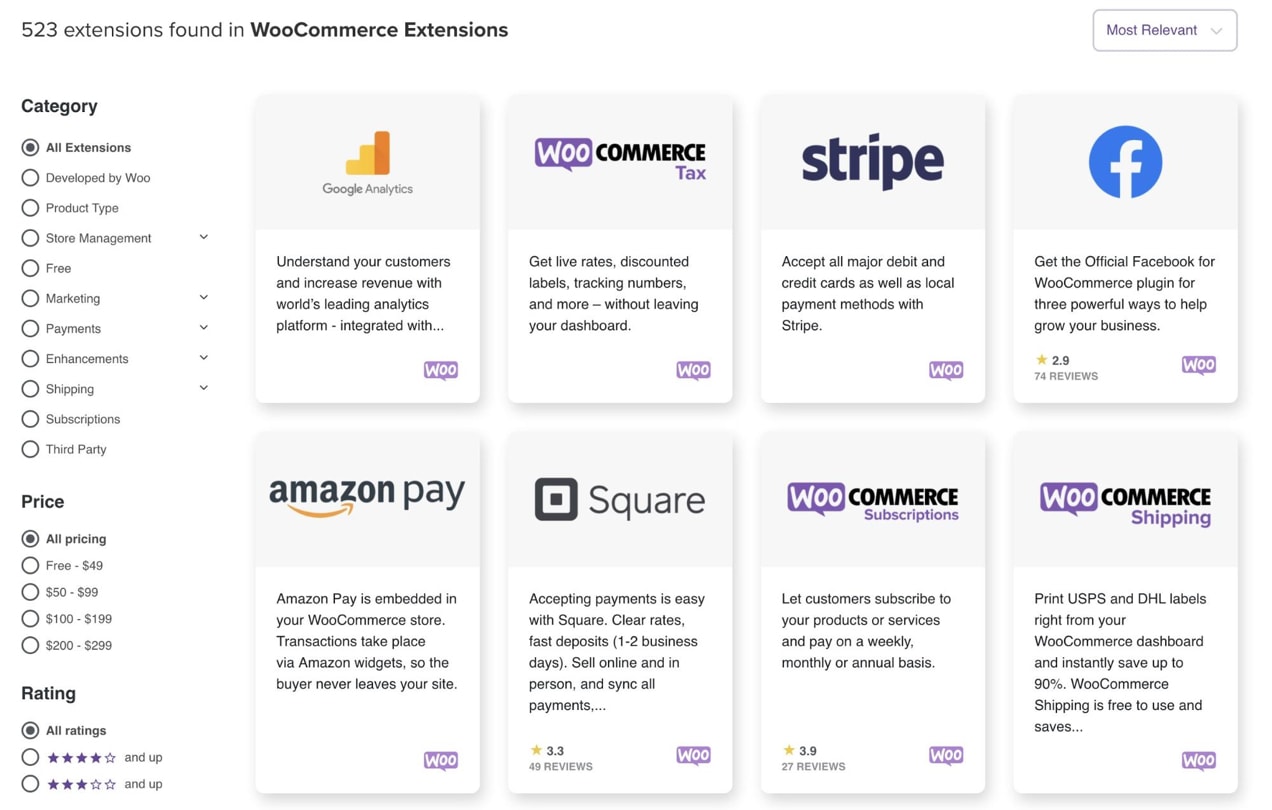
Free plugins are great until they’re not. Here’s what you’ll probably end up buying:
For Recurring Revenue:
WooCommerce Subscriptions ($199/year)
- Handle recurring billing
- Customer self-service portal
- Works with most payment gateways
For Service Businesses:
WooCommerce Bookings ($249/year)
- Appointment scheduling
- Calendar integration
- Resource management
For Recovery:
Abandoned Cart Recovery ($79-$99/year)
- Recapture 10-15% of lost sales
- Automated email sequences
- Worth every penny
For Speed:
WP Rocket ($49/year)
- Page caching that actually works
- Lazy loading
- Critical for conversions
Performance & Scalability: Can WooCommerce Handle Growth?

Short answer: Yes, but it’s not automatic like Shopify.
WooCommerce stores can handle millions in annual revenue if properly configured. The catch is that “properly configured” part.
What Helps:
- Quality managed hosting (WPX Hosting, Pressable, Kinsta, Servebolt)
- Content Delivery Network (Cloudflare, BunnyCDN)
- Database optimization (especially for stores with 1,000+ products)
- Caching plugins (FastPixel, WP Rocket, W3 Total Cache)
- High-Performance Order Storage (HPOS, now standard in WooCommerce)
What Kills Performance:
- Cheap shared hosting
- Too many plugins (20+ is asking for trouble)
- Unoptimized images
- Theme bloat from page builders
I’ve seen WooCommerce stores doing $2M+ annually run smoothly on Kinsta’s $300/month plan. That same store on Shopify would cost them $2,300+/month for the Shopify Plus plan once they hit that volume.
Security: Your Job Now
This is huge for any WooCommerce review: security is your responsibility.
Shopify handles it all. WooCommerce? You need to:
- Keep WordPress, WooCommerce, and plugins updated
- Use strong passwords and two-factor authentication
- Install security plugins (Wordfence, Sucuri)
- Regular backups (daily for active stores)
- SSL certificate (usually free from hosting)
- PCI compliance for payment data
Miss any of these, and you’re asking for trouble. According to recent stats, more than 25% of WooCommerce sites fail basic OWASP security tests. Don’t be part of that statistic.
The good news? Payment data never touches your server if you use WooPayments, Stripe, or PayPal. They handle PCI compliance for you.
Support: You’re Mostly On Your Own
Here’s what sucks about WooCommerce: There’s no phone number to call when shit hits the fan at ungodly hours.
What You Get:
- Documentation (actually pretty good)
- Community forums (helpful but slow)
- WordPress Facebook groups (mixed quality advice)
- Your hosting company’s support (if you chose well)
What You Don’t Get:
- 24/7 phone support
- Guaranteed response times
- Someone to blame when things break
Compare this to Shopify’s 24/7 support via phone, email, and chat. Yeah, you’re paying for that convenience in their monthly fees.
Pro move: Budget $100-$200/month for a developer on retainer. Having someone who knows your setup is worth way more than generic support.
Who Should Use WooCommerce in 2026?
After everything in this WooCommerce review, here’s who benefits most:
Perfect For:
✅ Content-heavy brands that blog/publish regularly
✅ Businesses with complex products requiring heavy customization
✅ High-volume stores ($500k+/year) where transaction fees matter
✅ Digital agencies building stores for clients
✅ Developers or technical founders comfortable with WordPress
✅ Anyone avoiding platform lock-in for long-term flexibility
Not Ideal For:
❌ Complete beginners who’ve never touched WordPress
❌ People want to manage everything with zero maintenance
❌ Businesses valuing time over money for setup and config
❌ Stores needing enterprise support with SLAs
❌ Anyone scared of occasional technical issues
My Verdict: Is WooCommerce Worth It in 2026?
Absolutely, but with conditions.
WooCommerce wins if you value flexibility, ownership, and long-term cost savings over convenience. You’ll invest more time and possibly money upfront, but you’ll save thousands over 3-5 years compared to locked-in platforms.
The free plugin is a beautiful lie, though.
Plan on spending $700-$2,000 annually, minimum, for a professional setup. Factor in developer time if you’re not technical.
For the right business, one that wants to own its platform, optimize for content, and scale without bleeding money to transaction fees, WooCommerce is unmatched.
For someone who wants to launch fast and worry about tech later, Shopify’s premium is worth it.
I give WooCommerce 8.5/10. It loses points for complexity and lack of official support, but gains them back for flexibility, cost-efficiency at scale, and true ownership.
Start Building with WooCommerce
FAQs
Is WooCommerce actually free?
The WooCommerce plugin is free to download and use. However, you’ll pay for hosting ($60-$1,000+/year), a domain name ($10-$20/year), and likely premium extensions ($79-$200 each).
Total minimum cost is around $150-$200/year for a basic setup, but most functioning stores spend $700-$2,000+ annually.
How does WooCommerce compare to Shopify in 2026?
WooCommerce offers more flexibility and lower long-term costs but requires technical knowledge. Shopify is easier to use with managed hosting and 24/7 support, but charges monthly fees ($39-$399/month) plus transaction fees (0.5-2%) if you don’t use Shopify Payments.
WooCommerce wins for high-volume or content-focused brands; Shopify wins for beginners wanting simplicity.
What are WooCommerce transaction fees?
WooCommerce itself charges zero transaction fees. You only pay standard payment processing fees to your gateway: WooPayments and Stripe charge 2.9% + $0.30, while PayPal charges 3.49% + $0.49 for standard transactions.
Shopify adds 0.5-2% on top of these if you use external payment processors.
Can WooCommerce handle large stores?
Yes, WooCommerce can handle stores doing millions in annual revenue. However, it requires quality managed hosting ($30-$300+/month), proper caching, a CDN, and regular maintenance.
Cheap shared hosting will not scale. Stores with 1,000+ products especially need High-Performance Order Storage (HPOS) and database optimization.
What hosting is best for WooCommerce?
Managed WordPress hosts like Kinsta ($35+/month), WP Engine ($30+/month), and Servebolt perform best. WooCommerce-specific hosts like Nexcess also work well.
Avoid cheap shared hosting under $10/month, as it will destroy your site speed and conversions.
Budget minimum $20-$30/month for adequate hosting.
Is WooCommerce secure?
WooCommerce can be very secure, but security is your responsibility. You must keep WordPress, WooCommerce, and plugins updated, use security plugins (Wordfence, Sucuri), implement two-factor authentication, and maintain regular backups.
Payment data security is handled by your gateway (Stripe, PayPal) via tokenization, so you don’t need PCI compliance if using these properly.
Do I need a developer for WooCommerce?
Not necessarily for basic stores, but you’ll likely need developer help for customization, troubleshooting plugin conflicts, or performance optimization.
Budget $500-$2,000 for initial setup help or $100-$200/month for ongoing retainer support. If you’re technical and comfortable with WordPress, you can manage without a developer.
What’s better: WooCommerce or Shopify?
Neither is universally better.
Choose WooCommerce if you need customization, want to avoid transaction fees, prioritize SEO/content, or are comfortable with WordPress.
Choose Shopify if you want managed hosting, 24/7 support, faster setup, and don’t mind paying premium prices for convenience. WooCommerce offers more freedom; Shopify offers more ease.
Can I migrate from Shopify to WooCommerce?
Yes, migration tools like LitExtension, Cart2Cart, and WP All Import can transfer products, customers, and orders from Shopify to WooCommerce.
However, you’ll need to reconfigure shipping, taxes, payment gateways, and theme styling. Budget 20-40 hours for DIY migration or $1,000-$3,000 for professional migration services.
What’s WooCommerce’s market share in 2026?
WooCommerce powers approximately 30-36% of all ecommerce websites globally, with 4.4-6.2 million active stores (numbers vary by tracking methodology).
It’s the most widely used ecommerce platform by store count, though Shopify (26-28% market share) generates higher average revenue per merchant.
Remember: The best ecommerce platform is the one you’ll actually use and maintain. WooCommerce rewards effort and technical competency. If that’s you, welcome to the club. If not, there’s no shame in paying for Shopify’s simplicity.
What’s your experience with WooCommerce? Drop your horror stories or success wins in the comments. I read everything.