How to Set Up WooCommerce Subscriptions and Recurring Income in 2026

Turn your WooCommerce store into a predictable revenue machine with subscriptions and recurring payments.
Disclosure: This article is sponsored by WordPress.com, but everything you’re about to read is my honest experience and opinion. I don’t do bullshit recommendations.
Quick Note: What You Need to Know About WooCommerce Subscriptions
How to add subscriptions and recurring income with WooCommerce starts with choosing the right plugin for your budget and business model.
The official WooCommerce Subscriptions plugin costs $279/year and handles everything, but solid alternatives like YITH, WP Swings, and WebToffee start around $49-89/year with most features you’ll actually use.
You’ll need a payment gateway that supports automatic recurring billing (Stripe and PayPal are your best bets), a hosting plan that can handle subscription renewals without hiccups, and about 30 minutes to set up your first subscription product.
Below, I’ll walk you through exactly how I’ve set up WooCommerce subscriptions for clients, which plugins actually deliver on their promises, and the gotchas that’ll save you hours of frustration.
Why I’m Writing This (And Why You Should Care)

Last year, I was having coffee with a friend at this outdoor café in our hood when she mentioned her meditation app membership site was hemorrhaging money. Turns out, she was manually processing monthly payments through PayPal invoices. Every. Single. Month.
I almost spit out my drink.
That’s exactly the kind of soul-crushing busywork that WooCommerce subscriptions are designed to eliminate.
If you’re selling anything repeatedly, digital products, physical subscription boxes, memberships, coaching packages, or software licenses, you need an automated system that handles the billing while you sleep.
And honestly? Setting up WooCommerce subscriptions isn’t rocket science, but there’s enough confusing information out there to make your head spin. So let’s cut through the noise.
Also Read: How to Sell Digital Products with WooCommerce in 2026
What Exactly Are WooCommerce Subscriptions?
WooCommerce subscriptions let you sell products or services with automatic recurring payments. Instead of customers buying once, they subscribe and get charged weekly, monthly, or annually until they cancel.
Think Netflix, but for your online store.
You can sell:
- Monthly subscription boxes (skincare, coffee, books)
- Digital memberships and courses
- Software licenses with annual renewals
- Weekly meal plans or grocery deliveries
- Ongoing services like coaching or consulting
The beautiful part? Once it’s set up, the system runs itself. Renewals happen automatically, customers manage their own subscriptions, and you get predictable monthly revenue.
Start Your Recurring Journey With WooCommerce
The Plugin Debate: What’s Worth Your Money
Let me be blunt about something: the official WooCommerce Subscriptions plugin is expensive as hell at $279 per year. But is it worth it?
WooCommerce Subscriptions (Official Plugin)

Price: $279/year (or $446.40 for 2 years)
This is the heavyweight champion. Developed by Automattic (the WordPress folks), it’s the most comprehensive option with 100K+ active installations.
But here’s the thing: it has a 3.2-star rating from 114 reviews, and people aren’t shy about calling out its problems.
The complaints?
Missing features like cancellation periods, compatibility issues with WooCommerce’s own Product Bundles, terrible front-end usability, and support that sometimes ghosts you when things break.
What it does well:
- Integrates with 25+ payment gateways
- Handles complex billing schedules
- Supports upgrades, downgrades, and plan switching
- Automatic failed payment retry
- Detailed reporting and analytics
- Gift subscriptions feature
My take: If you’re running an enterprise-level subscription business and need bulletproof reliability with all the bells and whistles, bite the bullet and pay for it. But for small to medium stores? There are better value options.
My Rating: 7/10 (Good product, overpriced, inconsistent support)
Check WooCommerce Subscriptions
YITH WooCommerce Subscription
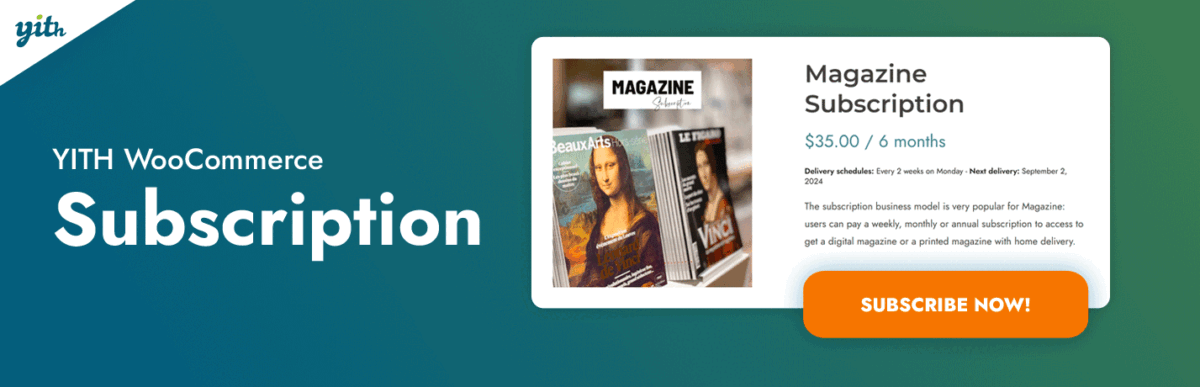
Price: Starts around $139-199/year (varies by plan)
YITH has built a solid reputation in the WooCommerce ecosystem, and their subscription plugin doesn’t disappoint. It’s significantly more affordable than the official plugin while still packing most of the features you’ll actually use.
Key features:
- Simple, variable, and grouped product subscriptions
- Free trial periods and sign-up fees
- Subscription boxes with custom product selection
- Multiple billing cycles (daily, weekly, monthly, yearly)
- Synchronized payments
- Customer self-service portal
- Integration with major payment gateways
What makes it special: The interface is clean and user-friendly. I’ve used this for a couple of client projects, and the setup is straightforward. The subscription box feature is particularly well-implemented, perfect for curated monthly deliveries.
My Rating: 8.5/10 (Best bang for your buck)
WP Swings Subscriptions for WooCommerce Pro

Price: Varies by tier
This is the underdog that punches above its weight. WP Swings has responsive support (they literally use WhatsApp for customer service), and their free version lets you test before committing.
Standout features:
- Subscription boxes with multi-step product selection
- Manual subscription order creation
- Payment retry for failed renewals
- Proration billing for mid-cycle changes
- REST API for programmatic access
- Compatible with Stripe, PayPal, Mollie, and more
- Works with affiliate programs (commissions on renewals!)
The support factor: Multiple reviewers mentioned getting issues resolved quickly, sometimes within hours. That’s worth its weight in gold when you’re troubleshooting at 2 AM.
My Rating: 8/10 (Great value, solid features, excellent support)
WebToffee Subscriptions for WooCommerce

Price: Around $89/year
A mid-range option that balances features and affordability. Good documentation and a 4.7-star rating tell you people are generally happy with it.
Features:
- Simple and variable subscriptions
- Free trials and signup fees
- Billing interval customization
- Renewal discounts (fixed or percentage)
- Synchronized renewals
- Stripe and PayPal integrations
Rating: 7.5/10 (Solid middle-ground option)
SUMO Subscriptions
Price: $49 one-time payment (yes, really)
If you’re on a tight budget, SUMO offers a one-time purchase model. No recurring annual fees for using a subscription plugin (ironic, right?). Basic functionality, no frills, but it works.
Rating: 6.5/10 (Budget-friendly but limited)
Real Talk: Which Plugin Should You Choose?
Here’s my decision tree:
Go with YITH if: You want robust features without the premium price tag. Small to medium businesses that value clean UX and good value. This is my default recommendation for most people.
Go with WP Swings if: You’re looking for great support and don’t mind a slightly less polished interface. The WhatsApp support alone makes it attractive.
Go with the official WooCommerce plugin if: You have the budget ($279/year isn’t pocket change) and need enterprise-level reliability with comprehensive features. Also, if you’re already invested in the WooCommerce ecosystem with other official extensions.
Go with WebToffee if: You want a balance of features and cost without extreme complexity.
Go with SUMO if: You’re bootstrapping and every dollar counts. Just know you’re getting basic functionality.
Payment Gateways: The Backbone of Your Subscription System
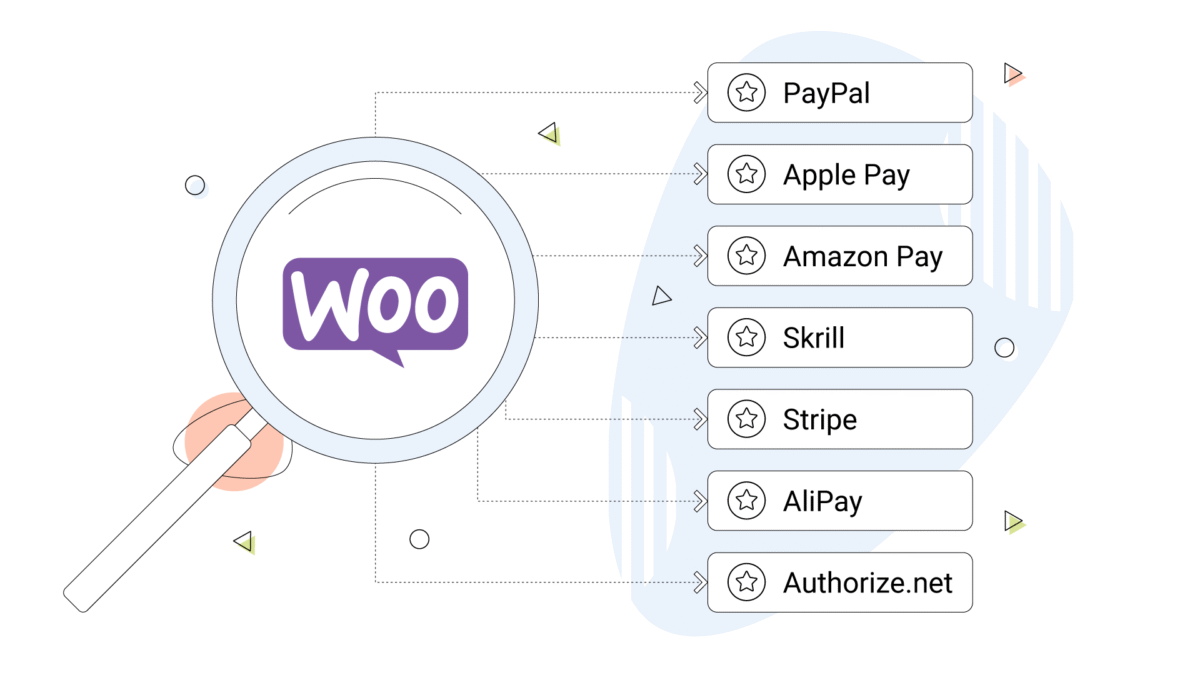
Here’s something people don’t talk about enough: your subscription plugin is only as good as your payment gateway.
If the gateway can’t handle automatic recurring charges, you’re basically running a manual payment system with extra steps.
Stripe: The Gold Standard
Transaction fees: 2.9% + $0.30 per transaction
Stripe is my go-to recommendation for WooCommerce subscriptions. It’s available in 40+ countries, supports 135+ currencies, and handles subscription billing natively.
Why Stripe works:
- Automatic recurring payments
- Customers can update payment methods easily
- Supports changing subscription amounts mid-cycle
- Apple Pay and Google Pay integration
- Built-in fraud detection (Radar)
- Developer-friendly if you need customizations
Set up is dead simple. Install the WooCommerce Stripe plugin, connect your Stripe account, and you’re good to go.
PayPal: The Trust Factor
Transaction fees: Around 2.9% + $0.30 per transaction
PayPal still has massive brand recognition, especially with older demographics who are wary of entering credit card details on smaller sites. The “Pay in 4” option can boost average order value by 15-20%.
The catch: PayPal’s subscription support through their official WooCommerce plugin works well, but the customer experience for updating payment methods isn’t as smooth as Stripe.
When to use PayPal: As a secondary option alongside Stripe. Offering both gives customers choice and catches people who only have PayPal accounts.
WooCommerce Payments (Powered by Stripe)
If you want everything managed inside your WooCommerce dashboard without leaving WordPress, WooCommerce Payments is worth considering. It’s built on Stripe’s infrastructure but with tighter WooCommerce integration.
The tradeoff: You get convenience but lose access to some advanced Stripe features.
My Payment Gateway Strategy
For most stores, I recommend offering both Stripe and PayPal. Stripe for the majority of transactions, and PayPal to capture customers who prefer it. This two-gateway approach typically increases conversion by 10-15%.
Step-by-Step: How to properly Set This Up
Alright, let’s do this. I’m walking you through setting up WooCommerce subscriptions using YITH (because it’s my favorite value option), but the process is similar regardless of which plugin you choose.
Step 1: Install Your Subscription Plugin
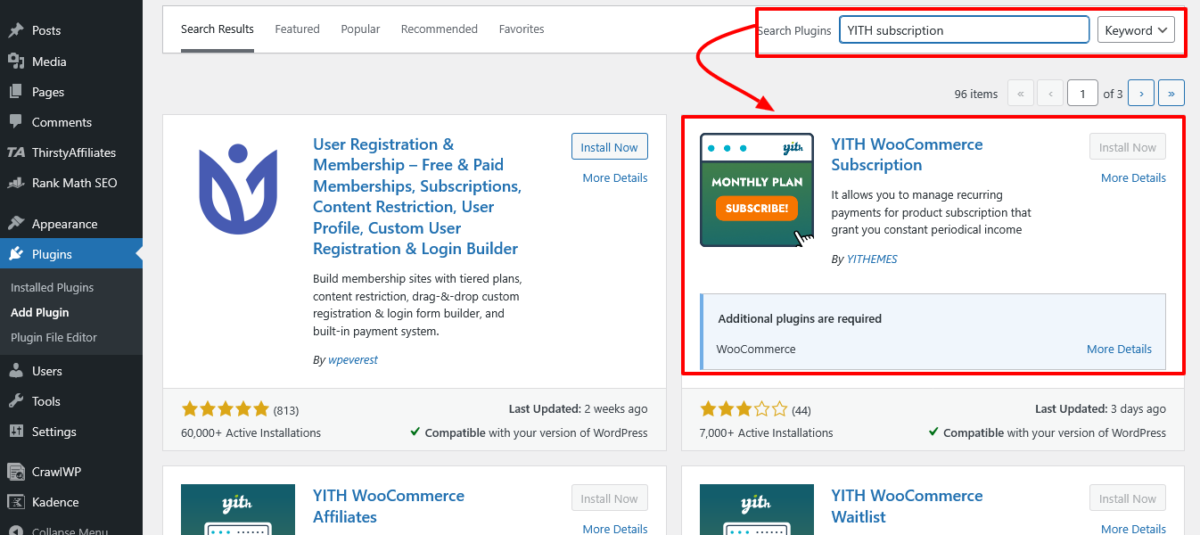
Go to Plugins > Add New in your WordPress dashboard. Search for your chosen subscription plugin and install it. If you’re using a premium plugin like YITH, you’ll download it from their site and upload it manually.
Activate the plugin once installed.
Step 2: Connect Your Payment Gateway
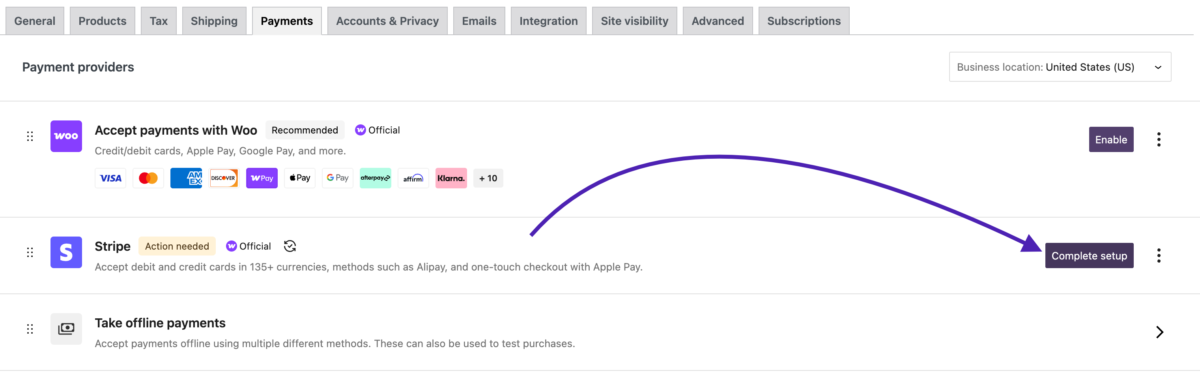
This is critical. Go to WooCommerce > Settings > Payments and enable your gateway (Stripe or PayPal).
For Stripe:
- Install the WooCommerce Stripe plugin if you haven’t
- Click “Manage” next to Stripe
- Connect your Stripe account (you’ll be redirected to Stripe)
- Enable test mode first to make sure everything works
Pro tip: Always test in sandbox mode before going live. Create a test subscription, process a test payment, manually trigger a renewal. Make sure it all works.
Step 3: Create Your First Subscription Product
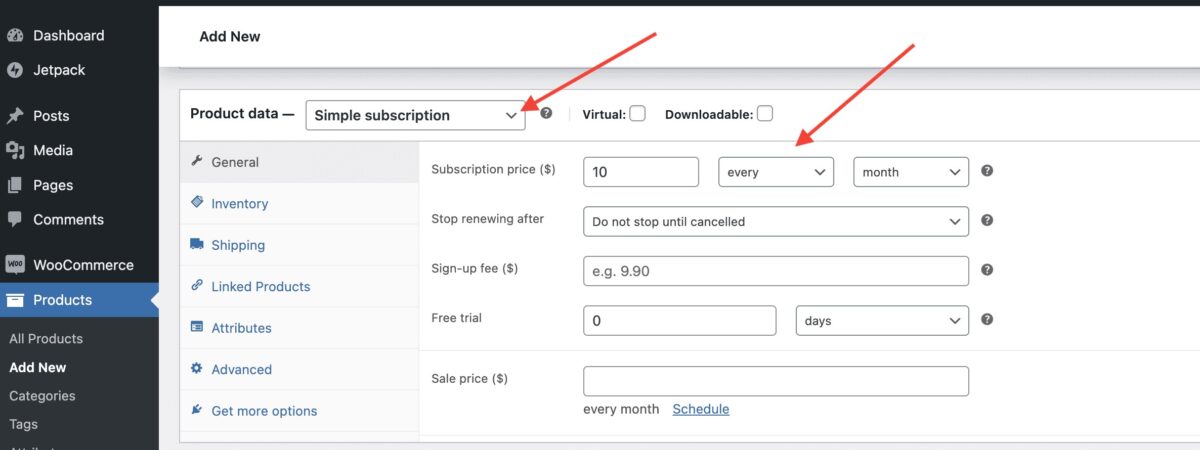
Navigate to Products > Add New. You’ll see new subscription options depending on your plugin.
For a basic monthly subscription:
- Enter your product name and description
- Scroll to Product Data and select “Subscription” (or check the subscription box)
- Set your recurring price (e.g., $29)
- Choose billing interval (monthly, weekly, yearly)
- Optional: Add a free trial period (e.g., 14 days)
- Optional: Add a signup fee
- Set subscription length (ongoing or fixed term)
- Publish
Step 4: Set Up Email Notifications
Your customers need to know when they’re being charged. Configure email templates for:
- Subscription activation
- Renewal reminders (3-7 days before renewal)
- Failed payment notifications
- Cancellation confirmations
Most plugins handle this automatically, but double-check the settings.
Step 5: Test Everything
Create a test account. Buy your subscription product using test mode in Stripe. Verify:
- Payment processes correctly
- Customer receives confirmation email
- Subscription appears in their account dashboard
- You can manually trigger a renewal
- Failed payment handling works
Only after everything checks out should you switch to live mode.
Common Pitfalls (That I’ve Seen Destroy Subscription Businesses)
1. Not Testing Renewals
Setting up the initial subscription is easy. Making sure renewals work six months later? That’s where things break.
Always manually trigger test renewals before going live.
2. Ignoring Failed Payment Recovery
About 10-15% of subscription renewals will fail (expired cards, insufficient funds, etc.). Your plugin should have automatic retry logic.
Configure it to retry 2-3 times over a week before canceling the subscription.
3. Poor Customer Communication
Send renewal reminders. Send payment failure warnings. Send “we miss you” emails when someone cancels. Communication keeps churn rates down.
4. Choosing the Wrong Billing Cycle
Monthly billing sounds great, but annual subscriptions reduce churn and give you bigger cash injections. Test both and see what your audience prefers.
5. Making Cancellation Hard
I see this all the time, stores that bury the cancellation button or require customers to email support. Don’t be that person. Make it easy to cancel. Ironically, this builds trust and reduces angry chargebacks.
Best Subscription Ideas That Work
Digital products: Online courses, ebooks, premium content, software licenses
Physical subscriptions: Coffee clubs, skincare boxes, book subscriptions, meal kits
Services: Coaching programs, maintenance packages, retainer-based work
Memberships: Access to community forums, exclusive content, discounted pricing tiers
The key is recurring value. Customers won’t stay subscribed unless they’re getting consistent benefits.
Managing Subscriptions: Ongoing Work
Setting up subscriptions is one thing. Managing them is another.
Customer Self-Service
Let customers manage their own subscriptions from their account dashboard. They should be able to:
- Pause or cancel subscriptions
- Update payment methods
- Change shipping addresses
- Upgrade or downgrade plans
This reduces support tickets dramatically.
Analytics and Reporting
Track:
- Monthly recurring revenue (MRR)
- Churn rate
- Customer lifetime value (LTV)
- Active vs. cancelled subscriptions
Most premium plugins have built-in reporting. Use it.
Proactive Churn Management
When someone cancels, find out why.
Send a quick survey. Offer a discount to stay. Sometimes, all it takes is acknowledging a customer concern to retain them.
Hosting Considerations
Subscription renewals happen automatically, often during off-peak hours. If your site is down at 3 AM when renewals are processing, you’ll lose revenue.
I use WPX Hosting, Nexcess WooCommerce, Kinsta, and Pressable for personal and client stores, and they’ve been solid for a long time. Other reliable options: Cloudways, Servebolt, FastComet + Bluehost (for beginners), and ChemiCloud.
Avoid cheap shared hosting for subscription stores. You need reliable uptime and good server response times.
Not-So-Pretty Truth About Subscription Businesses
Here’s what the “make passive income” gurus won’t tell you: subscription businesses are hard.
Customer acquisition costs are high.
Churn is brutal.
You’re constantly fighting to retain customers. Monthly revenue feels good until you realize you need to replace 5-10% of subscribers every month just to maintain your baseline.
But if you can deliver consistent value? The recurring revenue is absolutely worth it. Predictable income lets you plan, invest, and grow in ways that one-time sales never can.
Also Read: Best WordPress Hosting for Creators 2026 (Tested & Ranked)
My Final Recommendations
Best overall value: YITH WooCommerce Subscription ($139-199/year)
Best for beginners: WP Swings Subscriptions for WooCommerce ($89/year) with that WhatsApp support
Best enterprise option: Official WooCommerce Subscriptions ($279/year) if budget allows
Payment gateways: Stripe + PayPal (offer both)
Hosting: Something reliable with good uptime (WPX, WordPress.com, Kinsta, Servebolt)
Ready to Build Your Subscription Revenue Stream?
WooCommerce subscriptions work. I’ve seen them transform freelancers into agency owners and side hustles into full-time businesses.
But success comes down to execution. Choose a plugin that fits your budget, connect a reliable payment gateway, set everything up correctly, and test the hell out of it before going live.
And remember, building recurring revenue is a marathon, not a sprint. Focus on delivering value, and the subscriptions will follow.
Now go set up that first subscription product. You’ve got this.
Get Started with WooCommerce Subscription
FAQs
What’s the difference between WooCommerce Subscriptions and WooCommerce Memberships?
WooCommerce Subscriptions handles recurring payments for products and services. WooCommerce Memberships restricts content and offers member discounts.
You can use them together (memberships with annual renewals), but they serve different purposes. Subscriptions = billing automation. Memberships = content restriction.
Can I offer both one-time purchases and subscriptions for the same product?
Yes! Extensions like “All Products for WooCommerce Subscriptions” ($99/year) let you add optional subscription plans to existing products. Customers can choose to buy once or subscribe and save.
Do I need a separate merchant account for subscriptions?
No. Modern payment gateways like Stripe and PayPal handle everything. They manage the recurring charges and deposit funds directly to your bank account. No separate merchant account needed.
What happens when a customer’s payment fails?
Good subscription plugins automatically retry failed payments 2-3 times over several days. Customers get email notifications to update their payment method. If all retries fail, the subscription is typically put on hold or canceled.
Can customers pause their subscriptions instead of canceling?
Yes, most premium plugins support subscription pausing. This is huge for reducing churn—customers can pause for a month or two and resume later instead of canceling completely.
How do I handle subscription refunds?
Most plugins let you process refunds through WooCommerce. The subscription is typically canceled when refunded. Make your refund policy clear upfront to avoid disputes.
Can I change subscription prices for existing customers?
Yes, but be careful. You can technically change prices mid-cycle, but it’s bad practice unless you grandfather existing customers at their original price. Most plugins let you create new pricing tiers for new subscribers while keeping old ones at legacy prices.
What payment gateways work best with WooCommerce subscriptions?
Stripe is the gold standard, supports everything, works smoothly, and is great for international customers.
PayPal is solid as a secondary option. Both handle automatic recurring charges without issues. Avoid gateways that don’t explicitly support subscription tokenization.
Do I need SSL for subscription products?
Absolutely. You need an SSL certificate (HTTPS) for any WooCommerce store, but it’s especially critical for subscriptions since you’re storing payment tokens for future charges.
Most hosting providers include free SSL certificates now.
Can I sell subscription boxes where customers choose their products?
Yes! YITH and WP Swings both have subscription box features where customers can pick products for each delivery.
You set rules (minimum/maximum items, pricing structure) and customers build their custom box.
Remember: This article is sponsored by WordPress.com, but every recommendation here is based on my real experience setting up subscription systems for clients and personal projects. No fluff, no fake hype, just what works.