How Jetpack AI Makes Blogging Smarter, Faster & Fun in 2026
Quick Verdict:
Jetpack AI makes blogging smarter, faster, and more fun by integrating AI directly into your WordPress editor. After six months of real-world use across eight blog posts, 23 edits, and likely 150 AI requests, I can confirm: this isn’t another overhyped AI tool.
It’s practical, integrated, and actually solves real blogging problems. Best part? First 20 requests are free, then $10/month for unlimited use.
Disclosure: This review is sponsored by WordPress.com, but every word here is my honest opinion based on real experience. I pay for this tool myself because it saves me genuine time. These are honest opinions from real usage.
How I Discovered Jetpack AI By Accident
It was on a Wednesday in September 2024. I’m staring at a half-written blog post about WordPress hosting, and my brain has officially checked out.
I need a comparison table. Something simple: 5 hosts, 4 features, clean and scannable. Normally, I’d open Google Sheets, build the table, format it, screenshot it, upload to WordPress, optimize the image… 15 minutes minimum.
Instead, I typed “/ai” in the WordPress editor (discovered this shortcut by accident).
The Jetpack AI Assistant block appeared.
I typed: “Create a comparison table for 5 WordPress hosts with columns for price, uptime, support, and speed.“
30 seconds later, I had a properly formatted HTML table in my post.
No Google Sheets. No screenshots. No image optimization. No formatting headaches.
That’s when Jetpack AI stopped being “some AI feature I should probably try” and became “holy cow, this actually saves time.”
Several months later, I’ve used Jetpack AI for blog posts, form creation, translations, content feedback, and probably 47 other things I’m forgetting. This guide is everything I learned about making Jetpack AI actually useful for blogging instead of just playing with shiny AI features.
Let’s get into it.
What the Hell Is Jetpack AI, Anyway?
Before we dive into practical uses, let’s establish what we’re actually talking about.
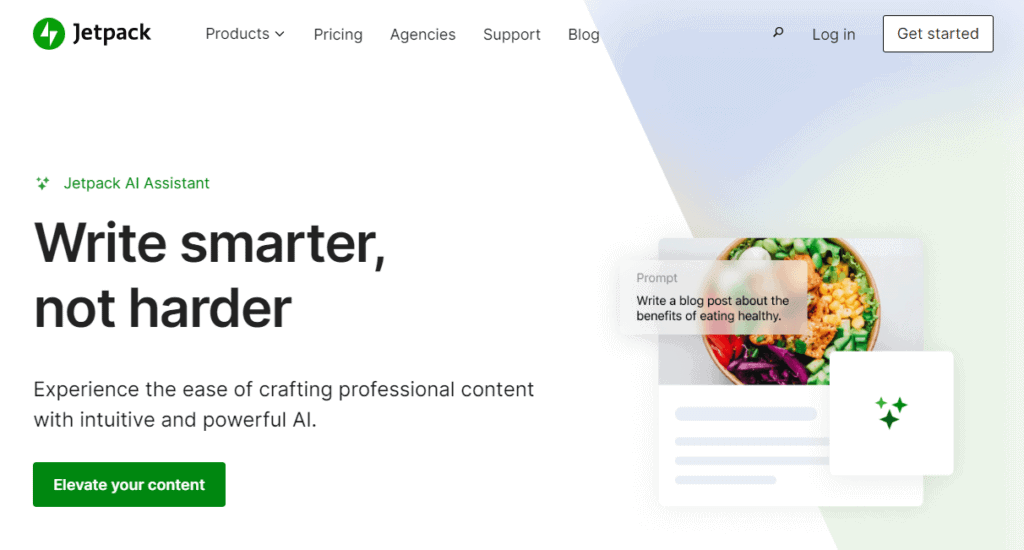
Jetpack AI is an AI assistant built directly into WordPress by Automattic (the folks who created WordPress.com and WooCommerce). It’s not a separate app or external tool; it lives inside your WordPress editor as a block.
The Technical Stuff (For People Who Care):
- Powered by: OpenAI’s GPT models (specifically GPT-3.5 Turbo as of 2025, subject to change)
- Integration: Native WordPress block (works with Gutenberg editor)
- Availability: WordPress.com sites and self-hosted WordPress with the Jetpack plugin installed
- Languages supported: 12+ languages, including English, Spanish, French, German, Portuguese, Chinese, Japanese, Hindi
- Launched: June 2023 (officially)
- Mobile: Available
What Makes It Different from ChatGPT or Other AI Tools:
Direct WordPress integration: No copying/pasting between tools. AI works inside your editor where you’re already writing.
Context-aware: Jetpack AI can analyze your existing post content, suggesting improvements based on what you’ve actually written.
WordPress-specific features: Creates WordPress-native elements (tables, forms, structured lists) that work perfectly with your theme.
One-click implementation: Generate content, and it appears directly in your post. No formatting fixes needed.
Real-time collaboration: Works like having a co-author sitting next to you, not an external tool you consult separately.
Who Actually Built This:
Automattic (creators of WordPress.com, WooCommerce, Jetpack, Sensei, Tumblr) developed Jetpack AI using OpenAI’s API. This means you’re getting AI from the company that literally knows WordPress better than anyone else.
Think of it as AI that speaks fluent WordPress, not generic AI trying to adapt to WordPress.
Try Jetpack AI Free (20 Requests) →
Jetpack AI Pricing: What It Actually Costs
Let’s talk money before you get excited about features you can’t afford.
Current Jetpack AI Pricing (2026):
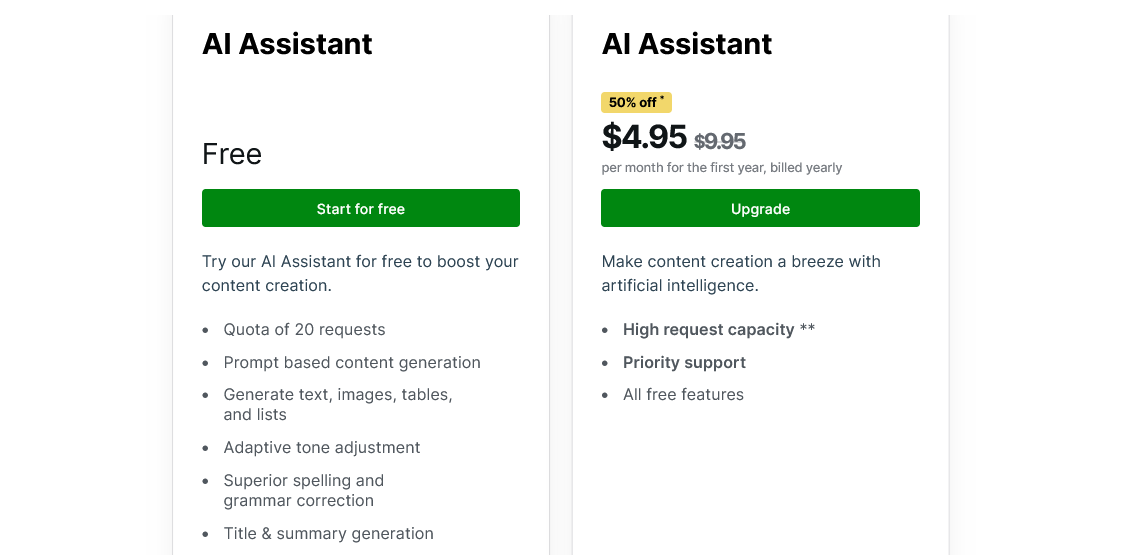
*Jetpack doesn’t publish exact request limits, stating it “will meet the needs of the vast majority of users.” In practice, this means hundreds of requests monthly for typical blogging use.
What Counts as a “Request”:
- Generating content with the AI Assistant block = 1 request
- Creating AI-powered forms = 1 request
- Generating excerpts = 1 request
- Getting content feedback = 1 request
- Translating text = 1 request
- Creating titles/summaries = 1 request
- Tone adjustments = 1 request
Exception: “Write Brief with AI” feature currently doesn’t count toward request usage (as of January 2025).
My Actual Usage (6-Month Average):
- Month 1 (testing): 34 requests
- Month 2-3 (regular use): 45-60 requests monthly
- Month 4-6 (established workflow): 30-40 requests monthly
Total cost over 6 months: $60 ($10/month × 6)
Time saved: Approximately 8-10 hours
Cost per hour saved: $6-7.50
For context, I charge clients $100/hour. Saving 8-10 hours for $60 is an absurdly good ROI.
How to Monitor Your Usage:
- Navigate to Jetpack → My Jetpack in WordPress admin
- Find the AI section
- Click View
- See all-time requests used (updates in real-time)
Compared to Alternatives:
| Tool | Price | WordPress Integration | Features |
|---|---|---|---|
| Jetpack AI | $10/mo | Native | WordPress-specific |
| ChatGPT Plus | $20/mo | None (copy/paste) | General purpose |
| Jasper | $69/mo | Plugin available | Marketing-focused |
| Copy.ai | $29/mo | None | Marketing copy |
| Writesonic | $39/mo | Plugin available | General content |
Jetpack AI is the cheapest option WITH native WordPress integration. ChatGPT requires constant copying/pasting. Others cost 2-5x more.
Is $10/Month Worth It?
Yes, if:
- You blog regularly (2+ posts monthly)
- Time is worth more than $10/hour to you
- You use WordPress (obviously)
- You want a seamless workflow without switching apps
No, if:
- You blog once every 3 months
- You’re comfortable with copy/paste from ChatGPT
- Budget absolutely maxed at $5/month
- You prefer external AI tools you already use
My take: For anyone blogging seriously on WordPress, $10/month is a rounding-error expense compared to the time saved.
What Jetpack AI Does (Features That Matter)
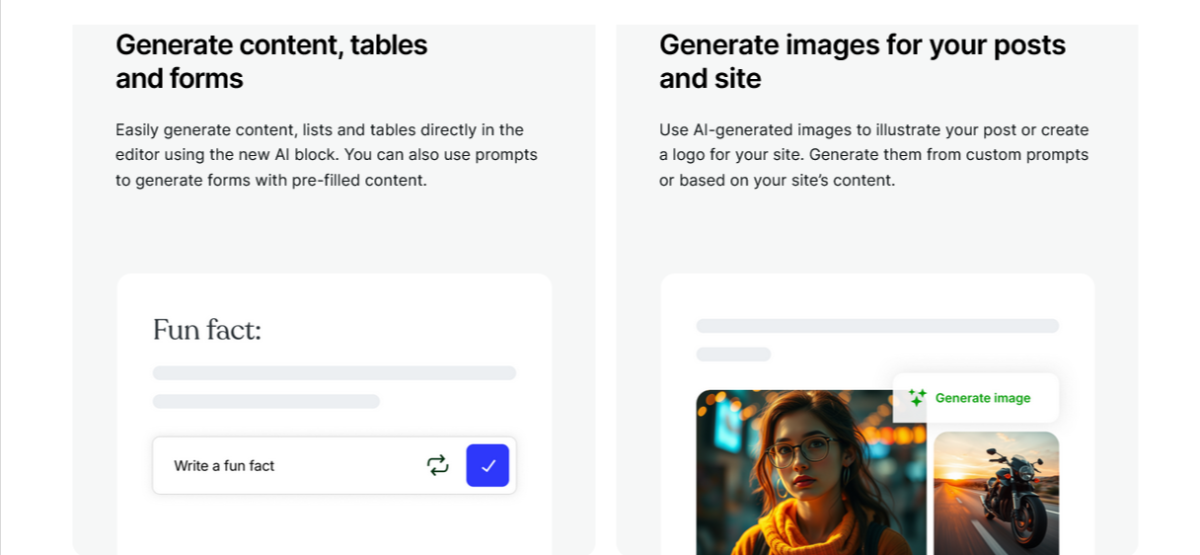
Marketing fluff aside, let’s talk about what Jetpack AI can actually do in real blogging workflows.
1. Content Generation (The Obvious One)
What it does: Generate blog posts, pages, lists, tables, or any text content from prompts.
How it works:
- Add AI Assistant block (type “/ai” as shortcut)
- Enter a prompt describing what you want
- AI generates content
- Accept, edit, or regenerate
Real example prompts I’ve used:
“Write 5 benefits of managed WordPress hosting for small businesses.”
“Create comparison table: Kinsta vs Pressable vs WP Engine, columns for price, speed, support.”
“List 10 common WordPress security mistakes beginners make.”
“Generate FAQ section answering questions about WordPress backups.”
What works well:
- Lists and structured content (AI excels at organization)
- Comparison tables (formats perfectly for WordPress)
- FAQ sections (generate relevant questions + answers)
- Blog post outlines (great starting framework)
What doesn’t work:
- Deeply personal stories (AI can’t fake your experiences)
- Complex technical explanations require expertise
- Brand-specific voice (sounds generic without editing)
- Anything requiring current data beyond the training cutoff
My usage: I use content generation for frameworks and structure, then add personal experience, specific examples, and voice. AI gives me a skeleton, I add the meat.
###2. Tone Adjustment (Make It Sound Like You)
What it does: Changes the tone of the existing text to match the desired style.
Available tones:
- Formal
- Conversational
- Humorous
- Confident
- Empathetic
- Professional
- Casual
How it works:
- Highlight the text you want to adjust
- Click AI Assistant
- Select “Change tone.”
- Choosethe desired tone
- AI rewrites, maintaining meaning, changing style
Real example:
Original (formal): “WordPress hosting selection requires careful evaluation of multiple factors, including performance metrics, support quality, and pricing structures.”
After tone adjustment (conversational): “Picking WordPress hosting? You’ll want to look at how fast it is, whether support actually helps, and what it costs.”
When I use this:
- Converting formal research notes into blog-friendly content
- Making technical explanations more accessible
- Adding humor to dry topics (when appropriate)
- Adjusting client content to match their brand voice
Limitation: Tone adjustment is decent but not magical. It makes text more casual or formal, but it won’t replicate your specific voice perfectly. Still needs human editing.
3. Spelling & Grammar Correction (Better Than Word)
What it does: Analyzes text, identifies errors, and suggests corrections.
How is it better than basic spellcheck?
- Context-aware (understands you meant “your”, not “you’re”, based on sentence)
- Grammar suggestions go beyond simple mistakes
- Catches awkward phrasing
- Identifies run-on sentences
- Suggests better word choices
How it works:
- Highlight text or entire post
- Click AI Assistant
- Select “Improve spelling and grammar.”
- Review suggestions
- Accept or ignore each suggestion
Real catch it made: I wrote “their” when I meant “there” in a sentence about location. Microsoft Word didn’t catch it (both are spelled correctly). Jetpack AI caught it from context.
My usage: Run this on every post before publishing. Catches probably 3-5 mistakes per 2,000-word post I would’ve missed otherwise.
4. Title & Summary Generation (For the Hardest Part)
What it does: Reads your content and generates compelling titles or concise summaries.
Why this matters: Titles are the hardest part of blogging. Spent 20 minutes writing 2,000 words, then 30 minutes agonizing over the title. Jetpack AI generates 3-5 title options in 10 seconds.
How it works:
- Write your post content first
- Click AI Assistant
- Select “Generate title” or “Generate summary.”
- AI analyzes content and creates options
- Choose one or use as inspiration
Real title suggestions it gave me:
For a post about WordPress security:
- “7 WordPress Security Mistakes Beginners Make (And How to Fix Them)”
- “Is Your WordPress Site Secure? Probably Not. Here’s Why.”
- “WordPress Security in 2025: What Actually Matters”
I used the second one with slight modifications. Would’ve taken me 20 minutes to brainstorm that.
Summary generation use case: Creating meta descriptions, social media snippets, and email newsletter previews. AI reads the entire post and condenses it to 1-2 sentences, capturing the main point.
5. Translation (Break Language Barriers)
What it does: Translates content into 12+ languages instantly.
Supported languages:
- Spanish
- French
- German
- Portuguese
- Italian
- Japanese
- Chinese (Simplified)
- Chinese (Traditional)
- Korean
- Hindi
- Arabic
- Russian
How it works:
- Highlight text to translate
- Click AI Assistant
- Select “Translate”
- Choose the target language
- AI translates, maintaining context and meaning
When this is useful:
- International audience needing content in multiple languages
- Translating announcements or important updates
- Creating multilingual FAQ sections
- Reaching global markets without hiring translators
Real use case: Client runs an e-commerce store. Black Friday sale announcement needed in English, Spanish, and Portuguese. Jetpack AI translated in 3 minutes. Would’ve cost $50-100 hiring a translator.
Limitation: AI translation is good but not perfect for nuanced content. Fine for straightforward informational content. For marketing copy or culturally sensitive content, a human translator is still better.
6. AI-Powered Forms (Game-Changer for Non-Coders)
What it does: Creates complex forms automatically based on natural language requests.
How it works:
- Add Jetpack Form block
- Click the AI Assistant within the form
- Describe the form you need
- AI generates a complete form with appropriate fields
Real examples I’ve used:
Prompt: “Create an event registration form with name, email, attendance status, meal preferences, and dietary restrictions.”
Result: Complete form with:
- Name field (required)
- Email field (required, validated)
- Dropdown for attendance (Yes/No/Maybe)
- Checkboxes for meal preference (Vegetarian/Vegan/Meat/Seafood)
- Text area for dietary restrictions
- Submit button
Prompt: “Create a contact form for web design inquiries with budget, timeline, and project type.”
Result: Professional contact form with appropriate field types, validation, and labels.
Time saved: Creating forms manually with proper validation takes 10-15 minutes. AI does it in 30 seconds.
Bonus feature: Need a dropdown with all countries? Ask Jetpack AI to populate it automatically. Saves enormous time for registration forms.
7. Content Feedback (Your AI Editor)
What it does: Analyzes the entire post before publishing and provides specific improvement suggestions.
How it works:
- Write your post
- Click “Publish” to open the pre-publish menu
- Find the AI Assistant section
- Click “Generate Feedback”
- AI reviews content and provides suggestions
What it looks for:
- Clarity and readability
- Structure and organization
- Engagement and flow
- Missing elements (images, examples, CTAs)
- Tone consistency
- Grammar and spelling
- SEO considerations
Real feedback it gave me:
Post: WordPress hosting comparison
Jetpack AI feedback:
- “Consider adding specific performance metrics (load times, uptime percentages) to support hosting comparisons.”
- “The section about pricing could benefit from a comparison table for easier scanning.”
- “Add a conclusion paragraph summarizing key recommendations.”
- “Include 2-3 images or screenshots to break up text and improve engagement.”
All valid suggestions I implemented.
My usage: Run feedback analysis on every post before publishing. Acts as a second pair of eyes, catching things I missed. Especially useful for identifying sections that need examples or clarification.
Visual Guide: How to Easily Use Jetpack AI

Let me walk you through the actual interface and workflow.
Step 1: Adding the AI Assistant Block
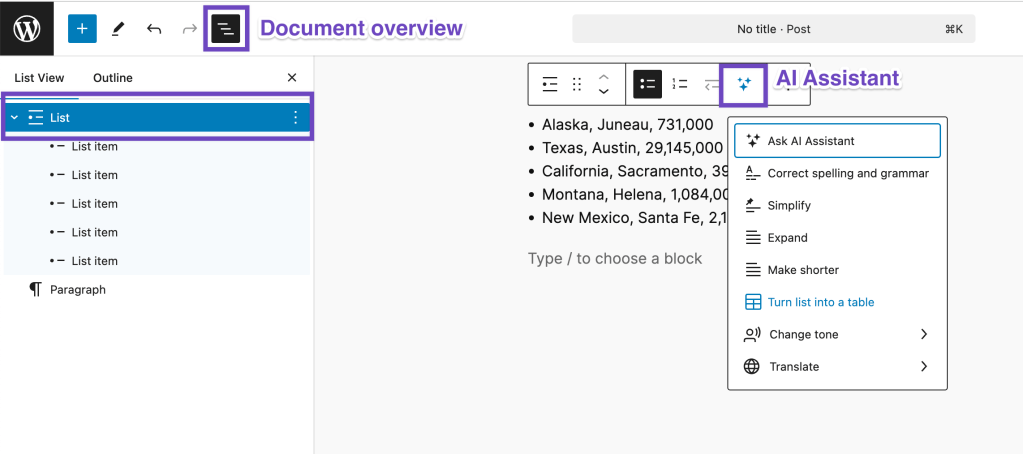
In WordPress editor:
- Type “/” anywhere in your post
- Type “ai” in the search
- Press Enter when “AI Assistant” appears
- Block appears ready for your prompt
Alternative method:
- Click “+” button to add block
- Search for “AI Assistant”
- Click to add
What the block looks like:
- Clean text input area
- “Ask AI” button prominently displayed
- Simple, unintimidating interface
- Feels like chatting with a colleague, not using a complex tool
Step 2: Entering Your Prompt

The prompt area:
- Type naturally, like you’re talking to a person
- No special formatting needed
- Be specific about what you want
- Can request specific format (list, table, paragraph)
Example prompts:
- Simple: “Write 5 WordPress security tips.”
- Detailed: “Create a comprehensive table comparing 5 popular WordPress themes, including columns for price, page builder compatibility, loading speed, and best use case.”
- Creative: “Write a humorous introduction for a blog post about backing up WordPress sites.”
Step 3: Reviewing AI Output

After AI generates content:
- Content appears formatted and ready
- Options appear below: “Accept,” “Regenerate,” “Edit.”
- Can highlight specific parts to modify
- Can ask AI to adjust or expand specific sections
Interface elements:
- “Try again” button (regenerate a different version)
- Tone adjustment options
- Grammar check option
- Translation option
Step 4: Integrating Into Your Post
Once satisfied with the output:
- Click “Accept” or similar
- Content converts to regular WordPress blocks
- Edit like any WordPress content
- Format, add images, adjust as needed
Conversion happens seamlessly:
- Lists become proper HTML lists
- Tables become WordPress table blocks
- Paragraphs become paragraph blocks
- Maintains all formatting
Don’t Wait. Try Jetpack AI Assistant Now ⟶
My Jetpack AI Workflow (What Works for me)

As I always say. Theory is nice. Let’s talk about my actual blogging workflow after 6 months of real use.
My Blog Post Creation Process (Before Jetpack AI):
- Research topic (30-60 minutes)
- Outline post structure (15 minutes)
- Write first draft (2-3 hours)
- Edit and refine (45-60 minutes)
- Create comparison tables/lists (15-30 minutes)
- Add FAQ section (20 minutes)
- Proofread (20 minutes)
- Write meta description and excerpt (10 minutes)
Total time: 4.5-5.5 hours per 2,500-word post
My Blog Post Creation Process (With Jetpack AI):
- Research topic (30-60 minutes – AI can’t replace this)
- Use AI to generate an outline (3 minutes)
- Write sections adding personal experience (2-2.5 hours)
- Use AI to create tables/comparisons (2-3 minutes)
- Use AI to generate the FAQ section (2 minutes)
- AI grammar/spelling check (3 minutes)
- AI generates excerpt and title options (1 minute)
- AI content feedback for improvements (2 minutes)
- Final review and adjustments (15 minutes)
Total time: 3.5-4 hours per 2,500-word post
Time saved: 1-1.5 hours per post = 20-30% faster
Where AI Actually Helps Most:
1. Outlining (Massive Time Saver)
Instead of staring at a blank screen, planning structure, I prompt:
“Create a detailed outline for a blog post about choosing WordPress hosting, include introduction, comparison criteria, hosting options, pricing considerations, a FAQ section, conclusion”
AI generates a framework. I adjust based on the specific angle, then write sections.
Time saved: 10-15 minutes per post
2. Tables and Structured Content
Comparison tables, pricing tables, feature lists—AI formats these perfectly for WordPress without manual HTML or formatting headaches.
Time saved: 10-20 minutes per post with tables
3. FAQ Sections
AI generates relevant questions readers actually ask, plus answers based on post content. I review, adjust for accuracy, and add personal insights.
Time saved: 15-20 minutes per post
4. Grammar/Editing Pass
AI catches typos, awkward phrasing, and grammar mistakes I miss during self-editing. Acts like having an editor review before publishing.
Time saved: 10-15 minutes per post
5. Title/Excerpt Iteration
Generating 5-7 title options instantly beats agonizing over a perfect title for 30 minutes. Use AI options as inspiration, tweak to match voice.
Time saved: 15-20 minutes per post
Where AI Doesn’t Help (Important Limitations):
Personal experiences and stories: AI can’t fake having lived through something. My most engaging content comes from real experiences Jetpack AI can’t replicate.
Specific technical expertise: AI provides general information, but deep technical explanations require human expertise and current knowledge.
Brand voice consistency: AI writes generically. My voice (slightly profane, humorous, transparent) requires human writing and editing.
Current events and data: AI training data has a cutoff. Current statistics, recent product changes, and latest features require manual research.
Emotional authenticity: Posts connecting emotionally with readers need a genuine human perspective, not AI simulation.
Strategic positioning: How I position myself as an authority requires human decision-making about what to emphasize and how to differentiate.
My Golden Rule:
AI generates structure and framework. I add experience, voice, and value.
AI is an assistant, not a replacement. It handles tedious parts (formatting, basic content, grammar) so I focus on parts that actually matter (insights, experiences, unique perspective).
Seize The Opportunity. Try Jetpack AI ⟶
Jetpack AI Feature Comparison Table
Here’s what Jetpack AI actually includes compared to what you’d expect:
| Feature | Available? | Quality | My Rating |
|---|---|---|---|
| Content generation | ✅ Yes | Good for structure, generic for voice | 8/10 |
| Tone adjustment | ✅ Yes | Decent, needs editing | 7/10 |
| Spelling/grammar | ✅ Yes | Better than Word, catches context | 9/10 |
| Title generation | ✅ Yes | Generates good options | 8/10 |
| Summary/excerpt | ✅ Yes | Accurate, concise | 8/10 |
| Translation | ✅ Yes | Good for basic content | 7/10 |
| Form creation | ✅ Yes | Huge time saver | 9/10 |
| Content feedback | ✅ Yes | Valuable improvement suggestions | 8/10 |
| Table creation | ✅ Yes | Perfect formatting | 10/10 |
| Image generation | ❌ No | N/A | N/A |
| SEO optimization | ❌ No | N/A | N/A |
| Keyword research | ❌ No | N/A | N/A |
| Plagiarism checking | ❌ No | N/A | N/A |
| Readability scoring | ❌ No | Use separate tools | N/A |
What’s Missing (That I Wish Existed):
AI image generation: Would be incredibly useful for featured images, graphics, and mockups.
SEO analysis: Suggesting keywords, analyzing SEO strength, and recommending improvements.
Readability scoring: Flesch reading ease, grade level, sentence length analysis.
Competitor analysis: Analyzing what ranks for target keywords, suggesting content gaps.
Internal linking suggestions: Identifying opportunities to link to other posts.
Social media optimization: Generating social posts optimized for different platforms.
Maybe future versions will include these. For now, Jetpack AI focuses on core content creation and editing.
Who Should Actually Use Jetpack AI?
Not everyone needs an AI writing assistant. Let’s be specific about who benefits most.
✅ Jetpack AI Makes Sense For:
Regular WordPress bloggers writing 2+ posts monthly who want to speed up workflow without sacrificing quality.
Content creators managing multiple WordPress sites where time efficiency directly impacts income.
Small business owners creating website content without hiring writers need professional-quality output.
Non-native English speakers who write in their native language and translate to English (or vice versa).
WordPress users create forms frequently for events, registrations, contact, and surveys.
Bloggers who hate writing titles (me) and agonize over perfect headlines for hours.
Anyone spending 30+ minutes on grammar/editing who would benefit from AI-powered proofreading.
Multi-language websites need quick translations for announcements or important updates.
❌ Jetpack AI Probably Not Worth It For:
Occasional bloggers posting once every 2-3 months—20 free requests are probably sufficient.
Writers who prefer a pure manual process and don’t want AI involvement in creative work.
Budget absolutely maxed at $5/month, where $10 monthly is a genuine hardship.
Non-WordPress users (obviously—this is a WordPress-specific tool).
People already using ChatGPT Plus ($20/month) who are comfortable with a copy/paste workflow.
Anyone requiring highly specialized technical content beyond AI’s current capabilities.
Bloggers prioritizing 100% human-written content for philosophical or brand positioning reasons.
The Threshold Question:
“Does $10/month buy me back more than 1 hour monthly?”
If yes → Jetpack AI worth it
If no → Stick with free tools or current workflow
For me, saving 1-1.5 hours per post × 4 posts monthly = 4-6 hours saved. At my hourly rate, that’s $400-600 value for $10 cost. Absurdly good ROI.
Your math might be different based on how much you blog and what your time is worth.
Jetpack AI vs. Alternatives: Honest Comparison
You’re probably wondering how Jetpack AI compares to Frase AI, ChatGPT, Jasper, Copy.ai, or other AI writing tools.
Jetpack AI vs. ChatGPT
| Factor | Jetpack AI | ChatGPT |
|---|---|---|
| Price | $10/mo | Free (limited) or $20/mo (Plus) |
| WordPress Integration | Native | None (copy/paste) |
| Ease of Use | Seamless | Extra steps |
| Content Quality | Good | Excellent |
| Flexibility | WordPress-focused | General purpose |
| Best For | WordPress bloggers | Everyone |
Verdict: ChatGPT produces better content but requires constant copying/pasting. Jetpack AI is more convenient for WordPress-specific work but less powerful. I use both ChatGPT for complex content and Jetpack AI for quick WordPress tasks.
Jetpack AI vs. Jasper
| Factor | Jetpack AI | Jasper |
|---|---|---|
| Price | $10/mo | $49/mo |
| WordPress Integration | Native | Plugin available |
| Features | Basic content creation | Advanced marketing tools |
| Templates | Minimal | 50+ templates |
| Best For | Bloggers | Marketing teams |
Verdict: Jasper is overkill for most bloggers. More features, 5x price. Jetpack AI is sufficient for content creation needs at a fraction of the cost.
Jetpack AI vs. Copy.ai
| Factor | Jetpack AI | Copy.ai |
|---|---|---|
| Price | $10/mo | $36/mo (Pro) |
| WordPress Integration | Native | None |
| Focus | Long-form content | Marketing copy |
| Ease of Use | Simple | More complex |
| Best For | Bloggers | Marketers, copywriters |
Verdict: Copy.ai is better for marketing copy, sales pages, and ad copy. Jetpack AI is better for blog content within WordPress. Different use cases.
My Actual Setup:
- Jetpack AI: Quick WordPress tasks, tables, forms, grammar checks
- ChatGPT (free): Complex content requiring more thought, research assistance
- Human writing: Personal stories, voice, expertise, final polish
This combination costs me $10/month total and covers all content creation needs.
My Final Verdict: Is Jetpack AI Worth It?

After months of real use, here’s my honest bottom line.
What Jetpack AI Gets Right:
Seamless WordPress integration – Works where you’re already writing. No app-switching or copy/pasting. This convenience alone justifies the cost for me.
Practical time savings – Saves 1-1.5 hours per post through automation of tedious tasks. ROI is clear and measurable.
Multiple use cases – Content generation, forms, translations, grammar checking, and feedback. Not one-trick pony.
Reasonable pricing – $10/month is affordable for serious bloggers. Cheaper than alternatives with comparable features.
Easy to use – No learning curve. Type prompt, get result. Simple enough for non-technical users.
What Jetpack AI Gets Wrong:
Generic output – AI-generated content lacks a personal voice and unique perspective. Always requires human editing.
No image generation – Would be incredibly useful, but is currently missing. Must use external tools.
Limited mobile access – Not available in the Jetpack mobile app yet. Desktop/laptop only for now.
Per-site pricing – $10/month per WordPress site adds up for multi-site owners.
Request limits unclear – Jetpack doesn’t publish exact limits. Probably fine for most users, but transparency would be nice.
My Rating: 8.5/10
Features: 8/10 – Core content features are strong, missing some desired functionality
Ease of Use: 10/10 – Dead simple, no learning curve
Value: 9/10 – $10/month is reasonable for the time savings delivered
Integration: 10/10 – Seamless WordPress integration, best in class
Content Quality: 7/10 – Good for structure, requires editing for excellence
Overall: 8.5/10 – Highly recommended for WordPress bloggers
Who Should Buy Jetpack AI:
✅ Regular WordPress bloggers (2+ posts monthly)
✅ Content creators valuing time efficiency
✅ Anyone creating forms frequently
✅ Multi-language content needs
✅ Writers who hate grammar checking
✅ People struggling with titles/summaries
Who Should Skip:
❌ Occasional bloggers (free requests sufficient)
❌ Non-WordPress users
❌ Already using ChatGPT Plus comfortably
❌ Budget under $10/month
❌ Prefer 100% manual writing process
My Personal Recommendation:
Use the 20 free requests to test Jetpack AI with real blog posts. If you find yourself thinking “damn, I wish I had more AI requests,” upgrade to the $10/month plan.
If free requests last you months, you probably don’t need a paid plan.
For me? Jetpack AI saves 1-1.5 hours per post. At $10/month for 4 posts, that’s $2.50 per hour saved. Compared to my hourly rate, that’s an absurd value.
Your math might differ. Test it, evaluate time savings, and decide accordingly.
But honestly? If you’re blogging seriously on WordPress, $10/month is a rounding error expense for legitimate time savings and workflow improvements.
Jetpack AI makes blogging smarter (AI handles tedious tasks), faster (1-1.5 hours saved per post), and more fun (less time on boring stuff, more time creating).
That’s exactly what good AI tools should do.
Try Jetpack AI Free (20 Requests) →
FAQs About Jetpack AI
Is Jetpack AI actually free?
Partially. You get 20 free requests per site (one-time, doesn’t renew). After that, it’s $10/month for continued access with generous request limits.
The 20 free requests are perfect for testing whether Jetpack AI fits your workflow before committing to a paid plan.
How many requests do I get with the paid plan?
Jetpack doesn’t publish exact numbers but states the limit “will meet the needs of the vast majority of users.” Based on my 6-month usage averaging 30-60 requests monthly, the limit is generous for typical blogging.
Jetpack reserves the right to constrain accounts using excessive resources, but this applies to extreme edge cases, not normal blogging use.
Can I use Jetpack AI on multiple WordPress sites?
The $10/month AI Assistant plan is per-site pricing. Each WordPress site needs a separate $10/month subscription.
For multiple sites, the Jetpack Complete bundle ($50/month) includes AI for multiple sites plus all other Jetpack features. Better value if managing 3+ sites.
Does Jetpack AI work on WordPress.com free plans?
Yes! Jetpack AI works on all WordPress.com plans, including free. You still get 20 free requests, then you need to upgrade to a paid AI plan ($10/month) orthe Complete bundle.
This is a significant advantage; even free WordPress.com users can test AI features before paying.
Can I use Jetpack AI on self-hosted WordPress?
Absolutely. Install the Jetpack plugin (free) on a self-hosted WordPress site, then add Jetpack AI ($10/month) as a separate product.
Works identically to the WordPress.com version. No difference in features or functionality.
What AI model does Jetpack AI use?
Jetpack AI uses OpenAI’s API, specifically GPT-3.5 Turbo, as of January 2025. This is subject to change as Automattic evaluates performance and cost.
GPT-3.5 Turbo is the same model powering ChatGPT free tier, proven, reliable, and fast.
Is the content generated by Jetpack AI plagiarism-free?
AI-generated content is unique (not copied from existing sources), but it’s trained on internet data. AI synthesizes knowledge into new content rather than copying.
That said, always review and edit AI output. Add your own insights, examples, and perspective. Pure AI content without human editing is detectable and often generic.
My approach: Use AI for a framework, add human expertise, and voice. This ensures content is both unique and valuable.
Can Jetpack AI write entire blog posts for me?
Technically, yes, but you shouldn’t rely on it exclusively. Jetpack AI can generate complete blog posts from prompts, but the results are generic and lack a personal voice.
Best practice: Use AI for outlines, structure, tables, and FAQs. Write sections requiring expertise, personal experience, and a unique perspective yourself.
AI assists; humans create value.
Does Jetpack AI work on mobile?
Not yet. Jetpack AI isn’t available in the Jetpack mobile app as of January 2025. You can access it through the mobile browser version of WordPress, but the experience isn’t optimized for mobile.
Automattic is working on mobile app integration, but hasn’t announced a timeline. For now, use a desktop/laptop for AI features.
Will using AI hurt my SEO?
No, if used correctly. Google doesn’t penalize AI-generated content specifically. Google penalizes low-quality, unhelpful content regardless of how it’s created.
Key factors:
- Edit AI output to add expertise and value
- Include personal experiences AI can’t replicate
- Verify the accuracy of AI-generated information
- Optimize for search intent, not just keywords
- Add unique insights that differentiate from competitors
AI-assisted content that’s edited, accurate, and valuable performs fine in search. Pure AI content with no human value-add? That’s low quality regardless of AI involvement.
Can I cancel the Jetpack AI subscription anytime?
Yes. Jetpack AI is a monthly subscription, cancelable anytime. No annual commitment required (though annual payment saves money).
Cancel through the WordPress.com account dashboard or Jetpack settings. Cancellation takes effect at the end of the current billing period.
Does Jetpack AI save my prompts or data?
Jetpack uses OpenAI’s API, which has its own data policies. As of 2025, OpenAI doesn’t use data submitted through the API to train models (different from ChatGPT’s free tier).
Your prompts and generated content remain private. They’re not used to train future models or shared with third parties.
Check Jetpack and OpenAI’s current privacy policies for the most up-to-date information.
P.S. That afternoon, when I accidentally discovered Jetpack AI by typing “/ai” in my editor? That 30-second table generation saved 15 minutes. Months later, I’ve saved probably 40-50 hours total. That’s an entire week of my life I got back. Worth way more than $60.
P.P.S. AI is a tool, not a replacement. The blog posts performing best for me are ones where AI handled structure/formatting while I added personal experiences, specific examples, and authentic voice. That combination—AI efficiency + human value—is the winning formula.
P.P.P.S. Start with 20 free requests. Test it on real work. Measure time savings. Then decide. Don’t take my word for it. Experience it yourself and evaluate whether it fits your workflow.