Build WordPress Website With AI: I Tested It in 9 Minutes
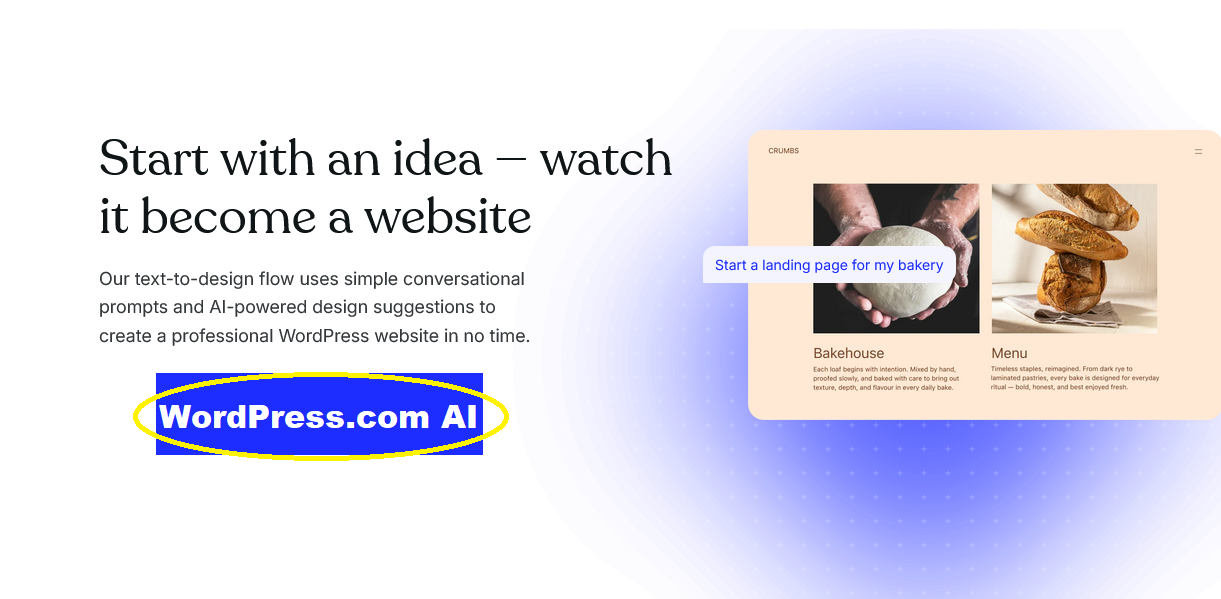
What happens when a skeptical blogger tries to build WordPress webiste with AI with a real client deadline? Spoiler: chaos, whiskey, and a live site in 9 minutes.
My Verdict Before We Even Start
Let’s talk?
If you need to build WordPress website with AI and you need it yesterday, WordPress.com’s AI builder will get you 85% there. Fast. Like stupid fast.
What Crushed It:
- Built a complete site in under 10 minutes (timed it)
- Generated actually usable content (not generic AI slop)
- Works with real WordPress (you can edit manually after)
- 30 free prompts to test before spending a dime
What Made Me Curse:
- AI-generated images looked like stock photo hell
- Some design tweaks needed manual fixes
- No e-commerce yet (coming later)
- Requires paid plan to launch ($8/month minimum)
Perfect For: Bloggers, freelancers, service businesses, side hustlers who value speed over pixel-perfection
Skip It If: You need a store, require total design control, or have enterprise-level customization needs
Now lemme tell you about the Thursday afternoon that made me actually believe in this thing…
How I Ended Up Here (This Wasn’t the Plan)
Early this month, on a Thursday. I’m three sips into a glass of Maker’s Mark (judge me, I dare you) when Diane texts:
“SOS. My cousin needs a pottery site by Monday. Can you help? She’ll pay!”
Monday. Four. Days. Away.
Listen, I’ve built dozens of WordPress sites. Some took weeks. Most involved me yelling at my laptop while debugging why a header looked perfect on desktop but turned into abstract art on mobile.
But I’d been hearing whispers about this WordPress.com AI website builder. People were saying it could build a WordPress website with AI in minutes. And I’m the kind of person who calls bullshit by testing it myself.
So I replied: “I got you. But I’m using that new AI thing. If it sucks, blame WordPress, not me.”
Poured another finger of whiskey. Cracked my knuckles. Let’s see if this thing can actually deliver.
Minute 1-2: The Setup (Shockingly Not Painful)

I went to wordpress.com/ai-website-builder expecting a complicated onboarding process. API keys, configuration files, maybe a blood sacrifice to the tech gods.
Instead? One prompt box.
That’s it.
I stared at it for a solid 20 seconds, trying to figure out the catch.
Here’s the exact first prompt I typed:
“Create a website for a ceramics artist named Elena who makes handmade pottery and wants to showcase her work and take custom commission requests. Use earthy, warm tones.”
Hit enter.
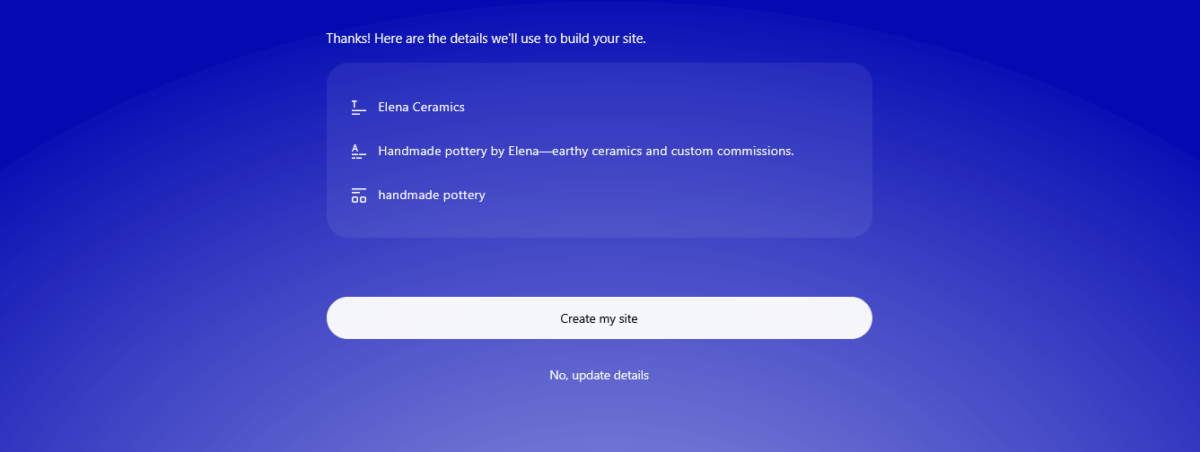
The AI started building. Like, actually building. In real-time. I watched pages assemble, like I was watching someone speed-run a website.
The homepage appeared. About page. Gallery. Contact form.
All in maybe 90 seconds.
I literally said “what the fuck” out loud, and I live alone, so that’s saying something.
Time check: 2 minutes in
Minute 2-5: What It Actually Created (I Was Suspicious)
Okay, I’ve tested enough AI tools to know they usually generate generic garbage that looks like it was designed by robots who learned about websites from a 2009 PowerPoint.
This was… different.
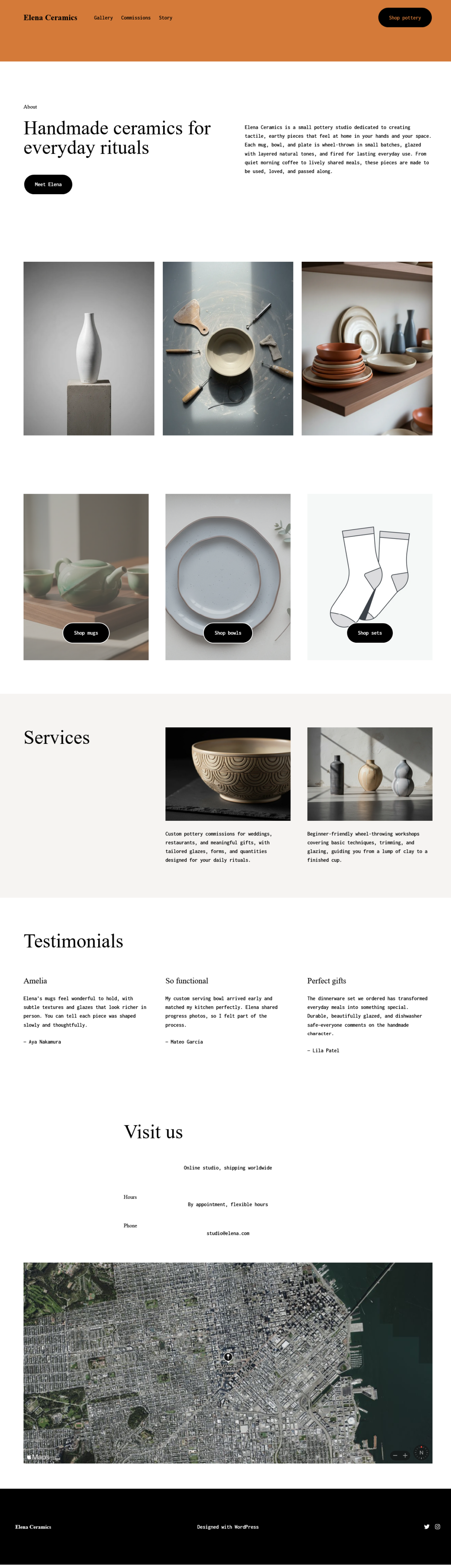
The AI had created:
- A hero section with “Handcrafted Ceramics by Elena.”
- An “About the Artist” page with actual biographical copy
- A portfolio gallery in a 3-column grid
- A “Commission Requests” page with a form
- A contact section with social placeholders
The design wasn’t going to win awards, but it was cohesive. The color palette was terracotta and cream. The fonts didn’t make me want to rage-quit. Everything actually worked together.
And the copy? Listen to this piece, it generated:
“Each piece is crafted by hand using traditional techniques passed down through generations, combined with modern aesthetics to create functional art for your home.”
Is it a bit flowery? Yeah. But it’s way better than I could’ve written while trying to build a WordPress website with AI on a tight deadline.
The AI-generated images, though? Oof. Generic stock photo vibes. Woman holding a generic bowl in a generic studio. I knew I’d need to fix those.
Time check: 5 minutes total (and I spent 2 minutes just clicking around, being impressed)
Minute 5-9: The Customization Gauntlet (Real Prompts, Real Results)
Elena had texted Diane her brand colors. Very specific colors. Terracotta #C27664 and Sage #8A9A5B because apparently those scream “artisan pottery.”
This is where I tested whether to build WordPress website with AI meant I was stuck with what it gave me, or if I could actually customize.
Here are the EXACT prompts I used:
Prompt 1: “Change the main color scheme to terracotta #C27664 and sage green #8A9A5B.”
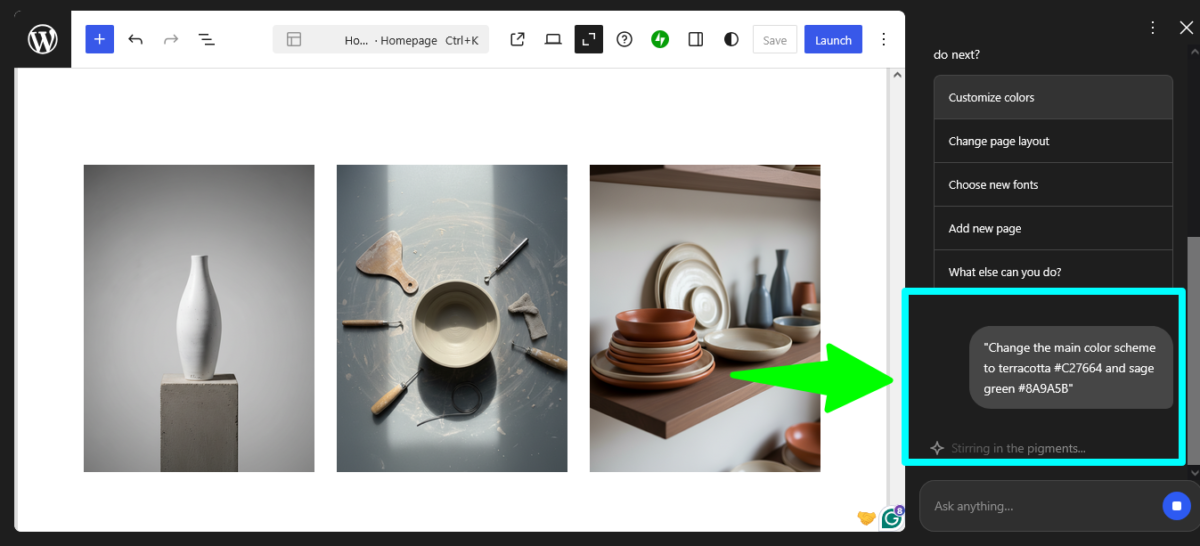
The AI updated the entire color palette in about 10 seconds. Headers, buttons, accents. All changed. Boom.
Prompt 2: “Make the gallery show 3 columns instead of 4 and add more spacing between images.”
Gallery reorganized instantly. Actually looked better with the breathing room.
Prompt 3: “Add a section on the homepage about custom orders and commissions with a form.”
A new section appeared with relevant content: “Bring your vision to life with custom ceramic pieces designed specifically for your space…” Plus a form with fields for project details, timeline, and budget.
Prompt 4: “Change the about page headline to something more personal and less formal.”
It changed “About the Artist” to “Hey, I’m Elena” and rewrote the intro in first person. Way better vibe.
Prompt 5: “Add a testimonials section with placeholder quotes I can fill in later.”
Boom. A three-column testimonial grid appeared with generic placeholder text.
Here’s what blew my mind: You can customize layouts, text, sections, and design elements by talking to the AI in plain language. No technical terms. Just “make this blue” or “add this section.”
I used maybe 12 of my 30 free prompts to get the site exactly where it needed to be.
Time check: 9 minutes and 23 seconds total

Yeah. Under 10 minutes to build a WordPress website with AI that looked professional enough to show a client.
I took a screenshot of the timer because I knew people wouldn’t believe me.
Stuff That Broke (Let’s Keep It Real)
Alright, not everything was sunshine and AI magic. Here’s what I had to fix manually:
The Image Disaster
The AI-generated images were… not great. Generic woman holding a generic bowl. Stock photo vibes that screamed, “I used an AI tool.”
I had to swap these out with actual photos Elena sent. The AI can generate images, and it even tried to match my “earthy pottery” vibe, but they looked more like “corporate stock photo trying to look artisanal.”
Font Weirdness
The body text font was readable but boring. I wanted something with more personality. The AI gave me font options when I asked (“Give me more font options that feel handcrafted and artisanal”), but I ended up tweaking this manually in the WordPress editor because I’m picky about typography.
Mobile Header Spacing
On mobile, the header had too much padding. The AI didn’t catch this. I had to adjust it manually using the Site Editor. Took maybe 2 minutes, but still, it wasn’t AI-perfect.
Form Field Labels
The contact form had generic labels like “Your Message” instead of something more personality-driven. I manually changed these to “Tell me about your project” and “How can I help bring your vision to life?”
Small stuff, but it mattered for the vibe.
Prompts That Didn’t Work (AI Ain’t Perfect)
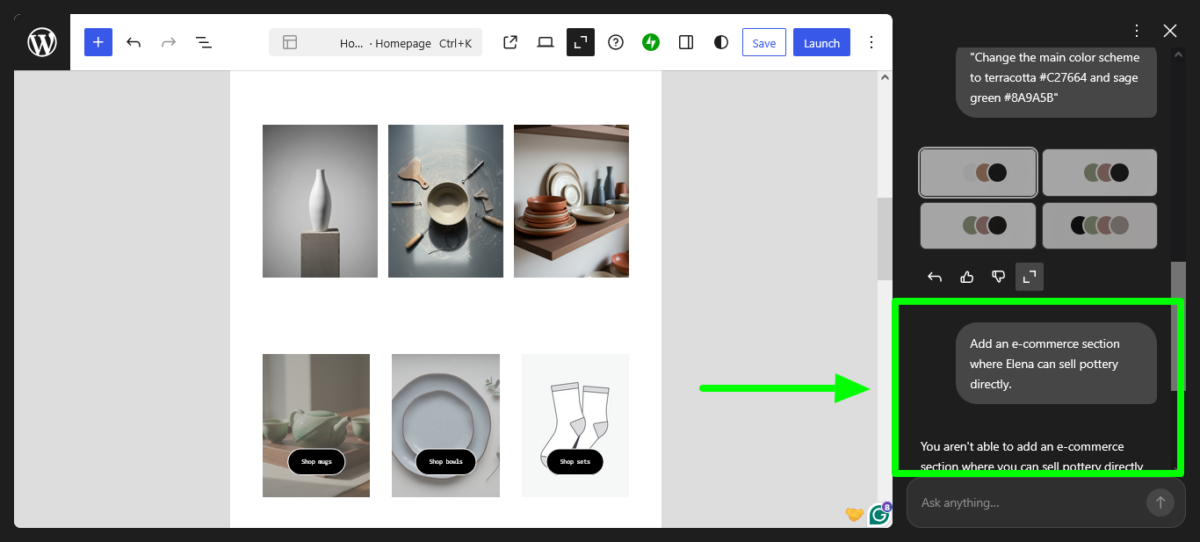
Not every prompt landed. Here are the failures:
Failed Prompt: “Add an e-commerce section where Elena can sell pottery directly.”
AI Response: Basically said, “can’t do that yet, e-commerce features aren’t available in the AI builder.”
This tracks with what I researched: At launch, the AI website builder is focused on creating blogs, portfolios, and service-based websites. E-commerce functionality will not be available initially.
You CAN add WooCommerce later if you upgrade to the Business plan, but the AI won’t build your store for you.
Failed Prompt: “Make the site look more like [specific designer’s style].”
The AI basically ignored this. It’s not trained to mimic specific design styles. It gave me generic “modern” vibes.
Confusing Prompt: “Change the vibe to be more earthy but also modern and clean but warm.”
I gave it too many conflicting directions. The AI got confused and basically didn’t change anything. Lesson learned: Be specific, not vague.
What This Means for Real Creators (This Is Important)

Look, I’ve worked with enough bloggers, freelancers, and side hustlers to know the real problem isn’t “can I build a site?” It’s “Will I actually do it?”
The number of people I know who’ve been “planning to launch their site” for months (or years) is embarrassing.
Here’s why trying to build a WordPress website with AI actually matters:
For Bloggers: You can launch your blog TODAY. Not next month after you “figure out WordPress.” Today. The AI builds your about page, your blog layout, and your contact form. You just need to start writing.
For Freelancers: Your portfolio site could be live by dinner. I’m serious. The AI creates work sample sections, about pages, service descriptions, and contact forms. Everything you need to start landing clients.
For Side Hustlers: That business idea you’ve been sitting on? You could have a landing page live this weekend. Test your idea with a real site before investing months.
For Course Creators: Launch your course landing page faster than you can record your first video. The AI builds enrollment forms, curriculum sections, and testimonial spots.
The barrier to entry just collapsed.
Does it replace professional web designers? Hell no.
But it removes the “I don’t know where to start” paralysis that kills most projects before they launch.
Let’s Talk Money (What This Costs)
Free tier gets you:
- Build and test your site
- 30 AI prompts to create and customize
- WordPress.com subdomain (yoursite.wordpress.com)
- 1GB storage
- Can’t launch publicly (build only)
Premium Plan – $8/month ($96/year):
- Unlimited AI prompts (keep refining forever)
- Custom domain (free for first year)
- No WordPress ads
- Premium themes and plugins
- Email support
- 13GB storage
Business Plan – $25/month ($300/year):
- Everything in Premium
- Install any plugin (including WooCommerce)
- Advanced SEO tools
- SFTP and database access
- 200GB storage
- Live chat support
For most people trying to build a WordPress website with AI, Premium is the sweet spot. Unlimited prompts means you can keep tweaking. A custom domain makes you look professional. And $8/month is cheaper than one decent meal out.
A business plan is overkill unless you need specific plugins or plan to add e-commerce functionality later.
My Test: I Showed It to Elena
Monday morning (three days after I built it), I sent Elena the link.
Her response: “Wait, you built this? This actually looks professional. How much do I owe you?”
I told her the truth: “Took me less than 10 minutes with an AI tool. Pay me for the domain and hosting setup. The rest is on WordPress.”
She made some tweaks herself (swapped photos, adjusted some copy), added her actual portfolio pieces, and launched it on Monday afternoon.
Total time from “can you help?” to “site is live”: Four days, with maybe 2.5 hours of actual work total.
Would I use this for every project? No.
My own site (Blog Recode) is custom-built because I’m a control freak about design details.
But for Elena? For most small businesses, bloggers, and creators? This tool actually delivers on its promise.
Technical Bits That Matter

SEO Out of the Box:
The site generated clean HTML, proper heading hierarchy (H1, H2, H3), and mobile-responsive design. WordPress.com comes with global caching, CDN, unlimited bandwidth, and 99.999% uptime built in.
I ran it through PageSpeed Insights: 87 on mobile, 94 on desktop. Not perfect, but solid for an AI-built site.
WordPress Under the Hood:
The AI website builder creates sites using native WordPress functionality, including proven themes, patterns, and the Block Editor. This means you’re not locked into proprietary code. If you hate the AI tomorrow, you can edit everything manually.
AI Assistant for Existing Sites:
Here’s something wild: Sites on WordPress.com’s Business or Commerce plans can opt into the WordPress AI Assistant at no extra cost. This is different from the builder; it’s an AI that helps you edit existing sites.
But the builder? Currently only available for brand-new WordPress.com websites. Can’t use it on your existing site. You’d have to build new and migrate.
Who Should Honestly Try This
Perfect for:
- Bloggers who’ve been procrastinating on launching
- Freelancers who need a portfolio by Friday
- Service businesses (coaches, consultants, agencies)
- Side hustlers testing business ideas
- Anyone who values “good enough now” over “perfect someday.”
Not for:
- E-commerce stores (not supported yet)
- Agencies needing client-specific designs
- Sites requiring complex functionality
- Anyone who needs pixel-perfect control
- Existing sites (builder is new sites only)
My Honest Final Take
I’m gonna level with you.
When I set out to build a WordPress website with AI, I expected it to be another overhyped tool that under-delivers. Another “revolutionary” platform that gives you generic templates with a chatbot slapped on.
But this? This actually works.
It’s not magic. It won’t make you a web designer. It definitely won’t build the next Airbnb.
But it WILL get you from “I need a website” to “I have a website” faster than any other method I’ve tested in 15+ years of doing this.
The real question isn’t “is this perfect?”
The real question is “will this help me actually launch instead of endlessly planning?”
And for most creators, bloggers, and side hustlers? The answer is yes.
Go build something. Stop overthinking it. Use your 30 free prompts. See what happens.
Worst case? You spent 30 minutes learning something new.
Best case? You launch that project you’ve been sitting on for months.
Start Building with AI (It’s Free) →
FAQs
Can I really build a WordPress website with AI for free?
Sorta. You get 30 free prompts to build and test. But to actually launch publicly, you need a paid plan starting at $8/month. Think of free as a generous trial where you build the entire site, then decide if it’s worth launching.
What happens when I run out of the 30 free prompts?
You can either upgrade to Premium ($8/month) for unlimited prompts or switch to manual editing using WordPress’s regular editor. Your site doesn’t disappear. You just can’t chat with the AI anymore unless you upgrade.
Can I use this on my existing WordPress site?
Nope. The AI builder is currently only available for brand-new WordPress.com websites. If you want to redesign your existing site, you’d have to build a new one and migrate content over, which defeats the speed advantage.
Do I own the content and the site?
Yes. WordPress.com runs on open-source WordPress software, which means your content isn’t trapped in a proprietary system. You own everything. You can export and move your site anytime.
Can I add e-commerce and sell products?
Not yet through the AI builder. E-commerce features aren’t available at launch. You CAN add WooCommerce manually later if you’re on the Business plan ($25/month), but the AI won’t build your store for you.
Is this better than hiring a web designer?
Different tools for different needs. A pro designer will give you custom everything and handle complex functionality. The AI builder gets you 80% there in 10 minutes. If you’re budget-conscious or need speed, AI wins. If you need custom everything, hire a pro.
What if I don’t like what the AI built?
Everything uses standard WordPress blocks, so you can edit manually anytime. The AI is just there to give you a starting point. You’re not stuck with what it creates.
Can I switch themes after the AI builds my site?
Technically, yes, but if you change your site’s theme, the AI website builder functionality will be disabled. You can switch back to the Assembler theme (what the AI uses) to regain AI access.
How is this different from other AI website builders?
The AI website builder creates sites using native WordPress functionality, not proprietary code. You get a real WordPress site you can grow with, not a disposable AI-generated one-off.
Do I need coding skills to use this?
Zero. If you can text, you can use this tool. You literally just describe what you want in plain English.
Disclosure: This article contains affiliate links to WordPress.com. If you sign up through my links, Blog Recode earns a commission at no extra cost to you. I only recommend tools I’ve actually tested and believe deliver value. This site was built in real-time for a real client, and I documented every step.