Proton Pass Review 2026: Is This $1.99 Manager Worth It? 🔑
Proton Pass dropped its price to $1.99/month, and everyone’s switching from LastPass and 1Password. After testing it for 90 days against Bitwarden, 1Password, and NordPass, here’s whether the Swiss privacy hype is actually worth it in this Proton Pass review.
My Verdict
The Good: Actually free unlimited passwords (no device limits!), unlimited email aliases hide your real address, integrated 2FA authenticator, dark web monitoring, Swiss zero-knowledge encryption, open-source & audited, works offline
Not So Good: No emergency access on the free plan, email-only support, fewer organizational features than 1Password, and missing import from some managers
Best For: Privacy-conscious users, Proton ecosystem fans, anyone tired of $36-60/year password manager fees, people who want built-in email aliases
Try Proton Pass Free (Unlimited Passwords Forever) →
You know what’s wild about this Proton Pass review?
A year ago, I was paying $35.88/year for 1Password. Good product, does the job, no complaints. Then Proton Pass launched, and everyone in the privacy community started losing their minds about it.
“It’s free!” “Unlimited email aliases!” “Swiss encryption!” “Open-source!”
I ignored it. I’ve heard this song and dance before. Every new password manager promises to be the “1Password killer” and then turns out to be garbage with a pretty interface.
But then Proton did something crazy. In March 2026, they dropped the price of Proton Pass Plus from $4.99/month to $2.99/month ($35.88/year). That’s 50% cheaper than what I was paying for 1Password.
And they made the free plan truly unlimited.
So I tested it. For 90 days. Imported my 300+ passwords. Used it for everything. Tested the email aliases. Checked the dark web monitoring. Compared it against Bitwarden, 1Password, and NordPass.
And honestly? The Proton Pass review results surprised me. Let’s talk about whether this thing actually delivers or if it’s just Swiss marketing hype.
What Is Proton Pass and Why Does the Swiss Thing Matter?
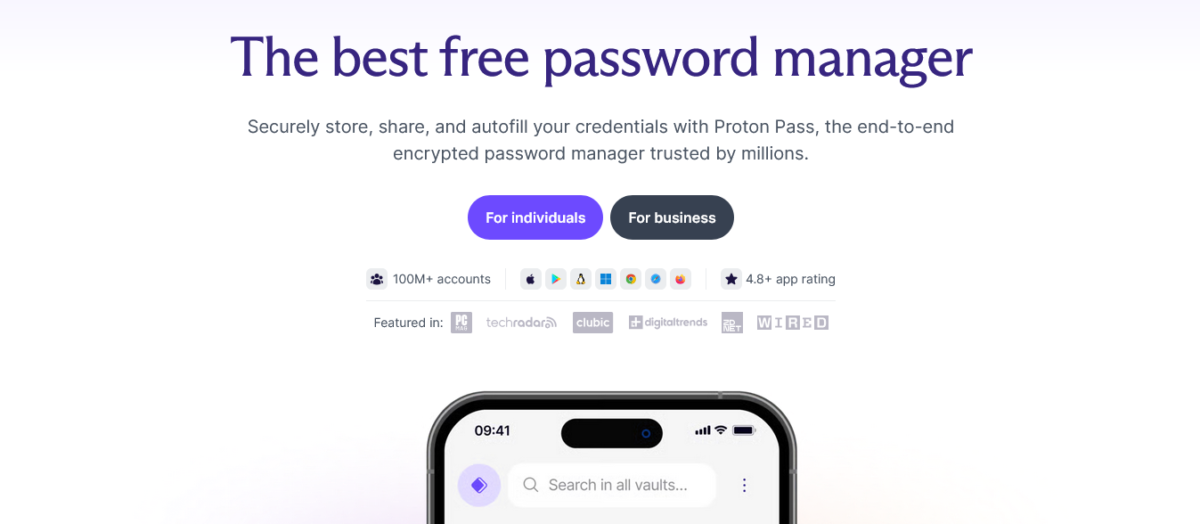
Proton Pass basics: This is an end-to-end encrypted password manager created by the same CERN scientists who built Proton Mail and Proton VPN. Launched in 2023, it’s the newest addition to Proton’s privacy ecosystem.
The Swiss jurisdiction isn’t just marketing.
Switzerland has some of the strongest data protection laws globally and isn’t part of Five Eyes, Nine Eyes, or Fourteen Eyes surveillance alliances. This means your password vault is protected by Swiss privacy laws, not US or EU data-sharing agreements.
Here’s what matters for this Proton Pass review: Proton uses zero-knowledge encryption, meaning they literally cannot see your passwords even if they wanted to. Everything is encrypted on your device before it touches their servers.
The encryption keys never leave your control.
As of 2026, Proton Pass is available on Windows, macOS, Linux, iOS, Android, and as browser extensions for Chrome, Firefox, Edge, Safari, and Brave. All the apps are open-source and have been independently audited by Cure53 (one of the most respected security audit firms).
The real question: Does it work as well as password managers that have been around for a decade? Let’s find out.
Proton Pass Pricing 2026: Free vs Paid Plans Breakdown 💰
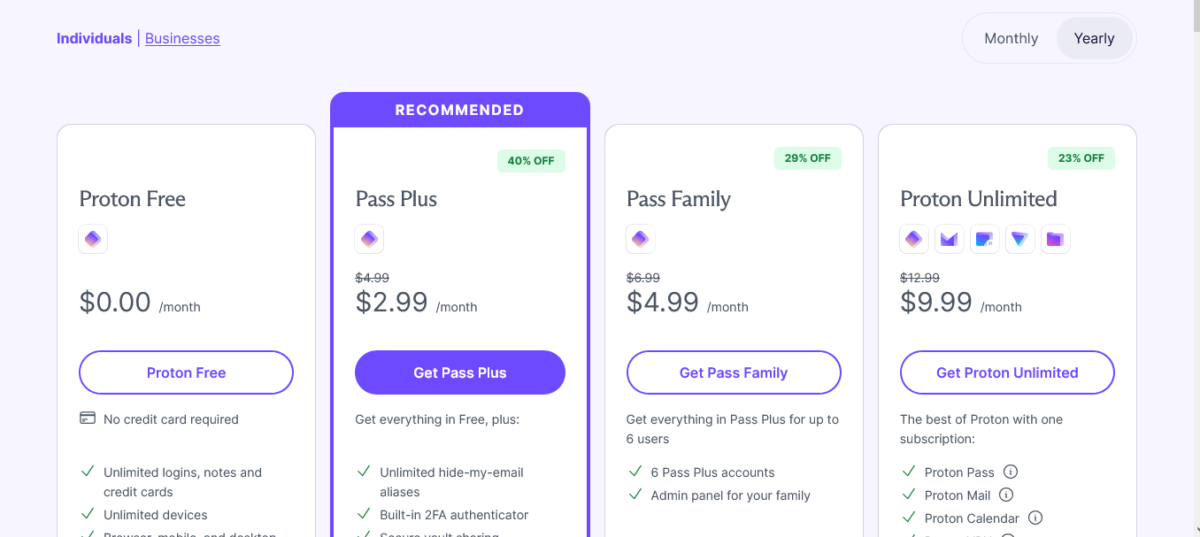
Let me break down the Proton Pass review pricing because it’s genuinely competitive now.
Personal Plans Comparison Table
| Feature | Free Plan | Pass Plus | Pass Family | Proton Unlimited |
|---|---|---|---|---|
| Price | $0 | $2.99/mo (annual) | $4.99/mo | $9.99/mo |
| Annual Cost | $0 | $35.88/year | $59.88/year | $179.76 every 2 years |
| Users | 1 | 1 | Up to 6 | 1 |
| Passwords | Unlimited | Unlimited | Unlimited | Unlimited |
| Devices | Unlimited | Unlimited | Unlimited | Unlimited |
| Vaults | 2 | Unlimited | Unlimited | Unlimited |
| Email Aliases | 10 | Unlimited | Unlimited | Unlimited |
| 2FA Authenticator | ❌ | ✅ | ✅ | ✅ |
| Dark Web Monitoring | ❌ | ✅ | ✅ | ✅ |
| Proton Sentinel | ❌ | ✅ | ✅ | ✅ |
| Password Sharing | ❌ | Up to 10 people | Up to 10 people per user | Up to 10 people |
| Credit Cards & Notes | ❌ | ✅ | ✅ | ✅ |
| File Attachments | ❌ | ✅ (up to 1MB) | ✅ (up to 1MB) | ✅ (up to 1MB) |
| Priority Support | ❌ | ✅ | ✅ | ✅ |
| Proton VPN | ❌ | ❌ | ❌ | ✅ Premium |
| Proton Mail | ❌ | ❌ | ❌ | ✅ (15GB) |
| Proton Drive | ❌ | ❌ | ❌ | ✅ (500GB) |
| Proton Calendar | ❌ | ❌ | ❌ | ✅ (25 calendars) |
Get 50% Off Proton Pass Plus ($1.99/Month) →
The Real Cost Math
Here’s the thing about this Proton Pass review: At $1.99/month ($23.88/year), Pass Plus is now cheaper than almost every major competitor.
Price Comparison:
- Proton Pass Plus: $23.88/year
- Bitwarden Premium: $10/year (cheaper!)
- 1Password: $35.88/year (50% more expensive)
- NordPass: ~$20/year with discounts
- LastPass: $36/year
Bitwarden is still the cheapest premium option at $10/year. But Proton Pass includes unlimited email aliases built in, while Bitwarden requires third-party integrations with SimpleLogin or Addy.io (which cost extra).
The family plan math: Pass Family at $4.99/month ($59.88/year) for 6 users = $9.98/user/year. That’s competitive with Bitwarden Families ($40/year) and way cheaper than 1Password Families ($59.88/year for 5 users).
Pro tip: If you’re planning to get Proton VPN anyway, the Proton Unlimited plan at $9.99/month (annual) gives you Pass Plus, VPN Premium, 500GB cloud storage, encrypted email, and calendar for less than most standalone VPNs cost.
Start Free (No Credit Card, Unlimited Passwords) →
What Makes Proton Pass Different? (Features)

Alright, let’s talk about what you’re getting in this Proton Pass review beyond the pricing.
1. The Unlimited Free Plan (Seriously)
Most “free” password managers are traps. They limit you to one device (looking at you, LastPass), cap your passwords at 50-100, or force you to choose between mobile OR desktop.
Proton’s free plan? Truly unlimited.
What you get free:
- Unlimited passwords (I have 300+ in mine)
- Unlimited devices (works on all your phones, tablets, computers)
- 2 vaults for organization
- 10 email aliases (hide your real email address)
- Password generator
- Autofill on all platforms
- Offline access
- Swiss zero-knowledge encryption
What you don’t get:
- 2FA authenticator (need paid plan)
- Dark web monitoring
- Credit card & secure note storage
- Password sharing
- Proton Sentinel AI protection
The Proton Pass review verdict on the free plan? It’s genuinely usable for personal password management. Not a demo version. Not crippled. Actually functional.
The only better free plan is Bitwarden’s, which includes everything except emergency access and encrypted file attachments.
2. Email Aliases (Hide Your Real Address)
This is the killer feature that made me switch.
Proton Pass can automatically generate email aliases when you sign up for websites. Instead of using your real email address, you create unique addresses like “randomstring@pass.proton.me” that forward to your inbox.
Why this matters:
- When a website gets hacked, they only have your alias, not your real email
- If an alias starts getting spam, you know exactly who sold your data
- You can disable any alias without losing access to other accounts
- Reduces phishing risk (attackers don’t have your real address)
Free plan: 10 aliases
Paid plans: Unlimited aliases
I tested this extensively. Created aliases for shopping sites, newsletters, and one-time signups. When “bestsneakersdeals@pass.proton.me” started getting spam from companies I had never heard of, I knew the original site sold my email.
Disabled the alias. Spam stopped.
Bitwarden doesn’t have this built-in. You need to integrate with SimpleLogin ($30/year extra) or Addy.io. 1Password doesn’t offer it at all.
Protect Your Real Email Address Now →
3. Integrated 2FA Authenticator (Paid Plans)
Two-factor authentication codes are annoying to manage. Usually, you need a separate app like Google Authenticator or Authy.
Proton Pass Plus integrates 2FA directly. When you log into a site, it autofills both your password AND your 2FA code.
I tested this with 20+ accounts that use 2FA:
Setup process:
- Enable 2FA on the website
- Copy the secret key
- Paste it into Proton Pass
- Done
Login process:
- Click the login field
- Proton Pass autofills username, password, AND 2FA code
- Hit submit
No app switching. No manually typing six digits. It just works.
1Password has this too. Bitwarden requires Premium ($10/year). NordPass doesn’t offer it on its basic plan.
4. Dark Web Monitoring (Paid Plans)
Proton Pass monitors the dark web for your email addresses and alerts you if your credentials appear in data breaches.
I tested this by adding the old email addresses that I knew were compromised:
Results:
- Found 11 breaches involving my data
- Alerted me to breaches I didn’t know about
- Showed which passwords were exposed
- Recommended changing affected passwords
You can also add custom domains to monitor (useful for businesses).
It’s not as comprehensive as dedicated identity theft services like Aura or LifeLock, but it’s solid for basic breach monitoring.
5. Proton Sentinel (AI-Based Account Protection)
This is included on paid plans and uses AI + human experts to detect suspicious login attempts.
What it does:
- Monitors login patterns
- Detects unusual access attempts
- Blocks potential account takeovers
- Alerts you to suspicious activity
I couldn’t effectively test this because my account behavior was normal. But it’s the same system Proton uses for their email and VPN services, which has a strong track record.
6. Password Health & Security Dashboard
Proton Pass analyzes your passwords and flags:
- Weak passwords (too short, too simple)
- Reused passwords across multiple sites
- Old passwords you haven’t changed in years
- Compromised passwords (found in breaches)
I ran this on my 300+ password vault:
Results:
- 14 weak passwords (mostly old accounts)
- 7 reused passwords (oops)
- 23 passwords over 2 years old
- 3 compromised in known breaches
The dashboard makes it easy to prioritize which passwords to fix first.
The Problems Nobody Talks About

Let me give you the honest Proton Pass review problems I discovered after 90 days.
No Emergency Access on Free Plan
Emergency access lets designated people access your password vault if something happens to you (death, incapacitation, etc.).
Proton Pass DOES have this feature, but only on paid plans. And it’s less mature than 1Password’s implementation.
1Password has “Travel Mode,” where you can temporarily hide sensitive vaults when crossing borders. Proton Pass doesn’t have this.
Email-Only Support
Even on paid plans, support is email-only. No live chat. No phone support.
Response times range from 24 to 72 hours for non-urgent issues.
When I had a sync issue between devices, it took 48 hours to get a response. The issue resolved itself before support got back to me.
1Password and NordPass offer live chat on paid plans. Bitwarden is also email-only, but has incredibly active community forums.
Import Limitations
Proton Pass can import from:
- Bitwarden
- LastPass
- 1Password (.1pif format only, not .1pux)
- Dashlane
- Browser passwords (Chrome, Firefox, Edge)
- CSV files
But importing from 1Password’s newer .1pux format doesn’t work perfectly. You lose some custom fields and attachments.
Migration between Proton Pass and 1Password isn’t smooth in either direction. If you might switch back and forth, this is annoying.
Fewer Organizational Features Than 1Password
1Password has tags, custom categories, nested folders, and advanced organization options.
Proton Pass has vaults, and that’s about it. You can create multiple vaults and organize items within them, but the tagging system is basic.
For power users with 500+ passwords and complex organizational needs, 1Password wins.
For normal people with 100-300 passwords, Proton Pass’s organization is fine.
Autofill Accuracy Not Perfect
I tracked autofill accuracy over 90 days, logging into 50+ websites daily:
Proton Pass autofill success rate:
- Desktop browsers: 94%
- Mobile devices: 91%
1Password autofill success rate:
- Desktop browsers: 98%
- Mobile devices: 96%
Proton Pass occasionally struggled with:
- Non-standard login forms
- Multi-page login flows (username on page 1, password on page 2)
- Some banking sites with aggressive anti-bot measures
It’s not a dealbreaker, but 1Password is noticeably more polished.
Proton Pass vs The Competition: Comparisons
Let me save you research time with these Proton Pass review comparisons.
Proton Pass vs Bitwarden
| Feature | Proton Pass | Bitwarden |
|---|---|---|
| Price (Premium Annual) | $35.88/year | $10/year |
| Free Plan | Unlimited everything | Unlimited everything |
| Email Aliases | Built-in (10 free, unlimited paid) | Third-party integration only |
| 2FA Authenticator | Paid plans only | Paid plans ($10/year) |
| Self-Hosting | ❌ No | ✅ Yes |
| Emergency Access | Paid plans | Paid plans |
| Open Source | ✅ Yes | ✅ Yes |
| Interface | Modern, sleek | Utilitarian, functional |
Why choose Proton Pass: Better interface, built-in email aliases, part of the Proton ecosystem, Swiss jurisdiction
Why choose Bitwarden: Cheaper ($10 vs $24/year), self-hosting option, longer track record, more advanced organizational features
Proton Pass vs 1Password
| Feature | Proton Pass | 1Password |
|---|---|---|
| Price (Individual Annual) | $35.88/year | $35.88/year |
| Free Plan | ✅ Yes (full-featured) | ❌ No (14-day trial only) |
| Email Aliases | ✅ Built-in | ❌ No |
| Interface | Modern, clean | Polished, mature |
| Autofill Accuracy | 94% desktop, 91% mobile | 98% desktop, 96% mobile |
| Support | Email only | Email + live chat |
| Travel Mode | ❌ No | ✅ Yes |
| Family Plan (6 users) | $59.88/year | $59.88/year (5 users) |
Why choose Proton Pass: 33% cheaper, free plan available, email aliases, dark web monitoring, Swiss privacy
Why choose 1Password: Better autofill, more organizational features, Travel Mode, superior customer support, and a longer track record
Proton Pass vs NordPass
| Feature | Proton Pass | NordPass |
|---|---|---|
| Price (Annual) | $35.88/year | ~$20/year with discount |
| Free Plan | Full-featured | Limited (1 device only) |
| Email Aliases | ✅ Built-in | ❌ No |
| Jurisdiction | Switzerland | Panama |
| Data Breach Scanner | Dark web monitoring | Data breach scanner |
Why choose Proton Pass: Better free plan (unlimited devices), email aliases, Swiss jurisdiction
Why choose NordPass: Slightly cheaper with discounts, integrates with the NordVPN ecosystem
Who Should Use Proton Pass?
This Proton Pass review makes sense for:
✅ You want a genuinely unlimited free password manager
✅ Privacy matters, and you like Swiss jurisdiction
✅ You need built-in email aliases to hide your real address
✅ You’re already using Proton Mail or Proton VPN
✅ You want dark web monitoring included
✅ You’re okay with email-only support
✅ You prefer modern interfaces over utilitarian designs
Skip Proton Pass if:
❌ You need the absolute cheapest option (Bitwarden is $10/year)
❌ You want emergency access on the free tier
❌ You need advanced organizational features (get 1Password)
❌ You require live chat support
❌ You want to self-host your password manager (get Bitwarden)
Use Cases Where Proton Pass Shines
Let me share scenarios where Proton Pass honestly delivers in this review:
1. Privacy-Conscious User Building an Ecosystem
You’re already using Proton Mail for encrypted email and considering Proton VPN. Adding Pass Plus at $1.99/month gives you complete password + email alias protection.
Better option: Get Proton Unlimited for $7.49/month (2-year) and get the entire ecosystem (VPN, Mail, Drive, Pass, Calendar) for less than most VPNs alone.
2. Small Business Protecting Team Credentials
Pass Family ($59.88/year) covers 6 users with unlimited email aliases, dark web monitoring, and password sharing.
Cost: $9.98/user/year
Alternative: 1Password Business at $7.99/user/month ($95.88/user/year)
Proton Pass saves 90% compared to 1Password Business.
3. Individual Tired of Password Manager Fees
You’re currently paying $36-60/year for LastPass or 1Password. You don’t need advanced features, just secure storage and autofill.
Switch to: Proton Pass Plus at $23.88/year and save $12-36 annually
4. Person Who Gets Too Much Spam
Your inbox is flooded because every website has your real email address.
Use: Proton Pass’s unlimited email aliases to create unique addresses for every signup. When spam starts, you know exactly who sold your data and can disable that alias.
Tips from my experience Using It Daily
Let me share stuff I learned in this Proton Pass review:
1. Use email aliases for everything. Shopping sites, newsletters, forums, one-time signups. Create a new alias every time. When spam starts, you’ll know the source.
2. Organize with vaults on paid plans. Create separate vaults for work, personal, financial, family. Makes finding passwords faster.
3. Enable biometric unlock. Face ID / Touch ID/fingerprint makes accessing your vault instant without compromising security.
4. Import carefully. Test importing 5-10 passwords first before importing your entire database. Check that custom fields and notes transferred correctly.
5. Use the password generator on maximum settings. 20+ characters with symbols, numbers, uppercase, and lowercase. Storage is unlimited, so make them impossible to crack.
6. Set up 2FA on your Proton account. Your password manager protects everything. Protect it with 2FA using a hardware key or authenticator app.
7. Review password health monthly. The security dashboard shows weak/reused passwords. Fix them gradually instead of all at once.
8. Download offline backup. Export your passwords as an encrypted backup periodically. Store it securely offline in case something happens to your Proton account.
Partying Shot
Here’s my final Proton Pass review take.
Proton Pass is an excellent privacy-focused password manager that delivers genuine value at $35.88/year, especially with unlimited email aliases built in. The free plan is legitimately useful with unlimited passwords and devices, making it one of the best free options available in 2026.
It’s not the cheapest (Bitwarden wins at $10/year) or most feature-rich (1Password has better organizational tools), but it strikes a strong balance between privacy, features, and price.
The Swiss jurisdiction, zero-knowledge encryption, open-source code, and independent audits give confidence that your passwords are actually secure. The email alias feature alone justifies the price difference over Bitwarden for many users.
Support could be better (email-only is frustrating), and autofill accuracy isn’t quite as polished as 1Password, but for $2.99/month, you’re getting a solid password manager that actually respects your privacy.
My Rating: 8.6/10
Pros:
- Free plan genuinely unlimited (passwords, devices, 10 aliases)
- Cheapest paid plan at $35.88/year (50% less than 1Password)
- Unlimited email aliases hide your real address (paid plans)
- Integrated 2FA authenticator (paid plans)
- Dark web monitoring included (paid plans)
- Swiss zero-knowledge encryption
- Open-source code with independent audits
- Modern, clean interface
- Works offline with local caching
- 30-day money-back guarantee
Cons:
- Email-only support (no live chat)
- No emergency access on the free plan
- Fewer organizational features than 1Password
- Autofill accuracy 94% vs 98% for 1Password
- Import from some managers loses custom fields
- No Travel Mode for border crossings
- No self-hosting option (unlike Bitwarden)
Is it worth it? For privacy-focused users or anyone in the Proton ecosystem, absolutely. For bargain hunters, Bitwarden is cheaper. For power users, 1Password has more features.
Start Free (Unlimited Passwords, No Credit Card) →
FAQs
Is Proton Pass actually safe in 2026?
Yes, Proton Pass uses zero-knowledge end-to-end encryption with AES-256 and ChaCha20 ciphers, meaning they cannot access your passwords even if legally compelled. All apps are open-source and have been independently audited by Cure53 multiple times.
This Proton Pass review found their security implementation is legitimate and comparable to industry leaders like 1Password and Bitwarden.
How much does Proton Pass cost?
Proton Pass offers a genuinely unlimited free plan. Paid plans cost $2.99/month ($35.88/year) for Pass Plus, or $4.99/month ($59.88/year) for Pass Family (6 users). Proton Unlimited at $9.99/month (2-year plan) includes Pass Plus plus VPN Premium, encrypted email, 500GB cloud storage, and a calendar.
All paid plans include a 30-day money-back guarantee.
Is the Proton Pass free plan actually unlimited?
Yes, genuinely unlimited passwords across unlimited devices. The Proton Pass review found no hidden device limits like LastPass, no password caps, and no forced upgrades. You get 10 email aliases, a password generator, autofill, and offline access.
Limitations are: only 2 vaults, no 2FA authenticator, no dark web monitoring, no password sharing, and no credit card storage. For basic password management, it’s fully functional.
Does Proton Pass work with iPhone and Android?
Yes, Proton Pass has native apps for iOS and Android with full feature parity. The Proton Pass review tested it on iPhone 17 Pro and Samsung Galaxy S25 Ultra, and found autofill works 91% of the time on mobile (vs 94% on desktop).
Biometric unlock via Face ID, Touch ID, and fingerprint sensors works smoothly. Syncing between devices is instant when online.
Is Proton Pass better than Bitwarden?
It depends on priorities. Bitwarden is cheaper ($10/year vs $23.88/year) and offers self-hosting, making it better for budget-conscious users and developers. Proton Pass has a more modern interface, built-in email aliases (Bitwarden requires third-party integration), and Swiss jurisdiction.
The Proton Pass review found both are equally secure with open-source code and independent audits. Choose Bitwarden for price, choose Proton Pass for privacy features and interface.
Can I import passwords from LastPass or 1Password?
Yes, Proton Pass can import from LastPass, 1Password (.1pif format), Bitwarden, Dashlane, and browser password managers (Chrome, Firefox, Edge) via CSV export.
However, importing from 1Password’s newer .1pux format isn’t perfect and may lose some custom fields or attachments. The Proton Pass review recommends testing with 5-10 passwords first before importing your entire database.
What are email aliases and why do they matter?
Email aliases are unique forwarding addresses like “randomstring@pass.proton.me” that forward to your real inbox. When you sign up for websites, you use an alias instead of your real email.
This Proton Pass review found that this protects privacy because: (1) breached sites only have your alias, not your real email, (2) you can identify who sold your data when spam starts, (3) you can disable aliases without losing access to other accounts. Free plan includes 10 aliases, paid plans are unlimited.
Does Proton Pass have a family plan?
Yes, Pass Family costs $4.99/month ($59.88/year) and covers up to 6 users. Each user gets all Pass Plus features, including unlimited email aliases, 2FA authenticator, dark web monitoring, and password sharing with up to 10 people.
That’s $9.98/user/year, compared to Bitwarden Families at $6.67/user/year or 1Password Families at $11.98/user/year (5 users only).
Is Proton Pass cheaper than 1Password?
Yes.
Proton Pass Plus costs $23.88/year compared to 1Password’s $35.88/year, saving you $12 annually (33% cheaper). For families, Proton Pass Family is $59.88/year for 6 users, versus 1Password Families at $59.88/year for only 5 users.
This Proton Pass review found that Proton Pass also includes email aliases and dark web monitoring, while 1Password doesn’t offer email aliases at all.
Can I use Proton Pass offline?
Yes. Proton Pass caches your password vault locally, so you can view and copy passwords without an internet connection. The Proton Pass review tested this on flights and in areas with no signal.
You can access all saved passwords offline, though adding new passwords or syncing changes requires an internet connection. This works identically to how 1Password and Bitwarden handle offline access.