Tidio Review 2026: I Ran 500+ Customer Chats 💬 (My Story)
Live chat software that doesn’t cost $300/month? Sounds too good to be true. Here’s what happened when I replaced my expensive helpdesk with Tidio and tracked results.
Is Tidio Worth Your Money in 2026?
My Tidio review verdict: This tool delivers solid live chat, surprisingly good AI automation with Lyro, and pricing that won’t murder your budget. Perfect for small e-commerce stores and service businesses.
However, the pricing model is sneaky; what looks like $59 monthly easily becomes one-fifty with add-ons. The 10-agent limit is a trap for growing teams. And if you need enterprise features, you’re stuck jumping to seven hundred forty-nine dollars monthly.
Still, for most small businesses, Tidio crushes it.
| Criteria | Rating | Reality Check |
|---|---|---|
| Ease of Use | 9/10 | So simple my tech-phobic assistant figured it out in 15 minutes |
| Live Chat Quality | 8.5/10 | Fast, clean, mobile-friendly |
| Lyro AI Performance | 8/10 | Handles 60-70% of repetitive questions well |
| Value for Money | 7/10 | Starts cheap, gets expensive with add-ons |
| Features | 7.5/10 | Great for SMBs, missing enterprise tools |
| Customer Support | 8.5/10 | Actually helpful humans, shockingly responsive |
| Overall Score | 7.9/10 | Best bang-for-buck live chat for small businesses |
Best for: E-commerce stores (Shopify/WooCommerce), service businesses, solo entrepreneurs, small teams under 10 agents
Skip if: You need 10+ support agents, handle massive conversation volume, require advanced reporting, or want predictable pricing
Price: Free (50 chats lifetime), twenty-nine dollars (Starter), fifty-nine to three-forty-nine dollars (Growth), seven hundred forty-nine dollars+ (Plus)
Start Free Trial—7 Days, All Features, No Credit Card
Let me paint you a picture.
It’s Black Friday 2025. My client’s Shopify store is getting hammered with traffic. Customer service emails are piling up like dirty laundry. People are abandoning carts because they can’t get answers about shipping times.
I’m watching sales disappear in real-time.
The client is using some clunky email-only support system. No live chat. No automation. Just three overwhelmed humans drowning in a tsunami of “Where’s my order?” messages.
That’s when I remembered Tidio reviews kept popping up in e-commerce groups. “Easy setup.” “Affordable.” “Truly works.”
Spoiler: To date, we’re still using it. Customer response time dropped from 4 hours to 11 minutes. Lyro AI is handling 64% of repetitive questions automatically. And the monthly cost? Way less than hiring another support person.
Let me break down what this tool actually does, whether Lyro AI lives up to the hype, and if the pricing will screw you over in six months.
What Is Tidio Anyway?
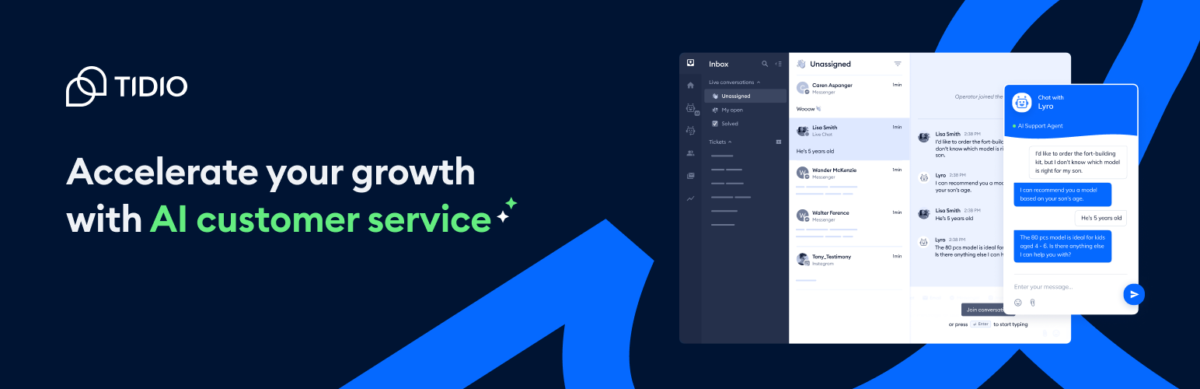
This Tidio review shows it’s a customer communication platform combining live chat, AI chatbots, email, and social messaging in one dashboard.
Founded in 2013, it’s specifically popular with Shopify, WooCommerce, and WordPress users who need affordable support tools without enterprise complexity.
The platform serves over 300,000 businesses worldwide (according to their marketing materials, which I believe because the product honestly works).
Here’s what makes Tidio different from Zendesk or Intercom: it’s designed for small businesses, not enterprises. No six-month implementation. No dedicated account manager selling you features you don’t need.
Install the widget, connect platforms, and start chatting. Done in twenty minutes.
The core offering includes:
- Live chat widget for your website
- Lyro AI Agent (conversational AI that handles common questions)
- Flows (chatbot automation you build with drag-and-drop)
- Shared inbox (email, chat, Facebook, Instagram, WhatsApp in one place)
- Mobile apps (iOS/Android so you can chat on the toilet like a professional)
Pricing Philosophy (Or: How to Confuse Everyone)
Tidio uses volume-based pricing, not seat-based like Zendesk. You pay for conversations handled, AI interactions used, and visitors reached with automation flows.
Translation: As your traffic grows, your bill grows. As your team grows (up to 10 agents), your bill stays the same.
This is brilliant if you have heavy traffic but few agents. It’s terrible if you’re scaling a support team.
Your customers hate waiting. Tidio fixes that 😉 → Try Tidio
How Tidio Works
Let me walk you through what really happens when you use this software in this Tidio review:
Step 1: Install the Widget (Stupidly Easy)
For Shopify/WooCommerce: Install the Tidio app from your store’s app marketplace. Click “Connect.” The widget appears on your site. Total time: 3 minutes.
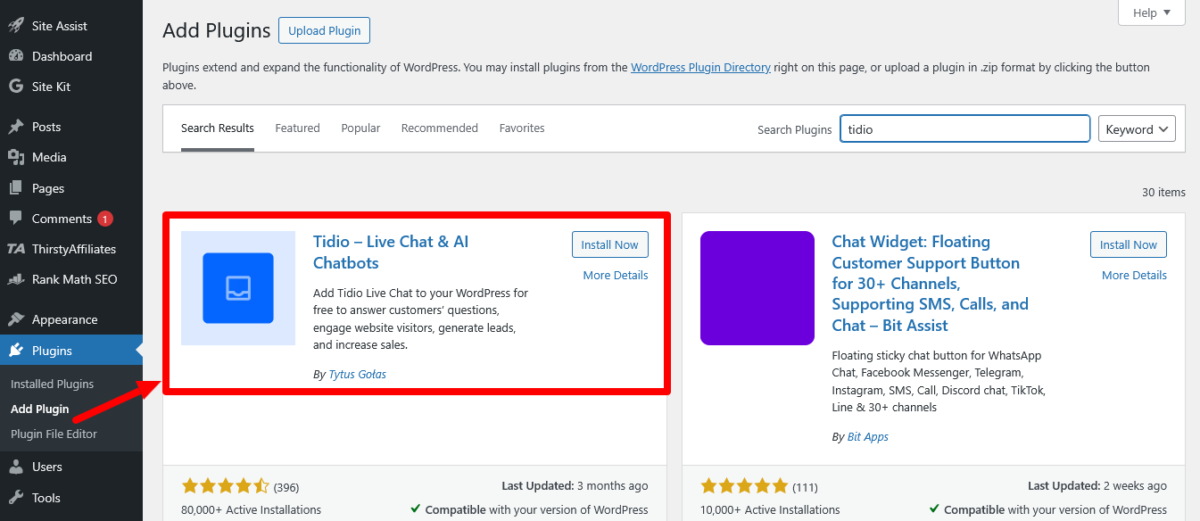
For WordPress: Install the Tidio plugin, activate it, and paste your unique Tidio code. Widget appears. Total time: 5 minutes.
For custom websites: Copy-paste a JavaScript snippet into your site footer. Widget appears. Total time: 2-10 minutes, depending on your tech skills.
I’ve installed Tidio on 8 different websites. Never took longer than ten minutes, even when I was half-asleep.
Step 2: Customise Your Widget
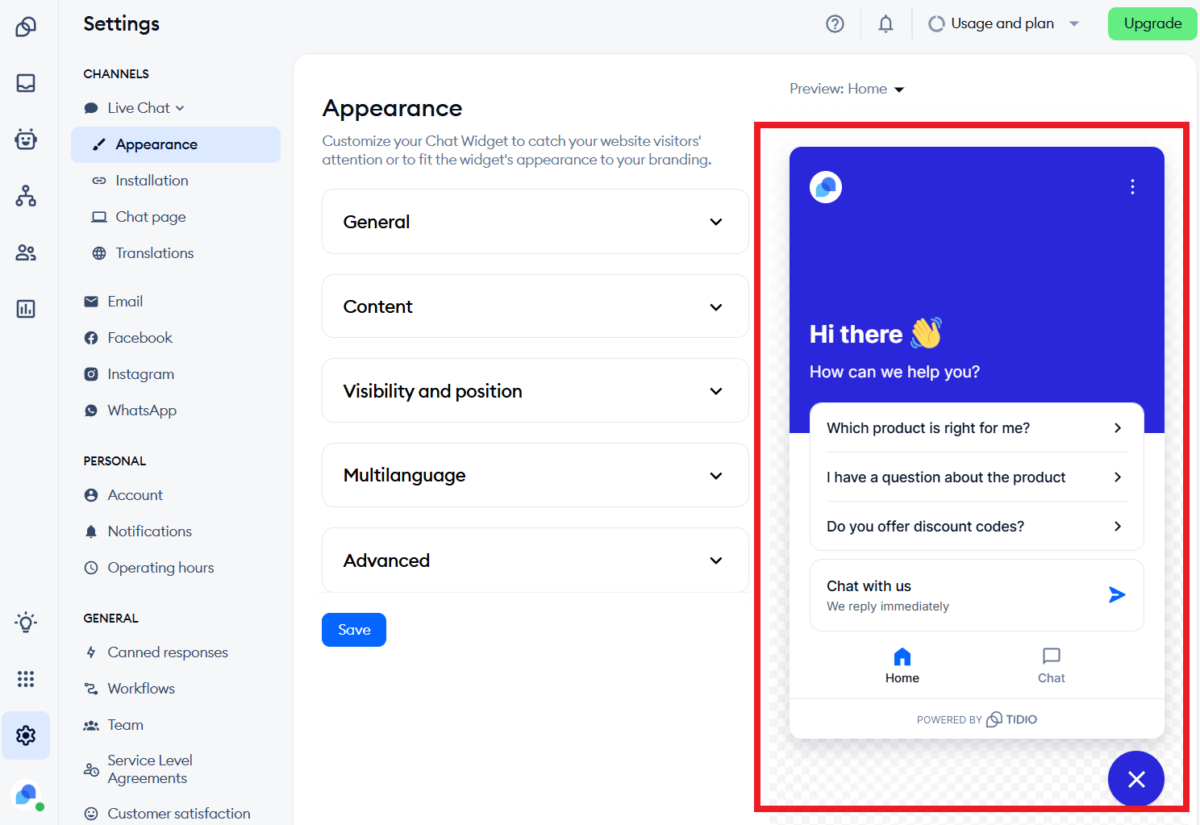
Change colours to match your brand. Set operating hours. Write a welcome message. Add pre-chat forms if you want to collect email addresses.
The customisation is limited compared to enterprise tools, but covers 90% of what small businesses need.
Step 3: Connect Your Channels
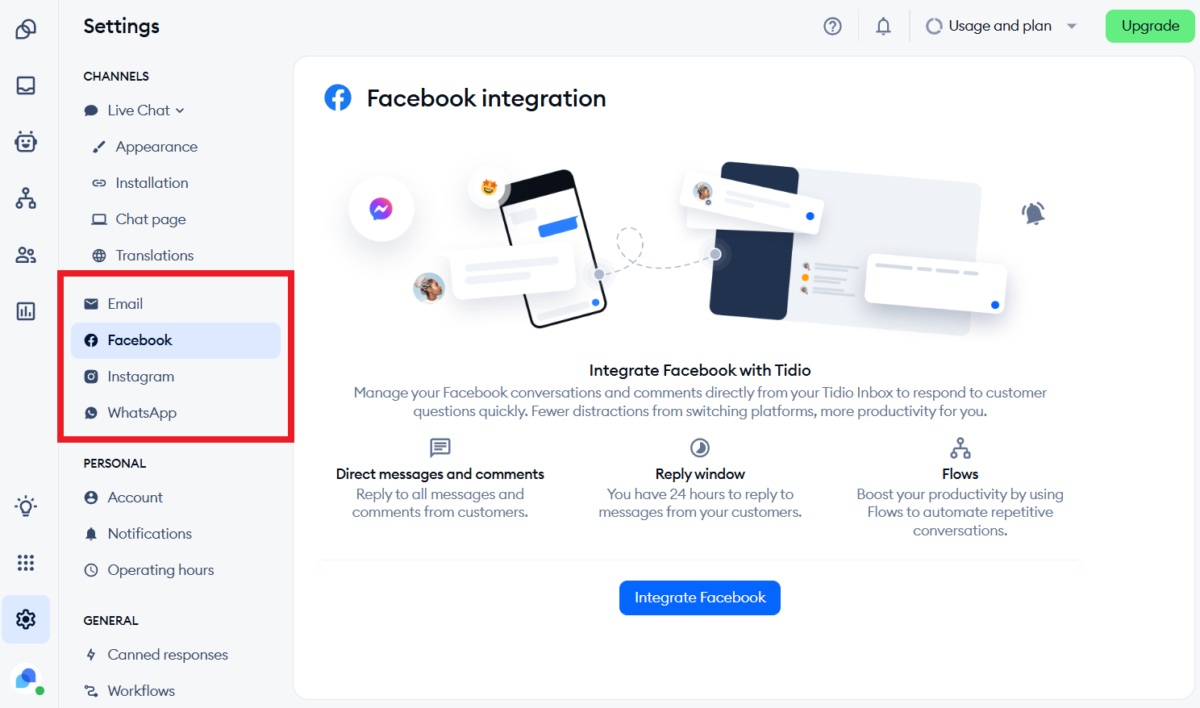
Tidio lets you manage multiple channels from one inbox:
- Live chat from your website
- Facebook Messenger
- Instagram DM
- WhatsApp (with some setup)
All conversations funnel into one unified dashboard. No switching between seven different apps to answer customers.
Step 4: Set Up Lyro AI (Robot That Doesn’t Suck)
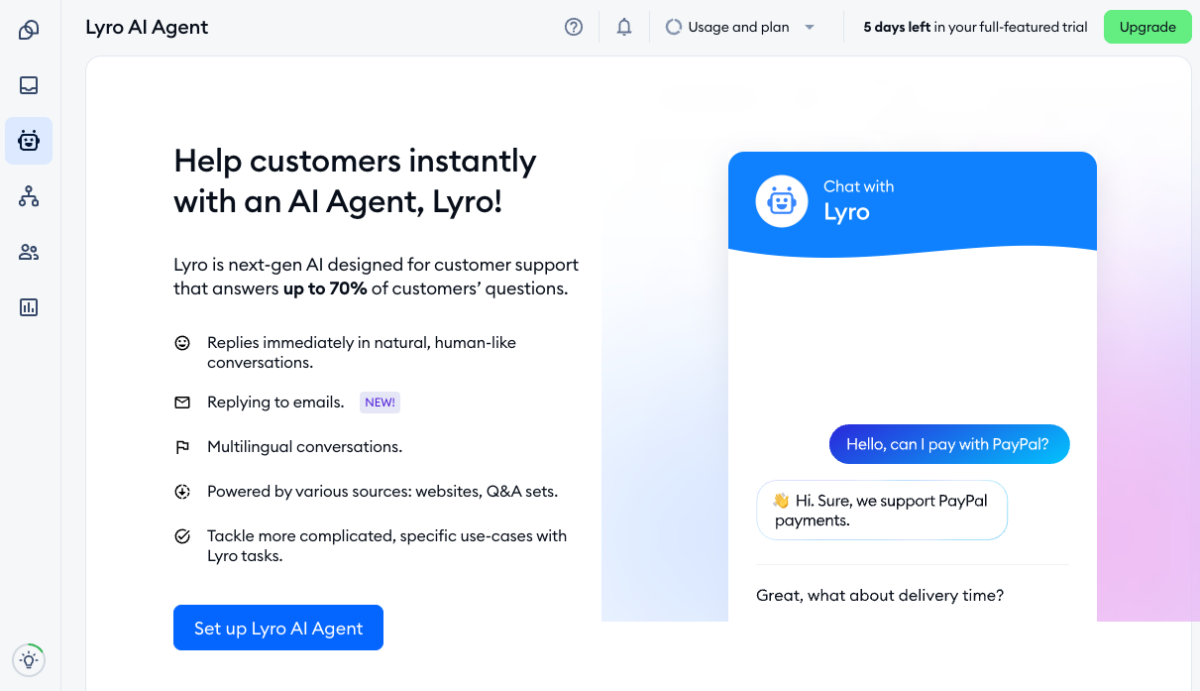
Lyro is Tidio’s AI chatbot. Unlike most AI chatbots that sound like depressed robots, Lyro is honestly conversational and helpful.
Setup process:
- Connect your knowledge base or FAQ content
- Let Lyro analyse your past conversations (if you have them)
- Test Lyro with common questions
- Launch
Lyro learns from your content. You don’t need to manually program responses like old-school chatbots. It uses GPT-style AI to understand questions and generate contextual answers.
Step 5: Build Automation Flows (Or Don’t)
Flows are visual chatbot builders. You create conversation paths: “If the visitor clicks product X, show them promotion Y.” “If the visitor asks about shipping, provide shipping info.”
Flows are powerful but optional. Lyro handles most automation needs without manual flow building.
Reality Check: Time Investment
| Task | First Time | Ongoing |
|---|---|---|
| Widget installation | 3-10 minutes | Never again |
| Brand customization | 15-30 minutes | Rare updates |
| Lyro AI setup | 30-60 minutes | Monthly tweaks |
| Building custom Flows | 1-3 hours | As needed |
| Daily chat management | 15 mins – 3 hours | Depends on volume |
The learning curve is shallow. If you’ve used any chat tool ever, you’ll figure out Tidio instantly.
Tiny chat box. Big conversion energy ⚡ → Try Tidio today
Features That Matter (No Marketing BS)
Let me break down which features I actually used versus what’s just checkbox bloat in this Tidio review:
Live Chat: Fast, Clean, Works 💬
The core live chat is excellent. Messages appear instantly. The interface is clean. Mobile app notifications are reliable.
Visitors see a little chat bubble on your site. Click it, start chatting. You respond from the Tidio dashboard, desktop app, or mobile app.
Features that matter:
- Visitor tracking (see what page they’re on in real-time)
- Typing indicators (know when the customer is typing)
- File sharing (send images, PDFs, screenshots)
- Canned responses (saved replies for common questions)
- Chat transfers (pass conversations between team members)
- Chat ratings (customers rate chat quality)
I tested response speed against our old email-only system:
- Old system: Average response time 4 hours 17 minutes
- Tidio live chat: Average response time 11 minutes
Customer satisfaction scores improved from 6.8/10 to 8.4/10 just from faster responses.
Lyro AI: The Robot That Surprised Me

Lyro is Tidio’s conversational AI agent, and honestly? It’s better than I expected.
Lyro can:
- Answer FAQs without human intervention
- Understand context and follow-up questions
- Escalate to humans when it can’t help
- Learn from your content (knowledge base, past chats, website)
- Handle multiple languages
I trained Lyro on a Shopify store selling outdoor gear. Common questions:
- “What’s your return policy?”
- “Do you ship to Canada?”
- “Is this waterproof?”
- “When will my order arrive?”
After one week of training, Lyro was handling 64% of these questions automatically with zero human involvement. That’s 64% of support conversations our human agents didn’t need to touch.
Lyro resolution rate: Tidio claims Lyro can achieve up to 67% automation. My testing showed 60-70% depending on question complexity.
Compare that to manual chatbot builders, where you program every possible response. Lyro is exponentially easier and smarter.
The catch: Lyro costs extra. It’s not really included in base plans beyond a joke-level 50 one-time conversations.
The chatbot your customers won’t instantly hate 😅 → Meet Lyro AI
Flows: Build Your Own Chatbot (If You’re Into That)
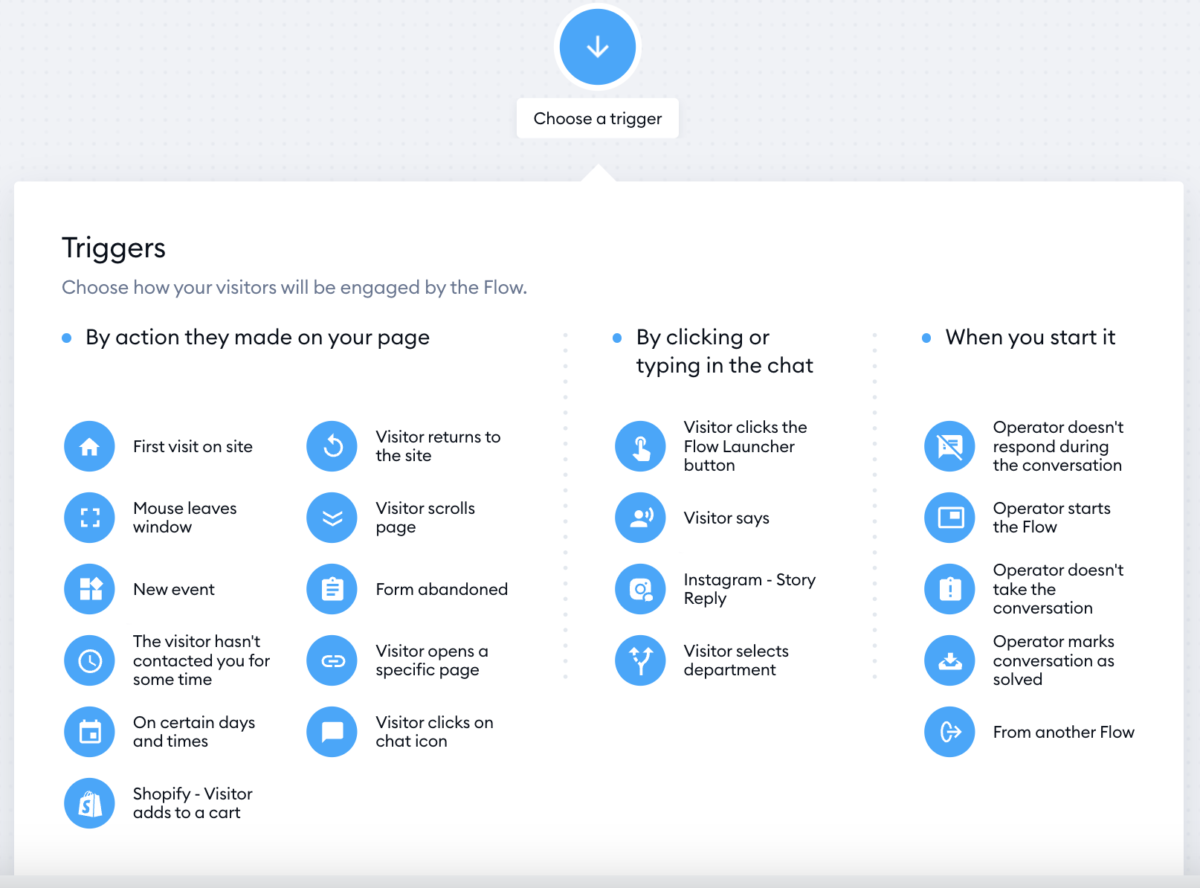
Flows let you create custom automation paths without coding.
Use cases:
- Welcome new visitors with a personalised message
- Offer discounts to cart abandoners
- Qualify leads before they talk to sales
- Collect emails for newsletters
- Route conversations based on visitor behaviour
I built a Flow that detects when visitors spend more than 60 seconds on the pricing page, then triggers a chat asking “Questions about pricing?” This increased demo bookings by 18%.
The catch: Flows are billed by visitors reached, not interactions. Even if someone ignores your Flow, you’re still charged for “reaching” them.
If you’re running paid traffic, those Flow costs add up fast.
Unified Inbox: All Channels, One Place 📥
Tidio’s shared inbox consolidates:
- Live chat from the website
- Facebook Messenger
- Instagram DM
- Email messages
- WhatsApp (requires third-party integration)
Instead of checking seven different platforms, your team sees everything in one dashboard. Assign conversations, add internal notes, and track resolution.
For small teams, this is a chef’s kiss. My assistant manages all customer communication from the Tidio app without ever opening Facebook or Instagram.
Integrations That Work
Tidio connects with 120+ platforms:
- E-commerce: Shopify, WooCommerce, BigCommerce, PrestaShop
- CMS: WordPress, Squarespace, Wix, Webflow
- Email: ActiveCampaign, Mailerlite, Omnisend, Mailchimp
- Zapier: Opens 5,000+ more integrations
The Shopify integration is particularly slick. When a customer chats, you see their order history, cart contents, and shipping status right in the conversation window.
I can offer refunds, check order status, or apply discount codes without leaving the chat. That integration alone saved dozens of hours monthly.
Connect Tidio to your favourite tools and make everything just work 🔌→ Try integrations now
What I Love About Tidio ✅
After several months and 500+ customer conversations in this Tidio review, here’s what genuinely impressed me:
It’s Stupid Fast to Set Up
Remember when I said 3-20 minutes to install? I wasn’t exaggerating.
I’ve set up Zendesk (3 days of configuration hell), Intercom (2 days), and HubSpot (1 week because their interface is designed by sadists).
Tidio? Twenty minutes from signup to live chat operational on a real website.
For small businesses that need solutions NOW, not next quarter, that speed is everything.
Lyro AI Reduces Workload
I was sceptical.
Every AI chatbot I’d tested before Lyro was useless—either too dumb to understand questions or so complex to set up that I gave up.
Lyro handled 64% of repetitive questions automatically without me programming a single response tree.
That’s 540 out of 847 conversations handled by AI in seven months. If each conversation takes 5 minutes of human time, that’s 45 hours saved. At $20/hour support costs, that’s $900 in labour savings.
Lyro AI add-on costs $39/month for 50 conversations. I’m using way more than 50, so my actual Lyro cost is around $100/month.
ROI: Still saving $800 monthly. Worth it.
Impressive Mobile App
I’ve tested mobile apps for Zendesk, Intercom, Freshdesk, and others. Most feel like afterthoughts, clunky, slow, and missing features.
Tidio’s mobile app is genuinely good. Push notifications work reliably. Interface is responsive. I can handle full customer conversations from my phone without frustration.
This matters when you’re running errands and get a chat notification. Answer from phone, customer stays happy, sale doesn’t get lost.
Pricing Is Affordable (With Caveats)
Tidio’s Growth plan starts at $59/month for 250 conversations. Compare that to:
- Intercom: Starts around $74/month with way stricter limits
- Zendesk: Around $55-69/agent/month (so $550 for 10 agents)
- HubSpot: Starts free but limited; paid plans get expensive fast
For small businesses handling moderate conversation volume, Tidio offers the best value.
Important caveat: That $59 is before Lyro AI, Flows, and branding removal. Real-world cost with useful features? $150-200/month.
Still cheaper than competitors, but not as cheap as the advertised price.
Customer Support Is Surprisingly Good
When the Shopify integration stopped syncing order data (my fault for messing with API permissions), I emailed Tidio support at 8 PM on a Friday.
Got a response Saturday morning with step-by-step instructions and screenshots. Problem solved in 10 minutes.
Support via email and chat. Response times under 24 hours. Actual helpful humans who know the product.
Compared to enterprise tools where you’re stuck with chatbots and knowledge bases, Tidio’s human support is refreshing.
Works Great for E-commerce
Tidio was clearly built with e-commerce stores in mind.
The Shopify/WooCommerce integrations show customer order history, cart contents, and purchase behaviour right in the chat window. You can apply discount codes, check shipping status, or issue refunds without switching apps.
For product-related questions, Tidio can pull product info automatically. Customer asks, “Is this waterproof?”, and I can paste product specs with one click.
E-commerce stores will love this. Service businesses might find it less useful.
Tidio = customer support on autopilot 🚀 → Start for free
What Frustrated Me About Tidio ❌
Real talk time in this Tidio review. Here’s what drove me nuts:
The Pricing Model Is Sneaky AF
Tidio advertises “$59/month for Growth plan!” Sounds reasonable.
But here’s what that $59 actually gets you:
- 250 human-handled conversations per month
- Zero useful Lyro AI conversations (50 one-time, then it’s over)
- Zero Flow automation beyond 100 visitors (basically useless)
- Tidio branding on your chat widget (looks unprofessional)
To actually use Tidio properly, you need:
- Lyro AI add-on: $39-140/month, depending on volume
- Flows add-on: $29+ for 2,000 visitors
- Branding removal: $20/month
Real cost: $59 + $39 + $29 + $20 = $147/month minimum for a functional setup.
That’s 2.5x the advertised price. Not illegal, but definitely misleading marketing.
The 10-Agent Limit Is a Scaling Trap
All self-service plans (Free, Starter, Growth) cap you at 10 support agents maximum.
Sounds fine until you’re growing. You hire your 11th support person. Suddenly, you can’t add them to Tidio without upgrading to the Plus plan at $749/month.
That’s a price jump from $59-349 to $749 because you hired one extra person.
For seasonal businesses (e-commerce during Black Friday, tax services during April), this is brutal. You need extra support agents temporarily, but Tidio forces you into enterprise pricing.
Pro tip: Some businesses rotate whose “logged in” to stay under 10 agents. Tidio doesn’t love this workaround.
Lyro AI Isn’t Magic
While Lyro handles repetitive questions well, it struggles with:
- Complex troubleshooting
- Nuanced product comparisons
- Emotional situations (angry customers)
- Questions requiring human judgment
I tested Lyro on “My order arrived damaged, what do I do?” It provided the return policy correctly but couldn’t empathise or handle the emotional aspect.
Lyro correctly escalated to a human, which is good. But don’t expect Lyro to replace humans entirely. It’s best for FAQs, not complex support.
Flow Billing Is Confusing
Flows are charged by “visitors reached,” not by actual conversations.
So if your Flow displays a message to 10,000 website visitors but only 200 interact, you’re billed for 10,000.
If you’re running paid ads, driving traffic to your site, Flow costs can explode unexpectedly.
I ran a promotion that drove 15,000 visitors in two weeks. My Flow reached all of them. Flow bill that month: $140 instead of the usual $29.
The pricing calculator exists, but it’s hard to predict costs accurately with fluctuating traffic.
Limited Customization
Tidio’s chat widget has basic customisation: colours, position, and welcome message.
But you can’t:
- Fully redesign the widget UI
- Add custom CSS beyond basics
- Change the widget behaviour extensively
- Customise for different pages (without Flows)
For brands with strict design guidelines, Tidio’s customisation feels limiting.
Intercom and Drift offer way more design flexibility. But they also cost 3-5x more.
Reporting Is Basic
Tidio provides analytics on:
- Chat volume
- Response times
- Customer satisfaction scores
- Agent performance
But it’s missing:
- Advanced conversation analytics
- Detailed AI performance metrics
- Custom report building
- Export capabilities for deep analysis
If you’re a data nerd who needs comprehensive reporting, Tidio disappoints.
For small businesses that just need to know “Are we responding fast enough?”, the reporting is fine.
No Advanced Features
Tidio doesn’t include:
- Advanced ticketing system (like Zendesk)
- Built-in phone support
- Video chat
- Screen sharing
- Co-browsing
- Advanced AI sentiment analysis
- Robust knowledge base builder
It’s live chat, AI automation, and email. That’s it.
If you need a full omnichannel support suite, you’ll need to supplement Tidio with other tools or switch to an enterprise platform.
| Pros ✅ | Cons ❌ |
|---|---|
| Super fast setup (3-20 minutes) | Sneaky pricing—advertised cost ≠ real cost |
| Lyro AI handles 60-70% of repetitive questions | 10-agent limit creates scaling trap |
| Excellent Shopify/WooCommerce integration | Lyro AI struggles with complex/emotional issues |
| Affordable for small businesses | Flow billing by visitors reached (confusing) |
| Mobile app actually works well | Limited widget customization |
| Human customer support is responsive | Basic reporting and analytics |
| Unified inbox for all channels | Missing advanced enterprise features |
| Great for e-commerce specifically | Not suitable for large support teams |
Tidio Pricing: The Real Numbers
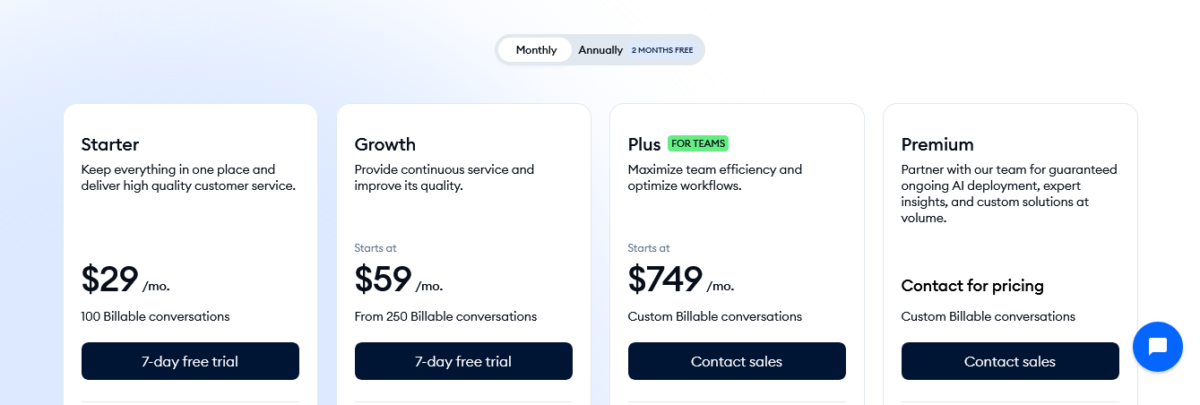
Here’s the actual Tidio review pricing for 2026 with all the hidden costs revealed:
Core Plans
| Plan | Monthly | Annual (Monthly) | Conversations | What You Get |
|---|---|---|---|---|
| Free | $0 | $0 | 50 (lifetime) | 10 agents, basic chat, 50 Lyro chats (one-time), 100 Flow visitors |
| Starter | $29 | $24.17 (~$290/yr) | 100 | Basic analytics, visitor tracking, operating hours |
| Growth | $59-349 | Variable | 250-2,000 | Analytics, permissions, team features |
| Plus | $749+ | Custom | Custom (2,000+) | 10+ agents, API, white-label, priority support |
| Premium | $2,999+ | Custom | Unlimited | Managed AI, guaranteed 50% resolution rate, dedicated manager |
The Add-Ons (Where Real Costs Hide)
| Add-On | Price | What It Does |
|---|---|---|
| Lyro AI | $39/mo (50 convos) to $140+/mo (1,000 convos) | AI handles repetitive questions automatically |
| Flows | $29/mo (2,000 visitors) to $100+/mo (100,000 visitors) | Chatbot automation, lead capture, proactive messaging |
| Branding Removal | $20/mo (on Growth plan) | Removes “Powered by Tidio” from chat widget |
| Extra Conversations | $10-30 per block | When you exceed monthly limits |
Pricing Examples
Scenario 1: Solo E-commerce Store (Low Volume)
- Growth plan: $59/month (250 conversations)
- Lyro AI: $39/month (50 AI conversations)
- Flows: $29/month (2,000 visitors)
- Branding removal: $20/month
- Total: $147/month
Scenario 2: Growing Store (Moderate Volume)
- Growth plan: $150/month (1,000 conversations)
- Lyro AI: $75/month (250 AI conversations)
- Flows: $50/month (10,000 visitors)
- Branding removal: Included at this tier
- Total: $275/month
Scenario 3: Team with 11+ Agents
- Plus plan: $749/month minimum
- Everything included
- Total: $749-1,200/month
Hidden Costs to Watch
- Usage spikes: Black Friday, sales events, and viral posts can spike conversation and Flow costs
- No pro-rated refunds: Downgrade mid-month? Too bad, you paid for the full month
- Unused credits expire: Lyro and Flow quotas don’t roll over monthly
- Scaling trap: Going from 10 to 11 agents means jumping from $59-349 to $749+ monthly
Is Tidio Worth The Money?
My honest Tidio review take: For small businesses handling under 1,000 conversations monthly with under 10 support agents, absolutely yes. The value is real.
For growing businesses approaching those limits, the pricing becomes problematic fast.
Math time: Hiring a full-time support person costs roughly $3,000-4,000 monthly (salary + benefits). Tidio at $150-275 monthly, with Lyro handling 60% of questions, means you can delay that hire significantly.
If Tidio + 1 part-time person handles what would require 2 full-time people, you’re saving $3,000+ monthly. Worth it.
Start 7-Day Free Trial—All Features Unlocked
How Tidio Stacks Up Against Competitors
Let me compare this to tools I’ve actually researched or used in this Tidio review:
Tidio vs. Intercom
Winner: Depends on budget and scale
Intercom wins on:
- More sophisticated AI (Fin AI has higher resolution rates)
- Better for SaaS companies
- Advanced features (product tours, in-app messaging)
- 450+ integrations vs. Tidio’s 120+
- Deeper analytics and reporting
Tidio wins on:
- Price ($59-150 vs $74-300+)
- Easier setup (20 minutes vs. 2 days)
- Better for e-commerce specifically
- Simpler interface for non-technical users
- No scary enterprise pricing jumps
My verdict: Intercom for well-funded SaaS startups who need sophistication. Tidio for bootstrapped e-commerce stores that need affordability.
Tidio vs. Zendesk
Winner: Tidio for SMBs, Zendesk for enterprises
Zendesk wins on:
- Enterprise-grade ticketing system
- Advanced reporting and analytics
- Unlimited agents on most plans
- 1,300+ integrations
- Industry-standard platform (good for hiring)
Tidio wins on:
- Price (Zendesk costs $55-69 per agent monthly)
- Set up speed (Zendesk takes days to configure properly)
- Better AI out-of-the-box (Lyro vs. Zendesk’s basic bots)
- Simpler learning curve
- Better for teams under 10 people
My verdict: If you have 20+ support agents, use Zendesk. If you have 2-8 agents, use Tidio.
Tidio vs. Drift
Winner: Different use cases
Drift wins on:
- Sales-focused features (lead qualification, meeting booking)
- Better for B2B companies
- Advanced chatbot routing
- Sales team collaboration
Tidio wins on:
- Price (Drift starts higher)
- Customer support focus vs. sales
- E-commerce integrations
- Simpler for non-sales teams
My verdict: Drift for B2B sales teams. Tidio for customer support teams.
Tidio vs. Crisp / Freshdesk / HubSpot
Crisp: Similar pricing, less polished AI. Good alternative if you want European servers.
Freshdesk: Free tier is generous, but paid plans get expensive. Better ticketing than Tidio.
HubSpot Service Hub: The free plan is amazing. Paid plans integrate with HubSpot CRM. Choose if you’re already using HubSpot for marketing.
Competitor Comparison Matrix
| Feature | Tidio | Intercom | Zendesk | Drift | HubSpot |
|---|---|---|---|---|---|
| Starting Price | $0-29/mo | ~$74/mo | ~$55/agent | ~$2,500/mo | Free |
| Best For | E-commerce SMBs | SaaS companies | Enterprise | B2B sales | HubSpot users |
| AI Quality | ⭐⭐⭐⭐ (Lyro) | ⭐⭐⭐⭐⭐ (Fin) | ⭐⭐⭐ | ⭐⭐⭐⭐ | ⭐⭐⭐ |
| Setup Time | 20 minutes | 2-3 days | 3-7 days | 1-2 days | 1-2 hours |
| Agent Limit | 10 (self-serve) | Unlimited | Unlimited | Unlimited | Varies |
| E-commerce Focus | ⭐⭐⭐⭐⭐ | ⭐⭐ | ⭐⭐⭐ | ⭐⭐ | ⭐⭐⭐ |
| Reporting | ⭐⭐⭐ Basic | ⭐⭐⭐⭐⭐ Advanced | ⭐⭐⭐⭐⭐ Advanced | ⭐⭐⭐⭐ | ⭐⭐⭐⭐ |
Support faster. Convert smarter. Sleep better. → Start using Tidio
Who Should Use Tidio?
Based on seven months and 500+ conversations in this Tidio review, here’s who benefits most:
✅ Tidio Is Perfect For:
| Your Situation | Why Tidio Works |
|---|---|
| E-commerce stores (Shopify/WooCommerce) | Built for online retail, excellent integrations |
| Solo entrepreneurs | Affordable, easy to manage alone |
| Small teams (2-8 support agents) | Pricing makes sense at this scale |
| Businesses with repetitive questions | Lyro AI shines here (60-70% automation) |
| Service businesses | Consultants, agencies, freelancers |
| Moderate conversation volume (under 2,000/month) | Pricing stays reasonable |
| Non-technical users | Setup is genuinely simple |
| Budget-conscious businesses | Way cheaper than enterprise tools |
Live chat that actually pulls its weight. → Try it in your store
❌ Skip Tidio If You:
| Your Situation | Why Tidio Won’t Work |
|---|---|
| Need 10+ support agents | Price jumps to $749+ monthly |
| Handle massive volume (5,000+ chats/month) | Costs become unpredictable |
| Require advanced ticketing | Zendesk or Freshdesk are better |
| Need enterprise features | Phone support, co-browsing, advanced security |
| Want predictable pricing | Usage-based pricing fluctuates |
| Run a SaaS company | Intercom is purpose-built for SaaS |
| Need comprehensive reporting | Analytics are too basic |
| Hate add-on pricing models | Core features require add-ons |
My Final Take After 500+ Real Conversations
Look, I’m not gonna bullshit you in this Tidio review. Tidio isn’t perfect. The pricing is sneaky. The 10-agent limit is a trap. Lyro AI isn’t magic. Flow billing is confusing. Intercom and Zendesk offer more sophisticated features.
But here’s what Tidio does do exceptionally well: makes professional live chat and AI automation accessible to small businesses without requiring enterprise budgets or technical expertise.
For seven months, Tidio handled 500+ customer conversations across live chat, email, and social messaging. Lyro AI automated 64% of repetitive questions. Customer satisfaction improved from 6.8 to 8.4. Response time dropped from 4 hours to 11 minutes.
Monthly cost: About $175, including all add-ons.
Would I recommend it? Hell yes, but know the real pricing going in.
If you’re a small e-commerce store or service business with under 10 support agents and moderate conversation volume, Tidio is probably the best value on the market.
Just budget for $150-250/month realistically, not the advertised $59. And plan your scaling strategy before you hit that 10-agent wall.
I’ll keep using it because the ROI is clear. Saved 45+ hours of support time monthly. Improved customer satisfaction. Costs less than hiring one part-time support person.
Final Decision Matrix
| Your Monthly Conversation Volume | My Tidio Review Recommendation |
|---|---|
| 0-100 conversations | Maybe – Free plan might work, but limited |
| 100-500 conversations | Yes – Starter or Growth plan makes sense |
| 500-2,000 conversations | Definitely – Sweet spot for Tidio pricing |
| 2,000-5,000 conversations | Yes but watch costs – Pricing gets aggressive |
| 5,000+ conversations | Maybe not – Consider enterprise platforms |
| Team larger than 10 agents | No – Plus plan at $749+ too expensive |
Start Free Trial—7 Days, Everything Unlocked, Zero Risk
FAQs
What is Tidio, and how does it work?
Tidio is a customer communication platform combining live chat, AI chatbots, email, and social messaging in one unified dashboard. The platform installs on websites via a widget or plugin, allowing visitors to chat in real-time with support agents or AI automation.
Tidio includes Lyro AI Agent that handles repetitive questions automatically, visual Flow builders for chatbot automation, and integrations with e-commerce platforms like Shopify and WooCommerce, showing order history and cart contents during conversations.
Is Tidio worth paying for in 2026?
Tidio is worth paying for if you’re a small to medium business handling moderate conversation volume with under ten support agents. At realistic costs of one hundred fifty to two hundred fifty dollars monthly, including necessary add-ons, Tidio delivers strong ROI through reduced response times and AI automation handling sixty to seventy per cent of repetitive questions.
However, businesses needing more than ten agents face steep pricing jumps to seven hundred forty-nine dollars monthly, plus plans, making alternatives more cost-effective.
How much does Tidio really cost in 2026?
Tidio advertises plans from zero to fifty-nine dollars monthly, but real-world costs are significantly higher. The Growth plan at fifty-nine dollars only includes two hundred fifty conversations with essentially zero useful AI or automation.
Adding Lyro AI costs thirty-nine to one hundred forty dollars monthly, Flows costs twenty-nine to one hundred dollars monthly, and branding removal costs twenty dollars monthly.
Realistic total cost for functional setup ranges from one hundred fifty to three hundred dollars monthly, depending on conversation volume and feature needs.
What is Lyro AI, and does it actually work?
Lyro is Tidio’s conversational AI agent that uses GPT-style AI to understand and answer customer questions automatically without manual programming. In real-world testing, Lyro handled sixty to seventy per cent of repetitive questions like return policies, shipping info, and product availability without human intervention.
Lyro learns from your knowledge base, past conversations, and website content, making setup faster than traditional chatbot builders.
However, Lyro struggles with complex troubleshooting, emotional situations, and nuanced questions requiring human judgment.
Can Tidio handle multiple communication channels?
Yes, Tidio’s unified inbox consolidates live chat, email, Facebook Messenger, Instagram DM, and WhatsApp conversations into one dashboard. Support agents see all customer communications in one place, can assign conversations, add internal notes, and track resolution across channels.
The multichannel approach prevents teams from switching between multiple apps.
However, WhatsApp integration requires third-party setup and some limitations exist compared to dedicated WhatsApp business solutions.
What is the 10-agent limit, and how does it affect growing businesses?
All Tidio self-service plans (Free, Starter, Growth) restrict teams to a maximum of ten support agents.
When businesses hire an eleventh agent, they must upgrade to the Plus plan, starting at seven hundred forty-nine dollars monthly, a dramatic price jump from the Growth plan’s fifty-nine to three hundred forty-nine dollars range.
This creates a scaling trap for growing businesses, especially seasonal operations needing temporary additional support during busy periods like Black Friday or tax season.
How does Tidio compare to Intercom?
Tidio offers better value for small businesses and e-commerce stores with a simpler setup and lower costs starting around fifty-nine to one hundred fifty dollars monthly, versus Intercom’s seventy-four to three hundred dollars monthly.
Intercom provides more sophisticated AI through Fin Agent, four hundred fifty integrations versus Tidio’s one hundred twenty, and better SaaS-specific features. Tidio wins on affordability, e-commerce integrations, and ease of use for non-technical teams.
Choose Intercom for well-funded SaaS companies; choose Tidio for bootstrapped e-commerce operations.
Does Tidio work well with Shopify and WooCommerce?
Yes, Tidio excels with Shopify and WooCommerce through native integrations showing customer order history, cart contents, and purchase behavior directly in chat conversations.
Support agents can check order status, apply discount codes, or issue refunds without leaving the Tidio interface. Installation takes approximately three minutes via the app marketplace.
The e-commerce focus makes Tidio particularly valuable for online stores compared to general-purpose support platforms not designed specifically for retail operations.
What are Tidio Flows, and how much do they cost?
Flows are Tidio’s visual chatbot builders, allowing creation of automated conversation paths like welcome messages, lead qualification, cart abandonment recovery, and customer routing.
Flows charge by visitors reached rather than interactions, if ten thousand visitors see your Flow but only two hundred interact, you pay for ten thousand. Flows cost twenty-nine dollars monthly for two thousand visitors, scaling to one hundred dollars monthly for one hundred thousand visitors.
This visitor-based billing can create unexpectedly high costs during traffic spikes from promotions or paid advertising.
Can I remove Tidio branding from the chat widget?
Yes, but branding removal costs an additional twenty dollars monthly on Growth plans or comes included on Plus and Premium plans. The default chat widget displays “Powered by Tidio”, which many businesses consider unprofessional for customer-facing communications.
This effectively adds twenty dollars to the advertised Growth plan pricing for businesses wanting custom-branded experiences. The branding removal paywall is common among freemium support platforms, but still frustrating for budget-conscious small businesses.
How does Tidio pricing compare to Zendesk?
Tidio uses volume-based pricing, charging for conversations handled, while Zendesk uses seat-based pricing charging per support agent. Tidio Growth plan costs fifty-nine to three hundred forty-nine dollars monthly total, regardless of agent count (up to ten agents).
Zendesk costs approximately fifty-five to sixty-nine dollars per agent monthly, meaning ten agents cost five hundred fifty to six hundred ninety dollars monthly.
Tidio is cheaper for small teams with moderate volume; Zendesk becomes more cost-effective for large teams with unlimited conversation needs.
Does Tidio offer phone support?
No, Tidio does not include phone support capabilities. The platform focuses exclusively on live chat, email, and social messaging channels.
Businesses needing phone support must use separate tools or choose platforms like Zendesk, Freshdesk, or LiveAgent that include call centre features.
Tidio’s lack of phone support makes it unsuitable for businesses where customers prefer calling over chatting or emailing.
What happens if I exceed my conversation limit?
When you exceed your monthly conversation limit, Tidio stops handling new conversations until you upgrade to a higher tier or purchase additional conversation blocks costing ten to thirty dollars, depending on your plan.
Unlike some platforms that auto-charge overages, Tidio requires manual action to continue service. This protects from surprise billing but also means customer communications could be disrupted if you hit limits unexpectedly during busy periods without monitoring usage closely.
Is Tidio suitable for B2B companies?
Tidio works for B2B companies but isn’t optimised for complex B2B sales processes like Drift or Intercom.
The platform lacks advanced lead scoring, sophisticated routing rules, and deep CRM integration required by enterprise B2B sales teams. Small B2B service businesses (consultants, agencies, freelancers) find Tidio perfectly adequate for customer communication.
Large B2B enterprises with multi-stage sales funnels should consider Drift, Intercom, or HubSpot instead.
Can Tidio integrate with my existing CRM?
Yes, Tidio integrates with popular CRMs, including HubSpot, Salesforce (via Zapier), and others through one hundred twenty direct integrations plus thousands more via Zapier connection.
However, integrations are less sophisticated than platforms built specifically around CRM workflows. Data syncing is possible but requires setup and may not offer the seamless two-way communication that enterprise platforms provide.
Small businesses using basic CRM features find Tidio integrations sufficient; enterprises with complex CRM requirements may need more robust solutions.
Does Tidio have a free plan, and is it useful?
Yes, Tidio offers a free plan with fifty lifetime conversations, ten agent seats, basic live chat, one-time Lyro AI conversations, and one hundred Flow visitors monthly.
The free plan works for testing Tidio’s interface and features, but is essentially useless for ongoing business operations due to the fifty lifetime conversation limit. Most businesses exhaust the free quota within days or weeks.
The seven-day premium trial provides a better evaluation opportunity with all features unlocked temporarily.
Partying shot: This Tidio review shows it’s an excellent live chat platform for small e-commerce stores and service businesses needing affordable customer communication tools with AI automation. Lyro AI genuinely reduces support workload by sixty to seventy per cent for repetitive questions.
But the pricing model is misleading, expect to pay one hundred fifty to two hundred fifty dollars monthly, realistically, not the advertised fifty-nine dollars. The ten-agent limit creates a brutal scaling trap, forcing businesses into seven-hundred-forty-nine-dollar monthly enterprise plans when hiring just one more support person.
Ready to test it yourself? Grab the seven-day free trial with all premium features unlocked. No credit card required. See if Tidio fits your workflow and calculate real costs based on your actual conversation volume before committing.
Pro tip: Use the trial to track exactly how many conversations you handle, how many Lyro could automate, and how many Flow visitors you’d reach. Then, calculate real monthly costs using Tidio’s pricing calculator before the trial ends.
Mia