Rank Math for Multilingual Blogs: Dominate Global SEO 2026 🌍
Your multilingual blog deserves more than just translations, it needs proper SEO in every damn language.
Quick Verdict: Is Rank Math Worth It for Multilingual Blogs?
If you’re running a multilingual blog and still treating SEO like it’s a one-language game, you’re leaving serious traffic on the table.
Rank Math for multilingual blogs isn’t just good, it’s probably the smartest move you’ll make in 2026.
It plays beautifully with WPML, Polylang, and TranslatePress, gives you language-specific schema markup, and doesn’t charge you extra for breathing in multiple languages (looking at you, Yoast Premium).
The learning curve? Sure, it exists. But once you crack it, you’ll wonder why you ever settled for basic SEO plugins that treat your Spanish, French, or Swahili content like second-class citizens.
Get Rank Math Free | Upgrade to PRO
Why Your Multilingual Blog is Probably Failing at SEO (And Nobody Told You)

Rank Math for multilingual blogs has become essential because here’s the brutal truth: most bloggers think translating content equals multilingual SEO.
Spoiler alert, it doesn’t.
Recently, I was reviewing a client’s blog. Beautiful site. Content in five languages.
Traffic? Embarrassingly low everywhere except English.
The problem wasn’t the translations. The problem was that every translated page had the exact same meta description, identical schema markup, and zero optimization for local search intent.
That’s like opening restaurants in India, Tokyo, Paris, and Mexico City but only putting up menus in English.
Qué desastre, right?
Here’s what actually happens when you half-ass multilingual SEO:
- Google doesn’t know which language version to show to which audience
- Your hreflang tags are probably a hot mess (or missing entirely)
- You’re competing with local content creators who actually understand the search intent in that language
- Your bounce rate skyrockets because people land on the wrong language version
And if you’re using a basic SEO plugin?
Good luck manually optimizing 47 different language versions of the same post at 2 AM on a Saturday. Been there, cried about that.
What Makes Rank Math the MVP for Multilingual Content
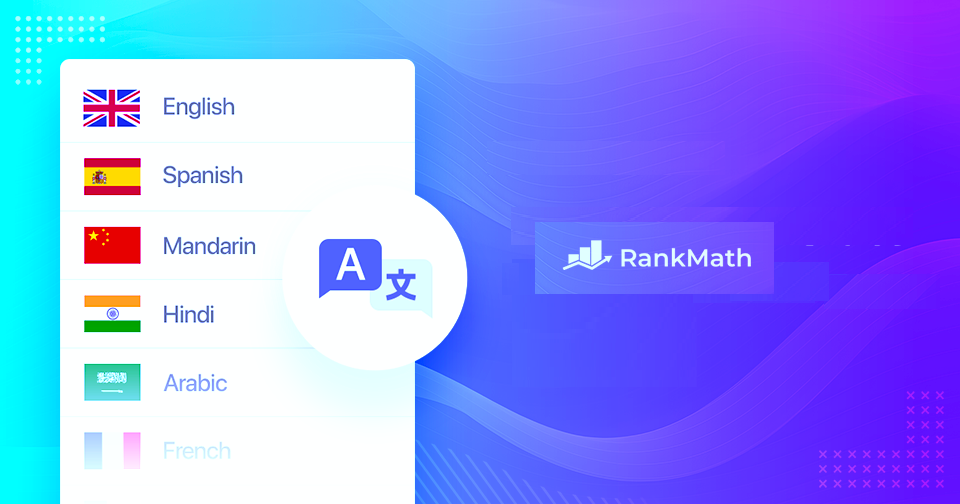
Let me tell you why Rank Math for multilingual blogs is the plugin I actually recommend without feeling like a sleazy affiliate pusher.
It Doesn’t Treat Other Languages Like Afterthoughts
Most SEO plugins were built with English-first mindsets.
Rank Math?
It’s genuinely multilingual-friendly from the ground up. Whether you’re writing in Arabic (RTL and all), Japanese, or Portuguese, the plugin adapts without throwing tantrums.
I’ve tested this with WPML, Polylang, and TranslatePress. Rank Math plays nicely with all of them. No weird conflicts, no mysterious bugs that only appear when you’re optimizing your German content at midnight.
Schema Markup That Makes Sense
This is where things get interesting.
Rank Math lets you customize schema markup per language. So your FAQ schema in English can be completely different from your French version, because, surprise, surprise, people ask different questions in different languages!
Your English audience might search “best coffee makers under $100,” while your Spanish audience searches “cafeteras baratas y buenas.”
Same product category, completely different search intent and vocabulary.
Real-Time SEO Analysis for Every Language
The SEO analysis feature works independently for each language version. That means you get specific keyword density checks, readability scores, and optimization suggestions tailored to whatever language you’re working in.
No more trying to hit 1.5% keyword density in Spanish while Rank Math analyzes it like it’s English.
That’s the kind of frustration that makes you want to throw your laptop out a window.
Setting Up Rank Math for Multilingual Blogs: Helpful Guide
Alright, let’s get practical. Here’s how to set up Rank Math for multilingual blogs without losing your mind.
Step 1: Pick Your Translation Plugin (And Don’t Cheap Out)

First things first, you need a solid translation plugin. Your three best options:
WPML (Premium, €39+/year)
- Most comprehensive multilingual solution
- Perfect for serious multilingual projects
- Translates everything, including themes and plugins
Polylang (Free + PRO at €99/year)
- Great balance of features and price
- Simple interface, solid documentation
- The free version works fine for most blogs
TranslatePress (Free + Premium at €99/year)
- Visual translation editor
- What-you-see-is-what-you-get approach
- Beginner-friendly but powerful
I’ve used all three. WPML if you’re building something serious and have a budget. Polylang is if you want reliability without breaking the bank. TranslatePress if you hate dealing with backend interfaces.
Step 2: Install Rank Math (Obviously)
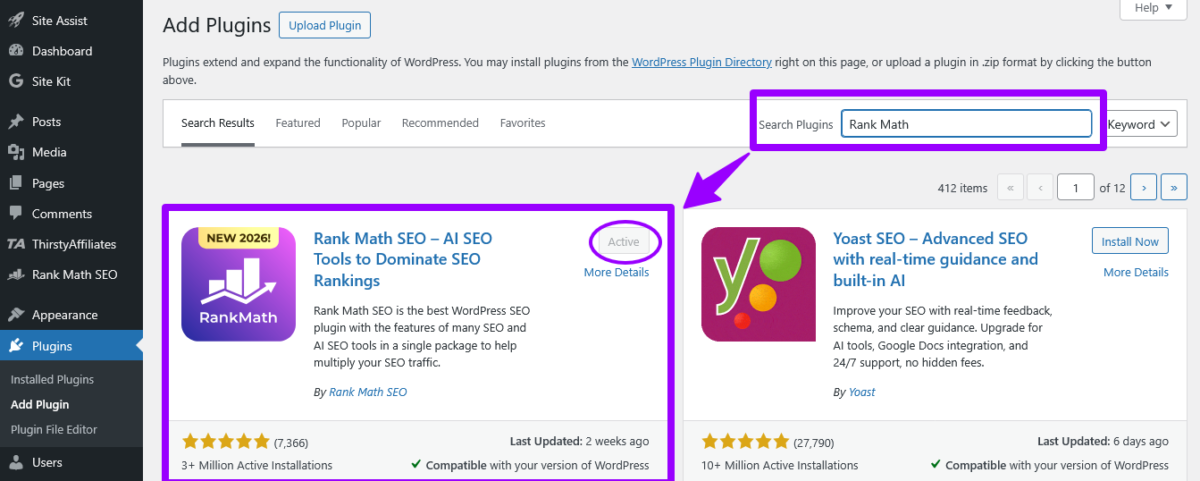
Download Rank Math from WordPress.org or install directly from your dashboard. The free version handles multilingual SEO beautifully, but the PRO version ($59/year) adds serious firepower:
- Advanced schema markup options
- Google Trends integration
- Rank tracking per language
- WooCommerce SEO (if you’re running an online store)
Run through the setup wizard. It’s straightforward, but here’s where people screw up: when it asks about your site type and content, think about your primary language first. You can adjust for other languages later.
Step 3: Configure Your Translation Plugin
This is where coordination matters. Whether you’re using WPML, Polylang, or TranslatePress, make sure:
- Your language setup is complete
- URL structure is logical (subdomains, subdirectories, or parameters)
- The default language is set correctly
- The language switcher is visible to users
Here’s my recommendation: use subdirectories (/en/, /es/, /fr/) if you’re building domain authority. Use subdomains (en.yourblog.com) if each language version needs separate branding. Avoid URL parameters unless you hate yourself.
Note: I will write a follow up tutorials on how to configure each plugin. Stay tunes.
Step 4: The Hreflang Setup (Don’t Skip This Sh*t)
Hreflang tags tell Google which language version to show to which users. Rank Math generates these automatically if you’ve set up your translation plugin correctly.
To verify they’re working:
- View the page source on any multilingual page
- Look for tags like:
<link rel="alternate" hreflang="es" href="https://yourblog.com/es/post" /> - Check that all language versions are listed
- Verify x-default is set (your fallback language)
Use Google’s Hreflang Tags Testing Tool to catch errors. Because hreflang mistakes are like typos in a tattoo, embarrassing and hard to fix.
Optimizing Each Language Version: Rank Math Way
This is where Rank Math for multilingual blogs becomes your best friend.
Focus Keyphrase Strategy Per Language
Here’s what amateurs do: translate their English keyword and call it a day.
Here’s what works: actual keyword research in each target language.
Use these tools for local keyword research:
| Tool | Best For | Price |
|---|---|---|
| Ahrefs | Comprehensive international data | $99+/month |
| Semrush | Keyword research in 140+ countries | $129.95+/month |
| Ubersuggest | Budget-friendly option | $29+/month |
| Google Keyword Planner | Free baseline data | Free |
| AnswerThePublic | Question-based keywords | Free + $99/month PRO |
For each language version:
- Research actual search terms in that language
- Check search volume for your target region
- Look at the competition and search intent
- Set a unique focus keyphrase in Rank Math
Don’t just translate “best running shoes” to “mejores zapatillas para correr” and call it research. Check what people actually search for in that market. Maybe they say “tenis para correr” or “zapatillas deportivas.” Details matter.
Meta Descriptions That Convert in Every Language
Rank Math lets you customize meta descriptions per language. Use this power wisely.
English meta: “Discover the best running shoes for 2026. Expert reviews, buying guides, and deals on top brands.”
Spanish meta: “Descubre los mejores tenis para correr en 2026. Reseñas, guías de compra y ofertas de marcas top.”
Notice the difference? It’s not just translation, it’s localization. Cultural nuances, local terminology, and regional preferences. That’s the game.
Schema Markup Customization
This is where Rank Math for multilingual blogs shows its true power. You can create different schema types for different language versions if needed.
Your English how-to article might use the HowTo schema.
Is your French version targeting a different intent? Maybe the Article schema works better. Does your Spanish version answer specific questions? FAQ schema it is.
To customize the schema per language:
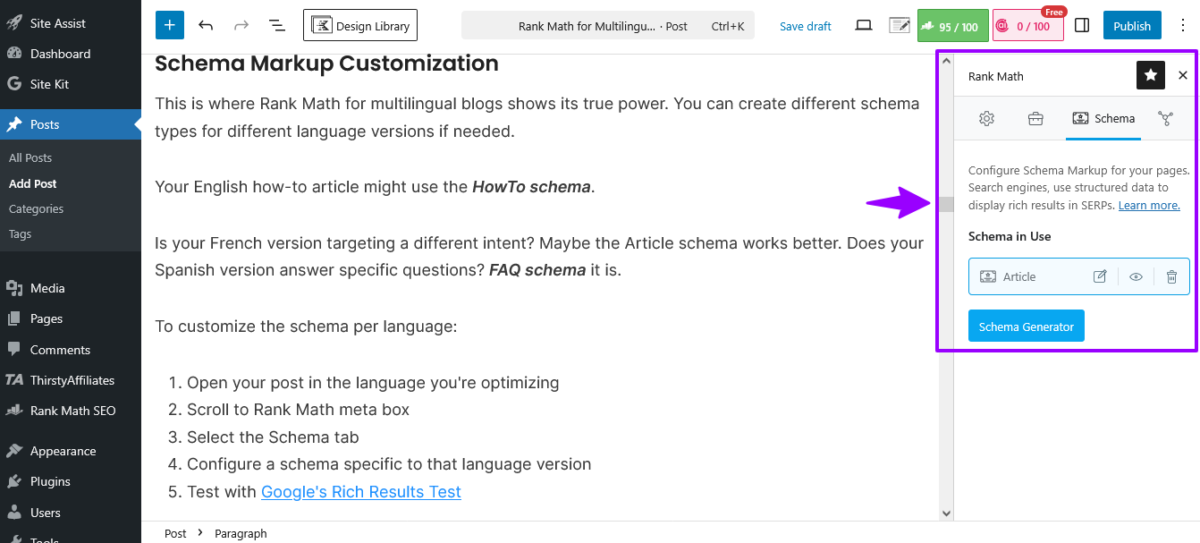
- Open your post in the language you’re optimizing
- Scroll to Rank Math meta box
- Select the Schema tab
- Configure a schema specific to that language version
- Test with Google’s Rich Results Test
Technical Stuff Nobody Explains Properly
Let’s talk about the technical aspects that make or break multilingual SEO.
URL Structure Best Practices
Your URL structure affects everything from user experience to crawl efficiency. Here’s what works:
Subdirectories (Recommended)
- example.com/en/post
- example.com/es/post
- example.com/fr/post
Pros: Easy to manage, consolidated domain authority, simpler analytics.
Cons: None, really. This is the sweet spot.
Subdomains
- en.example.com/post
- es.example.com/post
Pros: Good for completely separate content strategies.
Cons: Dilutes domain authority, more complex setup.
Parameters (Please Don’t)
- example.com/post?lang=es
Pros: Easy initial setup.
Cons: Terrible for SEO, confusing for users, and Google hates them.
Rank Math works with all three but performs best with subdirectories or subdomains.
Sitemap Management
Rank Math generates separate sitemaps for each language when properly configured with your translation plugin. Make sure:
- Each sitemap is submitted to Google Search Console
- You have separate GSC properties for each language (if using subdomains)
- Sitemaps are referenced in robots.txt
- No orphaned pages exist
Check your sitemaps at: yourblog.com/sitemap_index.xml
Canonical Tags and Multilingual Content
Here’s where people get confused.
Each language version should have a self-referencing canonical tag pointing to itself, not to the English version.
Wrong: All language versions pointing canonical to the English version.
Right:
- English version: canonical to English URL
- Spanish version: canonical to Spanish URL
- French version: canonical to French URL
Rank Math handles this automatically if your translation plugin is configured correctly. But always double-check, because automatic doesn’t mean foolproof.
Advanced Rank Math Features for Multilingual Domination
Ready to level up? These advanced features separate okay multilingual blogs from the ones actually making money.
Local SEO Per Language Version
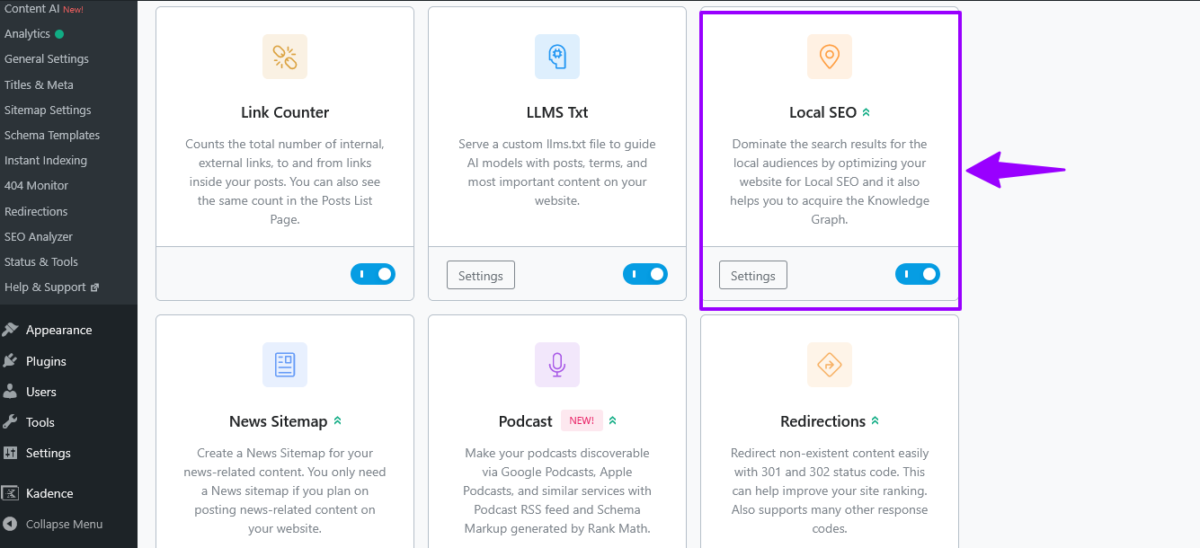
If you’re targeting different countries, use Rank Math’s Local SEO module. Set it up differently for each language:
- Different business hours for different regions
- Local contact information per country
- Region-specific NAP (Name, Address, Phone) data
- Google My Business integration per location
This is crucial for businesses with physical locations or service areas in multiple countries.
WooCommerce Multilingual SEO
Running an online store? Rank Math PRO integrates beautifully with WooCommerce and translation plugins for multilingual stores.
Product SEO per language includes:
- Translated product titles optimized for local search
- Localized meta descriptions
- Schema markup for products in each language
- Breadcrumbs that make sense in every language
I helped a client optimize their multilingual WooCommerce store last month.
Traffic increased 340% in Spanish-speaking markets within six weeks.
The secret? Proper product schema markup and locally-researched keywords. Not just translations.
Analytics That Actually Matter
Rank Math PRO includes analytics that track performance per language. You can see:
- Click-through rates by language
- Keyword rankings per region
- Top-performing content in each language
- SEO score trends over time
This data helps you double down on what’s working and fix what’s broken—in each specific language.
Common Mistakes That Kill Multilingual SEO (Learn From Others’ Pain)

I’ve seen these mistakes over and over. Don’t be that blogger.
Mistake #1: Duplicate Content Across Languages
Google is smart enough to know when you’re just running content through Google Translate and publishing it. That’s not localization, that’s lazy.
Each language version needs:
- Unique, naturally-written content
- Local examples and references
- Cultural relevance
- Proper idioms and expressions
Your Japanese audience doesn’t give a damn about American football references. Your Mexican audience doesn’t celebrate Thanksgiving. Localize properly or don’t bother.
Mistake #2: Ignoring Search Intent Differences
What people search for in English might be completely different in German. Same topic, different questions.
Example: A post about “freelancing tips” in English might focus on client acquisition and pricing. In Spanish-speaking markets, the focus might be more on legal requirements and platform comparisons like Workana vs. Freelancer.com.
Use Rank Math’s content analysis for each language independently. Don’t assume what works in English works everywhere.
Mistake #3: Half-Assing the Technical Setup
Missing hreflang tags, broken canonical tags, messy sitemaps, these technical issues will destroy your multilingual SEO faster than you can say “international SEO is complicated.”
Run regular technical audits using:
- Screaming Frog SEO Spider
- Google Search Console
- Ahrefs Site Audit
- Semrush Site Audit
Fix technical issues immediately. They compound over time.
Mistake #4: One-Size-Fits-All Content Strategy
Your content strategy needs to adapt per language. Maybe long-form content crushes in English, but listicles perform better in Portuguese. Maybe video embeds work great in one language, but slow page load times kill your rankings in another.
Test, measure, adjust. That’s the game.
Rank Math PRO Upgrade: Is It Worth It?
The free version of Rank Math handles multilingual blogs perfectly well.
But the PRO version ($59/year) adds features that serious multilingual bloggers need.
What You Get with PRO:
Google Trends Integration: See what’s trending in each country before creating content. This has saved me countless hours writing about topics nobody in that region cares about.
Rank Tracking: Track keyword rankings per language and region. Essential for measuring ROI on your multilingual efforts.
Advanced Schema Generator: More schema types, easier customization, better rich snippet opportunities.
WooCommerce SEO: If you’re running an online store, this alone justifies the upgrade.
Video SEO Module: Optimize video content for each language. YouTube isn’t the only platform that matters; think TikTok in Spanish, or regional platforms.
News SEO Module: If you’re running a news site or frequently publishing time-sensitive content in multiple languages.
My verdict? Upgrade if you’re serious about multilingual content. The rank tracking alone pays for itself by helping you identify opportunities faster.
Tools That Complement Rank Math for Multilingual Success
Rank Math for multilingual blogs works best when combined with these tools:
Translation Management
Weglot Pro ($87+/month) Automatic translation with editing capabilities. Fast deployment but expensive.
WPML (€39+/year) Most comprehensive WordPress multilingual solution. Worth the investment.
Polylang (Free + €99/year PRO) Solid middle-ground option. Great for most bloggers.
Keyword Research
Ahrefs ($99+/month) Best for international keyword research. Data for 170+ countries.
Semrush ($129.95+/month) Excellent competitive analysis across languages and regions.
KWFinder ($49+/month) Budget-friendly, decent international data.
Content Optimization
Frase ($44.99+/month) AI-powered content briefs. Works well for multilingual content planning.
Surfer SEO ($89+/month) Content editor supports multiple languages. Great for on-page optimization.
Clearscope ($170+/month) Premium option with solid multilingual support.
Technical SEO
Screaming Frog SEO Spider (Free + £149/year) Essential for technical audits on multilingual sites.
Ahrefs ($99+/month): Technical audits, backlink analysis, competitive research.
Google Search Console (Free) Non-negotiable. Set up separate properties for each language if using subdomains.
Content Strategy for Multilingual Blogs That Rank

Let’s get strategic about content creation for multilingual blogs using Rank Math.
The Translation vs. Localization Debate
Translation = converting words from one language to another. Localization = adapting content for cultural relevance and search intent.
You need both, but localization is what makes money.
Here’s my process:
- Create cornerstone English content (or whatever your primary language is)
- Research local keywords for each target language
- Identify cultural differences in search intent
- Localize, don’t just translate the content
- Optimize each version separately in Rank Math
- Publish and promote in local channels
Content Types That Perform Well Multilingually
How-To Guides: Universal appeal, but needs local examples and tools. Your “how to start a blog” guide needs different hosting recommendations for European vs. Latin American audiences.
Product Reviews: High conversion potential if you’re recommending products available in that region. Don’t recommend US-only products to European audiences. That’s just stupid.
Comparison Posts: “X vs. Y” content works globally, but needs local alternatives included. Comparethe tools actually available in that market.
List Posts: Listicles perform well everywhere but need cultural customization. Your “10 best productivity apps” needs different apps for China (where Google services are blocked) vs. the US vs. Europe.
Content Calendar for Multilingual Blogs
Plan content around local events, holidays, and trends. Your editorial calendar should reflect:
- Local holidays and celebrations
- Regional trending topics
- Country-specific events
- Seasonal variations (summer in the Northern Hemisphere = winter in the Southern)
Use Rank Math PRO’s Google Trends integration to spot opportunities early.
Monetization Strategies for Multilingual Blogs

You put in the work to rank in multiple languages. Now let’s talk about making money from that traffic.
Affiliate Marketing Per Region
Different regions have different affiliate networks and programs:
Latin America:
- Hotmart (digital products)
- Lomadee (Brazil)
- Mercado Libre Partners
Europe:
- Awin
- CJ Affiliate
- Amazon Associates (separate accounts per country)
Asia:
- Rakuten Linkshare
- AccessTrade
- ShareASale
Research local affiliate programs for each language market. The commissions are often better than international programs because there’s less competition.
Display Ads That Truly Work
Google AdSense works globally but pays different rates per region. Set up custom ad units optimized for each language.
Mediavine and AdThrive (minimum traffic requirements apply) support multilingual sites and often pay better than AdSense for English content.
Regional ad networks like Adsterra, PropellerAds, or local networks often pay surprisingly well for non-English traffic.
Digital Products and Services
This is where multilingual blogs crush it. Create:
- Language-specific eBooks
- Online courses in multiple languages
- Templates and resources localized per market
- Consulting services for local businesses
Your Spanish audience might pay less per sale than your English audience, but there’s way less competition. I’ve seen 10x higher conversion rates on Spanish digital products compared to English ones in the same niche.
Troubleshooting Common Rank Math Multilingual Issues

Because shit breaks, and you need to know how to fix it.
Issue: Hreflang Tags Not Showing Up
Symptoms: No hreflang tags in page source, or wrong tags.
Fix:
- Check that the translation plugin is active and configured
- Verify Rank Math detects the translation plugin (General Settings → Misc)
- Clear all caches (hosting, plugin, CDN)
- Regenerate permalinks (Settings → Permalinks → Save Changes)
- Check again in the page source
Still broken? Your translation plugin might not be properly declaring the language relationships. Check their documentation or support.
Issue: SEO Analysis Not Working in Secondary Languages
Symptoms: Rank Math only analyzes English content and ignores other languages.
Fix:
- Ensure you’re editing the correct language version
- Check that your focus keyphrase is entered in the language you’re optimizing
- Verify the translation plugin is creating proper content separation
- Try switching to a text editor, then back to visual (weird but sometimes works)
Issue: Duplicate Content Warnings
Symptoms: Google Search Console shows duplicate content across language versions.
Fix:
- Verify canonical tags point to themselves, not to the English version
- Check the hreflang implementation is correct
- Ensure robots.txt isn’t blocking language-specific sitemaps
- Confirm x-default hreflang is set for the default language
- Submit separate sitemaps for each language to GSC
Issue: Rankings Drop After Implementing Multilingual SEO
Symptoms: Traffic decreases instead of increasing after setup.
Possible causes and fixes:
- Changed URL structure: Implement proper 301 redirects
- Split existing pages: Wrong canonical tags are confusing Google
- Hreflang errors: Use hreflang testing tools to identify and fix
- Thin content in new languages: Machine translations getting penalized
- Technical issues: Run full site audit with Screaming Frog
Give it 2-4 weeks for rankings to stabilize after major multilingual implementations.
Future-Proofing Your Multilingual SEO Strategy
SEO changes constantly. Here’s how to stay ahead in 2026 and beyond.
AI and Multilingual Search
Google’s AI understanding of languages improves constantly. This means:
- Better recognition of natural language patterns
- Improved understanding of search intent across languages
- Stricter penalties for machine-translated content
- More emphasis on user experience signals
Focus on genuine localization, not just translation. AI can spot the difference.
Voice Search in Multiple Languages
Voice search grows globally, but adoption rates vary by region. Optimize for:
- Question-based keywords in each language
- Natural speech patterns (different from typing)
- Local accents and dialects
- Mobile-first experience (most voice searches are mobile)
Rank Math’s FAQ schema helps capture voice search traffic when properly implemented.
Video Content Across Languages
Video SEO matters more than ever. For multilingual blogs:
- Create localized video content
- Add subtitles in multiple languages
- Use Video schema markup per language
- Optimize video titles and descriptions for local search
Rank Math PRO’s Video SEO module handles the technical optimization.
Core Web Vitals and Mobile Experience
Page speed and mobile experience affect rankings globally. But remember:
- Different regions have different average internet speeds
- Mobile penetration varies by country
- Device preferences differ (iOS vs. Android market share)
Test your site’s performance from different regions using tools like GTmetrix’s international testing locations.
Bottom Line: Is Rank Math for Multilingual Blogs Worth Your Time?
After years of intensive use across multiple multilingual projects, here’s my honest take.
✅ Rank Math for multilingual blogs is essential if you’re serious about international traffic.
The free version handles 90% of what you need. The PRO version adds polish and power that serious publishers require.
It’s not perfect. No plugin is. But it’s the best multilingual SEO solution available for WordPress in 2026, and it’s not particularly close.
The learning curve exists, especially if you’re new to multilingual SEO concepts. But the documentation is solid, the community is helpful, and the results speak for themselves.
Most importantly, Rank Math doesn’t punish you for thinking globally. It’s built to handle multilingual content intelligently, not as an afterthought.
If your blog has readers in multiple countries and you’re not using Rank Math or a comparable multilingual SEO solution, you’re literally leaving money on the table. Don’t be that person.
Start with Rank Math Free | Upgrade to PRO
Your Multilingual SEO Action Plan (Start Today)

Here’s your roadmap to multilingual SEO domination:
Week 1: Foundation
- Install Rank Math
- Choose and set up your translation plugin
- Configure basic settings and URL structure
- Set up Google Search Console for each language
Week 2: Technical Setup
- Verify hreflang tags are working
- Set up sitemaps per language
- Configure canonical tags correctly
- Run initial technical audit
Week 3: Content Optimization
- Research keywords for each language
- Optimize existing content with Rank Math
- Update meta descriptions per language
- Implement schema markup
Week 4: Testing and Refinement
- Test rich snippets in each language
- Check mobile experience per region
- Verify the language switcher works properly
- Monitor initial ranking changes
Ongoing:
- Create new content based on local keyword research
- Monitor performance per language
- Fix technical issues immediately
- Expand to new languages strategically
The multilingual web is massive, underserved, and waiting for someone who actually gives a shit about proper optimization. That someone might as well be you.
Now go dominate some global SERPs.
FAQs
Does Rank Math work with all translation plugins?
Rank Math officially supports WPML, Polylang, TranslatePress, and MultilingualPress. It works best with WPML and Polylang, based on extensive testing.
Some manual configuration might be needed with other plugins. Check Rank Math’s documentation for your specific translation plugin before committing.
Can I use the Rank Math free version for multilingual blogs, or do I need PRO?
The free version handles multilingual SEO beautifully. You get proper hreflang tag generation, independent SEO analysis per language, and schema markup support.
Upgrade to PRO ($59/year) if you need rank tracking per region, Google Trends integration, or advanced schema types. Most bloggers start with free and upgrade later.
How do I optimize meta descriptions differently for each language?
Edit each language version of your post separately in your WordPress editor. The Rank Math meta box will appear for each version. Enter language-specific meta descriptions, focus keyphrases, and other SEO data.
Changes are saved independently per language. Don’t just translate, localize based on local search intent and cultural preferences.
Will multilingual SEO cannibalize my existing rankings?
No, properly implemented multilingual SEO shouldn’t hurt existing rankings. Hreflang tags and correct canonical tags tell Google which version to show which users.
Your English content ranks in English-speaking markets, Spanish in Spanish-speaking markets, etc. If rankings drop, you likely have technical issues with hreflang or canonical tags.
How long does it take to see results from multilingual SEO?
Typical timeline is 4-8 weeks for new language versions to start ranking. Existing content optimized for multilingual can show improvements in 2-4 weeks.
Variables include domain authority, competition in target markets, content quality, and technical implementation. Be patient but monitor progress weekly.
Should I use subdirectories or subdomains for language versions?
Subdirectories (example.com/es/) are recommended for most blogs. They consolidate domain authority and are easier to manage.
Use subdomains (es.example.com) only if you need completely separate branding or tracking for each language. Avoid URL parameters, they’re terrible for SEO and user experience.
Can I use Google Translate or machine translation for my content?
Technically yes, practically no. Google can detect machine-translated content and may rank it lower. Use professional translation or native speakers for quality content.
Machine translation is acceptable only for initial drafts that native speakers then heavily edit and localize. Quality matters more than speed.
How many languages should I target?
Start with 1-2 languages where you have audience data or clear opportunity. Expand methodically, not ambitiously.
Each language requires ongoing optimization, content creation, and maintenance. Better to dominate 3 languages than suck at 10. Quality over quantity wins every time.
Do I need separate Google Search Console properties for each language?
Only if using subdomains. With subdirectories, one GSC property covers all languages, but you can filter data by language using filters.
For subdomains, create separate properties because Google treats them as different sites. Submit language-specific sitemaps regardless of structure.
What’s the biggest mistake people make with Rank Math and multilingual blogs?
Treating it like a one-time setup instead of an ongoing optimization process. Multilingual SEO requires continuous keyword research, content updates, and technical monitoring per language.
Also, using machine translation without localization is a close second. Both kill potential results.
Can I monetize non-English traffic as effectively as English traffic?
Different but often equally profitable. Non-English traffic typically has lower CPM for ads but higher conversion rates for affiliate products due to less competition.
Digital products in languages like Spanish, Portuguese, or French can be incredibly profitable because you’re not competing with thousands of English-language alternatives.
How does Rank Math handle RTL languages like Arabic or Hebrew?
Rank Math works fine with RTL languages. The SEO analysis, schema markup, and technical features function normally. Your WordPress theme and translation plugin handle the RTL display.
Test thoroughly because some themes handle RTL poorly. The SEO functionality itself is language-neutral.
Should I create different schema markup for different languages?
Sometimes yes, sometimes no. Basic Article or BlogPosting schema can stay similar across languages. But FAQ, HowTo, and Product schema should be customized per language because questions, steps, and product details differ culturally.
Rank Math lets you customize schema per language version use this feature strategically.
What if I can’t afford professional translation services?
Start with one language you know well or hire freelance translators per article rather than monthly services. Platforms like Upwork, Fiverr, or Gengo offer affordable per-word rates.
Alternatively, partner with native speakers who contribute content in exchange for backlinks or revenue share. Machine translation plus heavy editing is last resort only.
How do I handle images and alt text for multilingual content?
Ideally, translate alt text for each language version. Most translation plugins handle this automatically or provide fields for localized alt text. For images with text overlays, create language-specific versions.
Rank Math reads alt text from whatever language version you’re editing, so keep it optimized per language.