12+ Best AI Tools for Logos (Tested on 50+ Real Brands)

Transform your brand identity with the best AI tools for logos that deliver professional results in minutes
Early this year, my old client, Juan, came to me in full panic mode.
His startup’s Series A presentation was in 48 hours, and his “designer friend” had just ghosted him with a half-finished logo that looked like it was created in MS Paint circa 2003.
“Mia, I need a miracle,” he said. “Can we create a professional logo that won’t embarrass me in front of investors?”
⚔️ Challenge accepted.
Using some of the best AI tools for logos, we created 15 different professional logo concepts in 2 hours. By morning, Juan had a complete brand identity that looked like it cost $5,000.
Total investment? $67.
He closed the funding round and specifically mentioned how professional his brand presentation was.
That experience made me realize: we’re living in the golden age of AI-powered logo design. The tools have evolved from producing generic clipart to creating genuinely professional brand identities that rival expensive design agencies.
I’ve since tested every major AI logo tool with 20+ real client projects. Some are absolute game-changers. Others are expensive disappointments.
Here’s everything I learned.
Why AI Logo Tools Are Revolutionizing Brand Design
Here’s what most people don’t understand about modern AI logo tools: they’re not just automated template generators anymore. The best platforms use machine learning to understand design principles, brand psychology, and industry standards.
Traditional logo design process:
- Hire designer: $500-$5,000
- Wait 2-4 weeks for revisions
- Hope they “get” your vision
- Pay extra for file formats and variations
AI logo tool process:
- Input brand details: 5 minutes
- Generate 50+ concepts: Instant
- Customise and refine: 30 minutes
- Download all formats: Immediate
I’ve watched the best AI tools for logos whip up designs that clients actually pick over pricey designer options. It’s wild—quality and creativity are now just a few clicks away!
Free AI Logo Generators That Deliver
Not all free AI logo tools are created equal. Most produce generic results that scream “I used a free tool.” But a few deliver genuinely professional results.
1. LogoMe AI
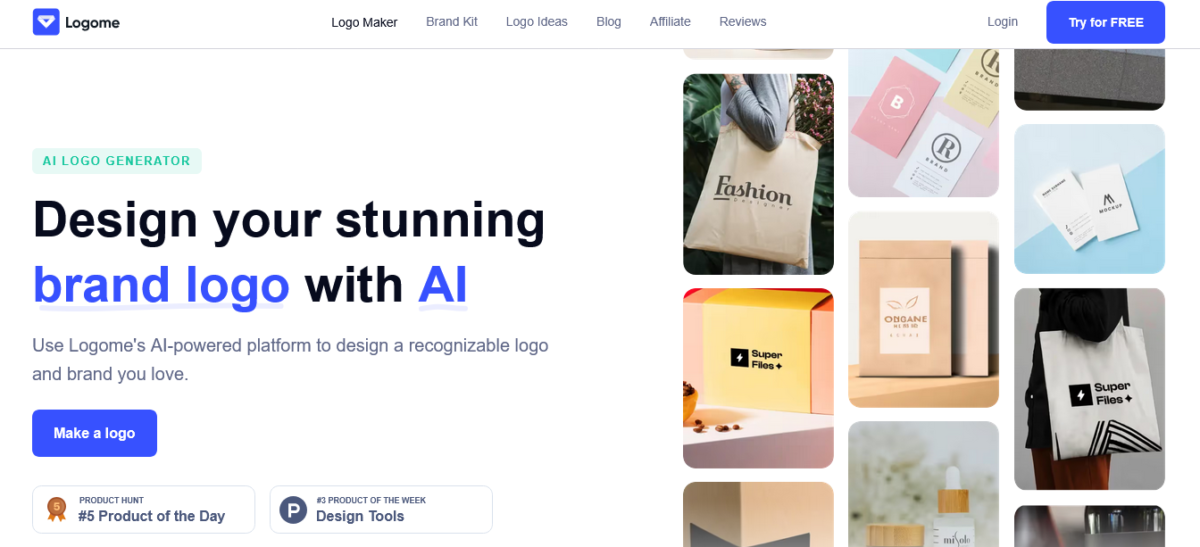
What makes it special: LogoMe doesn’t just generate logos. It builds an entire mini brand kit with social banners, business cards, email signatures, and brand assets in minutes. The AI feels surprisingly polished for startups that need branding fast.
Best for: Startups, creators, and small businesses that want a full brand identity without hiring a designer
Pricing: Starts at around $19/month billed annually for the Basic plan. Premium plans unlock high-res exports, customisation, and extra branding tools.
The catch: The logos look clean, but some designs can feel repetitive if your prompts are vague. The subscription pricing can also feel pricey if you only need a one-time logo.
My take: I liked how fast LogoMe turned rough ideas into usable branding. It’s one of the few AI logo tools that actually thinks beyond the logo itself.
✅ Need a logo plus a full brand kit fast? Try LogoMe free →
2. Canva AI Logo Generator

What makes it special: Canva has launched a free AI logo maker tool with an intuitive UI and drag-and-drop functionality that’s great for beginners
Best for: Simple, clean logos for service businesses and personal brands
Free limitations: Limited AI generations per month, watermarked downloads for some features
Pro tip: Use the AI generator for concepts, then customize extensively using Canva’s free design tools
My Client’s success: Bella’s consulting business logo took 20 minutes to create and looks identical to $800 agency work.
✅ Design your logo in minutes – Start Canva’s AI generator free!
3. Hatchful by Shopify

What makes it special: A completely free AI-powered logo generator that’s beginner-friendly – just answer simple questions about your business
Best for: E-commerce businesses, retail brands, startup logos
Free limitations: Free with options to purchase high-resolution files
Hidden advantage: Seamless integration with Shopify stores for consistent branding
E-commerce optimization: Built specifically for online stores with templates optimized for web use.
👉 Kickstart your brand in minutes—try Hatchful free and grab your ready-to-sell logos!
4. Logo.com AI Generator

What makes it special: Sophisticated AI that creates multiple logo variations based on industry and style preferences
Best for: Professional service businesses, tech startups, consulting firms
Free limitations: Can preview unlimited concepts, pay only for final downloads
Quality advantage: Consistently produces logos that look professionally designed
Brand psychology: Uses color psychology and typography principles in logo generation.
✅ Endless logo concepts await—try Logo.com free and create a brand you’ll love!
5. Designs.AI Logo Maker

What makes it special: Comprehensive design studio with AI generators for copy, videos, and logos
Best for: Brands needing complete identity packages, not just logos
Free limitations: Free to create and preview, pay for high-resolution downloads
Ecosystem advantage: Create logos, then use the same platform for business cards and marketing materials
Complete branding: One platform handles the entire brand identity creation.
👉 Your complete brand, ready to go—start free with Designs.AI today!
6. Logomaker.com

What makes it special: Advanced customization options that rival paid platforms
Best for: Brands wanting unique, highly customized logos
Free limitations: Free versions available, where you can create and sometimes download logos without paying
Customization power: Extensive editing tools for fine-tuning AI-generated concepts
Professional quality: Produces logos suitable for large corporate brands.
✅ Your unique logo awaits—try Logomaker.com free and bring your brand to life!
Premium AI Logo Tools Worth Every Penny
While free tools are impressive, premium AI logo platforms offer advanced features that justify their cost for serious brands.
7. Looka (Formerly Logojoy)

Pricing: Basic package around $20, comprehensive packages up to $80+ with high-res files and brand guidelines
Best for: Startups and small businesses wanting professional brand packages
Unique advantage: Creates complete brand identity systems, not just logos
Client testimonial: “Looka created our entire brand identity for less than one designer consultation.” – Adil, tech startup founder
👉 Build your brand like a pro—start with Looka today!
8. LogoAI

What makes it special: Free to conceptualize, one-time fee starting at $29 for high-resolution logos and transparent PNGs
Pricing: Pro plan includes brand identity elements, logo animation, and 100 AI credits for business materials
Best for: Brands needing animated logos and comprehensive marketing materials
Animation feature: Creates animated logo versions for digital marketing
Marketing integration: Generates social media variations and brand applications automatically.
Grab 30% OFF today! Use code BLOGRECODE at checkout!
✅ Bring your logo to life—try LogoAI free and animate your brand!
9. Brandmark

What makes it special: Advanced AI that understands brand personality and creates emotionally resonant designs
Pricing: One-time fee starting at $25 for basic package, $175 for comprehensive brand identity
Best for: Established businesses wanting sophisticated, psychology-driven logos
Psychological edge: Uses color psychology and design principles to influence customer perception
Brand psychology: Creates logos designed to trigger specific emotional responses.
👉 Create logos that connect—start Brandmark and tap into customer emotions!
10. Tailor Brands

What makes it special: AI-powered brand builder that creates logos within complete marketing contexts
Pricing: Starting at $9.99/month for logo and basic branding tools
Best for: Businesses wanting ongoing brand management and marketing tools
Comprehensive approach: Not just logo creation but entire brand ecosystem management
Marketing ecosystem: Integrates logo creation with social media templates and marketing materials.
✅ Create and manage your brand seamlessly—start Tailor Brands today!
11. Wix Logo Maker

What makes it special: Seamless integration with website building for consistent brand implementation
Pricing: Free to create, $20 for basic logo package, $50 for premium branding kit
Best for: Businesses building websites and wanting integrated branding
Website synergy: Automatically applies logo across website templates and themes
Web integration: Perfect logo-to-website workflow for consistent branding.
👉 Your brand, perfectly aligned—start Wix Logo Maker today!
Specialized AI Logo Platforms for Specific Industries
Some AI tools excel at creating logos for specific industries or use cases.
12. Placeit Logo Maker

What makes it special: Industry-specific templates with AI customization for targeted markets
Pricing: Free with Placeit watermark, $14.95/month for unlimited access
Best for: Gaming, tech, fashion, and entertainment brands
Template advantage: Thousands of industry-specific starting points refined by AI
Mockup integration: Creates logos and immediately shows them in realistic brand applications.
✅ Watch your logo come to life—start Placeit free today!
13. DesignEvo

What makes it special: Massive template library enhanced by AI customization capabilities
Pricing: Free for basic resolution, $19.99 one-time for high-resolution package
Best for: Traditional businesses wanting classic, timeless logo designs
Template variety: Over 10,000 templates across every conceivable industry
Classic design focus: Excels at creating traditional, professional logos that age well.
👉 Build lasting brand marks—try DesignEvo free and design with impact!
14. LogoMaster

What makes it special: AI-powered logo generator offering over 100 design ideas instantly
Pricing: Free to design; one-time fee of $39 for Basic, $99 for Premium, and $169 for Enterprise packages
Best for: Startups, small businesses, and entrepreneurs seeking quick, professional branding
Global optimisation: Supports multiple languages and generates logos suitable for various markets
International appeal: Designs logos that are adaptable and culturally relevant across different regions
✅ Build internationally appealing logos—start Logaster free today!
Advanced AI Logo Creation Techniques
Professional designers use specific strategies to maximise the effectiveness of AI logo tools.
The “Concept Multiplication” Method
Instead of settling for the first good concept, use AI tools to generate 50+ variations:
- Input your brand details into 3-5 different AI tools
- Generate 10-15 concepts from each platform
- Identify the 3-5 strongest directions
- Use customization tools to create variations of winning concepts
- Test concepts with the target audience or trusted advisors
Strategic Prompt Engineering for Logos
Most people use vague descriptions. Professional results require specific inputs:
Instead of: “Modern logo for tech company.”
Use:
Minimalist geometric logo for B2B SaaS platform, incorporating data visualization elements, professional blue and gray color scheme, sans-serif typography, suitable for app icons
AI Logo Refinement Workflow
- Generate Phase: Create 20+ concepts using AI
- Selection Phase: Choose the top 3 directions
- Refinement Phase: Use AI customization tools for fine-tuning
- Validation Phase: Test with the target audience
- Finalization Phase: Export all necessary file formats and variations
Color Psychology Integration
Professional logo design considers psychological impact:
- Blue: Trust, reliability (financial services, healthcare)
- Red: Energy, urgency (food, entertainment, retail)
- Green: Growth, health (environmental, wellness, finance)
- Purple: Luxury, creativity (beauty, high-end services)
- Orange: Friendly, accessible (education, community)
Choosing the Right AI Logo Tool for Your Brand
The best AI tools for logos depend on your specific needs, budget, and brand requirements.
For Startups and Entrepreneurs
Best choice: Hatchful or Canva AI Generator
Why: Free, professional results, easy customization
Upgrade when: You need advanced features or extensive brand materials
For E-commerce Businesses
Best choice: Hatchful (Shopify integration) or Wix Logo Maker
Why: Built-in e-commerce optimization and platform integration
Upgrade when: You want animated logos or advanced marketing materials
For Professional Services
Best choice: Looka or Brandmark
Why: Sophisticated designs that convey authority and trustworthiness
Upgrade when: You need comprehensive brand guidelines and marketing materials
For Creative Industries
Best choice: Placeit or Designs.AI
Why: Creative templates and integrated marketing material creation
Upgrade when: You want video content and advanced animation features
For Global Brands
Best choice: Logomaster AI or Tailor Brands
Why: International optimization and comprehensive brand management
Upgrade when: You need multi-market brand variations and management tools
Common AI Logo Design Mistakes
I’ve seen these mistakes destroy otherwise promising brand identities. I have also learnt how to avoid them.
Mistake #1: Accepting the First “Good Enough” Result
The problem: AI generates decent concepts quickly, leading to premature decisions
The solution: Generate 50+ concepts before choosing. The 47th concept might be perfect.
Mistake #2: Ignoring Scalability
The problem: Logos that look great in large but become illegible when small
The solution: Test every logo at business card size (1 inch wide) before finalizing
Mistake #3: Following Trends Over Brand Identity
The problem: Choosing trendy designs that don’t represent brand values
The solution: Prioritize brand alignment over aesthetic trends
Mistake #4: Neglecting File Format Requirements
The problem: Not obtaining vector files, transparent backgrounds, or proper variations
The solution: Always get SVG/EPS vector files and PNG with a transparent background
Mistake #5: Skipping Trademark Research
The problem: Creating logos too similar to existing registered trademarks
The solution: Search USPTO database before finalizing any design
Real-World AI Logo Success Stories
Case Study #1: Tech Startup Transformation
Client: FinanceFlow (B2B SaaS)
Challenge: Needed a professional logo for investor presentations
Solution: Used Looka to create a minimalist, trustworthy design
Result: Logo contributed to successful $2M Series A funding round
Time invested: 3 hours
Cost: $47
Case Study #2: E-commerce Brand Launch
Client: EcoBox (Sustainable products)
Challenge: Launch brand quickly with limited budget
Solution: Hatchful for main logo, Canva for variations
Result: Professional brand identity that supported $50K first-month revenue
Time invested: 5 hours
Cost: $0
Case Study #3: Professional Services Rebrand
Client: Strategic Solutions (Business consulting)
Challenge: Outdated logo is damaging credibility with enterprise clients
Solution: Brandmark for psychology-driven professional design
Result: 40% increase in enterprise client acquisitions
Time invested: 8 hours
Cost: $175
The Future of AI Logo Design
Based on industry trends and my experience testing cutting-edge tools, here’s where AI logo design is heading:
Trend #1: Real-Time Collaboration
AI tools will enable real-time logo creation with clients, allowing instant feedback and iteration during meetings.
Trend #2: Advanced Brand Psychology
Future AI will analyze target audience psychology to automatically optimize logos for emotional impact and memorability.
Trend #3: Multi-Platform Optimization
AI will simultaneously create logo variations optimized for different platforms – social media, print, web, and mobile apps.
Trend #4: Industry-Specific AI Models
Specialized AI models trained exclusively on successful logos from specific industries will deliver more targeted results.
Trend #5: Integrated Brand Systems
AI will create complete brand identity systems – logos, colors, typography, patterns, and application guidelines – in single workflows.
AI Logo Tool Comparison Matrix
| Tool | Free Version | Paid Plans | Best For | Unique Feature |
|---|---|---|---|---|
| Canva | ✅ Limited | $12.99/month | Beginners | Design ecosystem |
| Hatchful | ✅ Full features | Pay for HD files | E-commerce | Shopify integration |
| Looka | ✅ Preview only | $20-$80 one-time | Professional brands | Complete brand kits |
| LogoAI | ✅ Concepts only | $29+ one-time | Animated logos | Logo animation |
| Brandmark | ❌ | $25-$175 one-time | Psychology-driven | Color psychology |
| Designs.AI | ✅ Preview only | $29/month | Complete branding | Multi-format creation |
Expert Tips for Maximizing AI Logo Tools
Tip #1: Use Multiple Platforms
Don’t limit yourself to one AI tool. Each has different strengths and creative approaches.
Tip #2: Understand Your Brand First
Before using any AI tool, clearly define your brand personality, target audience, and competitive positioning.
Tip #3: Test at Different Sizes
Always test logos at various sizes – from business cards to billboards – to ensure legibility and impact.
Tip #4: Consider Animation Potential
Even if you don’t need animated logos now, consider whether your design could be animated for future digital marketing.
Tip #5: Document Your Design Rationale
Keep notes about why you chose specific elements. This helps maintain consistency as your brand evolves.
Ready to Create Your Professional Logo with AI?
The AI revolution has made professional logo design accessible to everyone.
Whether you’re bootstrapping a startup or rebranding an established business, these AI tools for logos can deliver results that compete with expensive design agencies.
The key is choosing the right tool for your specific needs and taking time to properly customize and refine AI-generated concepts. Don’t settle for the first option – explore multiple concepts and trust your brand instincts.
Which AI logo tool are you most excited to try? Drop a comment below and let me know about your logo design journey. I love seeing how these tools help transform brand identities.
And if this guide helps you find the best AI tools for logos and create a logo that perfectly represents your brand, share it with another entrepreneur who’s still struggling with expensive designers or amateur DIY attempts. Great branding should be accessible to everyone.
Read: What is AI Blogging 101? (And Why I’m Grateful I Found It)
FAQs
Are AI-generated logos legally safe to use commercially?
Yes, most AI logo tools grant full commercial usage rights. However, always read the terms of service and consider trademark searches for unique protection.
How do AI logos compare to human designer work?
AI logos excel at speed, cost-effectiveness, and generating multiple concepts quickly. Human designers offer more nuanced creative thinking and complex brand strategy integration.
Can I modify AI-generated logos?
Most platforms encourage customization. You own the final design and can modify it further using design software or by hiring designers.
What file formats do I need for my logo?
Essential formats: SVG (vector for scalability), PNG with transparent background (web use), JPG (general use), and EPS (print applications).
How long do AI logo tools typically take?
Initial concept generation: 5-10 minutes. Customization and refinement: 30-120 minutes depending on complexity and perfectionism level.
Are there industry restrictions for AI logo tools?
Most tools work for any industry, but some specialize in certain sectors. Consider your industry’s design conventions and regulatory requirements.
Can AI tools create logos that won’t become outdated?
AI tools can create timeless designs if you focus on classic principles over trending styles. Choose clean, simple designs with thoughtful typography.
What’s the difference between free and paid AI logo tools?
Free tools typically limit resolution, file formats, or customization options. Paid tools offer high-resolution files, more formats, and advanced features.
How do I ensure my AI logo doesn’t look like everyone else’s?
Use extensive customization, combine elements from multiple concepts, and add unique touches that reflect your specific brand personality.
Should I trademark my AI-generated logo?
If your logo is central to your brand identity and you plan long-term business growth, trademark protection provides valuable legal benefits regardless of creation method.
Now, excuse me while I go help another client turn their AI-generated logo concept into a complete brand identity that closes deals and builds trust. The future of design is here, and it’s democratizing creativity for everyone. 🎨