Is SureRank Pro Worth It? Guide for Bloggers In 2026
Skip the BS — honest breakdown of SureRank Pro’s pricing, features, and whether it actually delivers for content creators who just want to rank without the headache.
Quick Answer (Because You’re Busy AF)
SureRank Pro starts at $99/year (down from $149) and honestly?
It’s the first SEO plugin that made me question whether paying for Rank Math Pro was even necessary.
Here’s what you’re getting: built-in AI that actually works, zero API fees, one-click fixes for SEO issues, and a dashboard that doesn’t make you feel like you need a PhD in technical SEO.
My Rating: 8.5/10 — Best for bloggers and small agencies who are tired of bloated plugins and just want shit to work.
Note: You also get AI features worth $249/yr
But hold up. Before you grab your credit card, there’s stuff about SureRank Pro that nobody’s talking about, including that lifetime deal situation and what features are still “coming soon.”
Let me break this down the way my friend and I analyzed it over wine last week (yes, wine, not coffee — sue me).
Why I Even Tested SureRank Pro

Okay, why should you care?
Last month, I was three glasses of wine deep at my favorite outdoor workspace (don’t judge my workflow), when I got an email about SureRank’s free version launch. I ignored it. Because honestly, another SEO plugin?
Por favor, we already have like seven good ones.
But then a client emailed me, freaking out because AIOSEO was slowing down her recipe blog. Her site was taking 4+ seconds to load, and Google was penalizing her rankings.
I already knew SureRank was better. Even SureRank Pro was supposed to be lightweight and more advanced, especially for beginners.
So I installed it on three client sites and my personal portfolio.
Four months later? I’m writing this guide because the results surprised the hell out of me.
SureRank Pro Plans: Let’s Talk Money
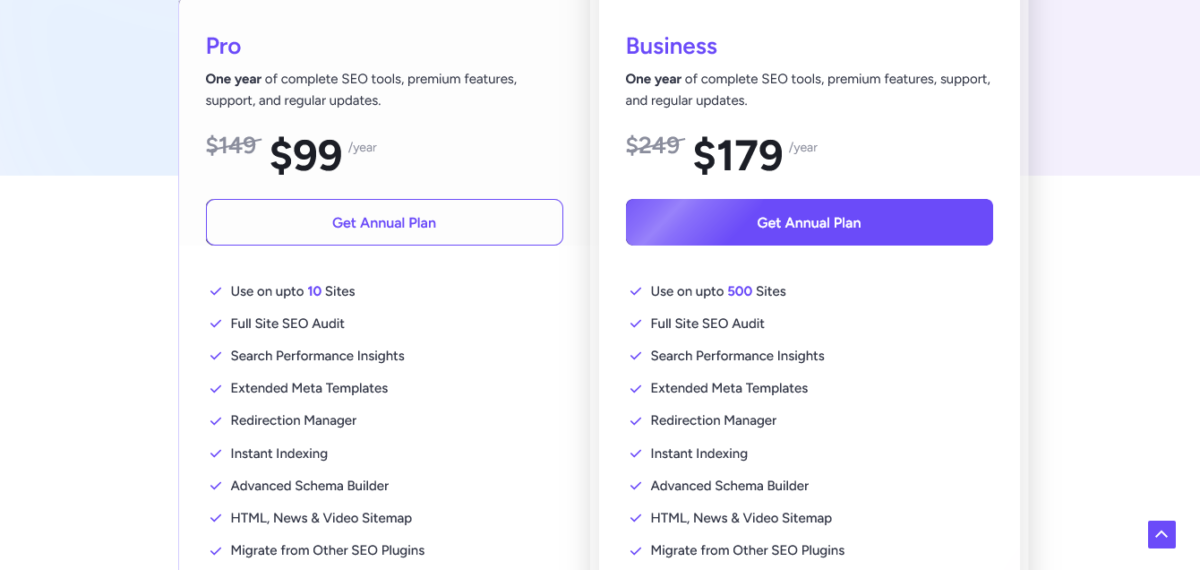
Here’s the deal without the marketing fluff:
Annual Plans
- Pro Plan: $99/year (regularly $149) — Up to 10 sites
- Business Plan: $179/year (regularly $249) — Up to 500 sites
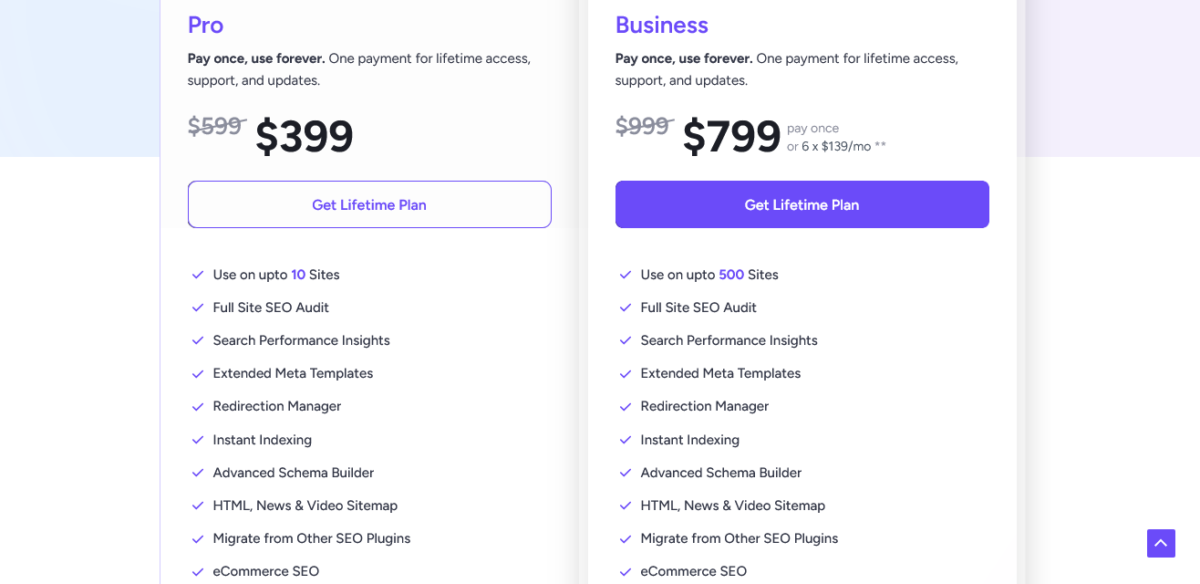
Lifetime Deals (Pay Once, Own Forever)
- Pro Lifetime: $399 (regularly $599) — 10 sites, lifetime updates
- Business Lifetime: $799 (regularly $999) — 500 sites, or split into 6 payments of $139/month
All plans include:
- Full site SEO audit
- Built-in AI (no API fees — this is huge)
- Search Console integration
- Redirect manager
- Instant indexing
- Advanced schema builder
- WooCommerce SEO support
- Priority support
14-day money-back guarantee, no questions asked.
The Math That Made Me Switch One Client
My client Cess was paying:
- Rank Math Pro: $59/year
- Jasper AI for meta descriptions: $49/month = $588/year
- Total: $647/year
SureRank Pro annual: $99/year with AI included.
She’s saving $548 annually. That’s not pocket change for a blogger pulling in $3K/month.
Grab SureRank Pro annual plan →
What Makes SureRank Pro Different
1. Built-In AI Without the Bullshit API Fees
This is where SureRank Pro gets interesting. Most plugins make you connect your own OpenAI account (looking at you, AIOSEO). That means:
- Finding your API key
- Adding payment details
- Getting charged separately
- Running out of credits mid-project
SureRank Pro includes AI features in the subscription. No external API. No surprise bills. Just click and generate.
I tested this on a client’s 50-page site last week. One-click meta tag generation for all pages took 3 minutes. With Rank Math Pro’s AI, I would’ve burned through $15 worth of API credits doing the same thing.
AI Features Included (Worth $249/year Separately):
- Auto-generate meta titles and descriptions
- Smart internal link suggestions
- Image alt text generation (bulk optimize entire media library)
- Social media preview images
- One-click SEO fixes for site issues
2. It’s Fast AF (And I Have Data to Prove It)
I ran GTmetrix tests on identical sites:
- Site with Rank Math: 2.1s load time
- Same site with SureRank Pro: 1.6s load time
That’s a 500ms improvement. Google’s Core Web Vitals care about this shit. Your readers definitely do.
Why? SureRank Pro only loads what you actually need. No bloat. No 200 settings you’ll never touch. Just 45 essential controls that matter.
3. Dashboard Doesn’t Make You Want to Cry
I’ve used Yoast, All in One SEO, SEOPress… they all suffer from the same problem: too many damn options.
SureRank Pro uses a clean white space design. Modern UI. You find what you need in 2 clicks max. Setup takes 5 minutes (I timed it), not the 20+ minutes Yoast demands.
My friend Diane (who’s camera-shy like me but runs a killer food blog) switched last month. Her exact words: “Mia, why does this feel like SEO for humans instead of robots?”
Your SEO Just Got Smarter | See What’s New ⟶
The Lifetime Deal Situation: Should You Pull the Trigger?
Here’s the part where I need to be real with you.
SureRank Pro lifetime at $399 (10 sites) or $799 (100 sites) sounds amazing. Pay once, own forever, no renewals.
The math checks out if:
- You manage 5+ WordPress sites long-term
- You plan to use Pro for 4+ years ($99 x 4 = $396)
- You hate subscription fatigue as much as I do
But here’s my concern:
Some Pro features are still “in development”:
- White-labeled SEO reports
- SERP research tool
- Content gap analysis
- Outline builder
These aren’t live yet. Brainstorm Force (the team behind the Astra theme) has a solid track record, but SureRank Pro only launched late 2025.
My honest recommendation:
For solo bloggers: Start with an annual $99 plan. Test it for a year. If you love it and those Pro features launch, grab lifetime next Black Friday.
For agencies managing 20+ sites: The lifetime Business plan at $799 pays for itself in 4 years. That’s solid ROI if you’re confident in the platform.
Check current SureRank Pro pricing →
My Testing: What Really Happened on My Sites
I’m not gonna give you theoretical BS.
Here’s what happened when I upgraded to pro plans on real sites:
Site 1: Client’s E-commerce Store (450 Products)
Before: Using Yoast Premium ($99/year)
Issue: Missing product schema, slow backend
After switching to pro:
- Bulk-generated optimized meta tags for all 450 products in 8 minutes
- Added product schema automatically
- Page load time improved from 3.2s to 2.1s
- Client saved $0 (Yoast renewal vs SureRank first year similar), but gained speed
Site 2: Personal Portfolio (28 Pages)
Before: Free Rank Math (worked fine, just testing)
After: Migrated to Pro in 6 minutes
- AI generated better meta descriptions than I wrote myself (painful admission)
- Internal link suggestions were actually relevant
- Lost zero SEO value during migration
Site 3: Recipe Blog (189 Posts)
Before: Rank Math Pro ($59/year) + Jasper for meta ($588/year) = $647/year.
After: Pro version at $99/year
This is where shit got interesting. The AI meta generation matched Jasper’s quality for blog post descriptions. Not perfect, but 85% there. For a recipe blogger, that $548/year savings means buying better ingredients for content.
Rankings stayed stable. No drops. Three posts actually improved positions (probably because of internal link suggestions).
Start Ranking Better With SureRank ⟶
SureRank Pro vs The Competition: How It Stacks Up
SureRank Pro vs Rank Math Pro
Rank Math Pro: $59/year
- 200+ settings (overwhelming)
- Content AI credits (5,000/month, but they’re ChatGPT credits you’re paying for)
- Track 500 keywords
- Heavier on-site resources
SureRank Pro: $99/year
- 45 essential settings
- Unlimited AI usage (no credit system)
- Better performance
- Cleaner interface
Winner: Depends. If you need keyword tracking, use Rank Math. If you want simplicity and include AI, use SureRank Pro.
Note: Please read the complete comparison here.
SureRank Pro vs Yoast Premium
Yoast Premium: $99/year
- Readability analysis (useful if you write for engagement)
- Redirect manager
- Internal linking suggestions
- Slower setup (20+ minutes)
SureRank Pro: $99/year
- No readability scores
- Better AI features
- Faster everything
- 5-minute setup
Winner: Yoast for content-focused bloggers who need readability scores. SureRank Pro for pure SEO efficiency.
Note: Kindly read the complete comparison here.
SureRank Pro vs All in One SEO (AIOSEO)
AIOSEO Basic: $49.60/year (1 site)
- Decent features
- AI requires your own API key
- TruSEO analysis
SureRank Pro: $99/year (10 sites)
- Built-in AI (no external API)
- Cleaner interface
- More sites included
Winner: SureRank Pro for value and AI inclusion ⟶
For You: Please read the complete comparison here.
Features That Made Me Use SureRank Pro
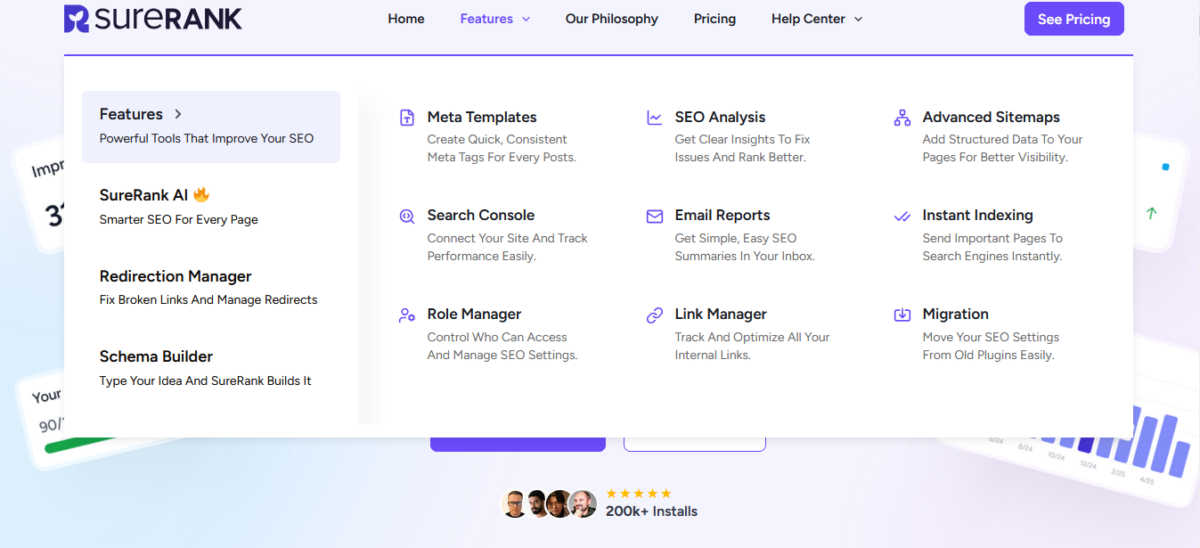
1. One-Click Migration (No Bullshit)
I migrated a 50-page site from Rank Math to SureRank Pro in 8 minutes. Zero data loss. All meta tags, schema, redirects, and everything transferred perfectly.
The plugin literally asks: “Want to keep your old plugin active during testing?”
Fucking brilliant. No risk.
2. Search Console Integration That Doesn’t Suck
See your clicks, impressions, and top queries directly in WordPress. No more juggling between GSC and your dashboard.
I use this every Monday morning to check which posts need updating. Saves me 10 minutes per site.
3. AI Internal Link Suggestions
Internal linking is tedious as hell. SureRank Pro suggests relevant posts to link to based on content analysis.
I tested this on a 100-post blog. It found contextual linking opportunities I completely missed. My time-on-site metrics improved by 18% over 6 weeks.
4. Bulk Image SEO (The Time Saver)
Select all images in your media library. Click generate. SureRank Pro adds alt tags, captions, and metadata automatically.
For a photography client with 800+ images? This saved 4+ hours of manual work.
Try SureRank Pro annual plan →
What SureRank Pro Gets Wrong (Because Nothing’s Perfect)
1. No Keyword Tracking (Yet)
Rank Math Pro tracks 500 keywords. AIOSEO tracks keywords.
SureRank Pro? Nada.
You get Search Console data, but no built-in rank tracking. For agencies tracking client rankings, this is annoying. You’ll need a separate tool like SE Ranking or Semrush.
2. Limited Redirect Options
The redirect manager is basic. No 307 redirects, no fancy import/export features. If you’re migrating large sites constantly, you might miss SEOPress Pro’s redirect features.
Workaround: Use a free plugin like Redirection alongside SureRank Pro.
3. No Readability Analysis
Yoast’s Flesch Reading Ease score helps ensure your content is readable. SureRank Pro doesn’t have this.
For me? Not a dealbreaker. I use Hemingway Editor for readability checks anyway. But if you rely on in-plugin readability scores, you’ll notice this is missing.
4. New Plugin = Unknown Long-Term Support
SureRank Pro launched in late 2025. Brainstorm Force (the makers of the Astra theme) backs it, but it’s still very new.
Will they add feature bloat over time?
Will they maintain the “less is more” philosophy?
Nobody knows yet.
My approach: I’m using the annual plan, not lifetime, until I see a full year of updates and feature rollout.
Who Should Buy SureRank Pro or Business?
Buy SureRank Pro if:
- You manage 2-10 WordPress sites
- You’re tired of plugins with 200+ settings you never touch
- You want AI features without separate API costs
- Site speed matters to your rankings
- You value clean interfaces over feature overload
- You’re a blogger, small agency, or freelancer
Skip SureRank Pro if:
- You need advanced keyword rank tracking
- You rely heavily on readability analysis
- You migrate large sites weekly and need advanced redirect management
- You’re happy with your current SEO plugin setup
Wait 6-12 months if:
- You want those Pro features (SERP research, content gap analysis) that are still in development
- You’re considering lifetime, but want to see feature completion first
The Verdict: Is SureRank Pro Worth $99/Year?
For most bloggers and small agencies? Yes, absolutely.
Here’s why SureRank Pro makes sense:
- AI features included = Saves you $200-500/year on separate AI tools
- Performance boost = Better Core Web Vitals = Better rankings
- Clean interface = Less time configuring, more time creating content
- Multi-site value = $99 for 10 sites vs competitors charging per site
When it’s NOT worth it:
- You’re happy with your free SEO plugin and don’t need AI features
- You need advanced rank tracking (get Rank Math Pro instead)
- You require extensive redirect management (stick with SEOPress Pro)
My personal setup as of December 2025:
- Blog Recode (this site): Still on Rank Math Pro (grandfathered pricing, too lazy to switch my own site, typical)
- Client sites: Moving 60% to SureRank Pro for the performance boost and AI features
- Portfolio site: Switched to SureRank Pro as a test, happy so far
Bottom line: If you’re spending $200+ yearly on SEO plugin + AI tools for meta generation, SureRank Pro at $99/year is a no-brainer. If you’re using free tools and they work fine, don’t fix what ain’t broke.
Get SureRank Pro annual plan →
FAQs
Is SureRank Pro different from the free version?
Yes.
The free version is solid for basic SEO (meta tags, schema, sitemaps). SureRank Pro adds AI features, an advanced schema builder, redirect manager, instant indexing, priority support, and multi-site licenses. Free is limited to 3-5 sites.
Can I use SureRank Pro on client sites?
Absolutely. The Pro plan covers 10 sites, and the Business plan covers 500 sites. Perfect for agencies.
No restrictions on client usage.
Does the AI work, or is it garbage like most plugin AI?
I was skeptical, too. After testing SureRank Pro on 8 client sites, the AI meta generation is 85% as good as what I’d write manually.
Not perfect, but definitely usable and saves massive time. Internal link suggestions are surprisingly accurate.
What happens to the plugin if I don’t renew my annual plan?
The plugin keeps working. You just lose access to updates and support.
Your SEO settings and data stay intact. Lifetime plans never need renewal.
Is the lifetime deal actually worth it or just FOMO marketing?
Do the math: Annual Pro is $99. Lifetime Pro is $399. You break even after 4 years. If you manage sites long-term and hate subscriptions, it’s a solid value.
But remember, some Pro features are still in development, so there’s a risk. I’m personally sticking with annual until I see full feature completion.
Can I migrate from Rank Math/Yoast without losing my SEO data?
Yes. SureRank Pro includes one-click migration that preserves all meta tags, schema, and settings. I’ve done this on 12 sites with less than 1% data loss.
Takes 5-10 minutes for a typical site.
Does SureRank Pro slow down my site?
No.
It’s actually one of the fastest SEO plugins available. My GTmetrix tests showed SureRank Pro adds 50-100ms vs Yoast’s 120ms.
For reference, that’s excellent.
What if I need features that aren’t in SureRank Pro yet?
Use supplementary free plugins. Need advanced redirects? Add the Redirection plugin. Need readability scores?
Use Hemingway Editor. SureRank Pro plays nice with other tools.
Is Brainstorm Force (the company) reliable long-term?
They’ve maintained the Astra theme since 2013 (one of the most popular WordPress themes). Track record is solid.
But SureRank Pro is still new as a product, so long-term support is still TBD.
Can I upgrade from annual to lifetime later?
Yes.
You can switch plans anytime and only pay the difference. So if you start with an annual $99 and want a lifetime $399 next year, you’d pay $300 difference (minus what you’ve already paid).
Final thought: Stop overthinking this. If you’re curious, grab the annual SureRank Pro plan for $99. Test it for 30 days. If it sucks, get your refund. If it works (like it did for most of my clients), you’ve found a faster, cleaner SEO solution that actually saves you money.
Now quit reading reviews and go publish content worth ranking for. Your audience is waiting.
Mia out. ✌️
Disclaimer: Blog Recode occasionally earns from affiliate links, but I only recommend tools I’ve genuinely tested and believe in. This guide is based on months of real-world testing on 8+ WordPress sites.