Meet ProfilePress: modern WordPress membership plugin?
The membership plugin your therapist would recommend (if your therapist knew about WordPress)
My Verdict & Rating
Look, ProfilePress isn’t perfect, but it’s damn good. After testing it on my own membership site idea, I can tell you this: ProfilePress review time is here, and spoiler alert, it’s one of the most underrated membership plugins you’ll find.
Here’s the real tea: While everyone’s obsessing over MemberPress like it’s the only option, ProfilePress is quietly doing the same job for less money, less complexity, and honestly? Better user experience.
At $129/year for a single site (compared to MemberPress’s $199.50), it’s like finding designer jeans at Target prices.
Who should buy it: Content creators who want to monetize without a PhD in WordPress. Small business owners. Course creators. Anyone tired of plugins that need a manual thicker than War and Peace?
Who should skip it: If you need advanced course-creation features built in (though it integrates with LearnDash and others perfectly), or if you’re running a super complex enterprise setup.
What the Heck is ProfilePress Anyway?
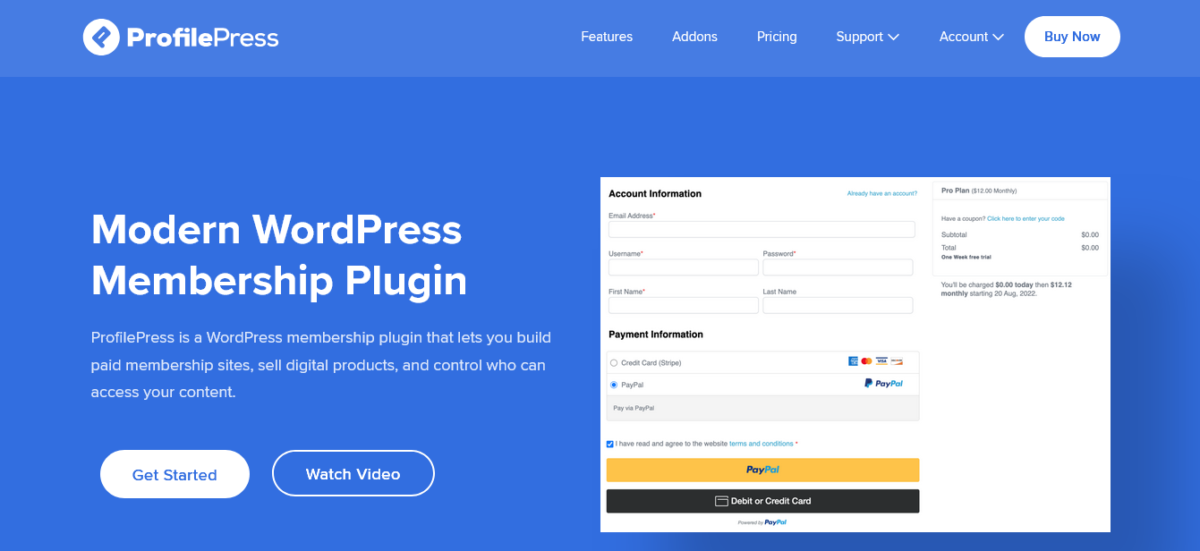
Okay, so ProfilePress is a WordPress membership plugin that does basically everything you need to turn your regular WordPress site into a money-making membership platform. We’re talking:
- Selling memberships and subscriptions
- Restricting content (the fancy term is “paywall”)
- Accepting payments via Stripe, PayPal, Razorpay, Mollie, Paystack
- Creating custom login and registration forms
- Building user profiles and member directories
- Selling digital products
The kicker? It’s developed by Proper Fraction LLC (the same folks behind MailOptin, FuseWP, FeedbackWP, and CrawlWP), which means it’s part of an ecosystem that actually talks to itself. Revolutionary concept, I know.
Please read my full CrawlWP review today.
My Honest ProfilePress Review (Good, Bad, and “Wait, What?”)
The Setup: Easier Than My Morning Coffee Routine ☕
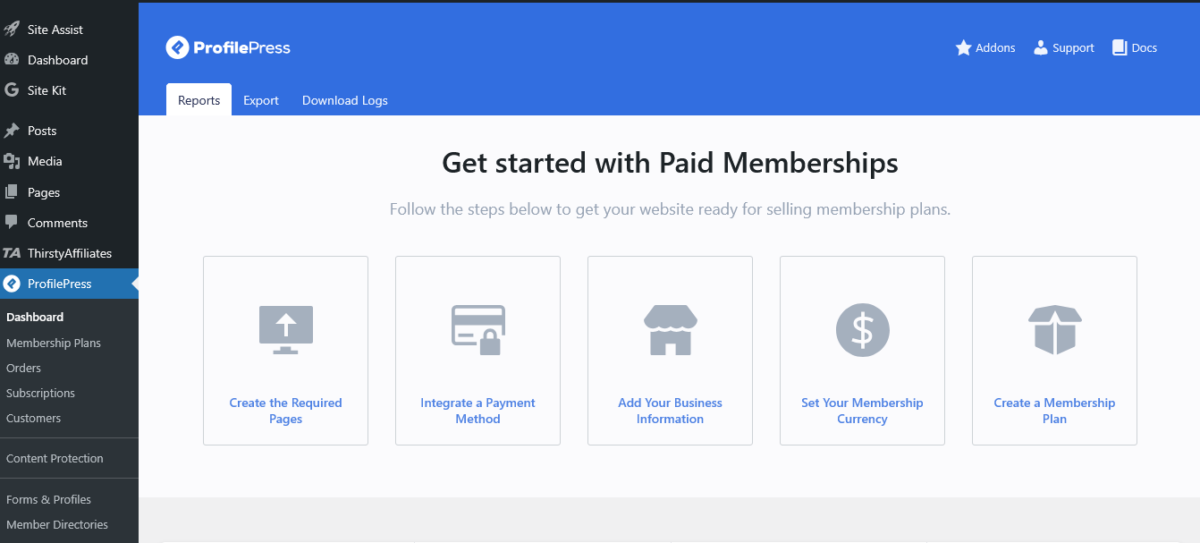
I installed ProfilePress on a Monday morning while nursing what I told myself was “just one cup of coffee”. Setup took maybe 15 minutes. The setup wizard walks you through everything without that condescending “for dummies” vibe some plugins have.
You get:
- Quick start guide
- Payment gateway connection
- First membership plan creation
- Basic settings
Compare that to when I tried setting up another membership plugin (cough, Paid Memberships Pro, cough) and spent three hours just figuring out where everything was. My studio apartment has seen some frustrated outbursts, but that day?
The neighbors definitely heard some choice words in Spanish.
Verdict: Setup is ridiculously simple. If you can install WordPress, you can set up ProfilePress.
Payment Gateways: Money, Money, Money 💰
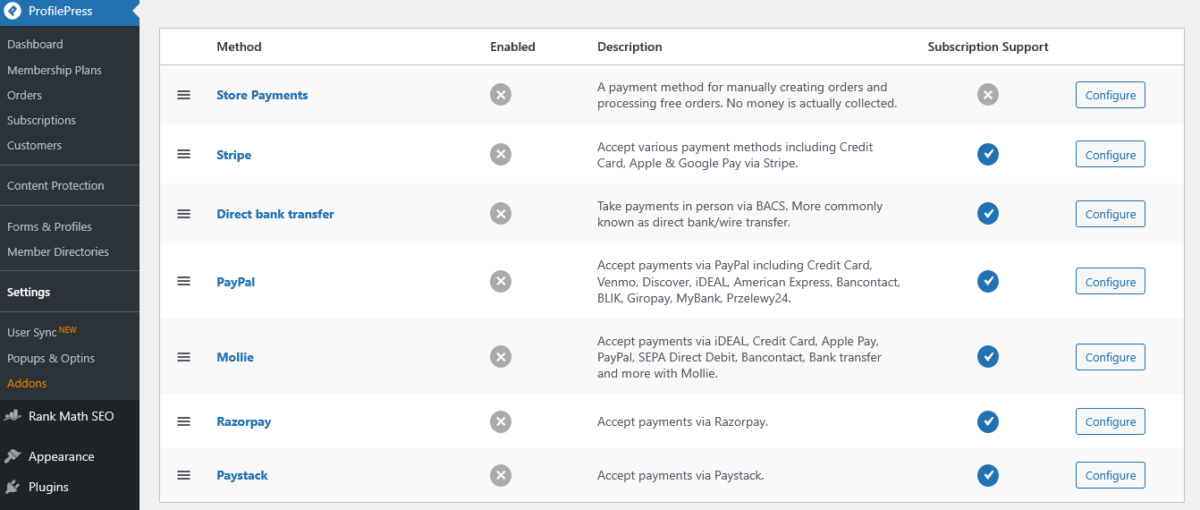
Here’s where ProfilePress gets interesting. The plugin supports:
- Stripe (including Apple Pay, Google Pay, ACH, iDEAL, Bancontact, and like 20 other payment methods)
- PayPal
- Razorpay (great for the Indian market)
- Mollie (European folks, this one’s for you)
- Paystack (African markets)
- Bank Transfer (for the old-school crowd)
But here’s the catch with the free version: You can use Stripe, but they slap an extra 2% fee on top of Stripe’s regular fees. So if you’re serious about making money, you need the paid version.
At $129/year, though, you’ll make that back after like… 10 sales?
Do the math.
I tested the Stripe integration on a test site, and holy shit, it just worked. No wrestling with API keys for 45 minutes. No error messages in ancient PHP.
Just smooth sailing.
Pro tip: The Stripe integration uses the Payment Element, which means your checkout automatically supports multiple payment methods without you doing anything.
That’s a creator’s kiss.
Note: For RazorPay and Paystack, you must enable the addon.
Content Restriction: Lock It Down Like Fort Knox 🔒
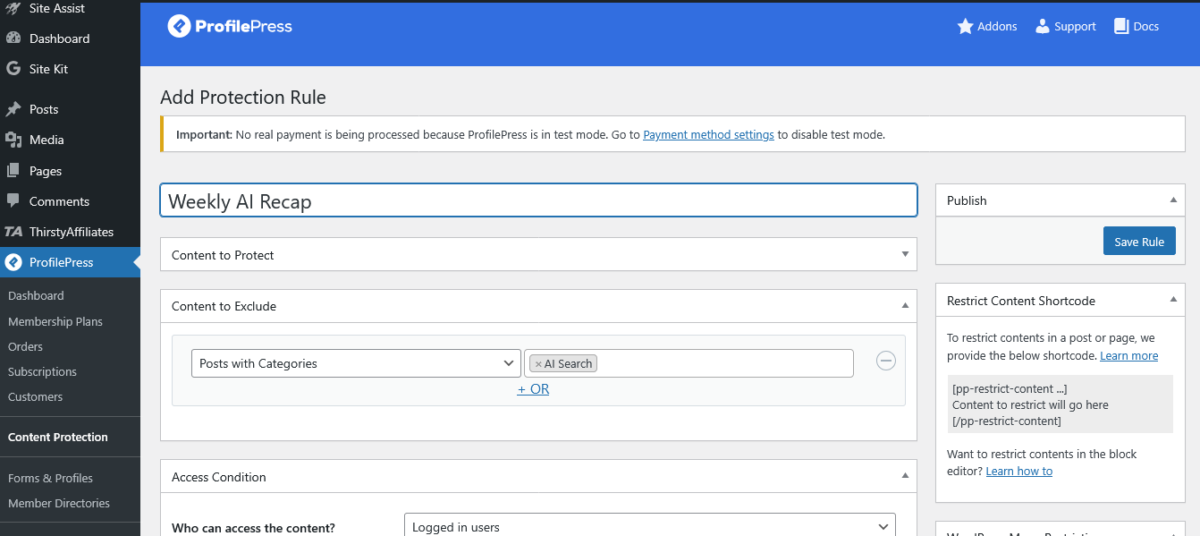
This is where ProfilePress really shines in my ProfilePress review. You can restrict:
- Individual posts and pages
- Categories and tags
- Custom post types
- Navigation menus (yes, even menus!)
- Child pages
The restriction options are wild. You can make content available to:
- Logged-in users only (see image above)
- Users with specific membership plans
- Users with certain WordPress roles
- Combinations of the above
I set up a test where different membership tiers got access to different content, and it took maybe 10 minutes. When I tried this with another plugin, I ended up with a migraine and an emergency call to Issa, my developer friend, at ungodly hours.
The metered paywall addon (available in Plus and Agency plans) lets you do the New York Times thing, where people get X free articles per month. Tested it. Works perfectly. No weird bugs or content leaking where it shouldn’t.
Form Builder: Drag, Drop, Done
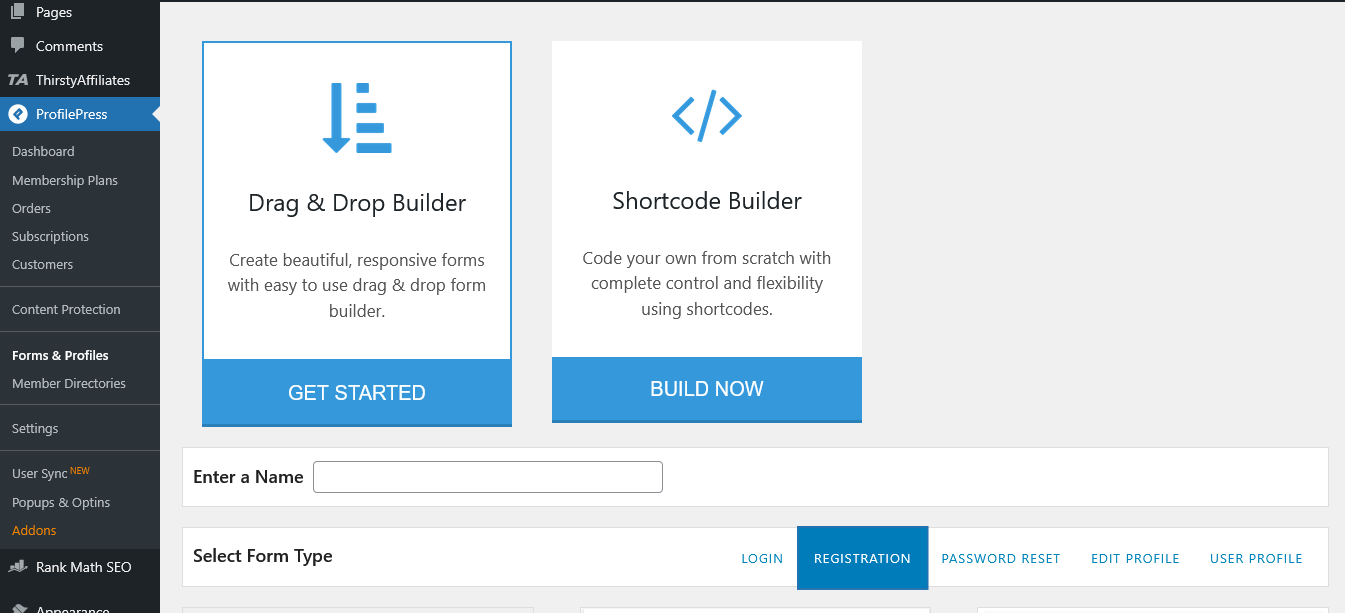
The drag-and-drop form builder is sexy. There, I said it. You can create:
- Registration forms
- Login forms
- Password reset forms
- Profile edit forms
- Member directories
Templates come pre-designed, so you’re not starting from a blank white screen of doom. But if you want to get fancy (and I did, because apparently I’m a masochist), there’s an advanced builder that works with shortcodes.
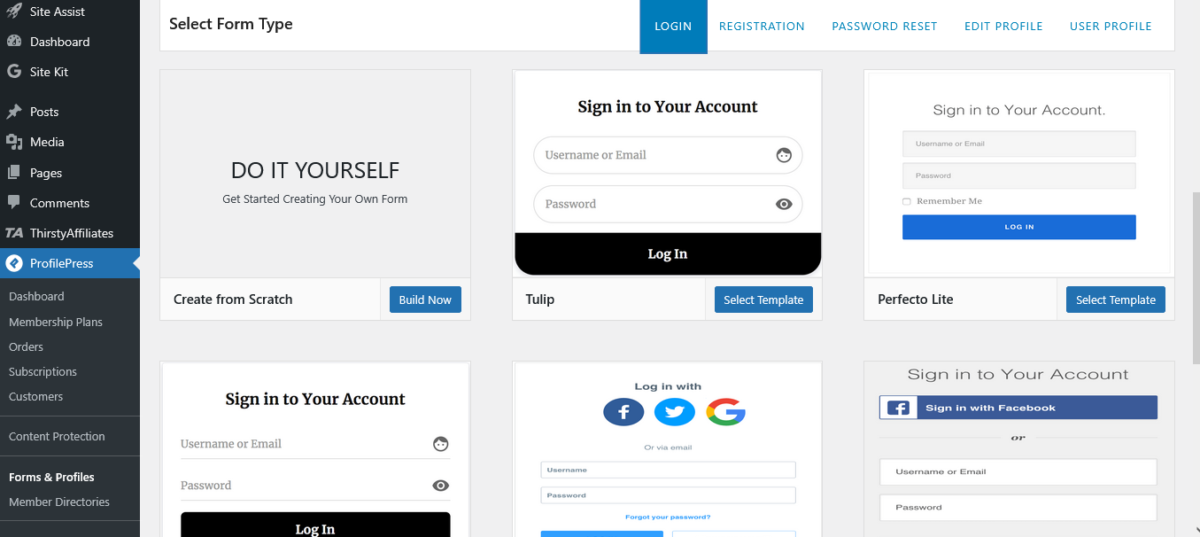
Pro tip: If you know basic HTML and CSS, the advanced builder gives you complete control. I built a registration form that matched my brand colors in about 20 minutes while watching Netflix. Multitasking wins.
User Profiles & Member Directories: The Social Proof Element 👥
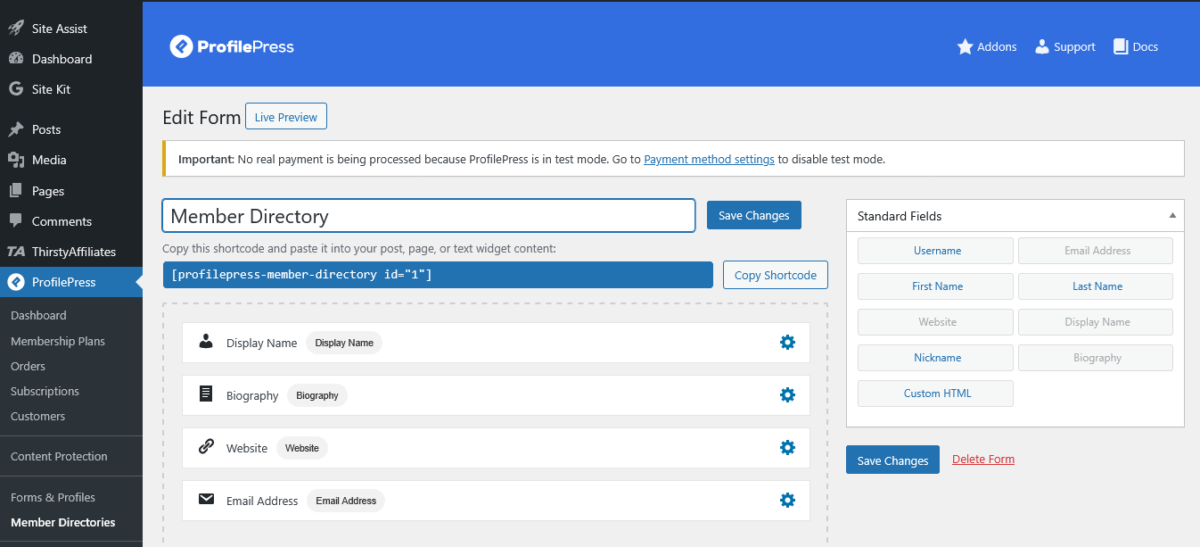
ProfilePress has over 100,000+ active installations.
Let that sink in. This isn’t some janky plugin from 2012 that hasn’t been updated since Obama was president.
The member directory feature is actually useful. You can create searchable, filterable directories with:
- Profile pictures
- Custom fields
- Pagination
- Search functionality
I tested this for a private community for coaches. Set up the directory, added custom fields for specializations, and boom, instant networking platform.
I was impressed. Would recommend it to everyone.
ProfilePress vs The Competition (Fight Club Style)
ProfilePress vs MemberPress
Let’s talk about the elephant in the room: MemberPress.
| Feature | ProfilePress | MemberPress |
|---|---|---|
| Pricing (1 site) | $129/year | $199.50/year |
| Payment Gateways | Stripe, PayPal, Razorpay, Mollie, Paystack, Bank Transfer | Stripe, PayPal, Authorize.net (others via add-ons) |
| Form Builder | Drag-and-drop included | ReadyLaunch (no-code tool) |
| Setup Complexity | Easy (15 mins) | Moderate (30-60 mins) |
| LMS Integration | LearnDash, LifterLMS, Tutor LMS, Sensei, Academy LMS, MasterStudy | Has built-in course builder |
| Free Version | Yes (with 2% Stripe fee) | No |
Real talk: MemberPress has more name recognition and a built-in course builder. But ProfilePress gives you more payment options, a better form builder, and costs less. For most people, ProfilePress is the smarter choice.
MemberPress wins if you need the built-in course features and don’t want to integrate with an LMS. ProfilePress wins on price, ease of use, and payment flexibility.
ProfilePress vs Paid Memberships Pro
Paid Memberships Pro (plus plan) starts at $299/year. Let me repeat: $299.
The Plus plan is the most popular. The standard plan starts at $174, which is still expensive compared to ProfilePress.
For what you get, ProfilePress at $129 is a steal. PMPro has more add-ons (they claim 34 free ones), but you’ll need them because the core plugin is bare bones. It’s like buying a car and then finding out the steering wheel costs extra.
ProfilePress includes most features in the core, then has add-ons for advanced stuff. Much better approach.
ProfilePress vs WooCommerce Memberships
If you’re already running a WooCommerce store, WooCommerce Memberships ($199/year) makes sense.
It integrates natively with WooCommerce products.
But ProfilePress has a WooCommerce addon too (included in Plus and Agency plans), so you get the best of both worlds.
Plus, you can use ProfilePress for membership stuff that has nothing to do with WooCommerce.
Winner: Depends on your setup. Heavy WooCommerce user? Maybe WooCommerce Memberships. Everything else? ProfilePress.
Pricing Breakdown: What You Get
Free Version
- Frontend login/registration forms
- User profiles
- Member directories
- Content restriction
- Stripe payments (with an extra 2% fee)
- Basic membership features
Good for: Testing, small hobby projects, broke bloggers (no shame, we’ve all been there)
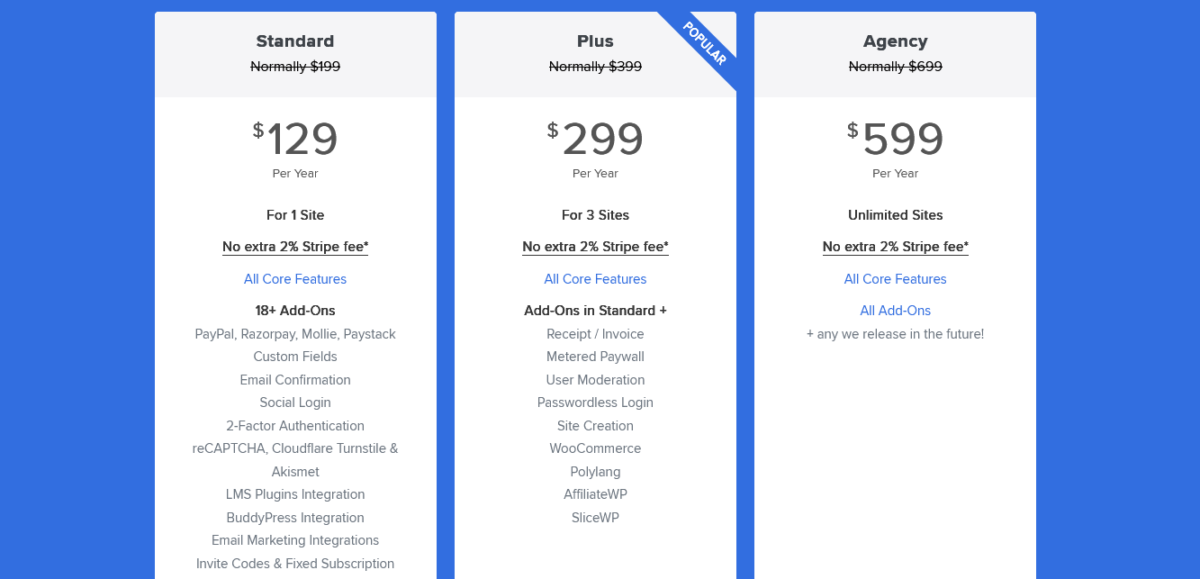
Standard Plan – $129/year (1 site)
- Everything in free
- No 2% Stripe fee (pays for itself fast)
- PayPal, Razorpay, Mollie, Paystack
- Custom fields
- Email confirmation
- Social login (Facebook, Google, Twitter)
- 2FA authentication
- reCAPTCHA & Akismet integration
- LMS integrations (LearnDash, LifterLMS, Tutor LMS, etc.)
- BuddyPress integration
- Email marketing integrations (Mailchimp, Campaign Monitor, MailerLite)
- Invite codes
Good for: Solo creators, small businesses, first membership site
Plus Plan – $299/year (3 sites)
- Everything in Standard
- Receipt/Invoice addon
- Metered Paywall (the NYT model)
- User Moderation
- Passwordless login
- Site Creation (multisite)
- WooCommerce integration
- Polylang (multilingual)
- AffiliateWP integration
- SliceWP integration
Good for: Agencies, developers with multiple clients, growing businesses
Agency Plan – $599/year (unlimited sites)
- Everything in Plus
- All current AND future add-ons
- Unlimited sites
- Priority support
Good for: Agencies, developers, people who manage lots of sites
Money-saving tip: Use code WPBGN20 for 20% off (yes, it still works as of January 2026).
Integration Game: Plays Well With Others
One of my favorite things about this ProfilePress review is how well it integrates with other tools.
Because Proper Fraction (the parent company) makes MailOptin, FuseWP, FeedbackWP, and CrawlWP, the ecosystem is tight.
MailOptin Integration
MailOptin is a lead generation and email automation plugin. With ProfilePress, you can:
- Automatically add new members to email lists
- Send welcome emails
- Segment based on membership level
- Automate email campaigns
I recommend MailOptin for pop-ups and newsletters. The ProfilePress integration means that when someone joins a membership, they automatically get added to the right email list.
❌ No Zapier.
❌ No complicated workflows.
✅️ Just works.
FuseWP Integration
FuseWP syncs WordPress users with email marketing platforms and CRMs. It’s like WP Fusion’s more affordable cousin who’s actually easier to talk to.
ProfilePress + FuseWP = automatic syncing to:
- Kit (ConvertKit)
- ActiveCampaign
- MailerLite
- Mailchimp
- HubSpot
- Constant Contact
- Keap
- And like 30 others
Changed a user’s membership level? FuseWP updates its tags in your CRM. Automatically. While you’re sleeping. It’s beautiful.
LMS Integrations
Works with:
- Sensei LMS
- LearnDash
- LifterLMS
- Tutor LMS
- Academy LMS
- MasterStudy LMS
So if you want to sell course access via memberships, ProfilePress has you covered. I tested the LearnDash integration, and it was smooth as butter.
Other Integrations
- WooCommerce (sell memberships as products)
- BuddyPress (social networking features)
- AffiliateWP (create affiliate programs)
- SliceWP (another affiliate option)
- Polylang (multilingual sites)
Technical Stuff (For the Nerds) 🤓
Performance
ProfilePress is lightweight. I ran speed tests with and without it activated. Difference? Negligible. Like 0.1 seconds load time difference.
The plugin uses:
- Asynchronous loading
- Aggressive caching
- Cache-busting for dynamic content
- Minimal database queries
Translation: It won’t slow down your site like some membership plugins that feel like they’re running on a potato.
Security Features
- 2FA (Two-Factor Authentication) – Available in Standard plan and up
- Email confirmation – Verify user emails before activation
- reCAPTCHA – Block spam registrations
- Cloudflare Turnstile – Alternative to reCAPTCHA
- Akismet integration – Another spam-blocking option
- Social login – Reduces weak passwords (people use their Google/Facebook accounts)
- User moderation – Approve users before they get access (Plus plan)
Real security story: I had a client getting hammered with fake registrations. Added reCAPTCHA via ProfilePress. Spam dropped to zero overnight. Client literally sent me a thank you email with a gif of someone crying happy tears.
Developer-Friendly
If you code (I dabble when wine is involved), ProfilePress has:
- Hooks and filters for customization
- Well-documented API
- Clean, readable code
- Active development (regular updates)
- GitHub repository
The documentation at profilepress.com/docs is actually useful. Not like those docs that just repeat what you can see in the interface. Actual examples, code snippets, use cases.
What ProfilePress Does Better Than Anyone Else

1. Payment Gateway Options
Most competitors give you Stripe and PayPal. Maybe Authorize.net. ProfilePress gives you Mollie, Razorpay, Paystack, and bank transfers.
If you’re serving international markets or niche payment needs, this is huge.
2. Form Building
The drag-and-drop builder is intuitive without being dumbed down.
Templates are truly attractive (not stuck in 2010). And if you want full control, the advanced builder delivers.
3. Pricing
$129/year for everything most people need.
Compared to competitors charging $180-$250 for similar features. Math isn’t hard here.
4. Ecosystem Integration
MailOptin for email marketing. FuseWP for CRM syncing. It all works together without hacky workarounds or expensive third-party tools.
5. The Free Version Actually Works
Unlike some plugins where the free version is basically a demo, ProfilePress free can run a legitimate membership site.
You’ll hit the 2% Stripe fee, but for testing or small operations, it’s genuinely usable.
What Could Be Better (Honest Criticism)
1. No Built-In Course Builder
If you want course features, you need to integrate with an LMS plugin. MemberPress has courses built in. For some people, that’s a dealbreaker.
Counter-argument: LMS plugins like LearnDash are way better than MemberPress’s course builder anyway. So ProfilePress’s approach of “integrate with the best” makes sense.
2. Documentation Could Be More Visual
The docs are good, but more screenshots and video tutorials would help. I’m a visual learner. Reading walls of text at 3 AM when trying to fix something isn’t ideal.
Update: They’ve been adding more videos lately, so this is improving.
3. Some Features Behind Higher Tiers
Want the metered paywall? Need Plus ($299).
WooCommerce integration? Plus.
Invoices? Plus.
This isn’t necessarily bad (you get what you pay for), but if you’re on Standard and realize you need these features, the upgrade is a $170 jump.
4. Learning Curve for Advanced Features
The basic stuff is easy. The advanced stuff (custom fields, complex restriction rules, integration setups) has a learning curve. Not terrible, but budget some time if you’re doing complex setups.
Use Cases (When ProfilePress Makes Sense)
1. Content Creator Monetization
You write, podcast, make videos, whatever. Want to put some content behind a paywall? ProfilePress makes this stupidly simple.
Example: Food blogger puts premium recipes behind $5/month membership. Uses a metered paywall, so free users get 3 recipes per month. Upgrades for unlimited access.
2. Online Course Sales
Integrate with LearnDash or Tutor LMS. Sell course access via membership plans. Different tiers for different course bundles.
Example: Yoga instructor offers Bronze ($19/month, basic classes), Silver ($39/month, intermediate + basic), Gold ($79/month, everything + live sessions).
3. Private Communities
Create member directories, forums (with BuddyPress), and exclusive content areas.
Example: Business coaches create a mastermind community. Members get profiles, can connect with each other, access exclusive resources, and join group coaching calls.
4. SaaS-Style Subscriptions
Sell software access, API keys, and exclusive tools via recurring subscriptions.
Example: A developer tools company charges monthly for access to their WordPress plugins. Different tiers unlock different plugins.
5. Digital Product Store
Sell ebooks, templates, graphics, courses, and software. Attach files to membership plans or sell individually.
Example: A graphic designer sells template bundles. Monthly members get new templates every month. One-time buyers get specific bundles.
ProfilePress Setup Tutorial (The Fast Version)
Step 1: Install the Plugin
WordPress dashboard → Plugins → Add New → Search “ProfilePress” → Install → Activate
Or download from profilepress.com and upload
Step 2: Run the Setup Wizard
ProfilePress will launch the setup wizard automatically. Follow prompts:
- Choose a payment gateway (Stripe recommended to start)
- Connect payment account
- Create the first membership plan
- Set basic settings
Step 3: Create Your First Membership Plan
ProfilePress → Membership Plans → Add New
Fill out:
- Plan name
- Price
- Billing frequency (one-time, monthly, yearly, etc.)
- Description
Choose what to restrict:
- Posts/pages
- Categories
- Custom post types
Save plan.
Step 4: Create Registration/Login Forms
ProfilePress → Optin Campaigns → Add New
Choose template (or start from scratch)
Customize:
- Colors
- Fields
- Text
- Placement
Integrate with the membership plan
Publish
Step 5: Restrict Content
Edit any post/page
ProfilePress metabox → Set access rules
Choose who can view:
- Everyone
- Logged-in users
- Specific membership plans
- Specific user roles
Save
Done. You have a functioning membership site.
Get Started with ProfilePress ⟶
Support & Documentation: When Shit Hits the Fan
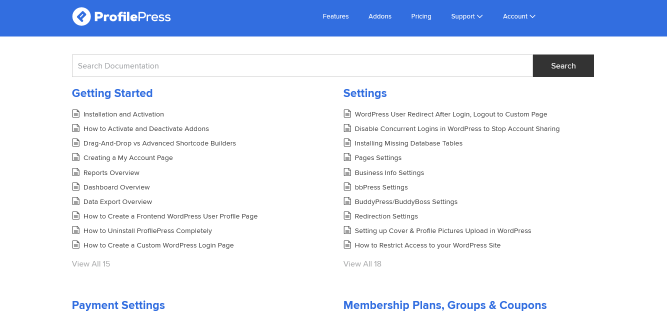
Documentation
Comprehensive docs at profilepress.com/docs covering:
- Setup guides
- Feature explanations
- Code examples
- Troubleshooting
The docs are searchable and organized logically. Not amazing, but solid.
Email Support
All paid plans include email support. Response time is usually within 24 hours (sometimes faster).
I’ve contacted support:
- Question about WooCommerce integration – Got a detailed answer in 6 hours
- Bug report (turned out to be my hosting) – They helped me figure it out anyway
Support quality: Good. Not “blow your mind” amazing, but competent and helpful.
Community
WordPress.org plugin forum has 200K+ users, so there’s community help available.
A Facebook group exists, but it isn’t super active.
Updates
Regular updates (monthly-ish). The development team is active. The plugin hasn’t been abandoned like some membership plugins from years ago.
Who ProfilePress Is Perfect For
✅ Content creators monetizing blogs, podcasts, videos
✅ Course creators using LearnDash, LifterLMS, etc.
✅ Small businesses offering member perks
✅ Service providers with subscription offerings
✅ Coaches/consultants building communities
✅ Digital product sellers (ebooks, templates, etc.)
✅ WordPress agencies needing flexible membership solutions
✅ International sellers needing multiple payment gateways
✅ People who value simplicity over bloated feature sets
Who Should Look Elsewhere
❌ Need built-in course builder (get MemberPress instead)
❌ Want every imaginable feature regardless of cost (try Paid Memberships Pro)
❌ Already deep in the WooCommerce ecosystem (WooCommerce Memberships might be simpler)
❌ Need enterprise-level features and don’t care about cost
❌ Want a hosted solution instead of a WordPress plugin
Ecosystem Advantage: CrawlWP, MailOptin, FuseWP, FeedbackWP
Here’s something most ProfilePress review articles miss: The Proper Fraction ecosystem is legit.
MailOptin ($99-$499/year)
Lead generation + email automation. Create popups, forms, and send newsletters. Works seamlessly with ProfilePress for:
- New member welcome emails
- Membership upgrade campaigns
- Automated email sequences based on membership level
- Abandoned cart recovery (with WooCommerce)
I use MailOptin on multiple client sites. It’s basically a cheaper, WordPress-focused alternative to OptinMonster or ConvertBox.
FuseWP ($119-$499/year)
Syncs WordPress users to CRMs and email platforms. Think WP Fusion, but simpler and cheaper.
ProfilePress + FuseWP = automatic syncing to:
- 40+ CRM platforms
- Automatic tag updates
- Custom field mapping
- Membership status syncing
Use case: When someone upgrades from Bronze to Gold membership, FuseWP automatically updates their tags in ActiveCampaign and triggers an automation. No Zapier needed.
CrawlWP ($49-$199/year)
Site monitoring tool. Monitors your WordPress sites for:
- Uptime
- Performance issues
- Security vulnerabilities
- Plugin/theme updates needed
Less directly related to ProfilePress, but useful for agencies managing multiple membership sites.
The point: Using ProfilePress, MailOptin, and FuseWP together creates a powerful ecosystem for membership sites, email marketing, and CRM integration. All from the same company, so integration is native, not hacky.
Common Questions (Because You’re Probably Wondering)
Does ProfilePress work with my theme?
Yes. It’s theme-agnostic. Works with Astra, GeneratePress, Divi, Elementor, Kadence, whatever.
Can I import members from another plugin?
Yes. CSV import function. I’ve migrated sites from other membership plugins. Takes some manual work but doable.
Will it work with my page builder?
Yes. Elementor, Divi, Beaver Builder, WPBakery, Gutenberg, whatever. The shortcodes work everywhere.
Can I offer free trials?
Yes. Built-in free trial support. Set a trial period, then automatic conversion to paid.
What about coupons/discounts?
Yes. Create percentage or fixed-amount coupons. Set expiration dates, usage limits, etc.
Can I do drip content?
Not natively, but the LMS integrations (LearnDash, LifterLMS) handle drip content if you need it.
Is it GDPR compliant?
Yes. Includes tools for data export, deletion, and consent management.
Can I use it on WordPress.com?
Only if you have the Business plan or higher (which allows custom plugins).
What about refunds?
14-day money-back guarantee. Pretty standard.
My Final Verdict (No Bullshit)
ProfilePress is one of the best membership plugins you’ve never heard of.
At $129/year for the Standard plan, it delivers more value than plugins charging $100+ more. The interface is clean, setup is easy, and it doesn’t slow down your site.
Is it perfect? No. The lack of a built-in course builder might be a dealbreaker for some. Documentation could be better. Some advanced features require jumping to higher-tier plans.
But for 90% of people building membership sites, ProfilePress checks every box. Multiple payment gateways, excellent form builder, solid content restriction, fair pricing, and an ecosystem (MailOptin, FuseWP) that actually works together.
The competition:
- MemberPress: More expensive, more complex
- Paid Memberships Pro: Way more expensive, overwhelming
- WooCommerce Memberships: Great if you’re all-in on WooCommerce
ProfilePress: Best balance of price, features, and ease of use.
The Rating Breakdown
Features: 9/10 – Has everything most people need. Loses a point for no built-in courses.
Ease of Use: 9.5/10 – Setup is stupid simple. Advanced features have a learning curve, but nothing crazy.
Pricing: 9/10 – Excellent value. The free version is actually useful.
Performance: 8.5/10 – Lightweight and fast. No complaints.
Support: 8/10 – Good response times, helpful answers. Could be better, but definitely adequate.
Integrations: 9/10 – Works with everything that matters. Ecosystem advantage is real.
Documentation: 7.5/10 – Comprehensive but could use more visuals and videos.
Overall: 8.7/10 – Highly recommended for most membership site use cases.
Should You Buy ProfilePress? (Decision Framework)

Buy Standard ($129/year) if:
- First membership site
- 1 site only
- Don’t need WooCommerce integration
- Basic membership features are enough
Buy Plus ($299/year) if:
- Managing 2-3 sites
- Need WooCommerce integration
- Want metered paywall
- Need invoices/receipts
- Multilingual site (Polylang)
Buy Agency ($599/year) if:
- Managing 4+ sites
- Running an agency
- Want all future add-ons
- Need maximum flexibility
Skip ProfilePress if:
- Need a built-in course builder
- Want enterprise features
- Already committed to the MemberPress ecosystem
- Don’t use WordPress
Conclusion: The Real Real
Look, I’ve tested a lot of membership plugins. Some made me want to throw my laptop out the window. Others work but cost a fortune. ProfilePress is the rare plugin that’s actually good, affordable, and doesn’t make you want to cry.
For content creators, course sellers, and small businesses, it’s a no-brainer at $129/year. Even the Plus plan at $299 is a solid deal when you look at what MemberPress charges.
The Proper Fraction ecosystem (ProfilePress + MailOptin + FuseWP + FeedbackWP) creates a powerful stack for membership sites, email marketing, and CRM integration without breaking the bank.
Is it perfect? No.
Will it work for everyone? No.
But for most people reading this ProfilePress review, it’s probably exactly what you need.
My recommendation: Try the free version. Kick the tires. If you like it, grab Standard for $129 (use code WPBGN20 for 20% off). If you outgrow it, upgrade to Plus or Agency.
Simple as that.
FAQs
Is ProfilePress better than MemberPress?
For most use cases, yes. It’s cheaper ($129 vs $199.50), easier to use, and has more payment gateway options. MemberPress wins if you need the built-in course builder.
Otherwise, ProfilePress is the smarter choice.
Can I use ProfilePress for free?
Yes. The free version from WordPress.org includes core features but charges an extra 2% on Stripe transactions. For serious use, the $129 Standard plan is worth it to eliminate that fee.
Does ProfilePress slow down my website?
No. It’s built with performance in mind using asynchronous loading and aggressive caching. Load time impact is negligible (tested at 0.1 seconds difference).
What payment gateways does ProfilePress support?
Stripe (with Apple Pay, Google Pay, iDEAL, etc.), PayPal, Razorpay, Mollie, Paystack, and Bank Transfer. Way more options than most competitors.
Can ProfilePress sell digital products?
Yes. Upload any file type (PDF, video, audio, ebooks, software, templates) and attach to membership plans. Customers get instant access after purchase.
Does it work with WooCommerce?
Yes, but you need the Plus plan ($299/year) or higher for the WooCommerce integration addon. It lets you sell memberships as WooCommerce products.
Is there a money-back guarantee?
Yes. 14-day money-back guarantee on all paid plans. Standard refund policy.
Can I create a metered paywall like The New York Times?
Yes, with the Metered Paywall addon (included in Plus and Agency plans). Set how many free articles users get before requiring membership.
Does ProfilePress work with LearnDash?
Yes. It integrates with LearnDash, LifterLMS, Tutor LMS, Sensei LMS, Academy LMS, and MasterStudy LMS. Sell course access via membership plans.
How does ProfilePress compare to Paid Memberships Pro?
ProfilePress is cheaper ($129 vs $247) and includes more features in the core plugin. PMPro has more add-ons, but many are necessary for basic functionality. ProfilePress is more value-focused.
Can I use ProfilePress on multiple sites?
The standard plan is for 1 site. Plus covers 3 sites ($299/year). Agency covers unlimited sites ($599/year).
Is ProfilePress good for beginners?
Yes. The setup wizard and drag-and-drop form builder make it beginner-friendly. You can have a membership site running in 15-30 minutes without coding.
What’s the difference between ProfilePress and WP Fusion?
Different tools. ProfilePress is a membership plugin. FuseWP (by the same company) is the WP Fusion alternative for syncing users to CRMs. They work great together.
Can I offer free trials with ProfilePress?
Yes. Built-in free trial support. Set trial duration, then auto-convert to paid subscription.
Does ProfilePress support affiliates?
Yes, via AffiliateWP or SliceWP integrations (included in Plus and Agency plans). Create an affiliate program for your membership site.
Is ProfilePress GDPR compliant?
Yes. Includes features for GDPR compliance, including data export, deletion, and consent management.
Can I restrict navigation menus with ProfilePress?
Yes. You can show/hide menu items based on login status, membership level, or user role. Useful for creating different experiences for different members.
What happens if I don’t renew my license?
The plugin continues working, but you lose access to updates, support, and premium features. Your existing setup keeps functioning, though.
Can I sell one-time products instead of subscriptions?
Yes. ProfilePress supports both one-time purchases and recurring subscriptions. Mix and match as needed.
About Me: Mia here. I run Blog Recode, where I help content creators blog smarter with AI. I’ve tested more WordPress plugins than I’d like to admit and have strong opinions about membership plugins. When I’m not writing reviews, I’m probably in my studio apartment questioning my life choices or plotting how to finally conquer my camera shyness. ProfilePress is one of the few plugins that didn’t make me swear in multiple languages.
Disclosure: This review may contain affiliate links. If you buy some products through links on this page, I may earn a commission at no extra cost to you. I only recommend tools I’ve used and believe in. This review is based on hands-on testing and real experience, not marketing fluff.