10 Powerful Nutshell CRM Features That Close More Deals in 2026

Forget the buzzwords. These 10 powerful Nutshell CRM features are built for one thing: closing deals without losing your mind 🥜
Quick Answer
Nutshell CRM is a powerful, affordable CRM built for B2B teams and SMBs that want serious sales firepower without the Salesforce-level headache.
Its most deal-closing features include visual pipeline management, sales automation, AI-powered lead recaps, email sequences, VisitorIQ website tracking, ProspectorIQ prospecting, meeting scheduling, reporting and forecasting, built-in web chat, and an AI chatbot.
Plans start at $13/user/month on annual billing. Read on for the full breakdown.
The Day That Turned My Opinion Around

I’ll be straight with you.
The first time I heard “Nutshell CRM,” I pictured something tiny, bare-bones, and a little underwhelming. A name like that doesn’t exactly scream “this thing is about to upgrade your entire sales operation.”
More like a CRM you grab because you couldn’t afford anything else.
Then a client of mine, a small B2B tech consultancy, told me on a random afternoon that they’d ditched HubSpot for Nutshell.
And not reluctantly. Happily.
I nearly choked on my water. “HubSpot? You left HubSpot?”
“Mia,” she said, “HubSpot was costing us a fortune, and half my team never even logged in. Nutshell costs less, does what we actually need, and my reps actually use it every morning.”
That one conversation sent me down a proper rabbit hole.
I spent a few weeks testing the platform myself, reading through hundreds of verified reviews on G2, Capterra, and Gartner, and talking to other small business owners running it day to day.
What did I find? This platform is genuinely underestimated.
So let’s fix that.
What Is Nutshell and Who Is It For?

Nutshell CRM is a cloud-based sales, marketing, and engagement platform founded in 2010 and headquartered in Ann Arbor, Michigan.
It’s built specifically for small and mid-sized B2B businesses that want a capable, well-rounded CRM without needing an IT team to run it or a startup budget to afford it.
Nutshell has been named a G2 Leader in CRM every single quarter since Fall 2020. That’s not a one-time fluke. That’s consistency you can actually rely on.
Every plan includes unlimited storage, unlimited contacts and accounts, free live support, email and calendar sync, and access to the AI Agent Marketplace. And when I say “actually affordable,” I mean it.
| Plan | Monthly Billing | Annual Billing |
|---|---|---|
| Foundation | $19/user/mo | $13/user/mo |
| Growth | $32/user/mo | $25/user/mo |
| Pro (Most Popular) | $49/user/mo | $42/user/mo |
| Business | $67/user/mo | $59/user/mo |
| Enterprise | $89/user/mo | $79/user/mo |
A 14-day free trial is available on all plans. No credit card. No traps.
👉 Try Nutshell free for 14 days and see which features your team actually needs before paying a cent.
Now, let’s get into the ten features that are built to close deals.
1. Visual Pipeline Management With Multiple Views

Every CRM has a pipeline. Not every CRM has one that reps actually enjoy opening.
There’s a difference.
Nutshell’s pipeline is drag-and-drop, clean, and built for speed. Move a deal from one stage to the next with a single click. But what sets it apart is the four different pipeline views: list, Kanban board, chart, and map. Each one serves a different rep and a different type of task.
The board view is your classic Kanban layout. Drag deals left or right as things progress.
The list view is for reps who want a filterable table. The chart view provides managers with a snapshot of pipeline health.
And the map view? That one genuinely surprised me. It plots your leads geographically, which is useful if you run field sales or territory-based teams. I’ve never seen that as a standard pipeline feature at this price point.
Pro plan unlocks 5 customizable pipelines. Business gives you 10. Enterprise gives you unlimited. So if you run different pipelines for inbound versus outbound, or multiple product lines, the room is there to grow.
Available on all plans. Multiple pipelines from the Growth plan onwards.
👉 See the pipeline in action with a free trial
2. Sales Automation That Does the Follow-Up for You

Sales reps are great at selling.
They are terrible at remembering to send that follow-up email three days after a demo. That’s not an insult. That’s just human nature when you’re managing 40 active deals simultaneously.
Nutshell’s sales automation handles the repetitive stuff so your team can focus on conversations that actually move deals forward. Set up automated task assignments, email triggers, stage-based follow-up sequences, lead status changes, and pipeline movements, all triggered by deal activity.
Here’s what that looks like in practice.
A rep completes a demo. The deal moves to “Demo Completed.” Nutshell automatically assigns a follow-up task, queues a follow-up email for 24 hours later, and flags the deal as hot if nobody touches it within 5 days.
No clicking. No reminding. Just done.
Automations trigger reliably without delays, even when multiple workflows run simultaneously. The automation builder isn’t as deep as a dedicated platform like ActiveCampaign, but for a CRM-native tool targeting SMBs, it’s absolutely fit for purpose.
Available on Pro plan and above at $42/user/month annually.
👉 Automate your follow-ups. Start your free trial today.
3. AI-Powered Lead Recaps and Next Steps

This one is newer, and it’s one of my favorite things about where Nutshell is heading in 2026.
Open a lead in Nutshell, and the AI Lead Recap gives you a plain-English summary of everything that’s happened with that contact. Who spoke to them, when, what was discussed, what was promised, and what the current status is.
All summarized instantly. Ready to scan in 15 seconds before you jump on a call.
Then the AI Next Steps feature tells you what to do next to move the deal forward. Think of it as a quiet sales coach living inside your CRM. “This deal hasn’t had contact in 8 days. Here’s your move.”
Business and Enterprise plans take it further with full meeting transcription. Zoom, Google Meet, and Microsoft Teams calls get transcribed and summarized automatically. No more “let me go back through the recording.”
Your notes write themselves.
Unlike traditional CRMs that just show you where you are, Nutshell’s AI tells you what to do next. That’s the difference between a CRM and a deal closer.
AI recaps and next steps on Pro+. Meeting transcription on Business and Enterprise.
👉 Let AI do the heavy lifting. Try Nutshell free.
4. Personal Email Sequences 📧

Cold outreach is not dead. Bad cold outreach is dead. And the difference between bad and good?
Follow-up consistency.
Nutshell’s personal email sequences let reps build multi-step outreach campaigns that send from their own email address, not a generic marketing account. Emails coming from a real person’s inbox get dramatically better open rates than mass campaigns.
Because they feel personal. Because they are personal.
Set up the sequence once. Email one on day one. Email two on day three. Phone call reminder on day seven. LinkedIn touchpoint note on day ten.
Nutshell manages the timing and prompts your rep for every step. And when someone replies or books a meeting, the sequence pauses automatically. No “I accidentally sent 9 follow-ups after they already signed the contract” disasters.
We’ve all been there. Let’s not go back.
You can create automated email campaigns using custom templates and track engagement with Funnel Reports, which follow customer journeys from initial contact all the way to closing.
Available on Pro plan and above.
👉 Build your first email sequence inside Nutshell. Free for 14 days.
5. VisitorIQ: Know Who’s on Your Website Before They Say Hello
This one genuinely surprised me the first time I tested it. And I don’t get surprised easily by CRM features anymore.
VisitorIQ is Nutshell’s website visitor identification tool. Drop a single tracking snippet on your site. From that moment, Nutshell starts identifying the companies visiting your pages, even when they haven’t filled out a single form.
You see which pages they visited, how long they stayed, and which content they engaged with. Then you unlock the specific people at those companies with a single credit. Their name, job title, email address, and LinkedIn profile appear right in your CRM.
One click. Add them as a lead. Automation takes over.
Think about what this means practically.
Someone at a mid-sized company in your target market spends 10 minutes reading your case studies on a Thursday afternoon. They don’t fill out a form.
Old world: you never know they exist.
Nutshell world: you have their name by Thursday evening, and you’re reaching out Friday morning before any competitor even knew they were curious.
VisitorIQ turns anonymous website traffic into warm, workable leads. That alone is worth the price of the add-on for most B2B teams.
All Nutshell customers get 10 free VisitorIQ credits per month to start. The Nutshell IQ add-on unlocks 100 credits for $37/company/month, shared across VisitorIQ, ProspectorIQ, and PeopleIQ.
Available as part of the Nutshell IQ add-on at $37/company/month.
👉 See who’s already on your website. Start your free Nutshell trial.
6. ProspectorIQ: A Database of 200M+ Contacts Built Into Your CRM

If VisitorIQ catches fish already circling your boat, ProspectorIQ finds entirely new fishing waters.
ProspectorIQ is Nutshell’s outbound prospecting tool, built directly inside the CRM.
No separate login.
No integration headaches.
It sources data from third-party providers covering over 200 million people and companies in the United States.
Define your ideal customer profile with filters: job title, industry, company size, revenue range, and location. ProspectorIQ searches the database and returns a matching list.
Verified email addresses, phone numbers, and LinkedIn URLs are available to unlock with a credit. Add them to your pipeline in a few clicks, and your automation is ready to run.
Compared to standalone tools like ZoomInfo or Apollo.io, ProspectorIQ is built right into your CRM and is significantly more affordable.
ZoomInfo starts at $14,000/year. Apollo.io starts at $49/user/month. Nutshell IQ covers your whole team for $37/company/month.
Fair warning: the database is currently US-focused. If your prospecting is primarily international, you’ll need to check with Nutshell’s team directly on options. But for businesses targeting US markets, this is a legitimately powerful tool at an SMB-friendly price.
Available as part of the Nutshell IQ add-on at $37/company/month.
👉 Find your next 100 prospects inside Nutshell. Try it free.
7. Built-In Meeting Scheduler
The email back-and-forth to book a 30-minute call is one of the most unnecessary time drains in sales. “Tuesday works.” “Actually, Wednesday.” “Thursday?” “I’m in meetings all Thursday.” Three days.
Nine emails. Still no call booked. C’est la vie.
Nutshell’s meeting scheduler is native; no third-party tools needed. It connects directly to your Google or Outlook calendar and lets prospects pick from your live availability.
The meeting goes into both calendars. Confirmation email sends automatically. Done.
Drop the link in your email signature, your proposals, and your website. Prospects book themselves. Your rep doesn’t lift a finger.
A 2025 update added a nice touch: meeting attendees can now invite additional people to their booking. They enter email addresses, and Nutshell sends confirmations to every participant.
Sounds small. For enterprise deals where multiple stakeholders need to be in the room on the first call, it’s quietly excellent.
Available on Business plan and above at $59/user/month annually.
👉 Stop the scheduling chaos. Try Nutshell Business free for 14 days.
8. Reporting, Forecasting, and Funnel Analytics
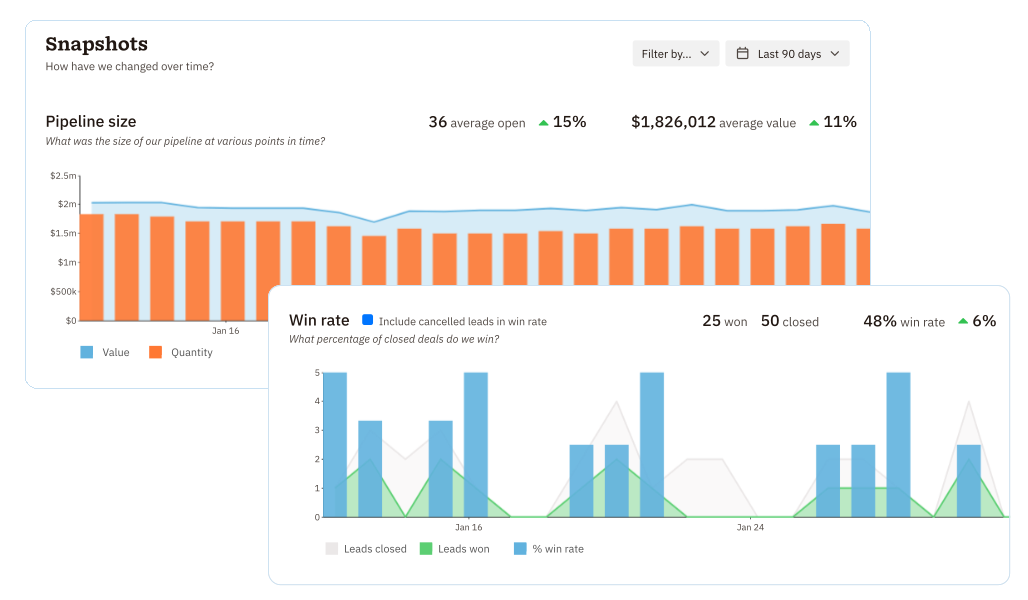
Closing deals is great. Understanding why you’re closing or losing deals is what builds a scalable sales process.
Nutshell’s full reporting suite on Pro and above gives you exactly that.
Funnel reports show where leads drop off at each pipeline stage. If 60% of your deals are dying after the proposal stage, that’s your signal. The problem isn’t the lead volume. It’s your proposal.
Activity reports track what reps are actually doing. Calls made. Emails sent. Meetings booked. Not just outcomes, input data. Managers love this.
Forecast reports give projected revenue based on your current pipeline, deal values, and historical close rates. They’re straightforward, not enterprise-grade complex, but they give SMBs exactly the visibility they need to plan ahead with confidence.
Loss reports are my personal favorite and wildly underused. Every closed-lost deal gets a reason. Over time, patterns emerge. “We lost 12 deals last quarter on pricing.” That’s actionable intelligence right there.
Enterprise plan users also get read-only SQL access, so if you have a data analyst on your team, they can query your CRM data directly.
One honest note: multiple reviewers on Capterra and GetApp flag that cross-platform reporting and Excel exports can be clunky. Not a dealbreaker, but worth knowing before you commit.
Activity and email reports on Growth+. Full suite on Pro+. Custom reports and SQL on Enterprise.
👉 Get full pipeline visibility. Start your free Nutshell trial.
9. Web Chat and AI Chatbot 💬

Most CRMs charge you extra for live chat or make you wire in a third-party tool and hope the data syncs. Nutshell includes web chat and an AI chatbot natively, on every plan, no add-on required.
The web chat widget sits on your website and routes live conversations directly to your sales or support team. Contact information gets captured automatically in the CRM. Nothing falls through the cracks.
The AI chatbot goes further. Train it with your product information, FAQs, and qualifying questions, and it handles inbound enquiries 24/7 without a human needing to be online. Conversations it can’t handle escalate to a live rep.
A prospect lands on your website at 9pm on a Sunday. The AI chatbot answers their questions, captures their contact details, and creates a lead in Nutshell before anyone on your team starts their Monday morning.
That’s a deal that might have otherwise bounced into a competitor’s pipeline.
Web chat, the AI chatbot, web forms, and landing pages are all included in every single Nutshell subscription. Not a higher tier. Every plan.
Available on all plans, included in base subscription.
👉 Turn your website into a lead machine. Try Nutshell free today.
10. Google and Microsoft 2-Way Sync 🔄

This one sounds boring. I almost moved it down the list. But hear me out, because this might be the feature that determines whether your team actually uses the CRM or just pays for it.
Nutshell’s 2-way sync with Google Workspace and Microsoft 365 means emails sent from your Gmail or Outlook account automatically show up on the right contact’s timeline in Nutshell. Calendar events sync both ways. No manual logging. No copy-pasting notes.
Your reps just work in their inbox the way they always have, and Nutshell quietly organizes everything behind the scenes.
I’ve watched CRMs get abandoned specifically because manual data entry was too annoying. Reps would rather track deals in a spreadsheet than spend 10 minutes a day logging activities. The 2-way sync removes that friction entirely.
And a CRM your team actually uses consistently is infinitely more valuable than a powerful CRM that nobody opens.
Available on all plans, included in base subscription.
👉 Sync your inbox and start closing smarter. Free trial, no card needed.
My Honest Verdict
Because this is Blog Recode and I don’t do half-truths.
Nutshell gets a lot right:
- The price-to-value ratio is genuinely excellent.
- Unlimited contacts on all plans.
- Free live support on every tier.
- Free data migration assistance when you switch.
- An AI layer that actually solves real problems instead of just sounding impressive in a product demo.
- And an interface clean enough that reps don’t need weeks of training before they’re productive.
Where does it fall short?
- Reporting exports can be clunky.
- The Nutshell IQ suite is US-focused, so international prospecting has limits.
- The mobile app works but is less polished than the desktop experience.
- And lower-tier plans feel restrictive enough that most growing teams will need to jump to Pro fairly quickly.
But here’s the bottom line. My client didn’t leave HubSpot because Nutshell was cheaper. She left because her team actually used it. That’s the real metric that matters for a CRM. A tool nobody logs into is not a tool. It’s an expensive monthly subscription collecting dust.
Overall Rating: 8.2/10
| Category | Score |
|---|---|
| Pipeline Management | 9/10 |
| Sales Automation | 8/10 |
| AI Features | 8.5/10 |
| Email Sequences | 8.5/10 |
| Prospecting Tools | 9/10 |
| Reporting | 7.5/10 |
| Ease of Use | 9/10 |
| Pricing Value | 9/10 |
| Support | 9/10 |
| Mobile App | 7/10 |
| Overall | 8.2/10 |
Parting Shot
The 10 Nutshell CRM features in this post are not just checkbox items on a product page. They’re the specific tools that take a deal from “we had a good first call” to “contract signed” without your reps drowning in manual admin.
The AI recaps, VisitorIQ, ProspectorIQ, personal email sequences, and visual pipelines together form a sales stack that genuinely punches above its weight class at this price point.
Is it perfect? No. But for SMBs and growing B2B teams who want a CRM that their reps will actually open every single morning, it deserves every serious look it can get.
Which of these ten features surprised you most? Drop a comment below. I’m genuinely curious which one hits differently depending on your sales process.
👉 Start your free 14-day Nutshell trial now. No credit card required. No commitment. Just see if it fits.
FAQs
What is Nutshell CRM best used for?
Nutshell CRM is best used by small and mid-sized B2B businesses that need an affordable, easy-to-use sales and marketing platform. It excels at pipeline management, sales automation, email outreach, lead prospecting, and customer relationship tracking.
It’s particularly strong for teams switching from spreadsheets or from expensive CRMs like HubSpot or Salesforce that feel over-engineered for their size.
How much does Nutshell CRM cost in 2026?
Nutshell pricing starts at $13/user/month on annual billing (Foundation plan) or $19/user/month on monthly billing.
The five plans are Foundation, Growth ($25/mo), Pro ($42/mo), Business ($59/mo), and Enterprise ($79/mo), all billed per user per month annually.
Add-ons include Marketing Pro ($49/company/month), Engagement Pro ($16/user/month), and Nutshell IQ ($37/company/month for 100 credits). A 14-day free trial is available on all plans, no credit card required.
Does Nutshell CRM have AI features?
Yes. Nutshell includes AI-powered lead recaps, AI next-step recommendations, AI call and meeting logging (Pro+), and AI meeting transcription with summaries for Zoom, Google Meet, and Microsoft Teams (Business and Enterprise plans).
All plans include access to the AI Agent Marketplace and the built-in AI chatbot at no extra cost.
What is Nutshell IQ?
Nutshell IQ is a prospecting and intelligence add-on at $37/company/month for 100 shared credits. It includes ProspectorIQ (search 200M+ US contacts to find ideal prospects), VisitorIQ (identify companies visiting your website before they fill out a form), and PeopleIQ (discover key contacts at companies already in your CRM).
All Nutshell customers get 10 free credits per month.
How does Nutshell compare to HubSpot?
Nutshell is significantly more affordable than HubSpot at comparable feature levels and requires far less technical setup.
HubSpot offers a more robust marketing automation suite and more advanced analytics at higher tiers.
Nutshell wins on simplicity, pricing transparency, live support on all plans, and ease of adoption for small sales teams.
Many users specifically switch from HubSpot to Nutshell after finding HubSpot’s pricing unsustainable as their contact list grows.
Does Nutshell integrate with Gmail and Outlook?
Yes. Nutshell offers a 2-way sync with both Google Workspace and Microsoft 365. Emails sent from Gmail or Outlook appear automatically on the relevant contact’s CRM timeline. Calendar events sync both ways.
This eliminates manual data entry and keeps your CRM current without requiring extra effort from your sales reps.
Is there a free plan for Nutshell CRM?
No. Nutshell does not offer a permanently free plan. However, all plans include a 14-day free trial with no credit card required.
The Foundation plan at $13/user/month annually is the most affordable entry point and includes unlimited contacts, basic pipeline management, email sync, web chat, AI chatbot, and access to the AI Agent Marketplace.
What plans include Nutshell’s sales automation?
Sales automation is available on the Pro plan and above at $42/user/month annually. This includes automated task assignment, email triggers, stage-based follow-up sequences, lead status automation, and pipeline movement rules.
Personal email sequences, AI lead recaps, and AI next-step recommendations are also included on the Pro plan.
Can Nutshell handle multiple pipelines?
Yes. The Pro plan supports up to 5 customizable pipelines. Business supports up to 10. Enterprise gives you unlimited pipelines.
The Foundation and Growth plans are limited to a single pipeline. Multiple pipelines are useful for teams managing different products, sales motions, or customer types within the same CRM.
Is Nutshell CRM good for B2B businesses?
Yes, it was built specifically for B2B organizations. Its pipeline management, email sequence tools, sales automation, meeting scheduler, and prospecting features are all designed around the B2B sales cycle, which involves longer timelines, multiple stakeholders, and complex follow-up processes.
It has been a G2 Leader in CRM every quarter since Fall 2020 and is consistently praised by B2B SMBs as one of the best value CRM options available.