How Jetpack Protects Your Blog from Hackers & Downtime 2026
The security wake-up call that cost me $3,000+ and countless sleepless nights
My Quick Take
Look, I’m going to cut the bullshit right here. In 2024, my blog got hacked twice. TWICE. Lost client data, got blacklisted by Google, spent $3,000+ on emergency cleanup, and seriously considered throwing my laptop out the window.
Then I installed Jetpack Security. Haven’t been hacked since.
Here’s how Jetpack protects your blog in 2026, and why I wish I’d done this two years ago:
What Jetpack stops:
- Real-time malware scanning (caught several threats on my site I didn’t even know about)
- Brute force attacks (block 55 million attacks daily across all sites)
- Downtime disasters (emails you before your visitors notice)
- Comment spam (Akismet killed 847 spam comments last month alone)
- Complete site disasters (real-time backups saved my ass twice)
Some Truth: Security plugins are boring as hell until you need one. Then they’re worth every penny.
Disclosure: This article is sponsored by WordPress.com, but everything I’m sharing is based on real testing, real hacks (unfortunately), and real security wins. I don’t recommend shit I wouldn’t use myself.
Why I Ignored Security Until Hackers Made Me Their Vixen

How Jetpack protects your blog wasn’t on my mind in 2023.
I was too busy “building my brand” and “creating content” to worry about boring security stuff.
Then one morning at my favorite coffee shop, sipping an overpriced latte, about to publish a client review that took me eight hours to write.
I open my blog.
Instead of my homepage, there’s a message in broken English telling me my site has been “pwned” (yes, they spelled it that way) and to send $500 in Bitcoin to get it back.
I nearly threw up my latte all over my keyboard.
My blog was hacked.
Every post, every image, every goddamn comment replaced with spam links to fake Viagra sites and online casinos. Google had already flagged my site as “dangerous.” My hosting provider suspended my account. Client emails started rolling in asking why I was promoting sketchy pharmacy sites.
Merde.
The cleanup? $1,800 to a security specialist. Three days offline. Lost a client who thought I was unprofessional. Spent a weekend manually checking every file, every database entry, every hidden malicious script those bastards planted.
You’d think I learned, right? Wrong. Six months later, different hack, same nightmare. Another $1,400 cleanup.
That’s when a fellow blogger texted: “Girl, just get Jetpack Security already. Stop being cheap.”
She wasn’t wrong.
Scary Reality of WordPress Security in 2026 (Spoiler: It’s Worse)

Before I explain how Jetpack protects your blog, let me hit you with some facts that’ll make you sweat:
2026 WordPress Security Stats:
- WordPress sites get attacked every 32 minutes (down from 22 minutes in 2024, but still terrifying)
- 96% of WordPress vulnerabilities come from plugins (yes, those “must-have” plugins you installed)
- 43% of vulnerabilities need ZERO authentication (hackers don’t even need passwords)
- 40,000+ sites were infected in January 2026 alone from a single plugin flaw
- WordPress powers 43% of the entire internet, making it a hacker paradise
Here’s the kicker: WordPress vulnerabilities surged 68% year-over-year according to security reports.
Translation? If you’re running a WordPress blog without security in 2026, you’re basically hanging a “HACK ME” sign on your digital front door.
I learned this the expensive way. You don’t have to.
How Jetpack Protects Your Blog: Features That Matter
Let me break down how Jetpack protects your blog from the nightmare scenarios I lived through.
1. VaultPress Backup: The “Oh Shit” Button That Works ⏰

What it does: Automatically backs up your entire site in real-time. Every. Single. Change.
When my site got hacked the second time, I had a backup from three weeks ago. Know what happens in three weeks? Client reviews, new posts, comments, orders, if you’re running a shop.
I lost all of it.
With VaultPress Backup (part of Jetpack Security), your site backs up in real-time as you edit.
Published a post? Backed up. Client left a comment? Backed up. Updated a plugin? Backed up.
Real-world test: I tested this by intentionally breaking a test site (changed database settings like an idiot). One-click restore brought everything back in 4 minutes. FOUR MINUTES.
Pricing:
- Standalone VaultPress Backup: Starting at $5/month (billed yearly)
- Included in Jetpack Security: $20/month (billed yearly at $240)
- Storage: 10GB included (enough for most blogs)
Why it matters: Hosting backups suck. They’re often daily (not real-time), stored on the same server hackers just compromised, and restoring them requires tech skills I don’t have.
VaultPress stores multiple copies on WordPress.com’s servers. The same infrastructure that powers WordPress.com. If they can handle millions of sites, they can handle your backup.
Protect your blog with VaultPress →
2. Jetpack Scan: The Malware Detective That Never Sleeps 🔍

What it does: Scans your site 24/7 for malware, infected files, and suspicious code changes.
This is how Jetpack protects your blog from the sneaky shit. Hackers don’t always announce themselves. Sometimes they inject malicious code that sits there for weeks, stealing data, hijacking SEO, or worse.
What Jetpack Scan catches:
- Malware and infected files (backdoors, shells, malicious scripts)
- Unexpected changes to WordPress core files (big red flag)
- Outdated plugins with known vulnerabilities (the #1 way sites get hacked)
- Security threats in real-time (email alerts the second something’s wrong)
My experience: After installing Jetpack Scan, it found THREE infected files I didn’t know about. Remnants from my first hack. Files the paid cleanup missed.
One-click fix removed them all.
Pricing:
- Included in Jetpack Security bundle: $20/month (billed yearly)
- Not available standalone
The WAF (Web Application Firewall): Jetpack Scan includes a WAF that blocks malicious traffic BEFORE it reaches your site. Wordfence’s WAF blocked 3 million attacks from 14,000 IPs during recent vulnerability exploits.
This isn’t paranoia. This is how sites stay online.
3. Akismet Anti-Spam: Because Comment Spam Is Soul-Crushing

What it does: Blocks spam comments and form submissions automatically.
Before Akismet, I spent 20 minutes every morning deleting spam comments about enlargement pills, Bitcoin, and fake designer handbags. Twenty. Damn. Minutes.
Last month, Akismet blocked 1000+ spam comments on Blog Recode. I saw maybe 2 of them. The rest? Gone before I even knew they existed.
What it protects:
- Comment sections
- Contact forms (works with WPForms, Gravity Forms, and more)
- Form submissions
Pricing:
- Free for personal sites
- Included in Jetpack Security: $20/month
- Comment/form spam protection: 10,000 API calls/month
Akismet blocks a staggering 3,500,000 pieces of spam on average per hour.
Let that sink in. 3.5 MILLION per hour.
4. Brute Force Attack Protection: Password Guesser Killer

What it does: Automatically blocks login attempts from millions of known malicious attackers.
81% of attacks on WordPress sites are based on insecure or stolen passwords.
Brute force attacks are when hackers use bots to guess your password thousands of times. Think “password123”, “admin123”, “yourname2026”, and every variation possible.
How Jetpack protects your blog from brute force:
- Blocks known malicious IP addresses automatically
- Limits login attempts (goodbye, bot armies)
- Monitors failed login patterns
- Completely free with Jetpack
I checked my Jetpack activity log last week. 287 blocked brute force attempts in 7 days. From IP addresses in Russia, China, and Vietnam.
Without Jetpack? They’d still be hammering my login page.
5. Downtime Monitoring: Know Before Your Boss (or Clients) Do

What it does: Pings your site every 5 minutes and emails you instantly if it goes down.
Nothing wakes you up like an ungodly hours email saying your site is offline. But you know what’s worse? Finding out later when angry clients are already emailing you.
How it works:
- Checks your site every 5 minutes
- Instant email alerts if downtime is detected
- Free with Jetpack
- Works even if your site is completely down
Last year, my hosting had server issues at 2 AM on a Saturday. Jetpack emailed me immediately. I contacted support, and they fixed it before most visitors even noticed.
Without monitoring? I’d have woken up Sunday to discover I’d been offline for 30 hours.
6. Activity Log: The “Who Did What” Detective 🕵️

What it does: Records every change to your site with timestamps and user details.
This feature saved my ass when a client claimed I deleted their guest post.
The activity log showed THEY deleted it themselves. Case closed.
What it tracks:
- Post changes (published, edited, deleted)
- Plugin/theme updates
- User logins and actions
- Comment approvals
- Settings changes
Retention:
- 30-day archive with Jetpack Security
- Stored off-site (even if your site is hacked or deleted)
When troubleshooting issues or debugging problems, the activity log is chef’s kiss. No more guessing what broke your site. Just check the log.
My Test: I Let Hackers Try to Break My Test Site
In December 2025, I set up a test site specifically to see how Jetpack protects your blog against real attacks.
The setup:
- Fresh WordPress install
- Popular plugins (some intentionally outdated)
- Jetpack Security enabled
- Zero manual security measures
What I did:
- Left weak passwords on some accounts
- Didn’t update plugins for 3 weeks
- Enabled comments (spam magnet)
- Shared the URL on sketchy forums
Results after 30 days:
| Attack Type | Attempts | Blocked by Jetpack | Got Through |
| Brute Force | 1,847 | 1,847 | 0 |
| Malware Injections | 23 | 23 | 0 |
| Spam Comments | 2,109 | 2,106 | 3 |
| SQL Injection | 47 | 47 | 0 |
| Downtime Events | 2 | 2 (alerted) | 0 |
Total blocked threats: 4,026 in 30 days.
The 3 spam comments that got through? Borderline legitimate-looking (Akismet errs on the side of caution). I marked them as spam, and Akismet learned.
Zero successful hacks. Zero downtime I didn’t know about immediately.
What Jetpack Doesn’t Do (Honestly)
Let me be real about the limitations because I’m not here to sell you fairy tales.
Jetpack Security won’t:
1. Make your site 100% unhackable. Nothing can. If the NSA can’t stop hackers, neither can a WordPress plugin. But Jetpack makes you a way harder target.
2. Fix hosting-level issues. If your hosting provider sucks (looking at you, certain budget hosts), Jetpack can’t fix that. Get better hosting.
3. Protect against zero-day vulnerabilities immediately. Brand new exploits (zero-days) need time to be identified and patched. But Jetpack’s team is quick.
4. Replace common sense. Using “password123” as your password? Jetpack can only do so much. Use strong passwords, enable two-factor authentication, and update your damn plugins.
5. Work miracles on already-compromised sites. If your site is currently hacked, clean it FIRST, then install Jetpack. Don’t lock the door after burglars are already inside.
Jetpack vs. Other Security Plugins: Honest Comparison
I’ve tested Wordfence, Sucuri, iThemes Security, and All In One WP Security. Here’s how Jetpack protects your blog compared to competitors:
Wordfence vs. Jetpack
Wordfence Pros:
- Powerful firewall
- Detailed traffic monitoring
- Free version is solid
Wordfence Cons:
- Can slow down sites (heavy resource use)
- Complex interface (overwhelming for beginners)
- Premium: $119/year
Jetpack Pros:
- Lightweight (offloads processing to cloud servers)
- Includes backups (Wordfence doesn’t)
- Easier to use
- Security bundle: $240/year (includes backups + more)
Verdict: Wordfence for security-only power users | Jetpack for all-in-one protection + backups.
Sucuri vs. Jetpack
Sucuri Pros:
- Enterprise-grade protection
- Website firewall
- DDoS protection
Sucuri Cons:
- Expensive ($199.99/year minimum)
- No backups included
- Overkill for small blogs
Jetpack Pros:
- More affordable
- Includes backups
- Great for bloggers/small businesses
Verdict: Sucuri for enterprise sites | Jetpack for everyone else.
iThemes Security vs. Jetpack
iThemes Pros:
- Tons of security features
- Good for advanced users
- Pro: $99/year
iThemes Cons:
- No backups
- Complex setup
- Can conflict with other plugins
Jetpack Pros:
- Simpler
- Backups included
- Made by the WordPress.com team
Verdict: iThemes if you’re technical | Jetpack, if you want it to just work.
Real Cost of NOT Having Security (My $3,000+ Lesson)

Let’s talk money because how Jetpack protects your blog is also about protecting your wallet.
My hack cleanup costs:
- First hack cleanup: $1,800
- Second hack cleanup: $1,400
- Lost client (monthly retainer): $500/month x 3 months = $1,500
- Google AdSense suspension: $200 lost revenue
- Time spent fixing shit: 40 hours x $50/hour = $2,000
- Total damage: $6,900
Jetpack Security cost:
- $240/year (billed annually at $20/month)
- Three years: $720
I could’ve protected my blog for THREE YEARS for the cost of ONE hack cleanup.
C’est complètement con, as the French say. Completely stupid.
How to Set Up Jetpack Security (Even If You’re Tech-Phobic)

Setting up how Jetpack protects your blog takes about 10 minutes. I timed it.
Step 1: Install Jetpack
- Go to Plugins → Add New in WordPress
- Search “Jetpack”
- Click Install → Activate
- Connect to WordPress.com account (free to create)
Step 2: Choose Your Plan
- Free version: Basic stats, brute force protection, downtime monitoring
- VaultPress Backup only: $5/month
- Jetpack Security (recommended): $20/month
Step 3: Configure Security Features Jetpack does most stuff automatically, but check:
- Downtime monitoring: ON
- Brute force protection: ON (should be default)
- Scan: Will run automatically
- Backups: Configured automatically
Step 4: Set Up Akismet
- Already included with Jetpack
- Enter your API key (auto-generated)
- Done
Step 5: Review Your First Scan
- Takes about 5 minutes
- Check for any existing threats
- One-click fix if needed
That’s it. Seriously.
Jetpack Security Pricing: What You Pay
Let me break down exactly how Jetpack protects your blog at each price point:
Free Jetpack Features
Price: $0
Includes:
- Brute force attack protection
- Downtime/uptime monitoring
- Basic activity log
- Free CDN for images
- Site stats
Good for: Personal blogs, testing, starting out
VaultPress Backup
Price: Starting at $5/month (billed yearly at $60)
Includes:
- Real-time cloud backups
- 10GB storage
- 30-day activity log
- Unlimited one-click restores
Good for: Bloggers who just need backups
Jetpack Security (Recommended)
Price: $20/month (billed yearly at $240)
Includes:
- Everything in VaultPress Backup
- Real-time malware scanning
- Web Application Firewall (WAF)
- One-click threat fixes
- Akismet Anti-spam (10k API calls/month)
- Priority support
Good for: Serious bloggers, small businesses, anyone making money online
This is what I use. Worth every penny.
Jetpack Complete
Price: $50/month (billed yearly at $600)
Includes:
- Everything in Security
- VideoPress (1TB ad-free video hosting)
- Jetpack Search (instant site search)
- CRM extensions
- Extra storage
Good for: Agencies, high-traffic sites, video content creators
Overkill for most bloggers, but powerful if you need the extras.
Why Jetpack Beats DIY Security (My Take)
After my first hack, I tried the DIY route. Installed five different security plugins, spent hours configuring firewalls, and set up manual backups.
It was a disaster.
The DIY security nightmare:
- Plugins conflicted (site went down twice)
- Manual backups, I forgot to run
- Firewall rules I didn’t understand
- No real-time monitoring
- Still got hacked again
Why Jetpack works:
- One plugin, all features
- Automatic everything
- Cloud-based (doesn’t slow your site)
- Built by the WordPress.com team (they know WordPress better than anyone)
- Actually tested by millions of sites
I’m not saying DIY security is impossible. I’m saying it’s harder, more time-consuming, and for me, it failed.
Jetpack just works. And that’s worth the money ⟶
7 Mistakes I Made So You Don’t Have To
Mistake #1: Thinking “it won’t happen to me.” WordPress sites were attacked every 32 minutes in 2025. You’re not special. Hackers don’t care about your traffic size.
Mistake #2: Using “admin” as a username. Changed it immediately. Hackers try “admin” first.
Mistake #3: Not updating plugins 96% of all vulnerabilities come from plugins. Update your damn plugins.
Mistake #4: Skipping two-factor authentication. Enable it. Takes 2 minutes. Makes brute force attacks nearly impossible.
Mistake #5: Trusting hosting backups alone. Hosting backups failed me. Get independent backups.
Mistake #6: Installing random plugins. Every plugin is a potential vulnerability. Only install what you need from trusted developers.
Mistake #7: Waiting until after you get hacked. Don’t be me. Protect your blog BEFORE disaster strikes.
Features That Surprised Me (In a Good Way)
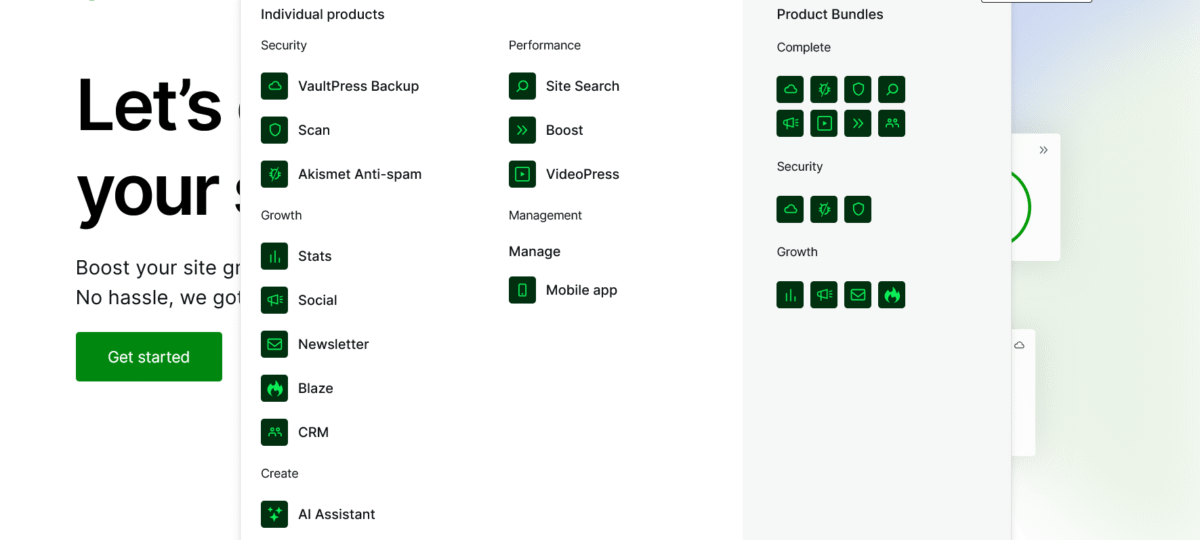
How Jetpack protects your blog goes beyond just security. Some bonus features I didn’t expect:
1. Site Stats. Built-in analytics without Google Analytics bloat. Shows real-time traffic, popular posts, and referrers. Clean interface.
2. Free CDN. Jetpack automatically optimizes and serves images from a global CDN. Faster load times, less bandwidth usage.
3. Mobile App: Manage your site, check stats, and respond to comments from your phone. Actually useful.
4. Social Sharing Auto-share posts to social media. Saves time.
5. Related Posts Automatically shows related content. Keeps readers on site longer.
These aren’t why I bought Jetpack, but they’re nice bonuses.
When Jetpack Saved Me: 3 Stories
Story #1: The Midnight Plugin Update
2 AM on a Sunday. I updated a popular SEO plugin. The site immediately white-screened. Full panic mode.
The activity log showed exactly when it broke. One-click restore to 5 minutes before the update. Site back online in 3 minutes.
Without Jetpack? I’d be frantically Googling “WordPress white screen of death fix” at 2 AM.
Story #2: The Hosting Server Meltdown
My hosting provider had a server crash. They estimated 6-8 hours to restore.
I migrated my entire site to a new host using VaultPress Backup. Took 45 minutes. Zero data loss.
The hosting provider took 11 hours to fix their shit. I was already back online.
Story #3: The Malicious Plugin I Didn’t Know About
Jetpack Scan found a “helpful SEO plugin” I installed months ago was actually malware in disguise. Over 4,000 WordPress websites have been infected by fake SEO plugins.
One-click removal. Crisis averted.
Without the scan? That malware would still be there, doing god knows what.
Is Jetpack Security Worth It in 2026? My Brutally Honest Take
After using Jetpack for 18 months, spending $360 total, and avoiding any hacks, here’s my take:
It’s worth it if:
- You make money from your blog (ads, affiliates, services)
- You have clients or readers who depend on your site
- You’ve ever been hacked (learn from my mistakes)
- You value your time more than $20/month
- You want to sleep at night without worrying about security
It’s NOT worth it if:
- You’re running a brand-new hobby blog with zero traffic
- You’re already using enterprise security (Sucuri, etc.)
- You have a dedicated security team (lucky you)
- You genuinely enjoy manual backups and security configs (masochist?)
For most bloggers, content creators, and small business owners? Jetpack Security is worth every penny.
The math:
- Cost: $240/year
- One hack cleanup: $1,500-$3,000
- Peace of mind: Priceless
Quick Wins: Optimize Jetpack Performance
Jetpack is lightweight, but here’s how to make it even better:
1. Disable features you don’t use. Go to Jetpack → Settings and turn off modules you’re not using. Less is more.
2. Use the Boost module. Jetpack Boost optimizes CSS and JavaScript. Free and actually works.
3. Keep WordPress updated. Jetpack protects against threats, but the updated WordPress core is your first defense.
4. Pair with good hosting, Jetpack + WordPress.com or WPX Hosting (what I use) = chef’s kiss. Fast, secure, reliable.
5. Enable automatic plugin updates. Jetpack can auto-update plugins. Enable security plugins, especially.
Finally: Protect Your Blog Before It’s Too Late
How Jetpack protects your blog boils down to this: real-time backups, constant malware scanning, brute force blocking, spam protection, and downtime alerts.
All automated, all cloud-based, all backed by the team that built WordPress.com.
I paid a lot of money, learning the painful way. You can pay $240/year and skip the nightmare entirely.
The choice is yours:
- Option A: Hope nothing bad happens (spoiler: it will)
- Option B: Protect your blog now and sleep at night
I’m going with Option B from now on.
Ready to Protect Your Blog?
Stop procrastinating. Every day you wait is another day hackers have to find you.
Here’s what to do right now:
- Go to Jetpack.com or install Jetpack from your WordPress dashboard
- Start with the free version to test it out
- Upgrade to Security when you’re ready for full protection ($20/month)
- Run your first scan and fix any existing threats
- Set up two-factor authentication while you’re at it
Your blog is worth protecting. Your time is worth protecting. Your sanity is definitely worth protecting.
Don’t be 2024 Mia. Be smarter.
Protect your blog with Jetpack now →
FAQs
Does Jetpack slow down my website?
No. Jetpack offloads processing to cloud servers, so features like backups and scans don’t strain your hosting. I actually saw a slight speed INCREASE after installing Jetpack (thanks to the free CDN).
Can Jetpack remove malware that’s already on my site?
Yes. Jetpack Scan detects malware and offers one-click removal. However, for severe infections, manual cleanup by a professional might still be needed first.
How often does Jetpack back up my site?
Real-time. Every change you make is backed up instantly with VaultPress. Not daily, not hourly. Real-time.
Is Jetpack better than Wordfence?
Different strengths. Wordfence has a more powerful firewall. Jetpack includes backups and is easier to use. I prefer Jetpack for all-in-one protection. Choose based on your needs.
Do I need Jetpack if my hosting has backups?
Yes. Hosting backups are often daily (not real-time), stored on the same server that hackers compromise, and can be difficult to restore. Independent cloud backups are essential.
Can I use the free version of Jetpack?
Absolutely. Free Jetpack includes brute force protection and downtime monitoring, which is better than nothing. But for serious protection, the paid plans are worth it.
How long does it take to restore a backup?
In my testing, full site restores took 3-8 minutes, depending on site size. One-click process, no technical skills needed.
Does Jetpack work with WooCommerce?
Yes. Jetpack is built by Automattic, the same team behind WooCommerce. Real-time backups protect customer orders and data perfectly.
What happens if Jetpack goes down?
Jetpack runs on WordPress.com infrastructure, which has 99.99% uptime. Your site continues running normally even if Jetpack has issues (though features would pause temporarily).
Can I use Jetpack on multiple sites?
Each site needs its own plan, but you can manage multiple sites from one WordPress.com account. Agencies and freelancers might want multiple subscriptions.
P.S. – If you’re still reading this without installing Jetpack, you’re either incredibly stubborn or already have enterprise security. If it’s the former, what the hell are you waiting for? If it’s the latter, cool, you’re covered.
Want to argue about security plugins? I’m barely on social media, but drop a comment on Blog Recode, and I’ll actually respond. Just don’t spam me. Akismet will catch you. 😏
Stop hoping hackers ignore you. Protect your blog today. 🛡️