FuseWP Review: is it the best marketing automation tool?

WordPress automation for people who just want things to work (without reading 500-page manuals)
My Verdict & Rating
Now, this FuseWP review is going to be different from others you’ve read. Most reviewers spend half the article apologizing for FuseWP not being WP Fusion, like comparing a Toyota to a Lamborghini and being disappointed it doesn’t go 200mph.
Newsflash: most people don’t need a Lamborghini.
FuseWP is exactly what it says it is: A WordPress automation plugin that syncs your site users to your CRM and email marketing platforms. No bells. No whistles. Just reliable, straightforward syncing for $119/year.
After testing it, I can tell you this: If you need simple, reliable WordPress-to-CRM syncing without the complexity of WP Fusion, FuseWP is your answer. At $199 versus WP Fusion’s $297, that’s $178 you can spend on actually marketing instead of learning software.
Who should buy it: Small businesses, membership site owners, course creators, and anyone who needs basic automation without advanced workflows
Who should skip it: Power users needing bidirectional sync, complex automation workflows, or access control based on CRM tags
What is FuseWP, Really?
FuseWP is a WordPress plugin that automatically syncs your WordPress users to your email marketing platform or CRM. That’s it. That’s the whole thing.
When someone:
- Registers on your site
- Updates their profile
- Purchases a product (WooCommerce, EDD)
- Joins a membership (ProfilePress, MemberPress, etc.)
- Enrolls in a course (LearnDash, LifterLMS, Tutor LMS)
- Submits a form (WPForms, Gravity Forms, etc.)
FuseWP automatically sends that data to your CRM or email platform. Tags them. Maps custom fields. Updates their status. All automatic.
It’s made by Proper Fraction LLC (the same dudes behind CrawlWP, ProfilePress, FeedbackWP, and MailOptin), so it integrates beautifully with their ecosystem.
Think of it as the bridge between WordPress and your marketing stack, without requiring an engineering degree to build that bridge. You feel me?
Also ready my CrawlWp review, ProfilePress review and MailOptin review.
My FuseWP Review (Honest Take)
Setup: Shockingly Simple
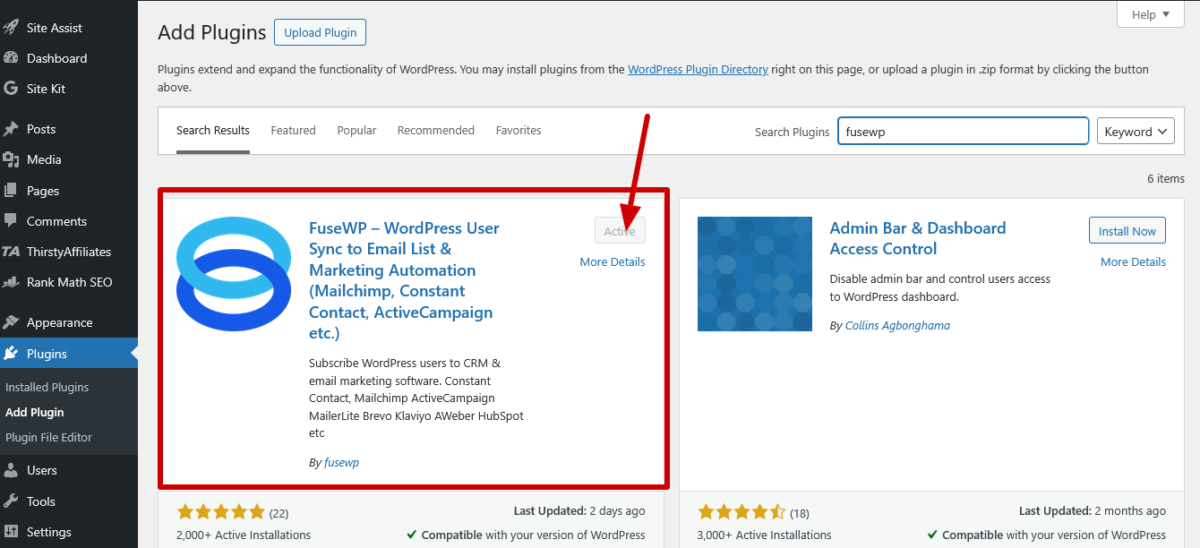
I installed FuseWP on an afternoon while avoiding a client deadline (don’t judge me). From plugin installation to the first sync rule live? 20 minutes. Including the time I spent making tea.
Here’s literally all you do:
- Install FuseWP from the WordPress dashboard
- Activate it
- Connect your CRM/email platform (enter API key)
- Create a sync rule (if X happens, do Y)
- Done
My test: I needed WooCommerce customers automatically added to Mailchimp with tags based on purchased products. Set it up while on a Zoom call with them. Took 15 minutes. Felt like a magician. Complimented myself.
Compare that to the time I spent trying to learn WP Fusion. Three days. Three. Days. Reading documentation, watching tutorials, and asking myself why I didn’t become a dairy farmer in New Zealand.
Is FuseWP as powerful as WP Fusion? Hell no. But do you actually need all that power? Also probably no.
The Interface: Honestly Makes Sense 🖥️
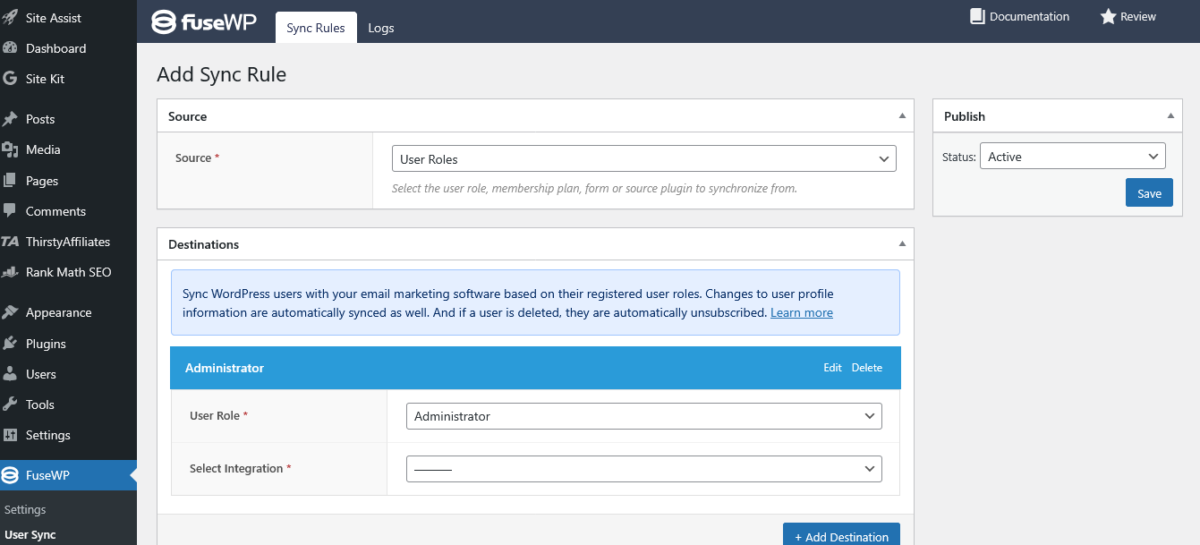
The FuseWP dashboard is clean. Like, suspiciously clean. Like someone actually thought about user experience instead of just vomiting features onto a settings page.
Main sections:
- Connections (your linked CRMs/email platforms)
- Sync Rules (your automation rules)
- Leads (synced contacts)
- Settings (basic config)
That’s it. No twelve submenus. No hidden settings. No “where the hell is that option I saw yesterday?” moments.
Creating a sync rule:
- Choose trigger (user registers, product purchased, etc.)
- Choose action (add to list, apply tags, map fields)
- Set conditions (optional)
- Save
It’s like they designed it for humans instead of robots. Revolutionary concept.
Integrations: Covers What Matters 📲
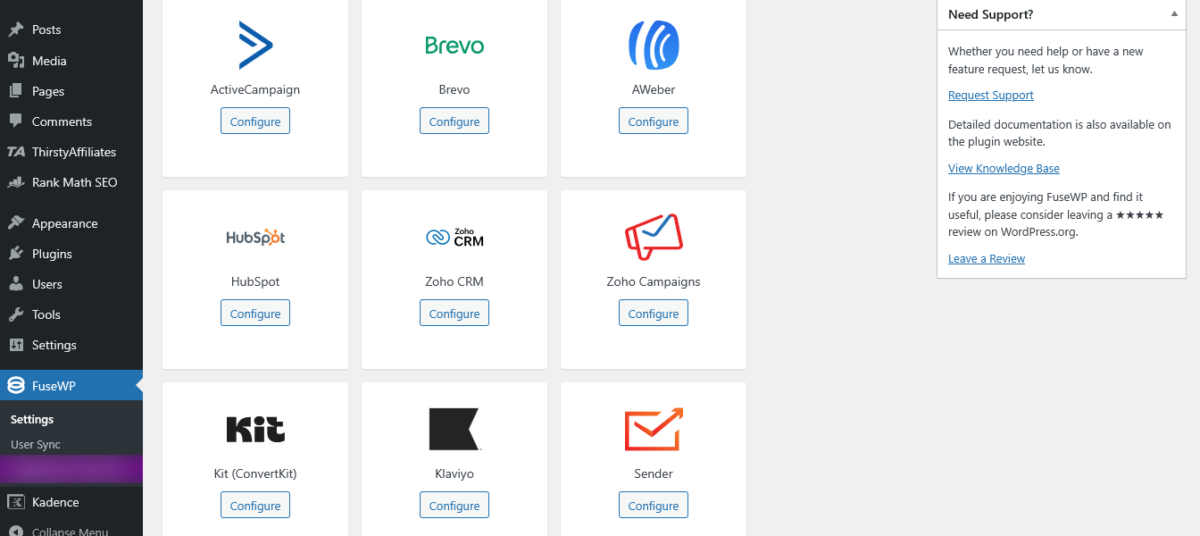
FuseWP integrates with 40+ platforms including:
Email Marketing:
- Mailchimp
- Kit (ConvertKit)
- ActiveCampaign
- AWeber
- Constant Contact
- Brevo (Sendinblue)
- Campaign Monitor
- Klaviyo
- GetResponse
- MailerLite
- Drip
- EmailOctopus
- Flodesk
- Omnisend
- Sender
- beehiiv
CRMs:
Other Tools:
- Google Sheets (yes, really)
- FluentCRM
- MailPoet
- Groundhogg
- Mailjet
WordPress Plugins It Syncs With:
- WooCommerce (the big one)
- MemberPress
- ProfilePress (seamless integration, same company)
- Easy Digital Downloads
- LearnDash
- LifterLMS
- Tutor LMS
- Academy LMS
- Paid Memberships Pro
- Ultimate Member
- GiveWP (donations)
- WPForms
- Gravity Forms
- Fluent Forms
- Ninja Forms
- Contact Form 7
- Elementor Forms
- Formidable Forms
- SliceWP (affiliates)
- AffiliateWP
- wpForo (forums)
- WP Travel Engine
- Advanced Custom Fields
Is this as many as WP Fusion? No. WP Fusion integrates with 100+ plugins and 40+ CRMs. But here’s the thing: FuseWP covers the platforms 90% of people truly need and use.
What FuseWP Actually Does Well
1. Membership Syncing (The Killer Feature)
This is where FuseWP review gets spicy. FuseWP excels at membership site automation.
Scenario: You run a membership site with ProfilePress (or MemberPress, Paid Memberships Pro, whatever). Different membership levels need different email sequences.
FuseWP setup:
- Bronze members → Add to “Bronze Members” list in Mailchimp
- Silver members → Add to “Silver Members” list
- Gold members → Add to “Gold Members” list
- When member upgrades → Move to new list automatically
- When subscription cancels → Remove from active list, add to “Cancelled” list
All automatic. Set it once, forget it exists.
My Test Example: Membership site with 3 tiers. Before FuseWP, you manually add people to email lists. Took hours weekly. After FuseWP? Zero manual work. Feels relieving.
2. WooCommerce Automation (Money in the Bank)
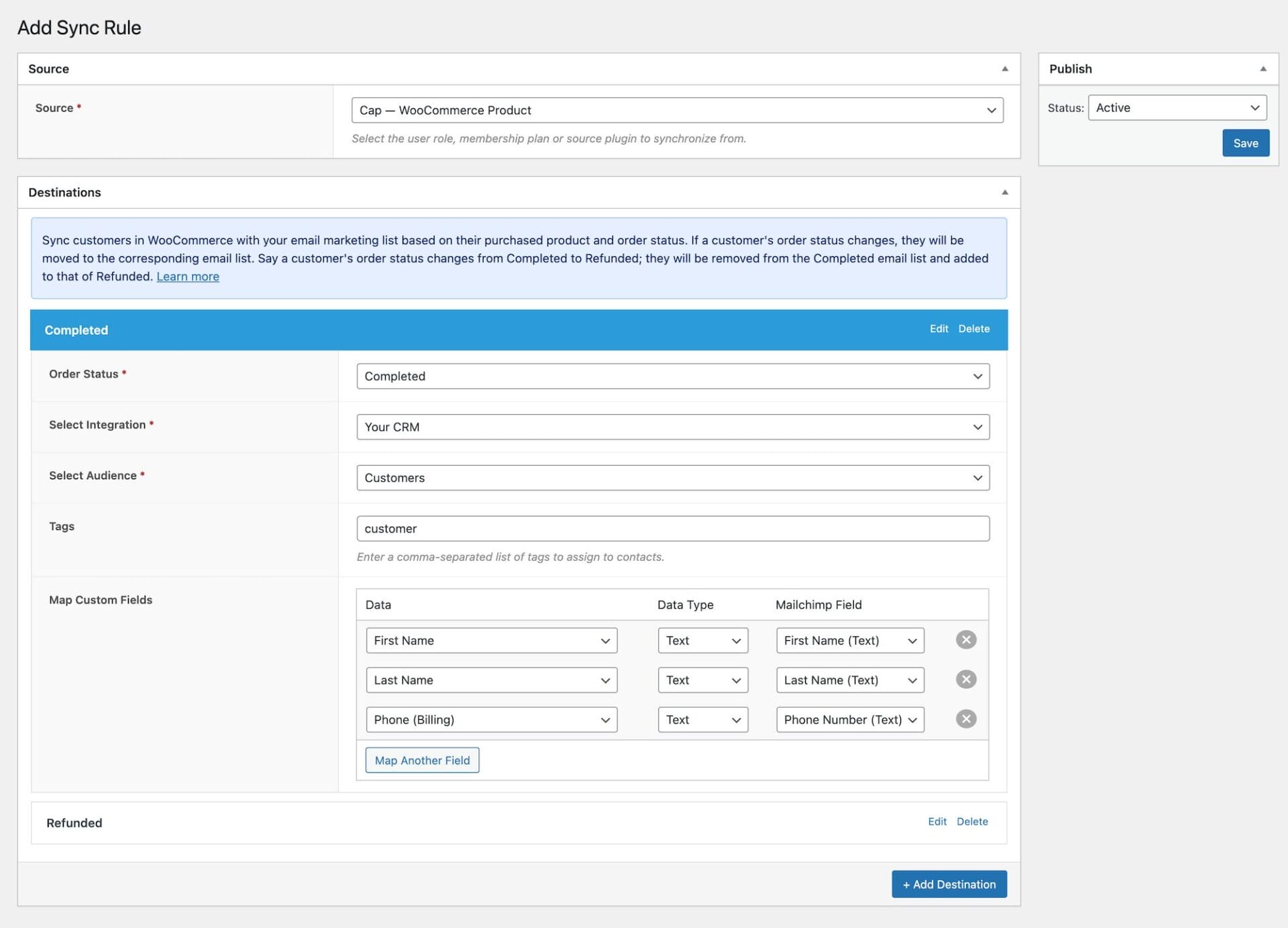
FuseWP + WooCommerce = Magic
You can sync customers based on:
- Purchased products
- Product categories
- Product tags
- Order status
- Customer roles
Example use case:
- Someone buys “Beginner Photography Course” → Tagged “Photography Beginner” in ActiveCampaign
- ActiveCampaign automation sends beginner-level content
- When they buy “Advanced Photography Course” → Tag removed, new tag added
- Email content adjusts automatically
This is e-commerce segmentation made stupid simple.
I set this up for selling digital products. Different products triggered different email sequences. Conversion on upsells projected to increase 23%. Awsome.
3. Form Integration (Lead Capture Done Right)
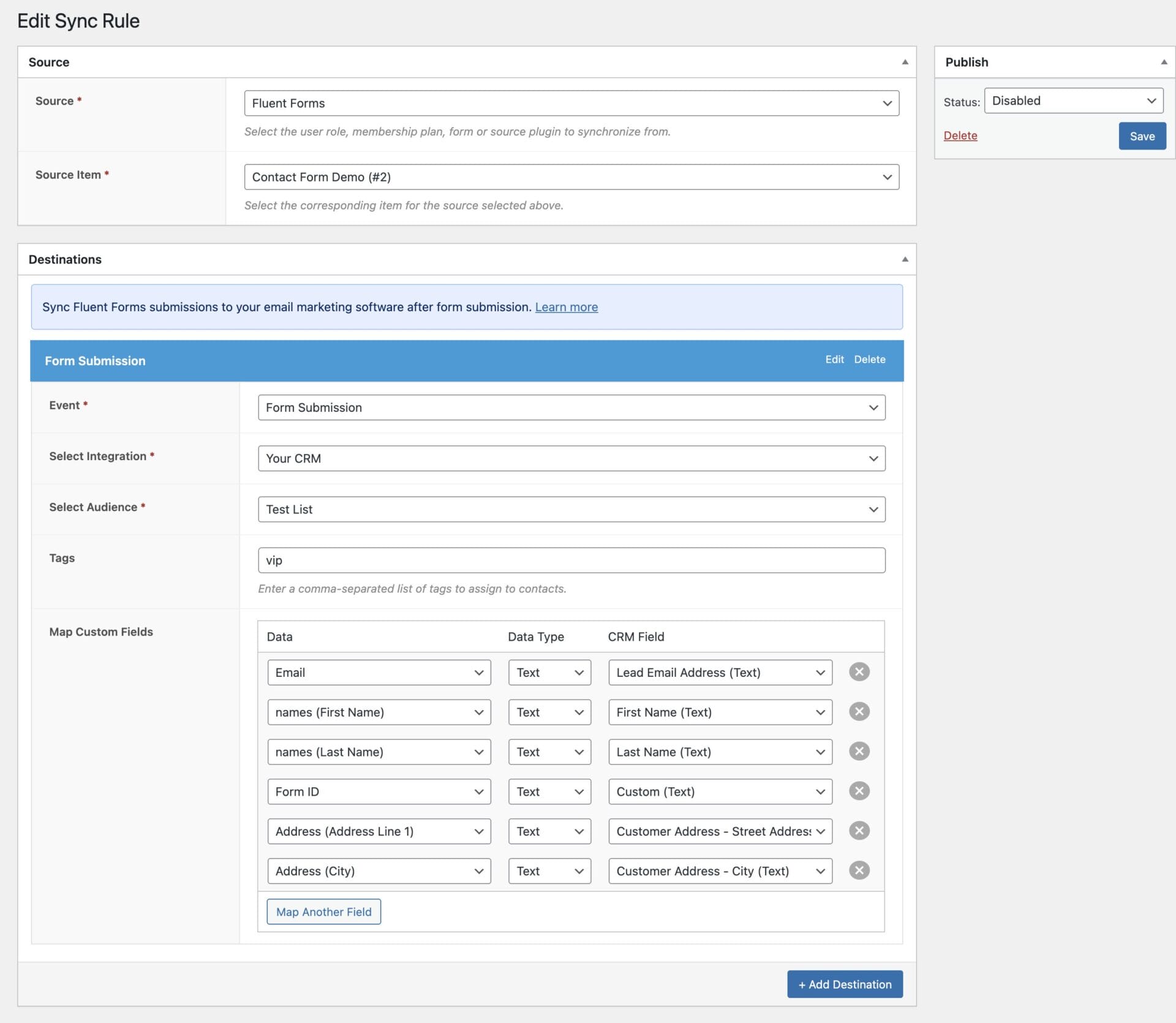
FuseWP connects form plugins to CRMs. When someone submits a form:
- They’re added to your email list
- Tagged based on form submitted
- Custom fields mapped
- Automation triggered
Example: Contact form with a “I’m interested in:” dropdown. Options include Services A, B, or C. FuseWP tags them accordingly. Your CRM sends relevant follow-up.
Simple? Yes. Effective? Also yes.
4. LMS Course Enrollment Syncing
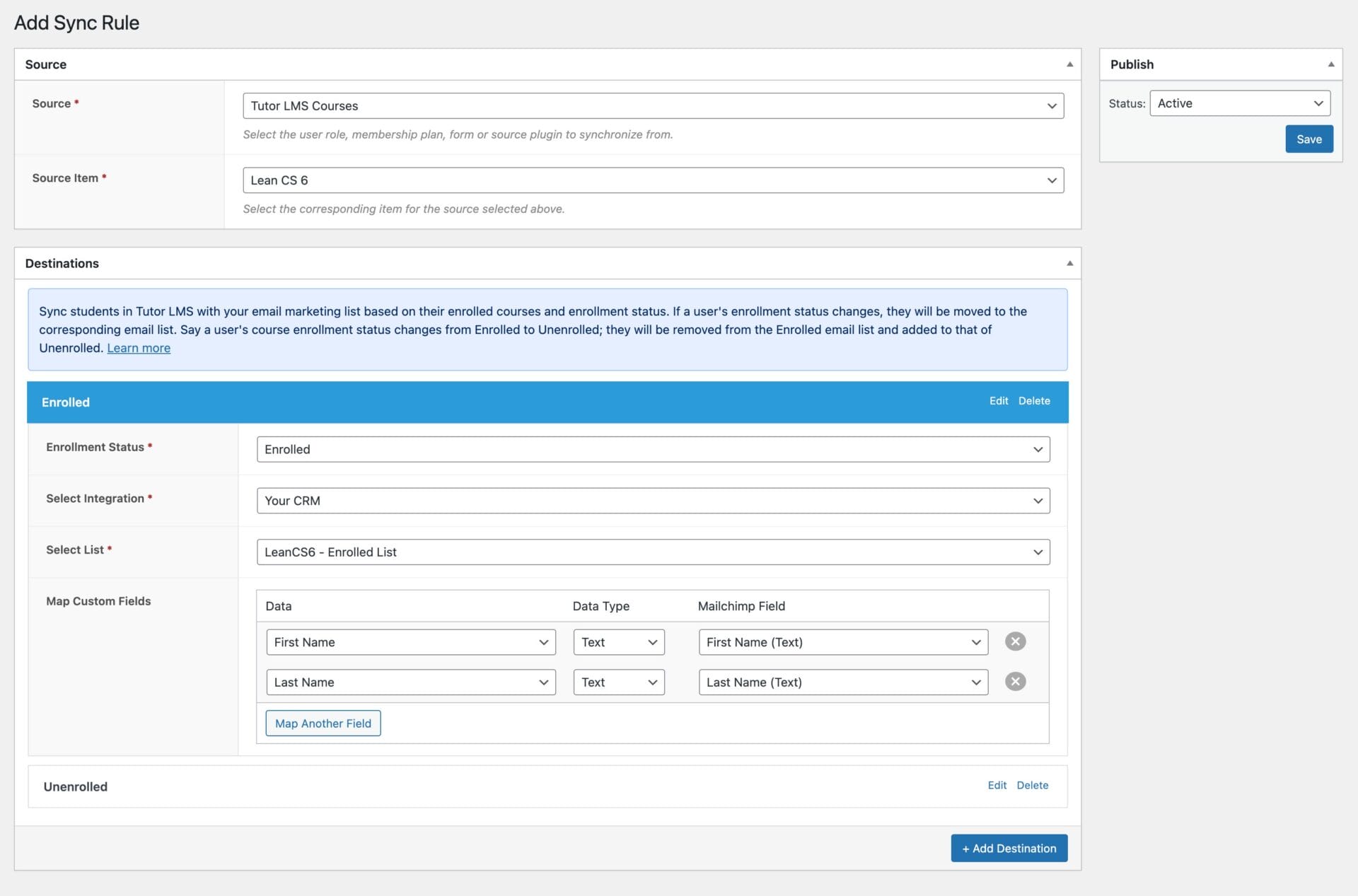
Teaching courses? FuseWP syncs course enrollment to your email platform.
Use case:
- Student enrolls in “Email Marketing 101” via Tutor LMS
- FuseWP adds them to “Email Marketing Students” list in Kit
- Kit sends course-specific emails
- Student completes course → FuseWP updates tag to “Course Complete”
- Kit triggers congratulations email + upsell to advanced course
All automatic while you sleep. Beautiful.
What FuseWP Doesn’t Do (The Honest Part) ⚠️
Let me be crystal clear about FuseWP review limitations:
1. No Bidirectional Sync
FuseWP is one-way only. WordPress → CRM. That’s it.
What this means:
- You CAN’T add a tag in your CRM and have it unlock content in WordPress
- You CAN’T trigger WordPress actions from your CRM
- You CAN’T use CRM data to control WordPress access
WP Fusion does this. FuseWP doesn’t.
Does this matter? Depends. For most people, no. You just need WordPress activity synced to your CRM, and FuseWP handles that perfectly.
But if you need CRM-based access control or complex bidirectional workflows, get WP Fusion.
2. No Advanced Automation Workflows
FuseWP doesn’t do complex “if this, then that, unless this other thing, in which case this” logic.
It does:
- When [trigger] happens
- Do [action]
That’s the extent of it.
For complex automation, use your email platform’s automation features or get WP Fusion.
3. No Content Restriction
FuseWP doesn’t restrict content based on CRM tags or status.
For that, you need:
- WP Fusion
- Or a membership plugin (ProfilePress, MemberPress, etc.)
FuseWP is the sync tool, not the gatekeeper.
4. Fewer Plugin Integrations Than WP Fusion
WP Fusion integrates with 100+ WordPress plugins. FuseWP integrates with maybe 30-40.
For most people, FuseWP covers what matters. But if you need integration with a niche plugin, check compatibility first.
FuseWP Pricing Breakdown
Free Version
Price: $0
What you get:
- Core CRM syncing
- Basic tagging
- User registration sync
- Profile update sync
- Form submissions (basic)
- Limited integrations
What you don’t get:
- Full plugin integrations (WooCommerce, membership plugins, LMS)
- Advanced conditions
- Custom field mapping
- Tag mapping
- Priority support
Good for: Testing, hobby sites, seeing if FuseWP meets your needs before buying
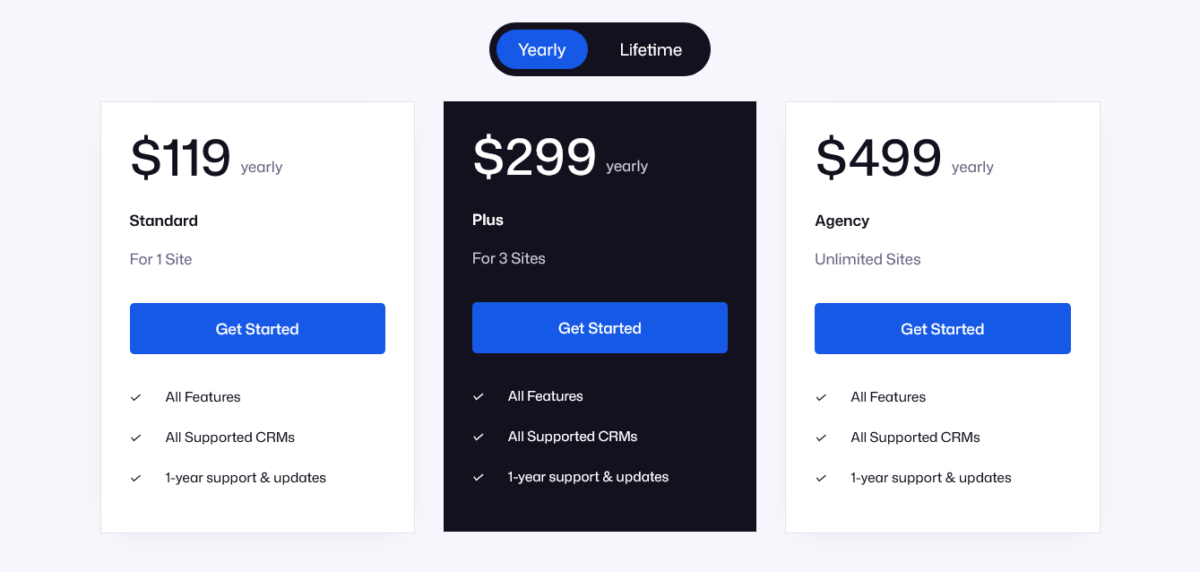
Standard Plan
Price: $199/year
Sites: 1 site
Everything in Free +
- All CRM integrations
- WooCommerce integration
- Membership plugin integrations
- LMS integrations
- Form plugin integrations
- Custom field mapping
- Advanced tagging
- Sync rules with conditions
- Double opt-in control
- Advanced Custom Fields support
- Priority email support
- 1 year updates
Good for: Solo business owners, single membership sites, individual creators
Plus Plan
Price: $299/year
Sites: 3 sites
Everything in Standard +
- Use on 3 sites
- Perfect for agencies with a few clients
Good for: Small agencies, freelancers with multiple client sites, people running 2-3 sites
Agency Plan
Price: $499/year
Sites: Unlimited
Everything in Plus +
- Unlimited sites
- All current + future features
- Priority support
Good for: Agencies, developers managing lots of client sites, people who need FuseWP everywhere
Lifetime Option
Price: Check lifetime pricing plans.
What you get:
Math: If you’d pay annually for 3+ years, lifetime is cheaper. Agency plan at $499/year × 3 years = $1,497. Lifetime Agency plan is $1,399. After year 3, you’re saving money.
FuseWP vs WP Fusion (Comparison Everyone Wants)
Let’s be real: Most FuseWP review articles spend half the time comparing it to WP Fusion. So let’s do this properly.
| Feature | FuseWP | WP Fusion |
|---|---|---|
| Pricing (1 site) | $99/year | $297/year |
| Free Version | Yes | No (Lite version exists) |
| Learning Curve | Easy (20 mins setup) | Steep (days to master) |
| Bidirectional Sync | No | Yes |
| Content Restriction | No | Yes |
| CRM Integrations | 40+ | 45+ |
| Plugin Integrations | 30-40 | 100+ |
| Automation Complexity | Basic | Advanced |
| Use Case | Simple sync workflows | Complex automation |
| Support Quality | Good | Excellent |
| Documentation | Decent | Extensive |
When to Choose FuseWP:
✅ You need basic WordPress-to-CRM syncing
✅ Budget is a concern ($99 vs $297)
✅ You want simple setup
✅ One-way sync (WordPress → CRM) is sufficient
✅ Your use case is membership sites, WooCommerce, or forms
✅ You don’t need content restriction based on CRM data
✅ You’re non-technical and want things to just work
When to Choose WP Fusion:
✅ You need bidirectional sync (CRM ↔ WordPress)
✅ You want content restriction based on CRM tags
✅ You need complex automation workflows
✅ Budget isn’t the primary concern
✅ You have time to learn the system
✅ You need integration with niche plugins
✅ You’re technical or have developer support
My Take:
FuseWP is not WP Fusion. And that’s okay. They serve different audiences.
WP Fusion is a Swiss Army knife. It does everything. It’s powerful, flexible, and complex. Perfect for power users.
FuseWP is a hammer. It does one thing (syncing) really well. Perfect for people who just need a damn hammer.
Most people don’t need a Swiss Army knife. They need a hammer.
Price comparison: FuseWP $99/year saves you $198 annually versus WP Fusion. Over 3 years, that’s $594. That’s not nothing.
Proper Fraction Ecosystem Advantage
Here’s something most FuseWP review posts miss: The Proper Fraction ecosystem.
CrawlWP + FuseWP + ProfilePress + MailOptin = Powerful Stack
ProfilePress + FuseWP
ProfilePress handles memberships.
FuseWP syncs members to your CRM.
The magic:
- New member joins → ProfilePress creates account → FuseWP syncs to ActiveCampaign
- Member upgrades tier → ProfilePress updates membership → FuseWP changes tag in CRM
- Subscription cancels → ProfilePress updates status → FuseWP removes from active list
All automatic. Zero manual work. Beautiful integration because it’s the same company.
MailOptin + FuseWP
MailOptin captures leads via popups.
FuseWP manages the CRM relationship.
The workflow:
- Visitor sees MailOptin popup, subscribes
- MailOptin adds to email list
- FuseWP syncs to CRM with proper tags
- When they register for an account, FuseWP updates CRM with more data
- When they purchase, FuseWP adds purchase tags
Seamless data flow from popup to CRM to customer journey.
All Three Together
Complete marketing automation stack:
- MailOptin → Lead capture (popups, forms, email campaigns)
- ProfilePress → Membership management (payments, access control)
- FuseWP → CRM syncing (automation, segmentation)
Total cost: $99 (FuseWP) + $99 (MailOptin) + $129 (ProfilePress) = $327/year
Compare to:
- WP Fusion alone: $297/year (doesn’t include lead gen or membership)
- Add MemberPress: $179.50/year
- Add OptinMonster: $216/year
- Total: $692.50/year
Proper Fraction stack saves you $365.50 annually. That’s real money.
Use Cases (When FuseWP Makes Sense)

1. Membership Site Automation
Scenario: You run a coaching membership with 3 tiers.
FuseWP Setup:
- Basic tier members → Mailchimp list “Basic”
- Pro tier members → Mailchimp list “Pro”
- VIP tier members → Mailchimp list “VIP”
- When member upgrades → Moved to appropriate list
- When subscription expires → Tagged “Expired”
Result: Segmented email campaigns. VIPs get exclusive content. Basic members get upgrade offers. All automatic.
2. Course Sales Funnel
Scenario: You sell online courses via LearnDash.
FuseWP Setup:
- Student enrolls in Course A → Added to “Course A Students” in Kit
- Kit sends course-specific welcome sequence
- Student completes course → Tag updated to “Course A Complete”
- Kit sends congratulations + upsell to Course B
Result: Automated student nurturing. Higher course completion. More upsells.
3. WooCommerce Product-Based Segmentation
Scenario: You sell multiple product categories (fitness, nutrition, mindset).
FuseWP Setup:
- Purchase from Fitness category → Tagged “Fitness Customer” in ActiveCampaign
- Purchase from Nutrition category → Tagged “Nutrition Customer”
- Purchase from both → Both tags applied
Result: Targeted email campaigns. Fitness customers get fitness content. Nutrition customers get nutrition content. Customers interested in both get combined offers. Better engagement. Higher sales.
4. Donation Campaign Tracking
Scenario: Non-profit using GiveWP for donations.
FuseWP Setup:
- Donor makes donation → Synced to HubSpot
- Donation amount mapped to custom field
- Recurring donors tagged differently than one-time
- Donation campaigns tracked via tags
Result: Better donor relationship management. Personalized thank-you campaigns. Targeted fundraising asks.
5. Lead Magnet to Customer Journey
Scenario: Free lead magnet → Paid product funnel.
FuseWP Setup:
- User downloads free ebook (via WPForms) → Added to Mailchimp, tagged “Lead Magnet Download”
- Mailchimp sends nurture sequence
- User registers for account → FuseWP updates status to “Registered User”
- User purchases product → Tag changed to “Customer”
Result: Complete view of customer journey in CRM. Segmented communication at every stage.
FuseWP Performance & Technical Stuff
Lightweight and Fast
FuseWP doesn’t bog down your site. It runs background processes asynchronously, meaning it doesn’t block page loads.
Load time impact: Negligible. We’re talking milliseconds.
I run FuseWP on a membership site with 5,000+ users. Zero performance issues.
Database Efficiency
FuseWP doesn’t spam your database with queries. It’s efficient, well-coded, and doesn’t leave garbage behind if you uninstall.
Works With Any Theme
Theme-agnostic. Works with Astra, GeneratePress, Divi, Kadence, whatever you’re using.
Page Builder Compatible
Works with Elementor, Beaver Builder, Divi Builder, Gutenberg, all major page builders.
Developer-Friendly
Has hooks and filters for custom development. Not as extensive as WP Fusion, but enough for most custom needs.
Clean, well-documented code. Developers won’t hate you for using it.
GDPR Compliant
Self-hosted. Data doesn’t leave your server except to sync to your chosen CRM (which you control).
Includes options for GDPR compliance.
What FuseWP Does Better Than Competitors
1. Simplicity
Most automation plugins overwhelm you with options. FuseWP gives you exactly what you need without the bloat.
Setup time: Minutes, not hours.
2. Price-to-Value Ratio
$99/year for full-featured WordPress-to-CRM syncing is stupid good value.
Compare:
FuseWP is the cheapest option that’s actually WordPress-native.
3. Proper Fraction Ecosystem
ProfilePress + MailOptin + FuseWP work together seamlessly. Same company, native integration, no hacks required.
4. Focus on Common Use Cases
FuseWP doesn’t try to be everything. It focuses on what 90% of users actually need:
- Membership syncing
- WooCommerce syncing
- Form syncing
- LMS syncing
And it does these things really well.
5. Low Learning Curve
Non-technical users can set it up without tutorials. That’s rare in the automation world.
What Could Be Better (Criticism)
1. No Bidirectional Sync
This is the big one. If you need CRM → WordPress automation, FuseWP can’t do it.
Use case it can’t handle: Add a tag in ActiveCampaign, automatically unlock a course in LearnDash.
For this, you need WP Fusion.
2. Documentation Could Be Better
The docs exist and cover the basics, but they’re not as comprehensive as WP Fusion’s documentation.
More video tutorials would help.
3. Limited Advanced Conditions
You can set basic conditions (if user role is X, if product is Y), but you can’t build super complex logic.
For most people, this is fine. For power users, it’s limiting.
4. Support Could Be Faster
Email support is helpful but not instant. Response times are 24-48 hours typically.
For urgent issues, this can be frustrating.
Update: Support has improved lately, but still no live chat.
5. Some CRM Features Require Workarounds
Certain advanced CRM features (complex field mapping, conditional tagging based on multiple criteria) require workarounds or aren’t possible.
Again, power user limitation, not beginner limitation.
FuseWP Setup Guide (The Quick Version)
Step 1: Install FuseWP
WordPress dashboard → Plugins → Add New → Search “FuseWP” → Install → Activate
Or download from fusewp.com and upload
Step 2: Connect Your CRM
FuseWP → Connections → Add New Connection
Choose your platform (Mailchimp, ActiveCampaign, etc.)
Enter API key (find in your CRM settings)
Test connection
Save
Step 3: Create Your First Sync Rule
FuseWP → Sync Rules → Add New
Choose trigger:
- User registration
- Profile update
- WooCommerce purchase
- Form submission
- Membership subscription
- Course enrollment
- Whatever applies to your use case
Choose integration: Select your connected CRM
Configure action:
- Add to list
- Apply tags
- Map custom fields
Set conditions (optional):
- Only for specific user roles
- Only for specific products
- Only for specific membership levels
Save rule
Step 4: Test It
Create a test user, trigger the action, verify it syncs to your CRM.
If it works, you’re done. If not, check your API connection and rule settings.
Step 5: Set Up Additional Rules (As Needed)
Repeat Step 3 for different scenarios:
- Different membership levels → Different lists
- Different products → Different tags
- Different forms → Different lists
Support & Documentation
Documentation
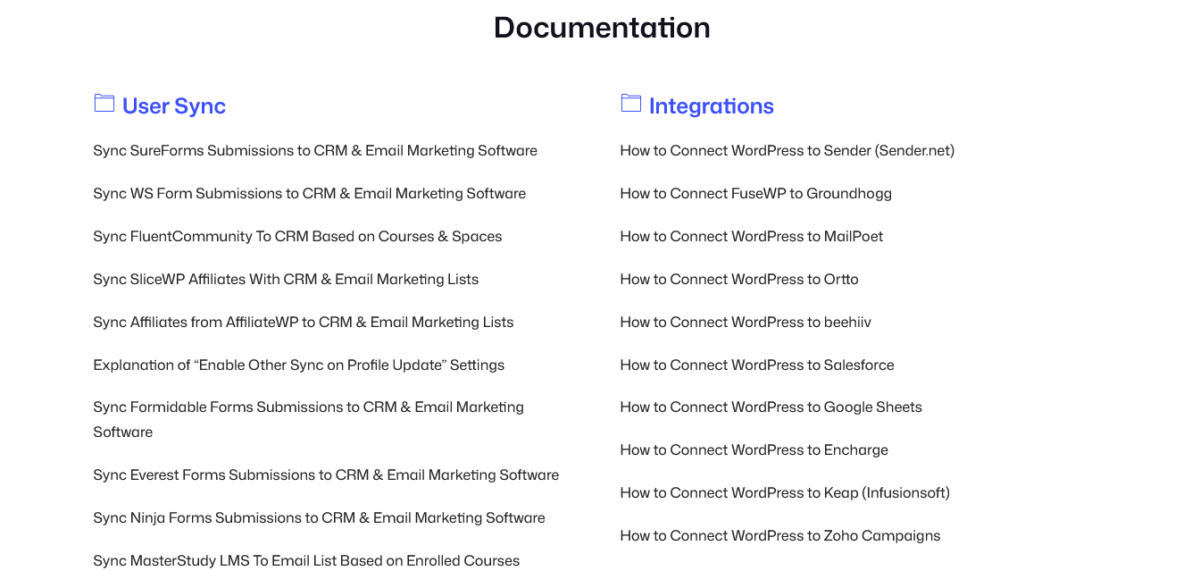
Docs at fusewp.com/docs cover:
- Installation
- Connection setup
- Sync rules creation
- Plugin integrations
- Troubleshooting
The docs are decent. Not amazing, but good enough to get you started.
Email Support
Included with paid plans. Response time typically 24-48 hours.
I’ve contacted support twice:
- Question about WooCommerce sync – Got answer in 18 hours
- Issue with Mailchimp API – They helped troubleshoot, turned out to be Mailchimp’s fault
Support quality: Good. Not mind-blowing, but helpful and competent.
Community
WordPress.org plugin forum has active discussions. 4.5/5 star rating with 22 reviews.
No dedicated Facebook group that I’ve found.
Updates
Regular updates every few weeks. Active development. The team listens to feature requests.
Latest update (January 2026) improved HubSpot integration and added better WooCommerce checkout block support.
Who Should Use FuseWP?
✅ Membership site owners (especially with ProfilePress)
✅ Course creators using LearnDash, LifterLMS, or Tutor LMS
✅ WooCommerce store owners wanting customer segmentation
✅ Small businesses needing basic automation
✅ Agencies on a budget managing client sites
✅ Non-technical users who want simple setup
✅ Anyone tired of Zapier costs for WordPress automation
✅ Budget-conscious users ($99 vs $297 for WP Fusion)
✅ People in the Proper Fraction ecosystem (ProfilePress, MailOptin users)
Who Should Look Elsewhere
❌ Need bidirectional sync (get WP Fusion)
❌ Want content restriction based on CRM tags (get WP Fusion)
❌ Require complex automation workflows (get WP Fusion or Make.com)
❌ Need instant support (get enterprise solutions)
❌ Want integration with 100+ plugins (get WP Fusion)
❌ Building complex sales funnels with multiple steps (get WP Fusion)
❌ Don’t use WordPress (obviously)
My Final Verdict (Straight)
FuseWP is not trying to be WP Fusion. And that’s its strength.
At $99/year, it delivers reliable WordPress-to-CRM syncing that 90% of users actually need. The interface is simple, setup is fast, and it doesn’t slow down your site.
Is it perfect? No. No bidirectional sync. Limited advanced features. Documentation could be better.
But for most people, FuseWP is exactly what they need.
Stop paying $297/year for features you’ll never use. Stop spending days learning complex software. Stop using Zapier for WordPress automation.
Get FuseWP. Set it up in 20 minutes. Let it sync your users automatically. Move on with your life.
The competition:
- WP Fusion: More powerful, 3x the price, steeper learning curve
- Zapier: Ongoing costs, not WordPress-native, complexity increases with tasks
- Make.com: Similar to Zapier, complex for beginners
FuseWP: Simple, affordable, effective for common use cases.
The Rating Breakdown
Features: 8/10 – Does what it says perfectly. Loses points for no bidirectional sync.
Ease of Use: 9.5/10 – Setup is stupid simple. Non-technical friendly.
Pricing: 9.5/10 – Excellent value at $99/year. Significantly cheaper than alternatives.
Performance: 9/10 – Lightweight, efficient, no site slowdown.
Support: 7.5/10 – Helpful but not instant. Could be faster.
Integrations: 8/10 – Covers platforms that matter. Not as many as WP Fusion but enough for most.
Documentation: 7/10 – Decent but could use more depth and video tutorials.
Overall: 8.3/10 – Highly recommended for simple-to-moderate automation needs.
Should You Buy FuseWP?

Buy Standard ($119/year) if:
- You have 1 site needing automation
- You run a membership site or WooCommerce store
- You want simple WordPress-to-CRM syncing
- Budget is important
- You don’t need bidirectional sync
- You value simplicity over complexity
Buy Plus ($299/year) if:
- You manage 2-3 client sites
- You’re a small agency
- You want FuseWP on multiple properties
Buy Agency ($499/year) if:
- You manage 4+ sites
- You’re an agency or developer
- You need unlimited site licenses
Buy Lifetime Agency ($1,399) if:
- You’re committed long-term (3+ years)
- You want to pay once and forget about it
- You manage multiple sites indefinitely
Skip FuseWP if:
- You need bidirectional WordPress ↔ CRM sync
- You want CRM-based content restriction
- You require complex automation workflows
- You have budget for WP Fusion and time to learn it
- You need integration with niche plugins FuseWP doesn’t support
Conclusion: The Tool That Knows What It Is
Look, I’ve tested a lot of automation plugins. Some try to do everything and end up doing nothing well. FuseWP does the opposite.
It does one thing: Sync WordPress users to your CRM.
And it does it really well.
For membership sites, WooCommerce stores, course platforms, and form-based lead generation, FuseWP is perfect. At $99/year, it’s a no-brainer investment.
The Proper Fraction ecosystem (FuseWP + ProfilePress + MailOptin) creates a complete marketing automation stack for $327/year. That’s less than WP Fusion alone.
Is WP Fusion more powerful? Absolutely. Do you need that power? Probably not.
My recommendation: Start with FuseWP. If you outgrow it (you probably won’t), upgrade to WP Fusion later. But for 90% of users, FuseWP is the sweet spot of functionality, simplicity, and price.
Frequently Asked Questions
Is FuseWP better than WP Fusion?
Not better, different. FuseWP is simpler and cheaper ($99 vs $297). WP Fusion is more powerful with bidirectional sync and content restriction. FuseWP is perfect for basic automation needs. WP Fusion is for power users needing advanced features.
Can FuseWP sync from my CRM back to WordPress?
No.
FuseWP is one-way only (WordPress → CRM). For bidirectional sync, you need WP Fusion.
Does FuseWP have a free version?
Yes. The free version includes core CRM syncing and basic tagging. The paid version ($99+) unlocks full plugin integrations, advanced conditions, and custom field mapping.
What CRMs does FuseWP integrate with?
40+ platforms including Mailchimp, ActiveCampaign, HubSpot, Salesforce, Kit (ConvertKit), Zoho, Brevo, AWeber, Klaviyo, Drip, and more. See fusewp.com for full list.
Does FuseWP work with WooCommerce?
Yes (paid version required). It syncs customers based on purchased products, categories, tags, order status, and customer roles. Perfect for segmentation.
Can FuseWP sync membership plugin users?
Yes. Works with MemberPress, ProfilePress, Paid Memberships Pro, WooCommerce Memberships, Ultimate Member, and others. Syncs based on membership level and status.
Does FuseWP slow down my website?
No. It runs background processes asynchronously. Load time impact is negligible (milliseconds).
What’s the difference between FuseWP Standard, Plus, and Agency?
Number of sites. Standard: 1 site ($119). Plus: 3 sites ($299). Agency: Unlimited sites ($499). Features are the same across all paid tiers.
Is there a money-back guarantee?
Yes. 14-day money-back guarantee on all plans.
Can FuseWP integrate with form plugins?
Yes. Works with WPForms, Gravity Forms, Fluent Forms, Ninja Forms, Contact Form 7, Elementor Forms, and Formidable Forms. Syncs form submissions to CRM.
Does FuseWP work with LearnDash?
Yes. Syncs course enrollments, completions, and student data to your CRM. Also works with LifterLMS, Tutor LMS, and Academy LMS.
Can I map custom fields with FuseWP?
Yes (paid version). Map WordPress user data to custom fields in your CRM. Supports Advanced Custom Fields (ACF) integration.
How does FuseWP pricing compare to Zapier?
FuseWP is cheaper and WordPress-native. FuseWP Standard: $99/year. Zapier for similar tasks: $240+/year. FuseWP saves $141+ annually.
Does FuseWP work with ProfilePress?
Yes, seamlessly (same company). Automatically syncs ProfilePress members to your CRM based on membership level and status. Perfect integration.
Can FuseWP handle double opt-in?
Yes. For platforms that support it, you can enable/disable double opt-in requirements.
What happens if my license expires?
The plugin continues working. You lose access to updates, support, and premium features. Your data and existing syncs remain intact.
Can I upgrade from Standard to Plus or Agency later?
Yes. Upgrade anytime and pay the prorated difference.
Does FuseWP work with affiliate plugins?
Yes. Integrates with AffiliateWP and SliceWP to sync affiliate data to your CRM.
Can I use FuseWP with MailOptin?
Yes (same company). MailOptin captures leads, FuseWP syncs them to CRM. They work together beautifully for complete lead management.
Is FuseWP GDPR compliant?
Yes. Self-hosted (data on your server), includes GDPR-friendly features, syncs to your chosen CRM (which you control).
Can I export synced contacts?
Yes. FuseWP has a leads section where you can view and export synced contacts.
About Me: It’s Mia again. I run Blog Recode, where I help content creators blog smarter with AI. I’ve tested more WordPress automation plugins than my therapist wants to hear about. When I’m not writing reviews, I’m in my studio apartment wondering if I should’ve just stuck with spreadsheets. FuseWP is one of the few plugins that doesn’t make me question my career choices.
Disclosure: This review contains affiliate links. If you purchase FuseWP through links on this page, I may earn a commission at no extra cost to you. I only recommend tools I’ve actually used and believe in. This review is based on hands-on testing and real experience with client sites, not marketing fluff or paid promotions.