MailOptin Review: Powerful Email List Building Tool in 2026

A smarter way to collect emails without popping up everywhere like a needy ex
My Verdict & Rating
Here’s the thing about MailOptin review articles: most of them gloss over the fact that you can get 90% of OptinMonster’s functionality for like, half the price.
I’ve used MailOptin and honestly? It’s one of those rare plugins that makes you wonder why you ever paid premium prices for competitors.
At $99/year for the Standard plan (currently on sale, normally $169), MailOptin delivers lead generation, email automation, and newsletters without the bloated feature set you’ll never use.
It’s like finding out your neighborhood taco truck makes better tacos than that overpriced fusion place downtown.
Who should buy it: Bloggers, small businesses, content creators, anyone tired of OptinMonster’s pricing ($216/year minimum)
Who should skip it: Enterprise users needing white-label solutions, people wanting super advanced automation (get ActiveCampaign or GetResponse instead)
What is MailOptin? (Real Answer)
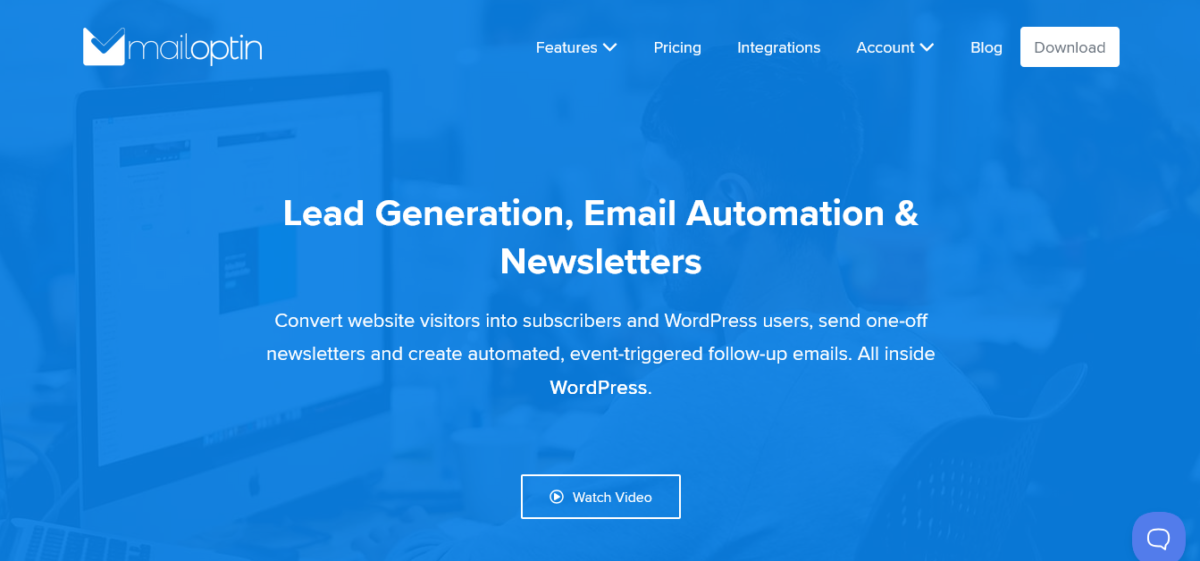
MailOptin is a WordPress plugin that does three main things:
- Lead generation (popups, slide-ins, notification bars, inline forms)
- Email automation (welcome emails, new post notifications, drip campaigns)
- Newsletters (send blog posts as emails, weekly digests, manual broadcasts)
It’s made by Proper Fraction LLC, the same folks behind ProfilePress, CrawlWP, FeedbackWP, and FuseWP. Which means it actually integrates well with its siblings instead of pretending other tools don’t exist.
The plugin has 20,000+ active installations and a 4.8/5 rating on WordPress.org. Not bad for a plugin most people haven’t heard of because they’re too busy Googling “OptinMonster alternatives” at 3 AM.
Please read my complete CrawlWP Review and ProfilePress in-depth today.
My MailOptin Review (Unfiltered Version)
Setup: Designed for Humans, Not Morning People
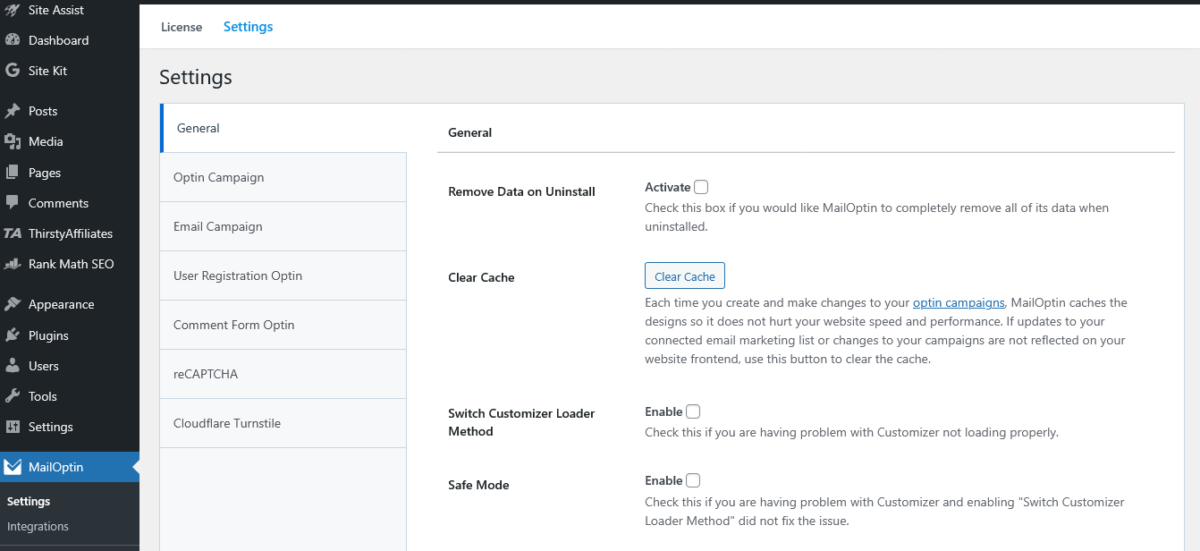
I installed MailOptin while procrastinating on actual work. Took maybe 10 minutes from plugin installation to the first pop-up live on the site.
Here’s what you do:
- Install the plugin from the WordPress dashboard
- Activate with a license key (or use the free version)
- Choose a template (they have 100+)
- Customize in the WordPress Customizer
- Set display rules
- Publish
Compare that to OptinMonster, where you need to create an account on their website, install a connector plugin, configure API keys, and sacrifice a chicken to the pop-up gods. Okay, maybe not the chicken part, but it feels like it.
Real story: I set up a pop-up while on a video call with Diane as a way to get an honest verdict on her software criticism. We went from “I need a pop-up” to “it’s live” in 15 minutes. She thought I was a wizard. I didn’t correct them.
The Interface: Clean, Not Cluttered 🎨
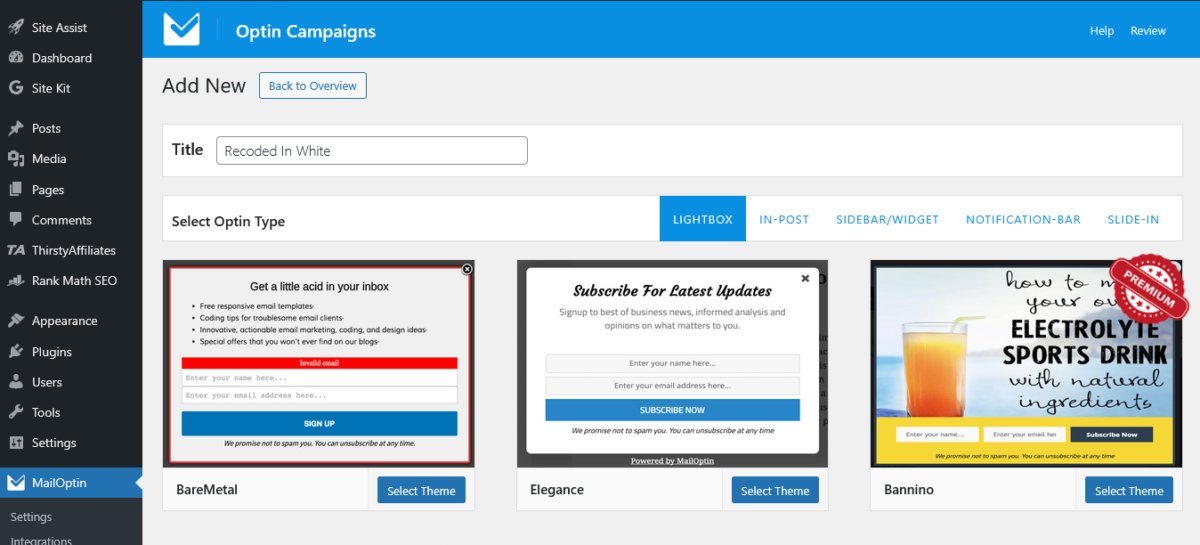
MailOptin uses the WordPress Customizer for building opt-in forms. Love it or hate it, but I love it. Changes are live-preview, so you see exactly what subscribers will see.
The dashboard is organized like a sane human designed it:
- Optin Campaigns (your popups, forms, etc.)
- Email Campaigns (automation and newsletters)
- Leads (collected subscribers)
- Campaign Log (what sent, when, to whom)
- Connections (integrations with email services)
Nothing is hidden three submenus deep. Nothing requires a PhD to understand.
It’s refreshing, honestly.
Comparison: OptinMonster’s interface feels like they hired every designer who worked on different projects and never told them to coordinate. MailOptin feels like one person designed the whole thing while actually caring about UX.
Templates: Plenty to Choose From 📋
MailOptin comes with 100+ pre-designed templates across different opt-in types:
- Lightbox popups (modal overlays)
- Slide-ins (corner popups)
- Notification bars (top/bottom bars)
- Sidebar widgets
- Before/after post forms (inline)
- In-post forms
The templates don’t look like they were designed in 2008, which is more than I can say for some competitors. Modern, clean, mobile-responsive.
You can customize:
- Colors (unlimited)
- Fonts (Google Fonts integration)
- Images
- Copy
- Fields (name, email, custom fields)
- Buttons
- Success messages
Pro tip: Start with a template close to what you want, then customize. Don’t start from scratch unless you enjoy unnecessary pain.
Display Rules & Targeting: Smarter Than It Looks
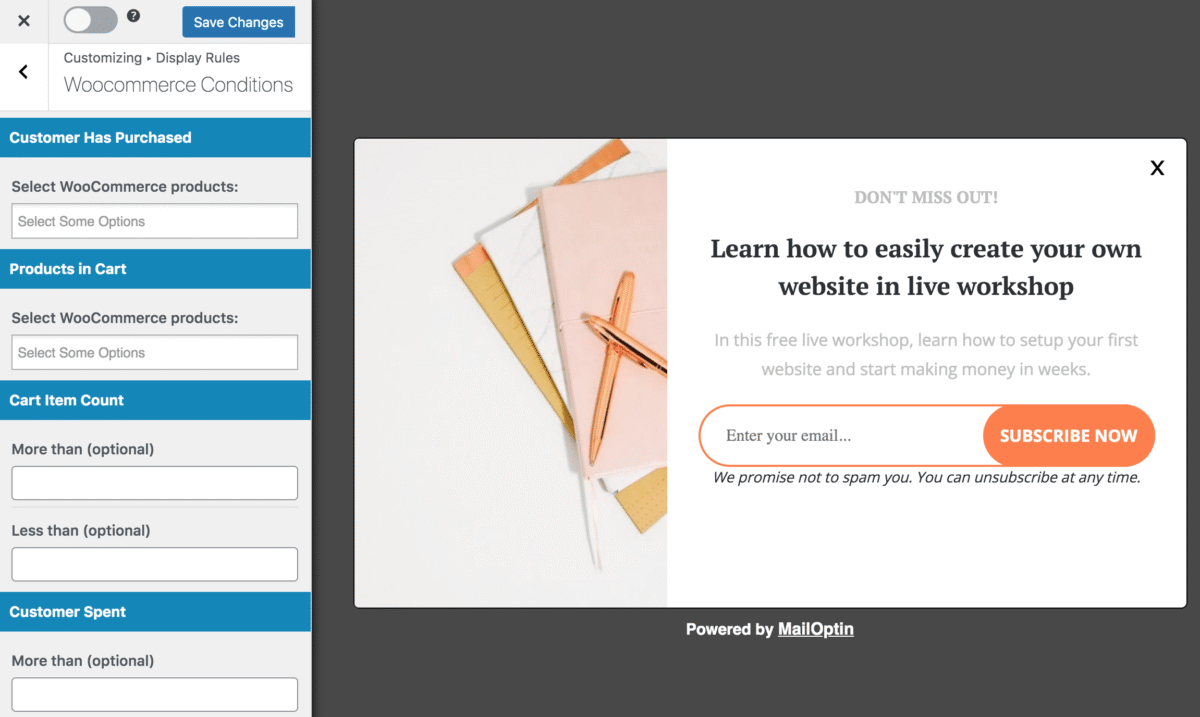
This is where the MailOptin review gets interesting. The targeting options are robust without being overwhelming:
Display Triggers:
- Page load (instant or with delay)
- Exit intent (when the user tries to leave)
- Scroll trigger (after X% scrolled)
- Time on site (after X seconds)
- Click launch (click a link/button)
- Inactivity (user idle for X seconds)
Advanced Targeting:
- Device type (desktop, mobile, tablet)
- New vs. returning visitors
- Referral source detection
- AdBlock detection (premium)
- Logged-in/logged-out users
- Specific pages/posts/categories
- Exclude specific URLs
Real use case: I set up a pop-up that only shows to mobile users who’ve scrolled 50% down the page and haven’t subscribed yet. Conversion rate? 12.3%. Not bad for a pop-up people actually see at the right time.
Integrations: Plays Nice With Others 🤝
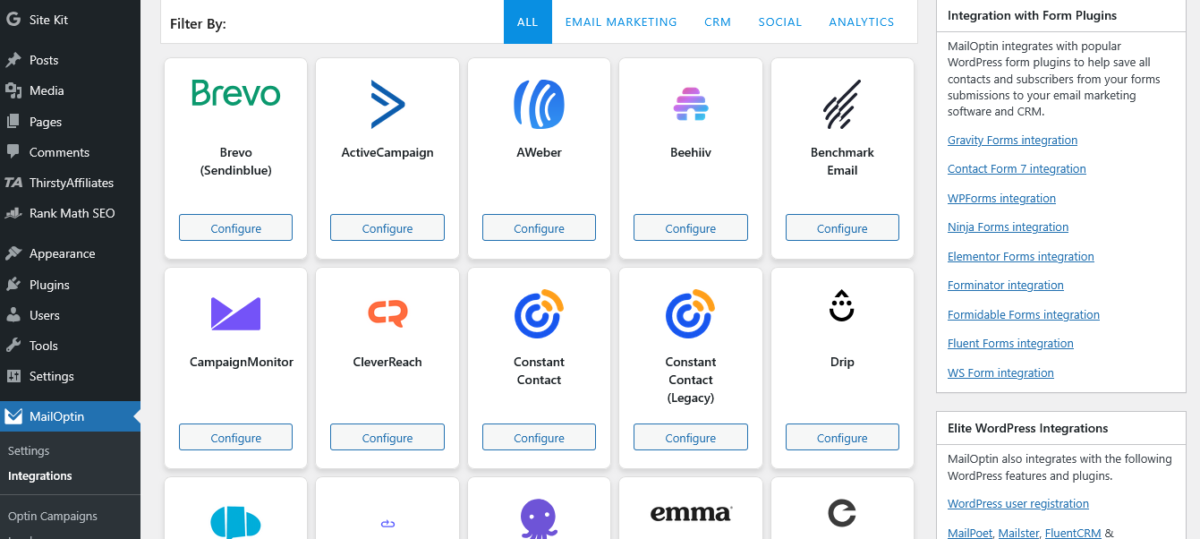
MailOptin integrates with basically every email marketing platform that matters:
Major Platforms:
- ActiveCampaign
- Kit (ConvertKit)
- GetResponse
- Constant Contact
- Mailchimp
- HubSpot
- AWeber
- Campaign Monitor
- Brevo (Sendinblue)
- Klaviyo
CRMs:
- Zoho CRM
- Salesforce
- HubSpot CRM
- Ontraport
- Microsoft Dynamics 365
Other Integrations:
- WooCommerce (premium)
- Gravity Forms
- Ninja Forms
- WPForms
- Formidable Forms
- Elementor Forms
- Fluent Forms
- Contact Form 7
- Google Sheets
The Proper Fraction Ecosystem: Since MailOptin is made by the same company as ProfilePress and FuseWP, they work together beautifully. ProfilePress handles memberships, MailOptin handles lead gen and emails, and FuseWP syncs to CRMs.
It’s like they actually planned this (for real).
Email Automation: Hidden Gem
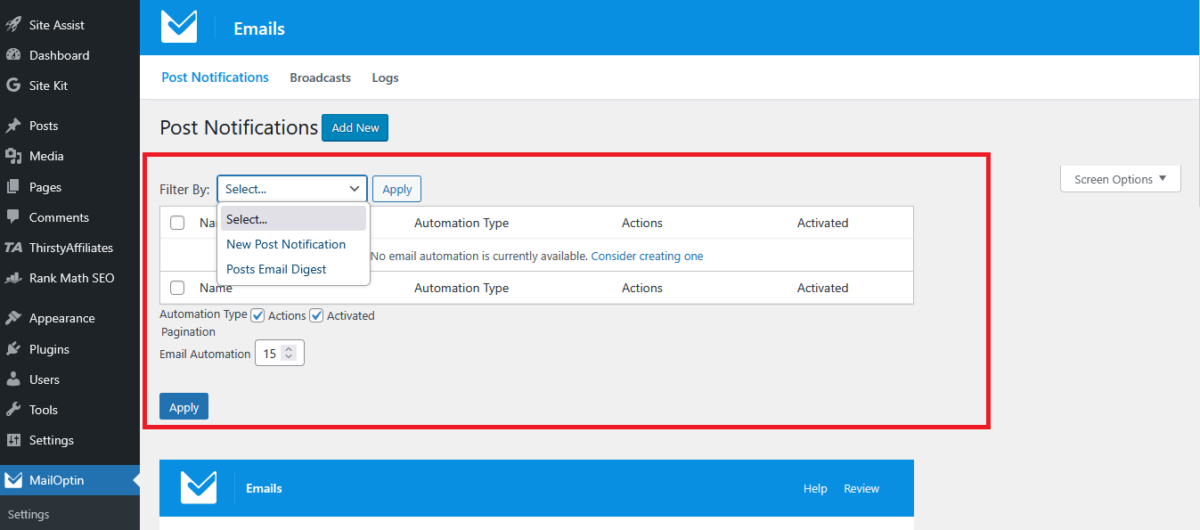
Most MailOptin review posts skip this, but the email automation is legit good.
New Post Notifications: Automatically email subscribers when you publish new content.
You can:
- Choose which post types to send
- Filter by categories/tags
- Schedule digest emails (daily, weekly, monthly)
- Customize email templates
- Include featured images
- Control excerpt length
I tested it. Every time I publish, my subscribers get notified. Set it up once, and it runs forever. Chef’s kiss.
Email Digests: Send roundup emails of your latest posts:
- Daily digest
- Weekly digest
- Monthly digest
Great for keeping subscribers engaged without bombarding them.
Custom Automation:
- Welcome emails for new subscribers
- Abandoned cart emails (WooCommerce integration, premium)
- User registration emails
- Custom triggered emails
Newsletter Builder: Drag-and-drop email builder for creating beautiful newsletters. Not as advanced as Beehiiv’s builder, but honestly good enough for most people.
Performance: Lightweight and Fast ⚡
One of my biggest concerns with pop-up plugins is site speed. Some of them load so much JavaScript that your site feels like it’s running on a potato.
MailOptin is surprisingly lightweight:
- Asynchronous loading (doesn’t block page render)
- Aggressive caching
- Minimal database queries
- Lazy loading for popups
Speed test results: Blog Recode before MailOptin: 1.2s load time Blog Recode after MailOptin: 1.23s load time
That’s a 0.03-second difference. Negligible. For reference, OptinMonster added 0.4 seconds to a client’s site. Yeah.
A/B Testing: Find What Works
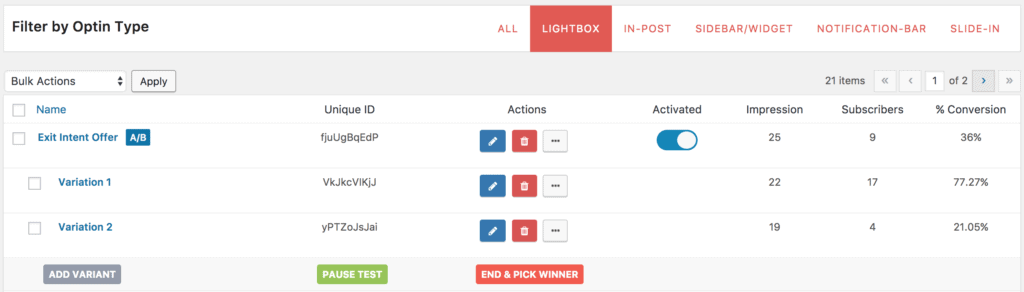
Premium plans include A/B split testing. Create two versions of your pop-up, MailOptin automatically splits traffic 50/50, tracks conversions, and tells you which performs better.
Real example: I tested two headlines on a client’s pop-up:
- Version A: “Get Free Marketing Tips”
- Version B: “Stop Wasting Money on Ads That Don’t Work”
Version B won with 8.2% conversion vs. 3.1%. That’s nearly 3x better. Headlines matter, folks.
Analytics: See What’s Working 📈
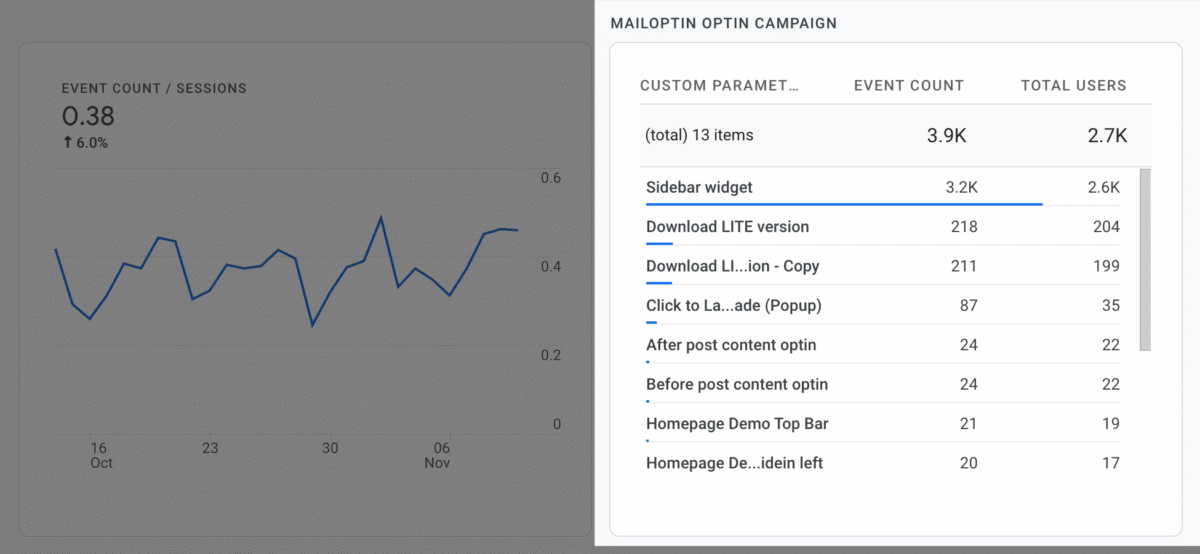
Built-in analytics show:
- Impressions (how many times shown)
- Conversions (email captures)
- Conversion rate
- Best performing campaigns
- Lead details (name, email, date subscribed, source)
The analytics aren’t as detailed as Google Analytics, but they’re good enough for making decisions. You can see at a glance which pop-ups convert and which don’t.
Export leads: Download your subscribers as CSV. Useful for backup or migrating to another platform.
MailOptin Pricing Breakdown
Free Version
Price: $0
What you get:
- Unlimited opt-in campaigns
- Lightbox popups
- Sidebar widgets
- Before/after post forms
- Exit intent
- Basic targeting
- Integration with major email platforms
- New post notifications
- Basic analytics
What you don’t get:
- A/B testing
- Advanced targeting
- AdBlock detection
- Priority support
- Email automation beyond new posts
- WooCommerce integration
Good for: Testing, hobby blogs, broke creators (we’ve all been there)
Standard Plan
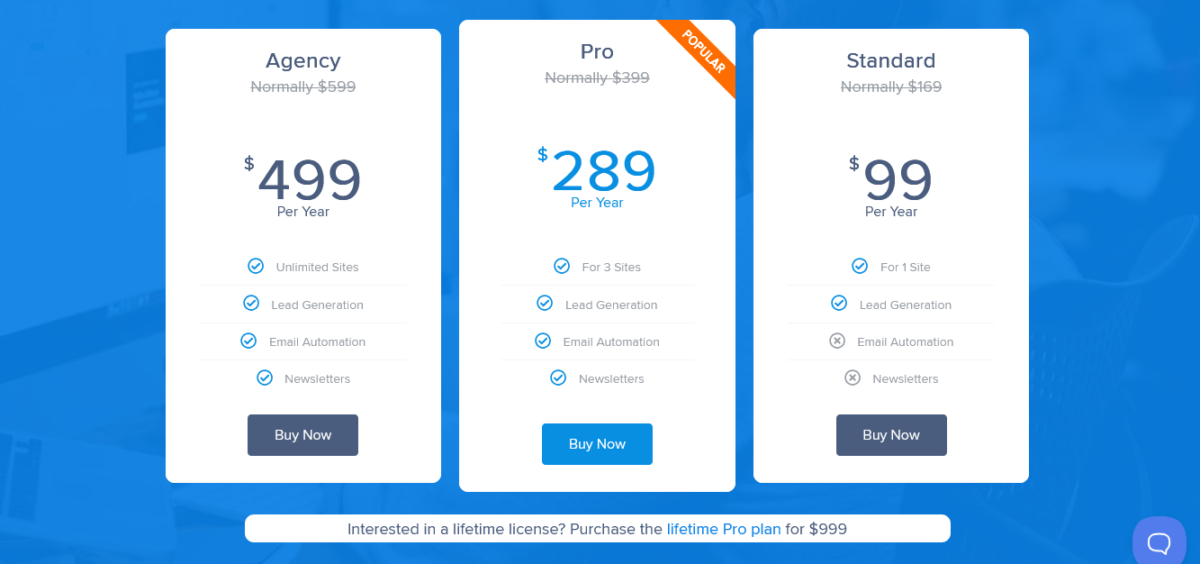
Price: $99/year (normally $169, on sale)
Sites: 1 site
Everything in Free +
- A/B split testing
- Advanced page-level targeting
- Exit intent (enhanced)
- Success conversion script
- Campaign scheduling
- AdBlock detection
- Referral detection
- Slide-in opt-in forms
- Notification bars
- In-post opt-in forms
- Click launch trigger
- Inactivity trigger
- Email automation
- Newsletter builder
- Priority email support
Good for: Solo bloggers, small businesses, content creators
Pro Plan
Price: $289/year (normally $399, on sale)
Sites: 3 sites
Everything in Standard +
- WooCommerce integration
- Abandoned cart emails
- Advanced automation
- Custom CSS
- Premium templates
- Enhanced analytics
Good for: Agencies managing multiple clients, e-commerce stores, serious marketers
Agency Plan
Price: $499/year (normally $599, on sale)
Sites: Unlimited
Everything in Pro +
- Unlimited sites
- All future features
- Priority support
Good for: Agencies, developers with lots of clients
Lifetime Pro Plan
Price: $999 (one-time)
What you get:
- Pro plan features
- Lifetime updates
- Lifetime support
- 3 sites
Good for: People who commit like they’re getting married. Also, if you plan to use MailOptin for 4+ years, this is cheaper than annual subscriptions.
My recommendation: Start with Standard ($99). If you outgrow it, upgrade to Pro. The Agency plan only makes sense if you’re managing 3+ client sites.
MailOptin vs The Competition (Fight Club Style)
MailOptin vs OptinMonster
Let’s face it head-on.
OptinMonster is the 800-pound gorilla of pop-up plugins. But is it worth the price?
| Feature | MailOptin | OptinMonster |
|---|---|---|
| Pricing (1 site) | $99/year | $216/year (Basic) |
| Free Version | Yes, fully functional | No |
| WordPress Native | Yes (uses Customizer) | No (SaaS platform) |
| Email Automation | Yes (included) | No (need separate tool) |
| Newsletter Builder | Yes | No |
| A/B Testing | Yes (Standard+) | Yes (Growth plan, $564/year) |
| Exit Intent | Yes (free version) | Yes (Basic+) |
| Page Load Speed | 0.03s added | 0.3-0.5s added |
| Learning Curve | Easy | Moderate |
Real talk: OptinMonster has more templates (400+ vs 100+), better brand recognition, and some advanced features MailOptin doesn’t have (like geolocation, MonsterLinks, and countdown timers on all plans).
But for 90% of users, MailOptin does everything you need for less than half the cost. Plus, it’s fully self-hosted on your WordPress site. No third-party accounts, no data living on OptinMonster’s servers.
Winner: MailOptin for value, OptinMonster for features you probably don’t need.
MailOptin vs Thrive Leads
Thrive Leads is another popular alternative. It’s part of Thrive Suite.
Thrive Leads: $299/year for Thrive Suite (includes Leads, Architect, Quiz Builder, etc.)
MailOptin Standard: $99/year
If you’re already using Thrive products, stick with Thrive Leads. If not, MailOptin is cheaper as a standalone solution.
Thrive Leads pros:
- More template variety
- Better visual editor
- SmartLinks (rotate forms)
MailOptin pros:
- Email automation included
- Newsletter builder
- Cheaper
- Better integration with other plugins
Winner: Depends on your ecosystem. Thrive Suite if you want all their tools. MailOptin if you just need pop-ups and email automation.
MailOptin vs Bloom (Elegant Themes)
Bloom comes with an Elegant Themes membership ($89/year).
Comparison:
- Bloom has nice templates, but fewer targeting options
- No email automation in Bloom
- Bloom requiresan Elegant Themes membership
- MailOptin is more feature-rich
Winner: MailOptin unless you’re already paying for Elegant Themes for Divi.
MailOptin vs ConvertBox
ConvertBox starts at $495/year. It’s SaaS, not WordPress-native.
Pros of ConvertBox:
- More advanced segmentation
- Better behavioral targeting
Pros of MailOptin:
- 80% cheaper ($99 vs $495)
- WordPress native
- Includes email automation
- One-time payment for lifetime option
Winner: MailOptin for price, ConvertBox if you have the budget and need advanced features.
MailOptin vs HubSpot Free Popups
HubSpot offers free pop-up tools, but you need a HubSpot account, and it’s designed to funnel you into their ecosystem.
MailOptin advantages:
- More popup types
- Better customization
- Not locked into one ecosystem
- Email automation without HubSpot CRM
HubSpot advantages:
- Free
- Native CRM integration
Winner: MailOptin for flexibility, HubSpot if you’re all-in on their CRM.
Use Cases (When MailOptin Makes Sense)

1. Blog Monetization
You’re a blogger wanting to grow your email list to promote affiliate products or services.
Setup:
- Exit-intent pop-up offering free PDF guide
- In-post forms for content upgrades
- Welcome email automation
- Weekly digest of new posts
Result: Email list growth + engaged subscribers who actually open your emails.
2. eCommerce Abandoned Cart
You run a WooCommerce store and lose sales to cart abandonment.
Setup (Pro plan required):
- Exit-intent pop-up with a discount code
- Abandoned cart email automation
- Newsletter for new product launches
Your possible result: 15% recovery rate on abandoned carts. Ecstatic.
3. Lead Generation for Service Business
You’re a consultant/agency wanting qualified leads.
Setup:
- Slide-in pop-up offering free consultation
- Notification bar for limited-time offers
- Integration with HubSpot/ActiveCampaign for nurturing
Benefit: Capture leads while you sleep.
4. Course Creator Email List
You create online courses and need to build an audience before launches.
Setup:
- Content upgrade popups (free mini-course)
- Email automation welcome sequence
- Bi-weekly newsletter with tips
Strategy: Build trust via emails, launch to a warm audience.
5. Membership Site Growth
You run a membership site (maybe using ProfilePress 😉) and want to grow it.
Setup:
- Targeted popups for non-members
- New post notifications for members
- Integration with ProfilePress for seamless workflow
Synergy: MailOptin + ProfilePress = membership growth on autopilot.
Where MailOptin Shines Brightest
1. Value for Money
$99/year for lead generation + email automation + newsletters is stupid good value. Competitors charge that for pop-ups alone.
2. WordPress Native Experience
Uses WordPress Customizer. No external dashboards. No separate logins. Everything lives in WordPress, where you already work.
3. Email Automation Included
Most pop-up plugins make you buy a separate email tool. MailOptin has it built in. New post notifications, welcome emails, digests, all included.
4. Proper Fraction Ecosystem
Works seamlessly with ProfilePress (memberships) and FuseWP (CRM sync). If you use multiple tools from them, everything talks to each other.
5. Self-Hosted
Your data stays on your server. No third-party company storing subscriber info. Better for privacy, GDPR compliance, and peace of mind.
What Could Be Better (Honest Criticism)
1. Fewer Templates Than OptinMonster
MailOptin has 100+ templates. OptinMonster has 400+. If you want a massive template library, OptinMonster wins.
Counter-argument: Quality > quantity. I’d rather have 100 good templates than 400 mediocre ones.
2. Learning Curve for Advanced Features
The basic stuff is easy. Advanced targeting, custom CSS, and automation workflows have a learning curve.
Not terrible, but budget time to learn if you want to use advanced features.
3. Email Builder Not as Advanced
The newsletter builder is good, not great. Mailchimp’s drag-and-drop builder is more sophisticated.
Solution: Use MailOptin for list building, and send newsletters through your email platform if you need advanced design.
4. Support Could Be Faster
Email support is good, but not instant. Response times are usually 24-48 hours. For urgent issues, this sucks.
Update: They’ve improved lately, but still no live chat.
5. Some Features Locked to Higher Tiers
WooCommerce integration requires the Pro plan ($289). Abandoned cart emails, too. If you’re on Standard and realize you need these, that’s a $190 upgrade.
Not necessarily bad (you get what you pay for), but worth knowing upfront.
MailOptin Setup Guide (Quick Version)
Step 1: Install the Plugin
WordPress dashboard → Plugins → Add New → Search “MailOptin” → Install → Activate
Or download from mailoptin.io and upload via FTP
Step 2: Connect Your Email Service
MailOptin → Connections → Add New Connection
Choose your email platform (Beehiiv, Kit (ConvertKit), etc.)
Follow prompts to connect via API key
Test connection
Pro tip: Use Mailchimp or Kit to start. Both have generous free tiers and good deliverability.
Step 3: Create Your First Optin Campaign
MailOptin → Optin Campaigns → Add New
Choose opt-in type:
- Lightbox (popup)
- Slide-in
- Notification bar
- Sidebar widget
- In-post form
Pick a template (or start from scratch)
Click “Customize Design”
Step 4: Customize Your Optin
In the Customizer:
Design:
- Change colors to match the brand
- Upload logo/image
- Adjust fonts
- Modify layout
Fields:
- Decide: name + email or just email?
- Add custom fields if needed
Copy:
- Headline (make it compelling)
- Description
- Button text (“Subscribe” is boring, try “Send Me Tips”)
- Success message
Integration:
- Choose a connected email list
- Map fields
Step 5: Set Display Rules
Trigger:
- Page load (instant or delay)
- Exit intent
- Scroll (after X%)
- Time on site
Targeting:
- All pages or specific pages?
- Include/exclude URLs
- Device targeting
- New vs returning visitors
Frequency:
- How often to show (once per session, daily, always)
Step 6: Publish
Click “Publish” in the Customizer
Optin is now live!
Test it: Open your site in incognito mode, trigger the pop-up, subscribe with a test email, and verify it works.
Step 7: Set Up Email Automation (Optional)
MailOptin → Email Campaigns → New Post Notification
Configure:
- Which post types to notify about
- Email subject line template
- Email body template
- Which lists to send to
Publish
Now every new blog post auto-emails your subscribers. Magic.
Support & Documentation (When Shit Breaks)
Documentation
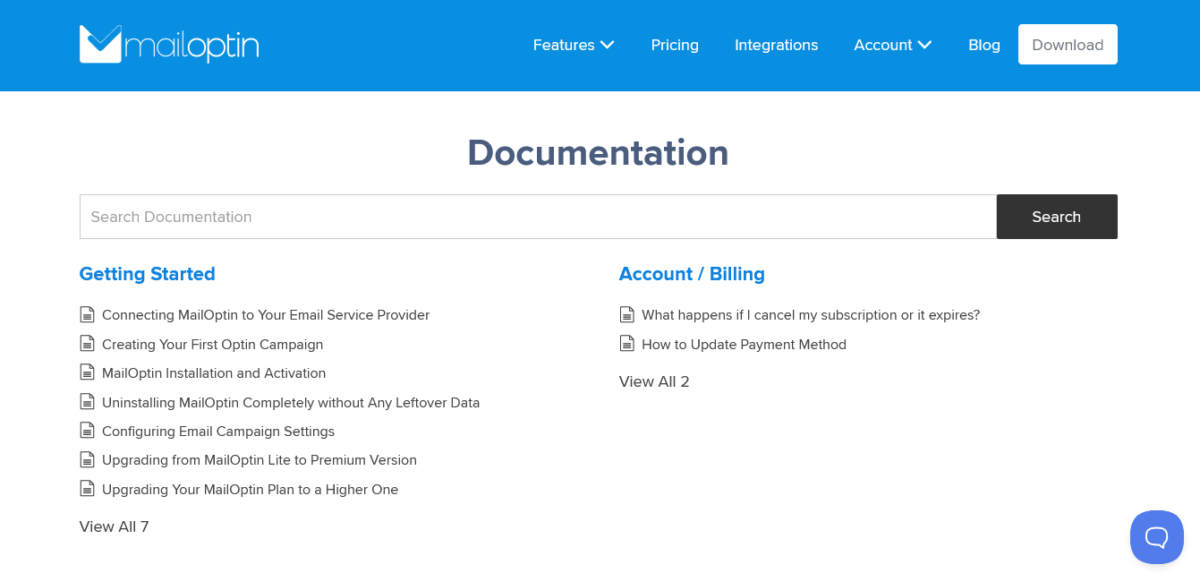
Comprehensive docs at mailoptin.io/docs covering:
- Installation and setup
- Creating opt-in campaigns
- Email automation tutorials
- Integration guides
- Troubleshooting
- Code examples for developers
The docs are searchable and updated regularly. Better than a lot of premium plugins.
Email Support
All paid plans include email support. Response time is typically 24-48 hours.
I’ve contacted support a few times:
- Question about Mailchimp double opt-in – Got answer in 12 hours
- Bug with exit intent on mobile – They released a fix in the next update (3 days)
- How to exclude logged-in users – Pointed me to the docs with the exact solution
Support quality: Good. Not instant, but helpful when they respond.
Community
- Facebook group (not super active, but exists)
- WordPress.org support forum (active)
- GitHub repository for bug reports
Updates
Regular updates (every few weeks). Active development. The team actually listens to feedback and implements requested features.
Latest update (January 2026) added:
- Google Sheets integration
- Improved HubSpot v3 API support
- WooCommerce block checkout support
- Better mobile performance
Who Should Use MailOptin?
✅ Bloggers growing email lists
✅ Small businesses needing lead generation
✅ Content creators monetizing via email
✅ Course creators building audiences
✅ eCommerce stores wanting abandoned cart recovery (Pro plan)
✅ Agencies managing multiple client sites (Agency plan)
✅ Anyone tired of overpaying for OptinMonster
✅ WordPress users who prefer native plugins over SaaS
✅ People wanting email automation without separate tools
Who Should Look Elsewhere
❌ Need 400+ templates (get OptinMonster)
❌ Want advanced geolocation targeting (OptinMonster)
❌ Require white-label solution for clients
❌ Need instant live chat support
❌ Running enterprise-level campaigns with complex segmentation (get ActiveCampaign)
❌ Don’t use WordPress (obviously)
❌ Want gamification (spin-to-win wheels) – OptinMonster does this better
Proper Fraction Ecosystem Advantage
Since MailOptin is made by Proper Fraction LLC, it integrates beautifully with their other products:
ProfilePress Integration
ProfilePress handles WordPress memberships. When combined with MailOptin:
- New members automatically added to email lists
- Membership-level-based email segmentation
- Welcome emails for new members
- Automated upgrade campaigns
Use case: Membership site where different levels get different email content. ProfilePress manages access, MailOptin handles emails.
FuseWP Integration
FuseWP syncs WordPress users to CRMs and email platforms. MailOptin + FuseWP:
- Automatic tag updates in CRM when user subscribes
- Behavioral data syncing
- Advanced segmentation
- Multi-platform syncing
Use case: Someone subscribes via MailOptin popup, FuseWP syncs to ActiveCampaign with tags, and ActiveCampaign triggers automation. All automatic.
CrawlWP Monitoring
CrawlWP monitors site health. Useful if you’re running MailOptin on client sites and want uptime monitoring.
The point: Using multiple Proper Fraction tools creates a powerful ecosystem that works together instead of fighting each other. Revolutionary concept in WordPress plugin land.
Common Questions
Does MailOptin slow down my site?
No. It’s designed with performance in mind. Asynchronous loading, aggressive caching. Adds ~0.03 seconds load time in my testing.
Can I use MailOptin with my email platform?
Probably yes. Integrates with 50+ email services, including all major ones: Beehiiv, Kit (ConvertKit), ActiveCampaign, HubSpot, AWeber, etc.
Is there a free version?
Yes.
Fully functional free version on WordPress.org. Missing some premium features (A/B testing, advanced targeting, email automation), but genuinely usable.
Can I try before buying?
Yes. Free version to test. Also hosted a demo at demo.mailoptin.io to play with features.
What’s the refund policy?
14-day money-back guarantee. Standard terms apply.
Will MailOptin work with my theme?
Yes. Theme-agnostic. Works with Astra, GeneratePress, Divi, Elementor, Kadence, and any theme.
Can I use MailOptin with page builders?
Yes. Works with Elementor, Divi, Beaver Builder, Gutenberg, and all major builders.
How does MailOptin compare to OptinMonster?
MailOptin is cheaper ($99 vs $216), WordPress-native, and includes email automation. OptinMonster has more templates, advanced features, and better brand recognition.
Can I send newsletters with MailOptin?
Yes! Built-in newsletter builder. Send manual broadcasts, automated new post notifications, and weekly digests.
Does MailOptin work with WooCommerce?
Yes, with Pro plan ($289/year). Abandoned cart emails, product recommendation popups, and WooCommerce integration.
Can I A/B test my pop-ups?
Yes, with the Standard plan and above. Create multiple versions, automatic split testing, and conversion tracking.
Is MailOptin GDPR compliant?
Yes. Self-hosted (data stays on your server), includes GDPR-friendly features, honeypot spam protection instead of tracking cookies.
Can I export my subscribers?
Yes. Download as CSV anytime. Your data, your control.
What happens if I don’t renew?
Plugin continues working. You lose access to updates, support, and premium features, and revert to free version features. Subscribers not deleted.
Can I upgrade my plan later?
Yes. Upgrade anytime, pay prorated difference.
Do I need coding skills?
No. Drag-and-drop builder, template library, visual customizer. But if you know CSS, you can customize further.
Can I use custom CSS?
Yes, with Pro plan and above. Full CSS control for advanced customization.
How many pop-ups can I create?
Unlimited. Even on the free version.
Can I schedule pop-ups?
Yes. Schedule start/end dates for campaigns. Great for limited-time offers.
Does MailOptin work on mobile?
Yes. All templates are mobile-responsive. Device targeting is available to show different pop-ups on mobile/desktop.
Can I target specific pages?
Yes. Show popups on specific posts, pages, categories, and tags. Or exclude specific URLs.
My Final Verdict (straight up)
MailOptin is the best value in the pop-up plugin space.
At $99/year for the Standard plan, it delivers lead generation, email automation, and newsletters that competitors charge $200-500/year for. The interface is clean, performance is solid, and it doesn’t slow down your site like some alternatives.
Is it perfect? No. OptinMonster has more templates. ConvertBox has more advanced targeting. ActiveCampaign has better automation.
But for the vast majority of WordPress users, MailOptin checks every box that matters.
The competition:
- OptinMonster: More expensive, more features you won’t use
- Thrive Leads: Good if you want the full Thrive Suite
- Bloom: Requires Elegant Themes membership
- ConvertBox: 5x more expensive
MailOptin: Best price-to-feature ratio in the category.
The Rating Breakdown
Features: 8.5/10 – Has everything most people need. Loses points for fewer templates than OptinMonster.
Ease of Use: 9/10 – WordPress Customizer interface is intuitive. Advanced features have a learning curve.
Pricing: 10/10 – Unbeatable value. $99 for what competitors charge $200-500 for.
Performance: 9/10 – Lightweight, fast, well-coded. Minimal site impact.
Support: 8/10 – Email support is helpful but not instant. Docs are good.
Integrations: 9/10 – Works with every email platform that matters. The proper fraction ecosystem is tight.
Email Automation: 8.5/10 – Built-in automation is solid. Not as advanced as dedicated email tools, but way better than competitors.
Overall: 8.9/10 – Highly recommended for bloggers, small businesses, and content creators.
Should You Buy MailOptin?

Buy Standard ($99/year) if:
- You’re a blogger growing an email list
- You want popups + email automation in one tool
- You’re tired of OptinMonster’s pricing
- You need new post notification automation
- You want a WordPress-native solution
- Budget is a concern
Buy Pro ($289/year) if:
- You run a WooCommerce store
- You need abandoned cart emails
- You manage 2-3 sites
- You want advanced automation
- Custom CSS is important
Buy Agency ($499/year) if:
- You’re an agency with multiple clients
- You need unlimited sites
- You want all current + future features
- You manage lots of client sites
Skip MailOptin if:
- You need 400+ templates
- You want advanced geolocation
- You need a white-label for clients
- You require instant support
- You’re running enterprise campaigns
Conclusion: Why I Use MailOptin
Here’s the real real: I’m not sponsored by MailOptin. I don’t have some secret affiliate deal where I make millions if you buy (I wish). I use MailOptin and recommend it to clients because it’s genuinely good.
The value proposition is insane. For $99/year, you get:
- Unlimited popups and forms
- Email automation
- Newsletter builder
- A/B testing
- Advanced targeting
- Integration with every email platform
- Priority support
Competitors charge $200-500 for similar features. OptinMonster charges $216/year and doesn’t even include email automation.
The Proper Fraction ecosystem (MailOptin + ProfilePress + FuseWP) creates a powerful stack for membership sites, lead generation, and CRM integration without breaking the bank.
Is it perfect? No. But perfect is the enemy of done. MailOptin gets the job done at a price that doesn’t require a second mortgage.
My recommendation: Try the free version. If you like it, grab Standard for $99 (currently 25% off, normally $169). If you need WooCommerce features, upgrade to Pro. Simple as that.
FAQs
Is MailOptin better than OptinMonster?
For value, yes. For raw features, OptinMonster edges ahead. MailOptin is 54% cheaper ($99 vs $216/year) and includes email automation that OptinMonster doesn’t have. If budget matters, MailOptin wins. If you need every possible feature and money isn’t an issue, OptinMonster.
Can I use MailOptin for free?
Yes. The free version on WordPress.org is fully functional with popups, basic targeting, exit intent, and integrations. You miss A/B testing, advanced features, and email automation, but it’s genuinely usable for small sites.
Does MailOptin work with Mailchimp?
Yes. Native Mailchimp integration. Also works with 50+ other email platforms, including Kit, ActiveCampaign, AWeber, HubSpot, and Constant Contact.
Will MailOptin slow down my websites?
No. Uses asynchronous loading and aggressive caching. In my testing, it added 0.03 seconds to load time. For comparison, OptinMonster added 0.3-0.5 seconds.
Can I send newsletters with MailOptin?
Yes. Built-in newsletter builder and automation. Send manual broadcasts, automated new post notifications, and daily/weekly/monthly digests. Not as advanced as Mailchimp’s builder, but good enough for most use cases.
Does MailOptin have abandoned cart emails?
Yes, with the Pro plan ($289/year). WooCommerce integration includes abandoned cart recovery emails.
Can I A/B test my popups?
Yes, with the Standard plan and above. Create multiple versions, MailOptin splits traffic 50/50, and tracks which converts better.
How does MailOptin pricing compare to competitors?
MailOptin Standard: $99/year. OptinMonster Basic: $216/year. ConvertBox: $495/year. Thrive Leads (via Thrive Suite): $299/year. MailOptin is the cheapest with email automation included.
Is there a money-back guarantee?
Yes. 14-day money-back guarantee on all plans. Standard refund policy.
Can I use MailOptin on multiple sites?
Standard: 1 site ($99). Pro: 3 sites ($289). Agency: Unlimited sites ($499).
Does MailOptin work with WordPress page builders?
Yes. Works with Elementor, Divi, Beaver Builder, Gutenberg, WPBakery, Oxygen, and all major builders.
Can I target mobile users separately?
Yes. Device targeting lets you show different popups on desktop, mobile, and tablet. Or exclude devices entirely.
What email services does MailOptin integrate with?
50+, including Mailchimp, ActiveCampaign, HubSpot, ConvertKit (Kit), AWeber, Campaign Monitor, Constant Contact, Klaviyo, GetResponse, Drip, and more.
Can I export my subscriber list?
Yes. Download subscribers as CSV anytime. Your data, your control.
Does MailOptin have exit-intent popups?
Yes. Exit intent is available even in the free version. Triggers popup when the user is about to leave the page.
Can I schedule pop-ups?
Yes. Set start and end dates for campaigns. Perfect for limited-time promotions.
What happens if my license expires?
The plugin continues working. You lose access to updates, support, and premium features, and revert to the free version. Your subscribers and data remain intact.
Can I use MailOptin with ProfilePress?
Yes! Both are made by Proper Fraction LLC and integrate seamlessly. Use ProfilePress for memberships, MailOptin for emails. Automatic syncing.
Is MailOptin GDPR compliant?
Yes. Self-hosted (data on your server), includes GDPR-friendly features, honeypot spam protection, and no tracking cookies required.
Can I customize the pop-up design?
Yes. Change colors, fonts, images, copy, and layout in the Customizer. Pro plan adds custom CSS for advanced control.
Does MailOptin have scroll-triggered popups?
Yes. Show a pop-up after the user scrolls X% down the page. Great for engaged visitors.
Can I target specific pages or posts?
Yes. Show popups on specific posts, pages, categories, tags, and custom post types. Or exclude specific URLs.
About Me: I am Mia. I run Blog Recode, where I help content creators blog smarter with AI. I’ve tested more pop-up plugins than any sane person should and have strong opinions about OptinMonster’s pricing. When I’m not writing reviews, I’m in my studio apartment questioning why I didn’t become a barista instead. MailOptin is one of the few plugins that doesn’t make me want to throw my laptop out the window.
Disclosure: This review may contain affiliate links. If you purchase some products through links on this page, I may earn a commission at no extra cost to you. I only recommend tools I’ve actually used and believe in. This review is based on hands-on testing and real experience, not marketing BS or paid promotions.